Produktas baigtasview
The FREEWOLF M96 is a compact 94-key ANSI layout wireless gaming keyboard designed for productivity and a tactile typing experience. It features a creamy membrane switch, rainbow LED backlight, a functional LCD smart screen, and a media knob. The keyboard supports dual connection modes (2.4Ghz wireless and Bluetooth) and is compatible with various operating systems.

Image: FREEWOLF M96 Wireless Gaming Keyboard. This image displays the full keyboard with its purple keycaps, the integrated LCD screen, and the volume knob. A small USB receiver is shown separately at the top left.
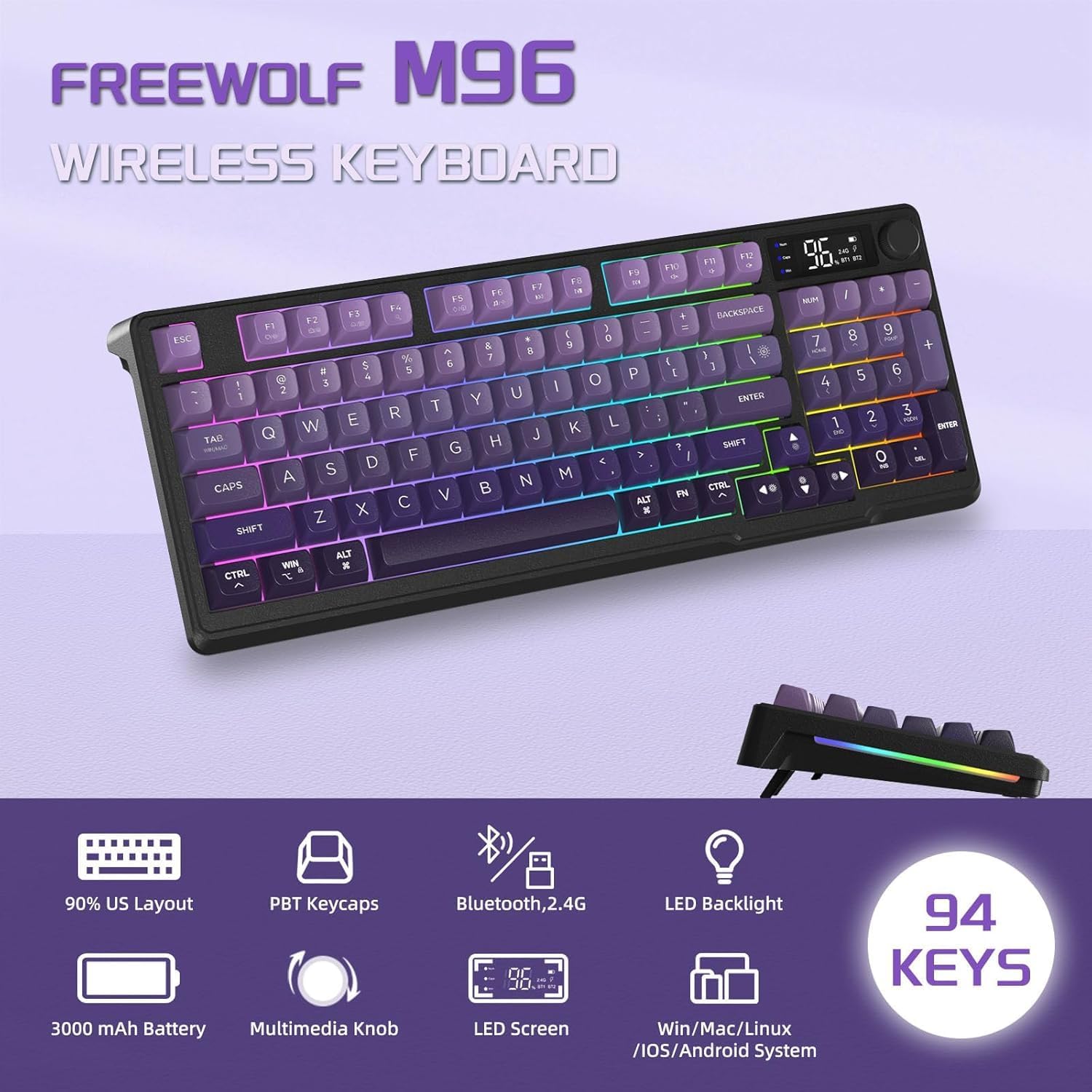
Vaizdas: Viršview of FREEWOLF M96 Wireless Keyboard features. This graphic highlights key features such as 90% US Layout, PBT Keycaps, Bluetooth/2.4G connectivity, LED Backlight, 3000mAh Battery, Multimedia Knob, LED Screen, and compatibility with Win/Mac/Linux/iOS/Android systems, along with a "94 KEYS" badge.
Pakuotės turinys
Atidarius pakuotę, įsitikinkite, kad yra visi šie daiktai:
- FREEWOLF M96 Wireless Gaming Keyboard
- USB 2.4Ghz Receiver (stored in the left foot stand of the keyboard)
- USB-C įkrovimo laidas
- Vartotojo vadovas (šis dokumentas)
Sąranka
1. Pradinis įkrovimas
Before first use, it is recommended to fully charge the keyboard. Connect the provided USB-C charging cable to the keyboard's Type-C charging port and the other end to a USB power source (e.g., computer USB port, wall adapter). The LCD screen will indicate charging status.
Note: The USB-C port is for charging only; the keyboard cannot be used via wired connection.

Image: Dual Mode Wireless Keyboard. This image illustrates the two connection modes: Bluetooth (BT1, BT2) and 2.4GHz Wireless via a USB receiver. It also shows the location of the Type-C charging port, power switch, and 2.4G/BT1/BT2 switch on the keyboard.
2. Klaviatūros prijungimas
The M96 keyboard supports two wireless connection modes: 2.4Ghz and Bluetooth.
2.1. 2.4 GHz belaidis ryšys
- Locate the USB 2.4Ghz receiver, which is stored in the left foot stand of the keyboard.
- Prijunkite USB imtuvą prie laisvo kompiuterio ar įrenginio USB prievado.
- On the keyboard, slide the connection switch (located on the side) to the "2.4G" position.
- The keyboard should automatically connect to your device. The LCD screen will indicate the 2.4G connection status.
2.2. „Bluetooth“ ryšys
The keyboard can connect to up to three Bluetooth devices (BT1, BT2, BT3).
- On the keyboard, slide the connection switch to either "BT1", "BT2", or "BT3" position.
- The corresponding Bluetooth indicator on the LCD screen will blink, indicating it's in pairing mode.
- Savo įrenginyje (asmeniniame kompiuteryje, nešiojamajame kompiuteryje, planšetiniame kompiuteryje, išmaniajame telefone) įjunkite „Bluetooth“ ir ieškokite naujų įrenginių.
- Select "FREEWOLF M96" (or similar name) from the list of available devices to pair.
- Once paired, the Bluetooth indicator on the LCD screen will become solid.
- To switch between paired Bluetooth devices, simply slide the connection switch to the desired BT channel.
3. Adjustable Foot Stand
The keyboard features adjustable foot stands on the underside, allowing you to set an ergonomic typing angle that suits your preference. Simply flip out the stands to raise the keyboard's rear.
Naudojimo instrukcijos
1. LCD Smart Screen
The integrated LCD screen provides real-time information about the keyboard's status:
- Maitinimo ekranas: Rodo esamą baterijos procentątage.
- Ryšio būsena: Indicates whether the keyboard is connected via 2.4Ghz, BT1, BT2, or BT3.
- Įkrovimo indikatorius: Displays when the keyboard is charging.
- Senkančios baterijos indikatorius: Įspėja, kai akumuliatoriaus lygis žemas.
- Caps Lock/Num Lock/Win Lock: Indicators for these key states.
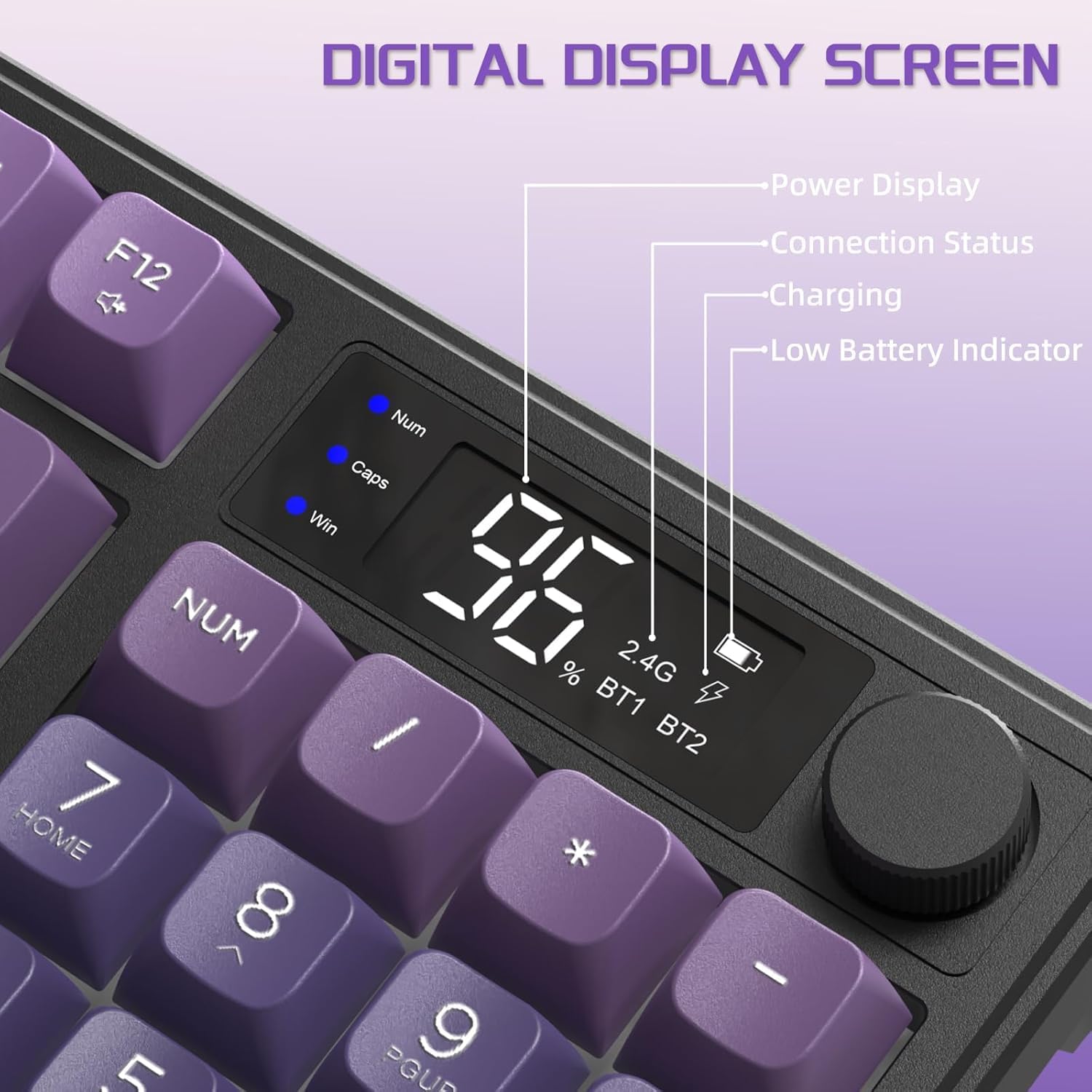
Image: Digital Display Screen. This image details the information displayed on the keyboard's LCD screen, including power display (battery percentage), connection status (2.4G, BT1, BT2), charging indicator, and low battery indicator. It also shows indicators for Num Lock, Caps Lock, and Win Lock.
2. Media Knob Functionality
The multi-functional knob allows for quick adjustments:
- Default Function (Short Press/Rotate):
- Sukite pagal laikrodžio rodyklę: padidinkite garsumą
- Rotate counter-clockwise: Volume Down
- Short press: Mute/Unmute
- Light Control Function (Press and Hold for 5 Seconds):
Press and hold the knob for approximately 5 seconds to switch its function to backlight control. The LCD screen may indicate the change.
- Rotate clockwise: Backlight Brightness Increase
- Rotate counter-clockwise: Backlight Brightness Decrease
- Short press: Cycle through Light Effects (if applicable, though backlight color is fixed)
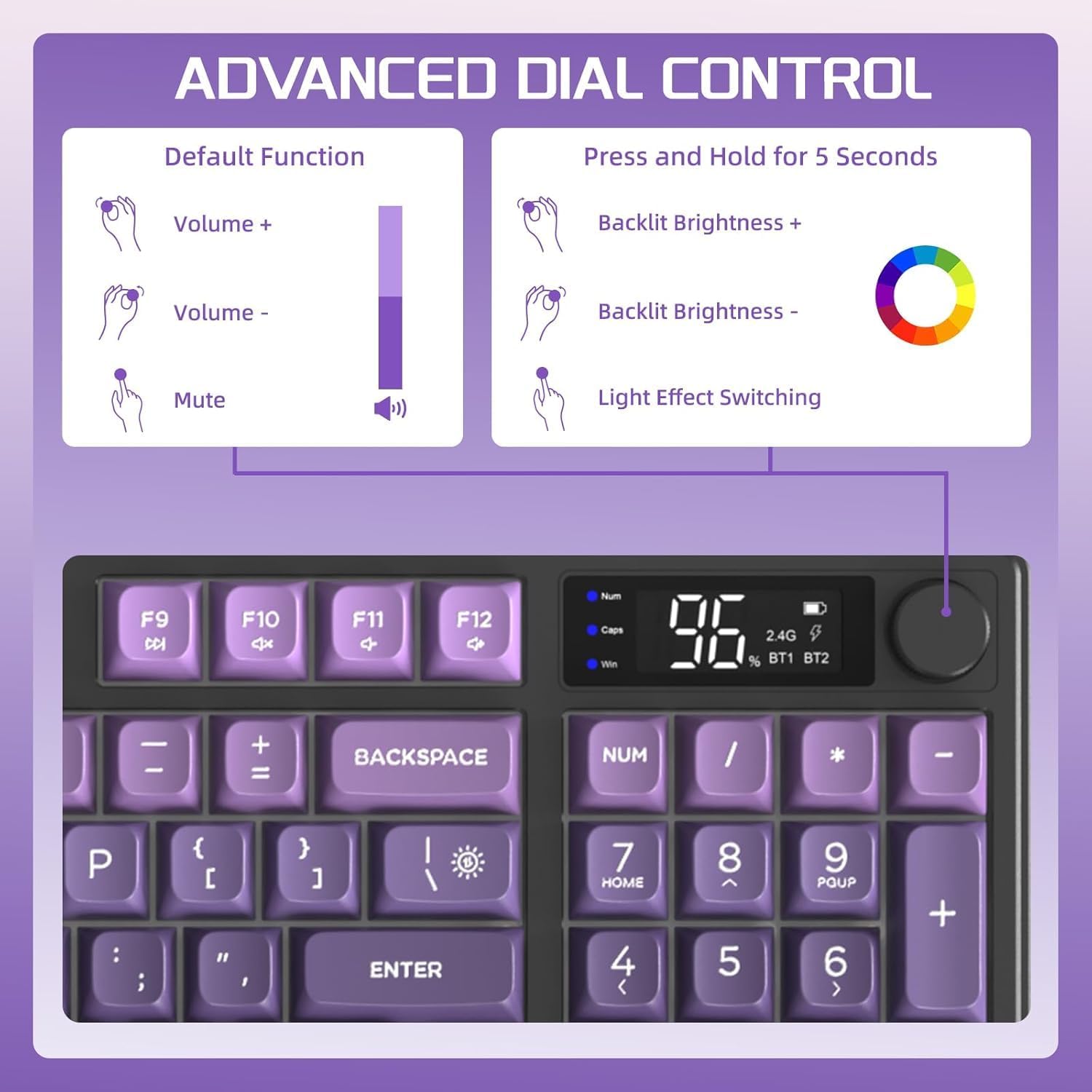
Image: Advanced Dial Control. This graphic explains the dual functionality of the media knob. Its default function is volume control (volume up, volume down, mute). Pressing and holding the knob for 5 seconds switches it to backlight control (backlit brightness increase, decrease, and light effect switching).
3. Apšvietimo valdymas
The keyboard features a rainbow LED backlight. While the color is fixed, you can adjust its brightness and mode using FN key combinations:
- FN + N: Cycle through Backlight Modes (if multiple modes are available beyond fixed rainbow).
- FN + ↑ (rodyklė aukštyn): Increase Backlight Brightness.
- FN + ↓ (rodyklė žemyn): Decrease Backlight Brightness.
- FN + ← (rodyklė kairėn): Decrease Backlight Speed (for dynamic modes).
- FN + → (rodyklė dešinėn): Increase Backlight Speed (for dynamic modes).
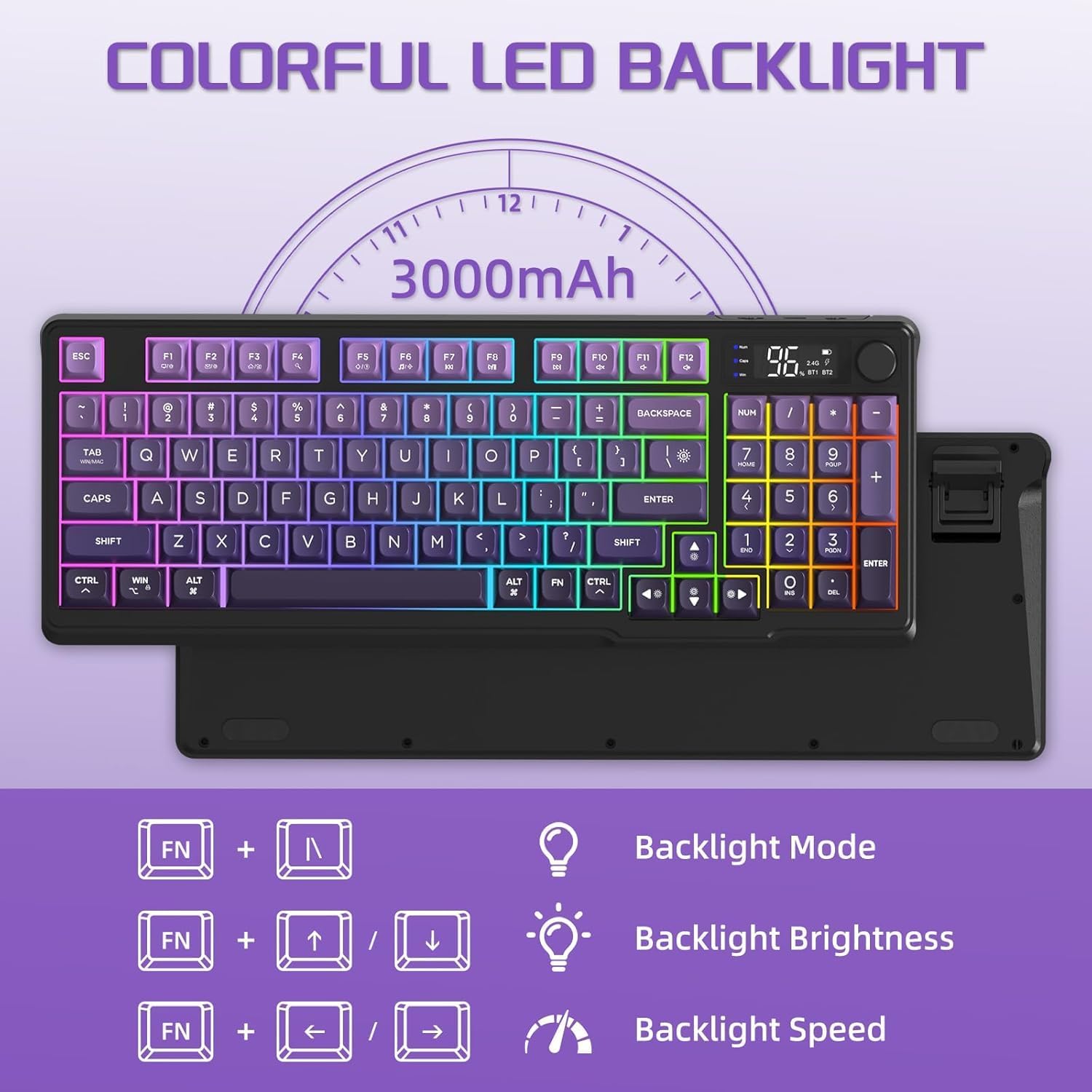
Image: Colorful LED Backlight. This image shows the keyboard with its rainbow backlight illuminated and illustrates the FN key combinations for controlling backlight mode, brightness, and speed.
4. Energijos taupymo funkcijos
To conserve battery life, the keyboard will automatically enter sleep mode if no activity is detected for 3 minutes. Press any key to wake it up.
5. Suderinamumas
The FREEWOLF M96 keyboard is broadly compatible with the following operating systems and devices:
- Windows (PC, Laptop)
- Mac OS (Mac, Laptop)
- „iOS“ („iPad“, „iPhone“)
- Android (Tablets, Smartphones)
- Linux
For use with game consoles like PS4/PS5/Switch/Xbox, a corresponding adapter may be required (not included).
Priežiūra
1. Klaviatūros valymas
- Always power off the keyboard before cleaning.
- Šiek tiek naudokite minkštą, be pūkelių šluostę dampened with water or a mild, non-abrasive cleaning solution to wipe the surface of the keyboard and keycaps.
- Dulkėms ir šiukšlėms tarp klavišų pašalinti naudokite suslėgtą orą arba mažą šepetėlį.
- Venkite purkšti skysčius tiesiai ant klaviatūros.
- Ensure the keyboard is completely dry before powering it on again.
2. Akumuliatoriaus priežiūra
- Reguliariai kraukite klaviatūrą, kad palaikytumėte baterijos veikimo laiką.
- Venkite dažnai visiškai iškrauti akumuliatorių.
- If storing the keyboard for an extended period, charge it to about 50% to prevent battery degradation.
- Įkrovimui naudokite tik pridedamą arba sertifikuotą USB-C laidą.
Trikčių šalinimas
| Problema | Galima priežastis | Sprendimas |
|---|---|---|
| Keyboard not connecting (2.4Ghz) | USB receiver not properly inserted; keyboard not in 2.4G mode; low battery. | Ensure receiver is fully inserted. Slide switch to "2.4G". Charge the keyboard. Try a different USB port. |
| Klaviatūra neprisijungia (Bluetooth) | Keyboard not in pairing mode; device Bluetooth off; already connected to max devices; low battery. | Slide switch to desired BT channel (BT1/BT2/BT3) and ensure it's blinking. Enable Bluetooth on your device. Forget previous pairings and re-pair. Charge the keyboard. |
| Keys not responding or delayed input | Low battery; interference; keyboard in sleep mode. | Charge the keyboard. Move closer to the receiver/device. Press any key to wake from sleep. Restart the keyboard and device. |
| Foninis apšvietimas neveikia arba yra silpnas | Backlight turned off; brightness set too low; low battery. | Use FN + Up Arrow to increase brightness. Ensure keyboard is charged. Note: Backlight color is fixed rainbow. |
| LCD ekranas nerodomas | Keyboard is off; low battery; temporary glitch. | Ensure keyboard is powered on. Charge the keyboard. Restart the keyboard. |
| Media knob not adjusting volume/light | Knob function switched; temporary glitch. | Press and hold the knob for 5 seconds to toggle between volume and light control. Restart the keyboard. |
Specifikacijos
| Funkcija | Detalė |
|---|---|
| Modelis | M96 |
| Klaviatūros tipas | Membraninė klaviatūra |
| Raktų išdėstymas | 94 Key ANSI Layout |
| Keycap medžiaga | PBT (Ball Shape) |
| Ryšys | Dual Mode: 2.4Ghz Wireless, Bluetooth (up to 3 devices) |
| Baterijos talpa | 3000 mAh (įmontuota) |
| Foninis apšvietimas | Rainbow LED (fixed color, adjustable brightness/speed) |
| Ypatingos savybės | LCD Smart Screen, Media Knob, Adjustable Foot Stand, 26 Anti-ghosting Keys, Auto Sleep Mode |
| Suderinama OS | „Windows“, „Mac OS“, „iOS“, „Android“, „Linux“. |
| Matmenys (I x P x A) | Approx. 15.16 x 5.71 x 1.57 inches (385mm x 145mm x 40mm) |
| Svoris | 1.74 svaro (0.79 kg) |

Image: Product Size. This image provides the dimensions of the FREEWOLF M96 keyboard: 385mm/15.16 inches in length, 145mm/5.71 inches in width, and 40mm/1.57 inches in height.
Garantija ir palaikymas
For warranty information, please refer to the documentation included with your purchase or visit the official FREEWOLF website. If you encounter any issues not covered in this manual or require further assistance, please contact FREEWOLF customer support or your retailer.
Keep your purchase receipt and product packaging for warranty claims.


