Įvadas
This user manual provides detailed instructions for the FREEWOLF T96 Smart Display Wireless Gaming Keyboard and Mouse Combo. This combo is designed for a seamless and responsive experience across various devices and applications, from gaming to office work.
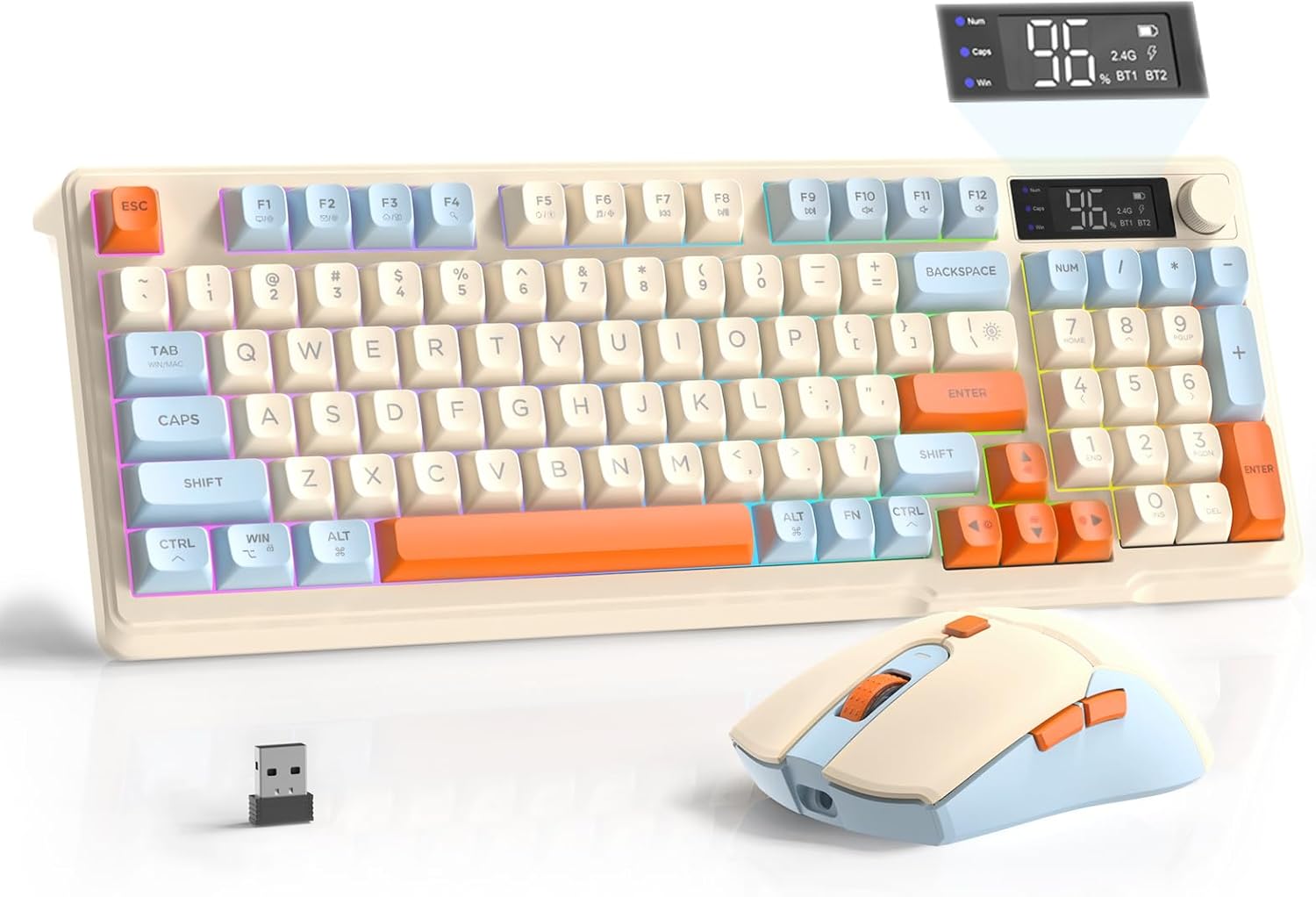
Image: The FREEWOLF T96 Wireless Gaming Keyboard and Mouse Combo, featuring the keyboard, mouse, and USB receiver.
Pakuotės turinys
Įsitikinkite, kad pakuotėje yra visi daiktai:
- 1 x T96 Membrane Keyboard
- 1 x T96 Wireless Mouse
- 1 x USB-C laidas
- 1 x USB Receiver (stored in mouse bottom slot)
- 1 x Vartotojo vadovas
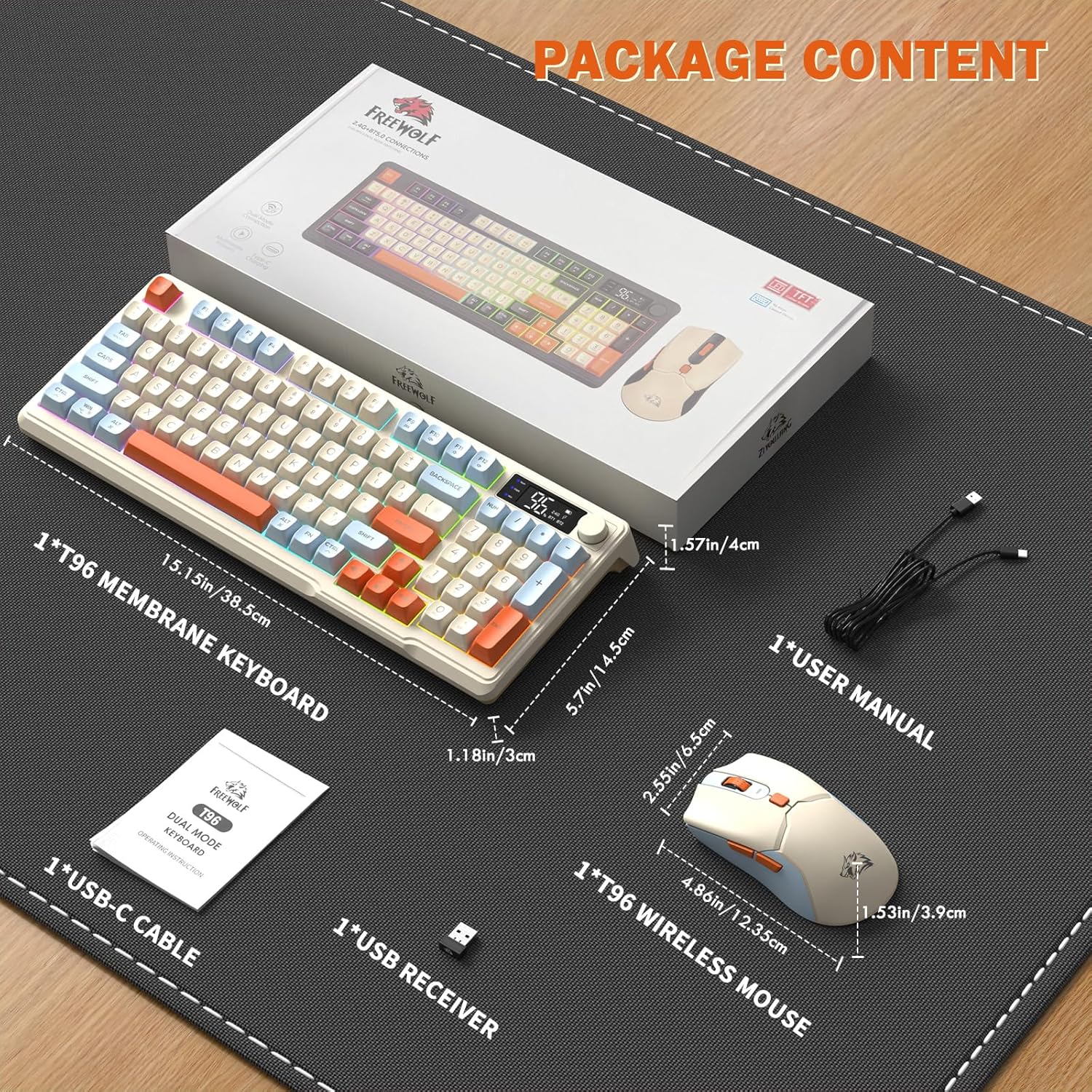
Image: A visual representation of the package contents, including the keyboard, mouse, USB-C cable, USB receiver, and user manual.
Sąranka
Ryšio parinktys
The T96 combo supports dual-mode wireless connectivity:
- 2.4G belaidis ryšys: Utilizes the included USB receiver for a stable, plug-and-play connection.
- Bluetooth Connections (BT1/BT2): Allows pairing with up to two Bluetooth-enabled devices, enabling seamless switching.
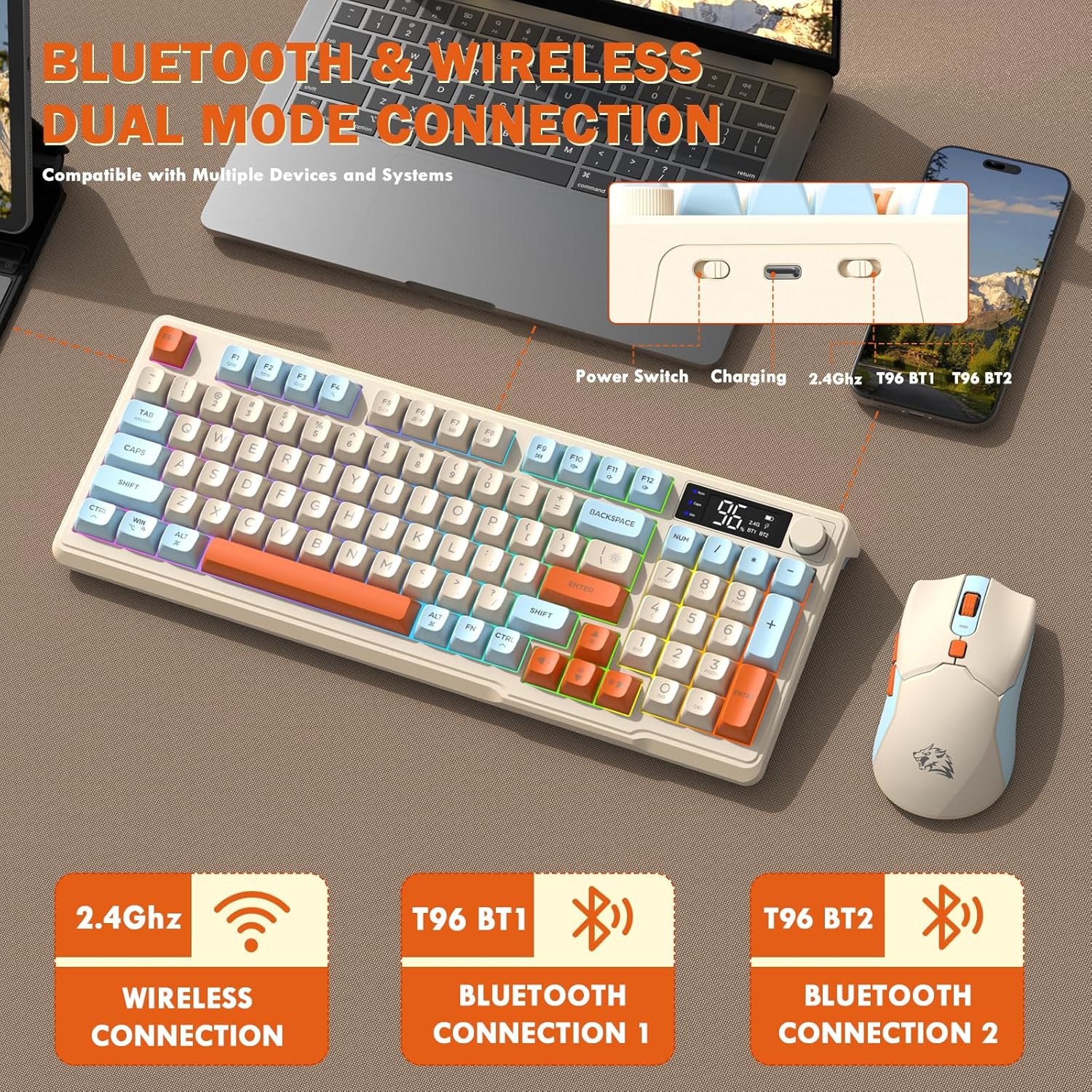
Image: Diagram illustrating the dual-mode connection options (2.4GHz, Bluetooth 1, Bluetooth 2) and the location of the power switch, charging port, and connection indicators on the keyboard.
Pradiniai nustatymo veiksmai
- Įkrovimo įrenginiai: Before first use, fully charge both the keyboard and mouse using the provided USB-C cable. The keyboard has a 2000mAh battery, and the mouse has a 500mAh battery. The smart display on the keyboard will show charging progress.
- Raskite USB imtuvą: The USB receiver for 2.4G wireless connection is stored in a slot on the bottom of the mouse. Remove it for use.
- Maitinimas: Įjunkite klaviatūrą ir pelę naudodami atitinkamus maitinimo jungiklius.
- Connect via 2.4G Wireless:
- Įkiškite USB imtuvą į laisvą kompiuterio USB prievadą.
- Ensure the keyboard and mouse are set to 2.4G mode (indicated on the keyboard's smart display). They should connect automatically.
- Prisijunkite per Bluetooth:
- Switch the keyboard and mouse to BT1 or BT2 mode.
- On your device (PC, laptop, tablet, smartphone), open Bluetooth settings.
- Ieškokite "T96 Keyboard" and "T96 Mouse" in the list of available devices and pair them.
- The smart display will indicate the active Bluetooth connection (BT1 or BT2).
Naudojimo instrukcijos
Klaviatūros veikimas
The T96 keyboard features a 94-key compact layout with various functions to enhance your experience.
Smart Display Functions
Išmanusis LED ekranas teikia informaciją realiuoju laiku:
- Baterijos būsena: Rodo likusį akumuliatoriaus įkrovos procentątage.
- Ryšio režimas: Indicates active connection (2.4G, BT1, BT2).
- Įkrovimo eiga: Displays charging status when connected to power.
- Caps Lock/Num Lock/Win Lock Indicators: Shows status of these keys.
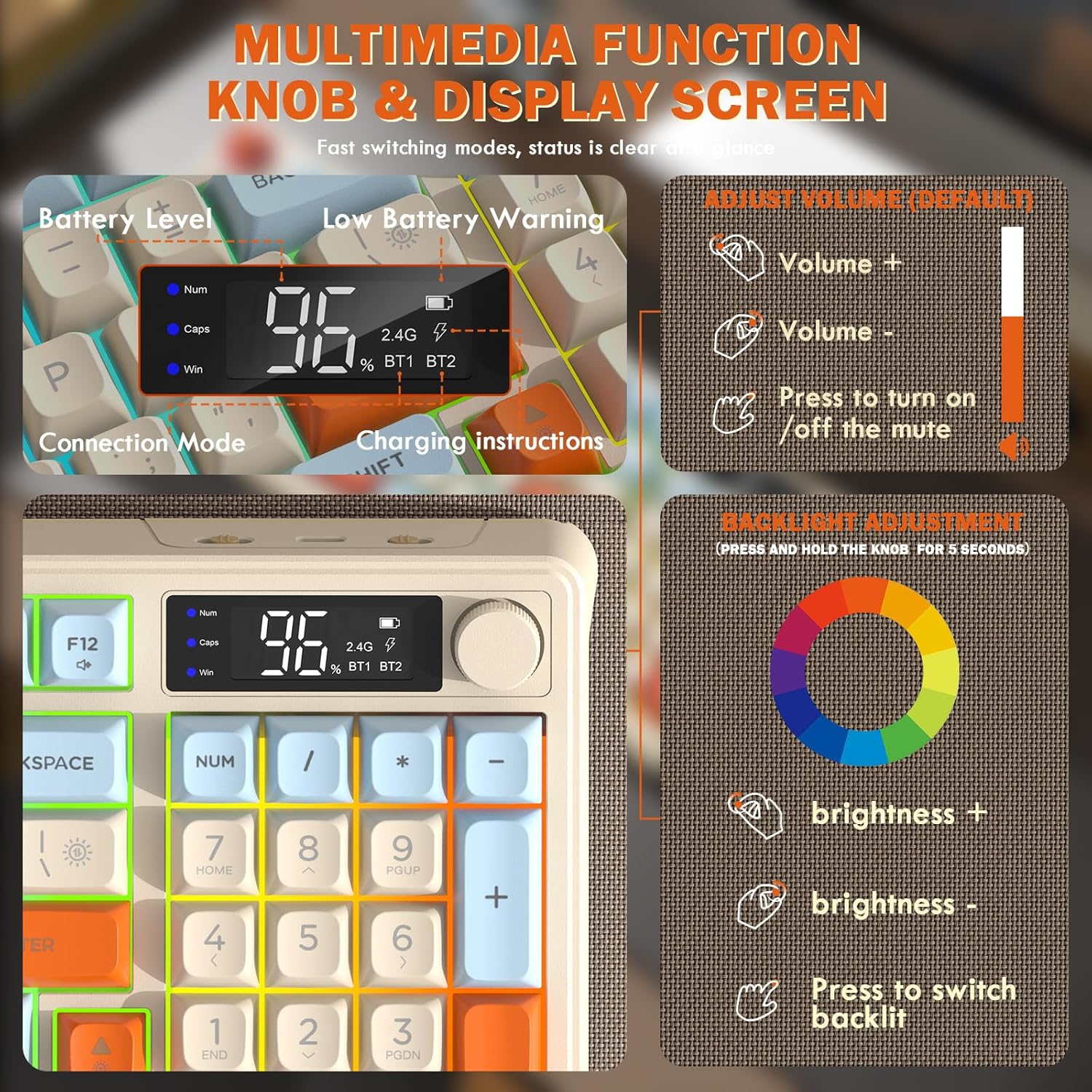
Image: Close-up of the keyboard's smart display showing battery level, connection mode, and charging instructions. Also details the multimedia knob's functions for volume and backlight control.
Multimedia Control Knob
Located on the top right of the keyboard, this knob offers quick control:
- Pasukti: Adjusts system volume (clockwise for volume up, counter-clockwise for volume down).
- Paspauskite: Toggles mute on/off.
- Paspauskite ir palaikykite (5 sekundes): Activates backlight adjustment mode. Rotate to change brightness, press to switch light effects.
Multimedia Hotkeys (FN Combinations)
The keyboard includes 12 dedicated multimedia hotkeys accessible via the FN raktas:
- FN + F1–F12: Access various multimedia and system functions (e.g., media playback, volume, browser, email). Refer to keycap legends for specific functions.
Foninio apšvietimo valdymas
The keyboard features vibrant rainbow LED backlighting. Control it using the following combinations:
- FN + rodyklė aukštyn: Padidinkite foninio apšvietimo ryškumą.
- FN + rodyklė žemyn: Sumažinkite foninio apšvietimo ryškumą.
- FN + rodyklė dešinėn: Padidinkite foninio apšvietimo greitį.
- FN + rodyklė kairėn: Sumažinkite foninio apšvietimo greitį.
- FN + \|: Switch between different lighting modes (e.g., always on, breathing, off).
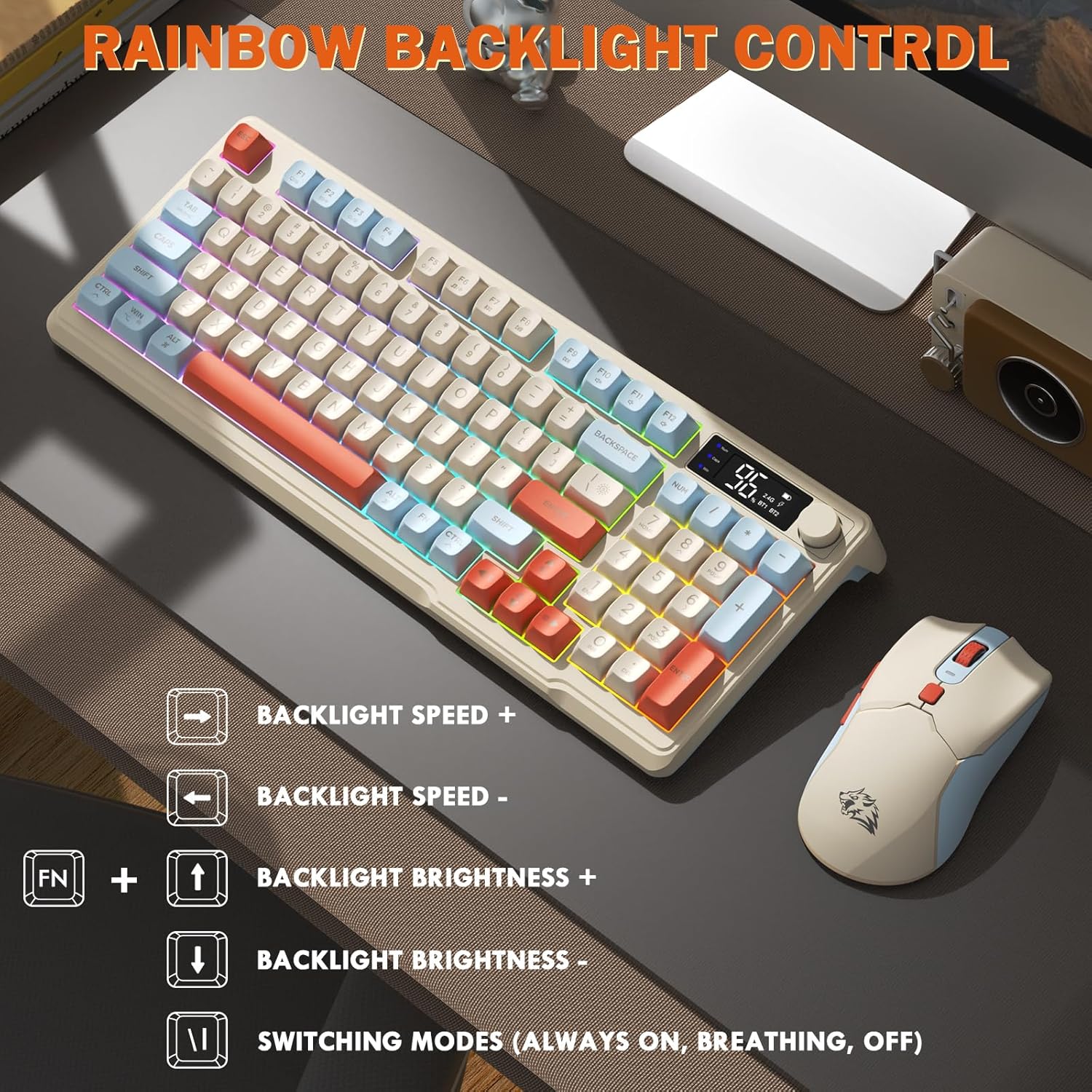
Image: Visual guide for controlling the rainbow LED backlight, showing key combinations for brightness, speed, and mode switching.
Anti-Ghosting
The keyboard supports 26-key rollover anti-ghosting technology, ensuring accurate registration of multiple simultaneous key presses, crucial for gaming.
Pelės veikimas
The T96 gaming mouse is designed for precision and comfort.
DPI reguliavimas
Adjust the mouse sensitivity (DPI) to suit your preference:
- Paspauskite DPI mygtukas (located behind the scroll wheel) to cycle through available DPI settings: 800 / 1600 / 2400 / 4000 DPI.
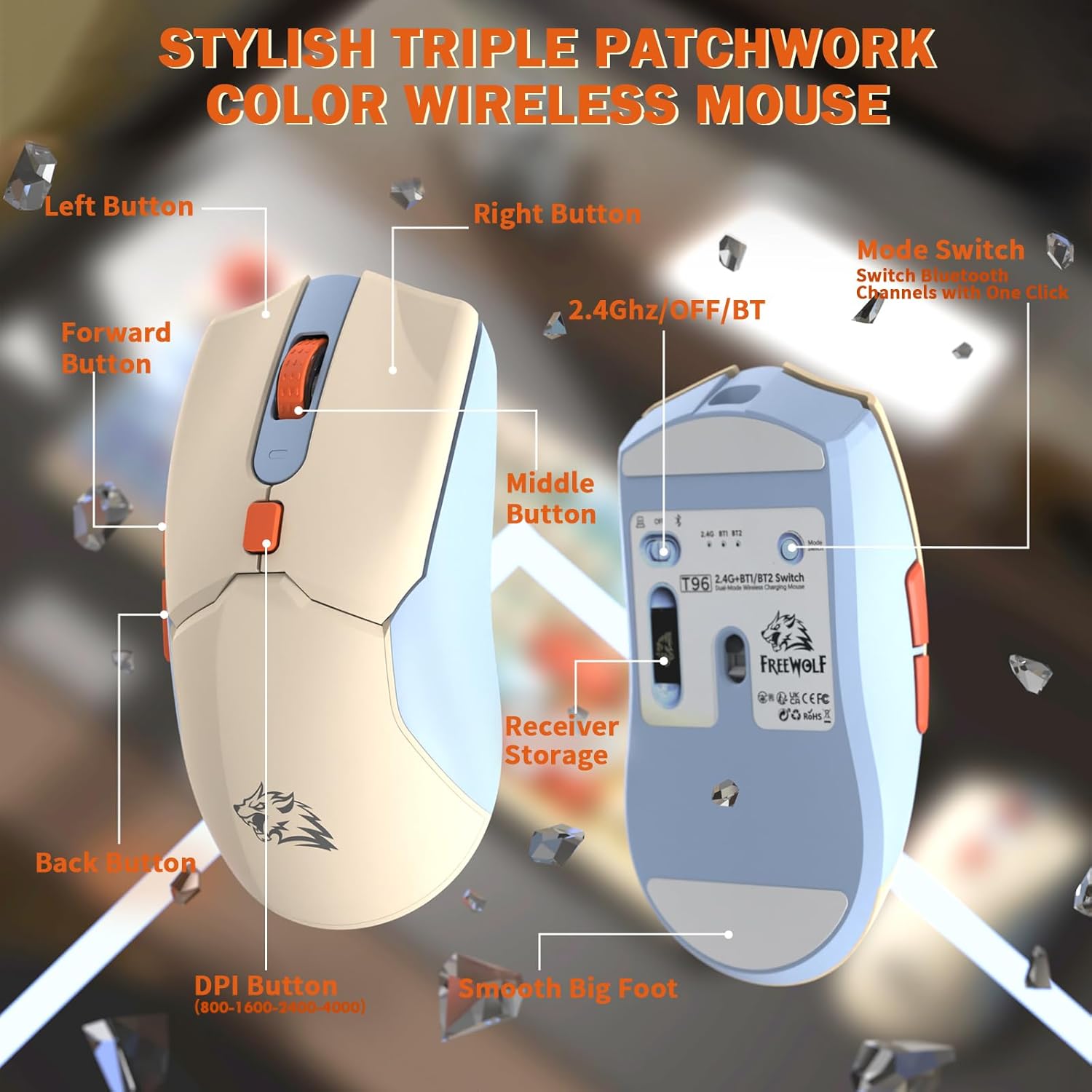
Vaizdas: Išsamus view of the T96 wireless mouse, highlighting its buttons (Left, Right, Middle, Forward, Back, DPI) and the receiver storage compartment on the bottom.
Programuojami mygtukai
The mouse features six programmable buttons. Refer to specific software (if applicable, not mentioned in data) or operating system settings for customization options.
Balsavimo tarifai
The mouse operates at different polling rates depending on the connection mode:
- Bluetooth (BT): 115 Hz
- 2.4G belaidis ryšys: 125 Hz
Priežiūra
Valymas
- Klaviatūros ir pelės paviršiams valyti naudokite minkštą, sausą šluostę.
- Įsisenėjusiam purvui šiek tiek pamirkykiteamplt šluostę nuvalykite vandeniu arba švelniu, neabrazyviniu valikliu.
- Venkite naudoti stiprias chemines medžiagas, tirpiklius ar abrazyvines medžiagas, nes jos gali pažeisti apdailą.
- Nemerkite prietaisų į vandenį ar kokį nors kitą skystį.
Akumuliatoriaus priežiūra
Norėdami maksimaliai padidinti akumuliatoriaus veikimo laiką ir našumą:
- Recharge the devices when the low battery indicator appears on the keyboard's smart display.
- Venkite dažnai visiškai iškrauti akumuliatorių.
- Ilgesnį laiką nenaudojamus prietaisus laikykite vėsioje, sausoje vietoje.
- The devices feature smart power-saving modes: the keyboard enters sleep mode after 3 minutes of inactivity, and the mouse after 2 minutes. They wake instantly upon touch.

Image: Illustration showing the 2000mAh battery capacity of the keyboard and 500mAh battery capacity of the mouse, emphasizing long-lasting power.
Trikčių šalinimas
If you encounter issues with your T96 combo, refer to the following common solutions:
| Problema | Galima priežastis | Sprendimas |
|---|---|---|
| Klaviatūra / pelė nereaguoja | Low battery; Incorrect connection mode; USB receiver not connected (2.4G); Bluetooth not paired. |
|
| Vėluojantis arba nutrūkstantis ryšys | Trikdžiai; Atstumas nuo imtuvo / įrenginio; Išsikrovusi baterija. |
|
| Foninis apšvietimas neveikia arba yra silpnas | Backlight turned off; Brightness set too low; Low battery. |
|
| Pelės DPI nesikeičia | Netinkamai paspaustas DPI mygtukas. |
|
Specifikacijos
| Funkcija | Detalė |
|---|---|
| Prekės ženklas | LAISVAS VILKAS |
| Modelis | T96 |
| Ryšio technologija | 2.4Ghz Wireless, Bluetooth (BT1, BT2) |
| Klaviatūros tipas | Membrane, 94-Key Compact Layout |
| Klaviatūros | PBT Triple-Tone Spherical Keycaps |
| Foninis apšvietimas | Rainbow LED Backlight |
| Anti-Ghosting | 26 klavišų perjungimas |
| Klaviatūros baterijos talpa | 2000 mAh |
| Pelės DPI | 800 / 1600 / 2400 / 4000 DPI (reguliuojama) |
| Mouse Polling Rate (BT) | 115 Hz |
| Mouse Polling Rate (2.4G) | 125 Hz |
| Pelės baterijos talpa | 500 mAh |
| Suderinami įrenginiai | Laptop, Gaming Console, PC, Tablet, Smartphone |
| Operacinės sistemos | „Windows“, „MacOS“, „Linux“, „iOS“, „Android“. |
| Prekės svoris | 2.12 svaro (apie 0.96 kg) |
| Pakuotės matmenys | 16.26 x 8.78 x 1.85 colio (apytiksliai 41.3 x 22.3 x 4.7 cm) |
Garantija ir palaikymas
Informacija apie produkto garantiją ir klientų aptarnavimą nebuvo pateikta turimuose duomenyse. Žr. produkto pakuotę arba oficialią gamintojo informaciją. websvetainėje rasite informacijos apie garantiją ir kaip susisiekti su klientų aptarnavimo tarnyba.


