1. Įvadas
Thank you for choosing the Infiniity DM56 Sport Smartwatch. This device is designed to enhance your active lifestyle with advanced fitness tracking, health monitoring, and smart connectivity features. Equipped with a vibrant 1.43-inch AMOLED display, built-in GPS, and comprehensive health sensors, the DM56 is your reliable companion for both daily wear and intense workouts.
This manual provides detailed instructions on how to set up, operate, maintain, and troubleshoot your smartwatch to ensure optimal performance and longevity.

1.1 vaizdas: priekis view of the Infiniity DM56 Sport Smartwatch, showcasing its round AMOLED display and rugged design.
2. Kas yra dėžutėje
Upon opening your Infiniity DM56 Sport Smartwatch package, please ensure all the following items are present:
- Infiniity DM56 Sport Smartwatch
- Įkrovimo kabelis
- Vartotojo vadovas (šis dokumentas)
3. Sąranka
3.1 Išmaniojo laikrodžio įkrovimas
Before first use, fully charge your DM56 smartwatch. A full charge typically takes approximately 2 hours.
- Connect the magnetic charging cable to the charging contacts on the back of the smartwatch. Ensure the pins align correctly.
- Prijunkite įkrovimo laido USB galą prie standartinio USB maitinimo adapterio (rekomenduojama 5 V / 1 A) arba kompiuterio USB prievado.
- The watch display will show a charging indicator. Once fully charged, the indicator will change or disappear.
3.2 Susiejimas su išmaniuoju telefonu
To unlock the full potential of your DM56 smartwatch, you need to pair it with your smartphone via Bluetooth using the dedicated companion application. The DM56 is compatible with Android 5.0+ and iOS 11 and above.
- Atsisiųskite programą: Ieškokite the official Infiniity companion app (refer to the packaging or quick start guide for the exact app name) on the Google Play Store (for Android) or Apple App Store (for iOS) and install it.
- Įjungti Bluetooth: Įsitikinkite, kad jūsų išmaniajame telefone įjungtas „Bluetooth“.
- Atidarykite programą: Launch the companion app on your smartphone and follow the on-screen instructions to create an account or log in.
- Pridėti įrenginį: Programėlėje eikite į skyrių „Pridėti įrenginį“ arba „Susieti įrenginį“. Programėlė ieškos galimų išmaniųjų laikrodžių.
- Select DM56: Select 'DM56' from the list of found devices. A pairing request may appear on both your phone and the watch. Confirm the pairing on both devices.
- Užbaigti sąranką: Once paired, the app will guide you through initial settings, such as profile information, notification permissions, and data synchronization.
4. Išmaniojo laikrodžio valdymas
4.1 Pagrindinė navigacija
The DM56 features a responsive touchscreen and physical buttons for intuitive control.
- Jutiklinis ekranas: Braukite aukštyn, žemyn, kairėn arba dešinėn, kad naršytumėte meniu ir pranešimus. Palieskite, kad pasirinktumėte elementus.
- Fiziniai mygtukai: The watch has multiple buttons, typically labeled 'SPORT', 'SEL', 'BACK', and a dedicated 'GPS' button. Their functions may vary depending on the current screen or mode.
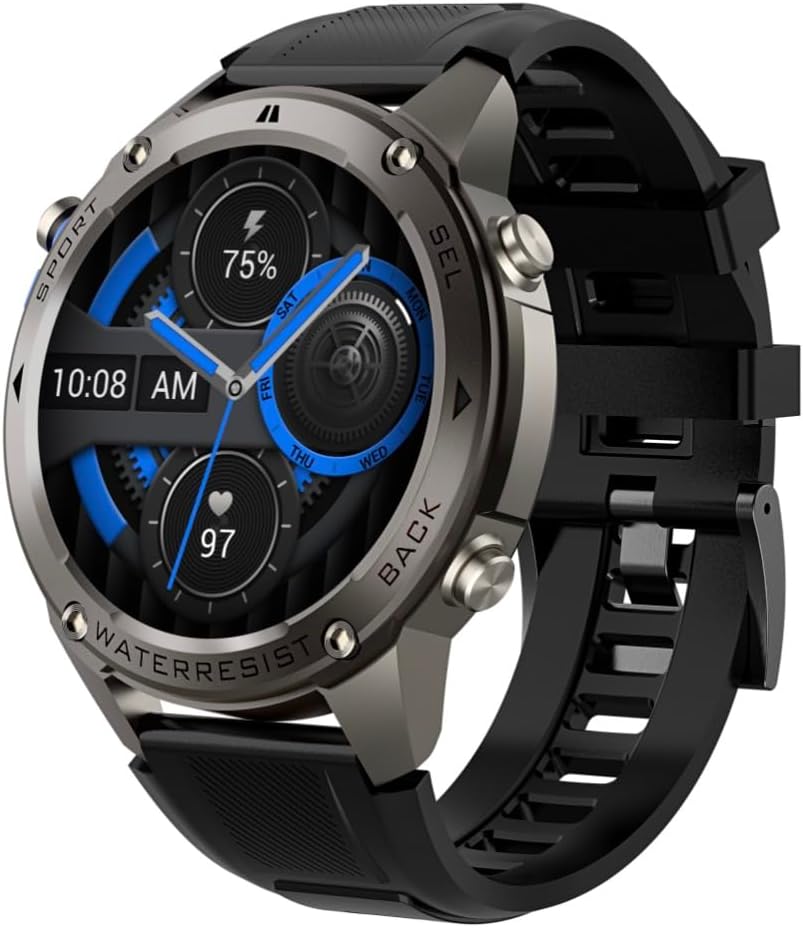
4.1 paveikslėlis: Šonas view of the Infiniity DM56 Sport Smartwatch, highlighting the physical control buttons.
4.2 Ekrano funkcijos
The 1.43-inch AMOLED display offers vibrant colors and deep blacks with a resolution of 466x466 pixels.
- Visada įjungtas ekranas: The DM56 supports Always-On Display functionality, allowing you to see the time and essential information at a glance without needing to raise your wrist or press a button. This feature can be configured in the watch settings.

Image 4.2: The Infiniity DM56 Sport Smartwatch display, showcasing a typical watch face with various data points.
4.3 Built-in GPS & Compass
The DM56 features dual-frequency GPS (L1+L5) and supports multiple satellite systems (GPS, GLONASS, BDS, Galileo, NAVIC, QZSS) for precise outdoor tracking. A built-in compass further aids navigation.
- GPS sekimas: When starting an outdoor activity (e.g., running, cycling), the watch will automatically attempt to acquire a GPS signal. Ensure you are in an open area for faster signal acquisition. Your route, distance, and pace will be recorded.
- Kompasas: Access the compass feature from the watch's menu to get real-time directional information.

Image 4.3: The Infiniity DM56 Sport Smartwatch from an angle, highlighting the dedicated GPS button on the side.

4.4 pav.: Stambus planas view of the GPS button on the Infiniity DM56 Sport Smartwatch, indicating its function.
4.4 All-Day Health Monitoring
The DM56 is equipped with the VC30F sensor for continuous health monitoring.
- Širdies ritmo stebėjimas: Track your heart rate in real-time throughout the day. View your current heart rate on the watch face or in the dedicated heart rate app.
- Kraujo deguonies (SpO2) stebėjimas: Išmatuokite kraujo prisotinimo deguonimi lygį.
- Miego stebėjimas: The watch automatically monitors your sleep patterns, including deep sleep, light sleep, and awake times. View išsami miego analizė papildomoje programėlėje.
- Streso stebėjimas: Stebėkite savo streso lygį visą dieną.
- Pedometras: Counts your daily steps, distance, and estimated calories burned.
Note: The Infiniity DM56 Smartwatch is NOT A MEDICAL DEVICE. All health monitoring data is for reference only and should not be used for medical diagnosis or treatment.
4.5 sporto režimų
The DM56 offers over 170 customizable sports modes, with 14 built-in modes such as outdoor running, cycling, and swimming. You can add up to 10 additional modes manually via the companion app.
- Veiklos pradžia: Navigate to the 'Workout' or 'Sports' menu on the watch, select your desired activity, and tap to start.
- Veiklos metu: The watch will display real-time metrics such as duration, distance, heart rate, and calories burned.
- Ending Activity: Swipe or press the designated button to pause or end the activity. Your workout data will be saved and synchronized with the app.
4.6 Smart Notifications & Calls
Once paired with your smartphone, the DM56 can receive notifications and handle calls directly on your wrist.
- Pranešimai: Receive alerts for incoming calls, SMS messages, and app notifications (e.g., social media, email). Configure which app notifications you want to receive in the companion app.
- Make/Answer Call: The DM56 allows you to make and answer calls directly from the watch, utilizing its built-in microphone and speaker. Ensure the watch is connected to your phone via Bluetooth.
5. Priežiūra
5.1 Atsparumo vandeniui įvertinimas
The DM56 has a 5ATM waterproof rating, meaning it can withstand water pressures equivalent to a depth of 50 meters. This makes it suitable for swimming, showering, and other water-based activities. However, it is not recommended for diving or high-pressure water activities.
- Venkite laikrodžio sąlyčio su karštu vandeniu, garais ar stipriais valikliais.
- Po sąlyčio su sūriu vandeniu laikrodį nuplaukite gėlu vandeniu ir kruopščiai nusausinkite.
5.2 Valymas ir priežiūra
Norėdami išlaikyti išmaniojo laikrodžio išvaizdą ir funkcionalumą:
- Reguliariai valykite laikrodžio korpusą ir dirželį minkšta, d šluosteamp audinys.
- Prieš įkrovimą įsitikinkite, kad laikrodžio gale esantys įkrovimo kontaktai yra švarūs ir sausi.
- Nenaudokite abrazyvinių valiklių ar tirpiklių.
5.3 Baterijos veikimo laiko optimizavimas
The DM56 is powered by a 500mAh high-voltage battery, offering extended usage. To maximize battery life:
- Adjust screen brightness to a lower level.
- Limit the use of Always-On Display if not essential.
- Išjunkite nereikalingus pranešimus.
- Išjunkite nuolatinį širdies ritmo stebėjimą, jei jo nereikia 24 valandas per parą, 7 dienas per savaitę.
6. Problemų sprendimas
If you encounter issues with your Infiniity DM56 smartwatch, try the following common solutions:
- Laikrodis neįsijungia: Įsitikinkite, kad laikrodis yra visiškai įkrautas. Prijunkite jį prie įkroviklio ir palaukite kelias minutes, prieš bandydami jį vėl įjungti.
- Nepavyksta susieti su telefonu:
- Įsitikinkite, kad jūsų telefone ir laikrodyje įjungtas „Bluetooth“.
- Įsitikinkite, kad laikrodis yra jūsų telefono „Bluetooth“ diapazone.
- Iš naujo paleiskite ir laikrodį, ir telefoną.
- Išvalykite „Bluetooth“ talpyklą telefone („Android“) arba pamirškite įrenginį ir iš naujo sujunkite.
- Įsitikinkite, kad papildoma programėlė atnaujinta į naujausią versiją.
- Netikslūs sveikatos duomenys:
- Įsitikinkite, kad laikrodis tvirtai uždėtas ant riešo – ne per stipriai ir ne per laisvai.
- Nuvalykite jutiklį laikrodžio gale.
- Note that environmental factors and individual physiology can affect readings. Remember, it is not a medical device.
- Pranešimai negauti:
- Patikrinkite pranešimų nustatymus papildomoje programoje.
- Įsitikinkite, kad programa turi reikiamus leidimus jūsų telefone (pvz., prieigą prie pranešimų).
- Verify that the watch is connected to your phone.
- Trumpas baterijos veikimo laikas: Patarimų, kaip optimizuoti akumuliatoriaus veikimo laiką, rasite 5.3 skyriuje.
Jei problema išlieka ir išbandžius šiuos veiksmus, kreipkitės į klientų aptarnavimo tarnybą.
7. Specifikacijos
| Funkcija | Specifikacija |
|---|---|
| Modelio numeris | 56 DM |
| Ekranas | 1.43-inch AMOLED, 466x466 pixels |
| Jutikliai | Heart Rate (VC30F), Accelerometer (STK8321), Magnetometer (Compass), Barometer+Altitude (SPL07-03) |
| Ryšys | Bluetooth 5.3 |
| Baterijos talpa | 500 mAh |
| Atsparus vandeniui lygis | 5 bankomatas |
| Suderinamumas | Android 5.0+ and iOS 11 and above |
| Prekės svoris | 3 uncijos |
| Pakuotės matmenys | 4.25 x 4.25 x 2.8 colio |
| Operacinė sistema | Android Wear 2.7 (Note: This refers to the underlying OS, not necessarily full Android Wear functionality) |
| GPS | Integruotas GPS (L1+L5 dviejų dažnių) |
| Forma | Apvalus |
| Baterijos tipas | Nonstandard Battery, Lithium Ion |
8. Garantija ir palaikymas
The Infiniity DM56 Sport Smartwatch comes with a standard manufacturer's warranty. Please refer to the warranty card included in your product packaging for specific terms and conditions, including warranty duration and coverage details.
For technical support, troubleshooting assistance beyond what is covered in this manual, or warranty claims, please contact Infiniity customer service through the contact information provided on the product packaging or the official Infiniity websvetainę.
Prašome išsaugoti pirkimo įrodymą garantijos tikslais.


