1. Įvadas
Thank you for choosing the MOVE SPEED Z70Pro Power Bank. This device is designed to provide reliable and high-speed portable charging for a wide range of electronic devices, including smartphones, tablets, and laptops. With its massive 70,000mAh capacity, 100W Power Delivery (PD) output, and integrated 35W fast charger with a retractable Type-C cable, it offers unparalleled convenience and power for your daily needs and outdoor adventures.
Prieš naudodami gaminį, atidžiai perskaitykite šį vadovą, kad užtikrintumėte saugų ir optimalų veikimą. Išsaugokite šį vadovą ateičiai.
2. Saugos informacija
- Do not expose the power bank to extreme temperatures (above 60°C/140°F or below -10°C/14°F), direct sunlight, or fire.
- Do not immerse the power bank in water or expose it to rain or moisture.
- Neardykite, neremontuokite ir nemodifikuokite įrenginio patys. Visus techninės priežiūros darbus patikėkite kvalifikuotiems darbuotojams.
- Laikykite maitinimo bloką vaikams nepasiekiamoje vietoje.
- Naudokite tik pateiktus arba sertifikuotus įkrovimo laidus ir adapterius.
- Saugokitės, kad maitinimo blokas nenukristų arba nepaveiktų stipraus smūgio.
- If the power bank swells, emits an odor, or becomes excessively hot, discontinue use immediately and contact customer support.
- Išmeskite išorinę bateriją pagal vietinius reikalavimus. Nemeskite jos su buitinėmis atliekomis.
3. Pakuotės turinys
Patikrinkite pakuotę, ar joje yra šie daiktai:
- MOVE SPEED Z70Pro Power Bank (70,000mAh)
- 35W PD Fast Charger with Retractable Type-C Cable
- USB-C į USB-C įkrovimo laidas
- Vartotojo vadovas

3.1 pav.: Pakuotės turinysview. The image displays the MOVE SPEED Z70Pro Power Bank, a white 35W wall charger with a retractable Type-C cable, and two separate USB-C to USB-C charging cables.
4. Produkto ypatybės
- 20 000 mAh didelės talpos: Provides extensive power, capable of fully charging an iPhone 14 approximately 16 times or a MacBook Pro 14'' multiple times. Ideal for extended travel and outdoor use.
- 100W Super Fast Charging (PD3.0 & QC3.0): Equipped with a powerful 100W Power Delivery output, allowing rapid charging of laptops and other high-power devices. Charges a MacBook Pro 14'' to 50% in just 35 minutes.
- Integrated 35W Super-Fast Charger: Features a built-in 35W wall charger with a retractable Type-C cable for convenient and fast recharging of the power bank itself or other devices. Charges an iPhone 16 Pro Max to 65% in 30 minutes.
- Kelių įrenginių įkrovimas: Supports simultaneous charging of multiple devices.
- Avarinis LED apšvietimas: Includes an integrated LED light with four modes (High, Medium, Low, SOS) for illumination in various situations.
- Išmanusis ekranas: Digital display shows remaining battery percentage ir įkrovimo būsena.

Figure 4.1: Key Features of the Z70Pro Power Bank. The image shows the power bank with its side LED light illuminated, placed on a wooden table in an outdoor camping scene, emphasizing its large capacity and fast charging capabilities.
5. Sąranka
5.1 Pradinis išorinės baterijos įkrovimas
Before first use, it is recommended to fully charge your MOVE SPEED Z70Pro Power Bank.
- Locate the integrated 35W PD Fast Charger on the side of the power bank.
- Extend the retractable Type-C cable from the charger.
- Plug the 35W charger directly into a standard wall outlet.
- The digital display on the power bank will show the charging progress. A full charge from empty takes approximately 5 hours.
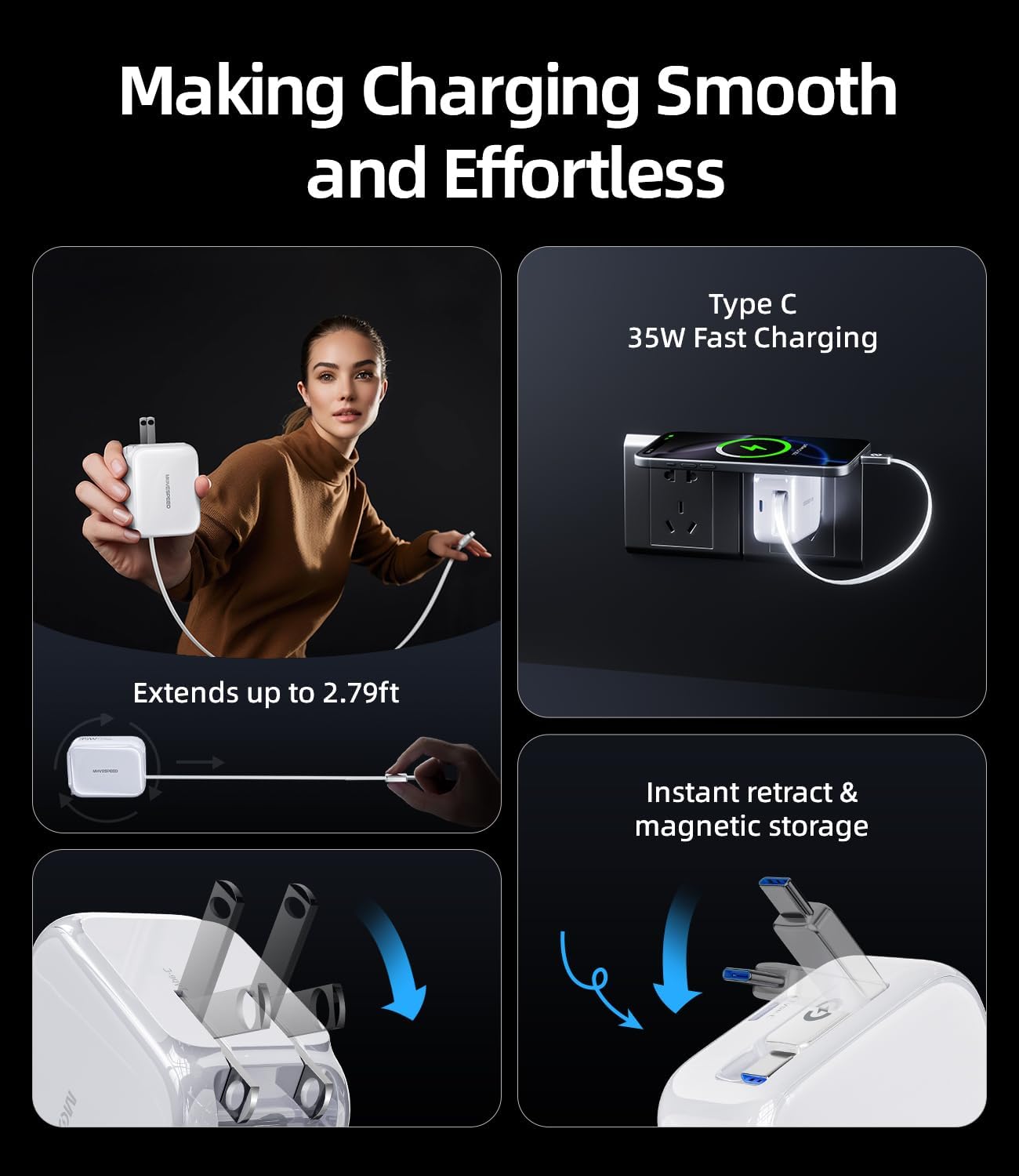
Figure 5.1: Extending the Retractable Cable. This image illustrates how the integrated Type-C cable extends from the 35W wall charger for convenient use.

Figure 5.2: 35W GaN Charger Technology. This image highlights the compact design and advanced GaN technology of the integrated 35W charger.
6. Naudojimo instrukcijos
6.1 Įrenginių įkrovimas
The MOVE SPEED Z70Pro Power Bank offers multiple output ports for charging various devices simultaneously.
- Using the 100W PD Output: For laptops, tablets, and other high-power devices, use a compatible USB-C to USB-C cable (one is included) and connect it to the 100W PD output port on the power bank and your device. This port supports up to 100W fast charging.
- Using the 35W Output (Retractable Cable): For smartphones and other devices compatible with Type-C, simply extend the integrated retractable Type-C cable from the 35W charger and plug it into your device. This port supports up to 35W fast charging.
- Using Other USB Ports: The power bank also features additional USB-A and USB-C ports for charging other devices. Connect your device's charging cable to the appropriate port.
- The digital display will indicate when a device is connected and charging.
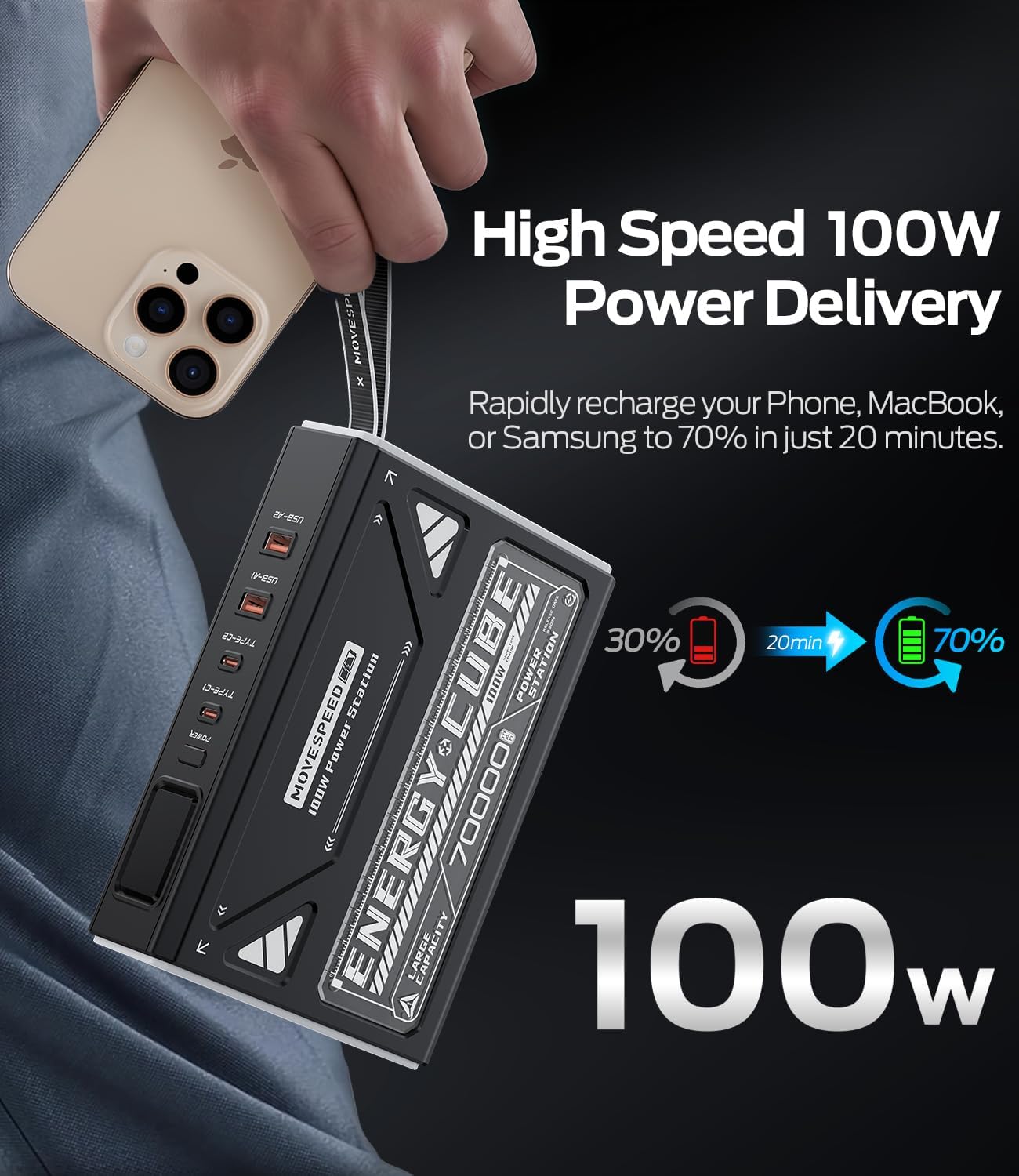
Figure 6.1: High-Speed 100W Power Delivery. This image illustrates the rapid charging capability of the 100W output, showing a phone charging from 30% to 70% in 20 minutes.

Figure 6.2: Multi-Protocol Fast Charging. This image demonstrates the versatility of the charger, capable of powering phones, tablets, and computers with various fast charging protocols.
6.2 Using the Emergency LED Light
The Z70Pro Power Bank includes a built-in LED light for emergency situations or general illumination.
- To turn on the LED light, locate the power button (or dedicated light button, if present) on the power bank and press it briefly.
- Subsequent brief presses will cycle through the light modes: High, Medium, Low, and SOS (Morse code for distress).
- To turn off the LED light, continue pressing the button until the light turns off, or press and hold the button for a few seconds.

Figure 6.3: Emergency Light with 4 Modes. This image displays the power bank's LED light functioning in an outdoor setting, illustrating its different brightness levels and SOS signal.
7. Priežiūra
- Valymas: Išorinės baterijos paviršių valykite minkštu, sausu skudurėliu. Nenaudokite stiprių cheminių medžiagų ar abrazyvinių medžiagų.
- Saugykla: Store the power bank in a cool, dry place away from direct sunlight and extreme temperatures. If storing for extended periods, charge the power bank to about 50-70% capacity every 3 months to prolong battery life.
- Kabelio priežiūra: Ensure the retractable cable is fully retracted when not in use to prevent damage. Avoid bending or twisting cables excessively.
8. Problemų sprendimas
| Problema | Galima priežastis | Sprendimas |
|---|---|---|
| Maitinimo bankas neįkraunamas | Charger not properly connected; faulty cable/adapter; power bank battery depleted. | Ensure charger is securely plugged into outlet and power bank. Try a different cable or adapter. Allow power bank to charge for a few minutes. |
| Įrenginys neįkraunamas iš maitinimo bloko | Power bank battery depleted; incompatible cable; device not properly connected; device requires more power than available. | Recharge the power bank. Ensure the cable is securely connected to both the power bank and the device. Use a compatible cable. Check if your device's power requirements exceed the power bank's output. |
| Lėtas įkrovimas | Using a non-fast charging port/cable; device not supporting fast charging protocol; multiple devices charging simultaneously. | Ensure you are using the 100W PD or 35W output ports with compatible cables. Verify your device supports the fast charging protocols (PD, QC). Charging multiple devices may reduce individual charging speeds. |
| LED lemputė neveikia | Power bank battery low; incorrect operation. | Recharge the power bank. Refer to section 6.2 for correct operation of the LED light. |
9. Specifikacijos
| Funkcija | Detalė |
|---|---|
| Modelis | Z70Pro |
| Talpa | 70,000 mAh / 259 Wh |
| Input (for Power Bank Charging) | 35W (via integrated charger) |
| Output 1 (USB-C PD) | Galia iki 100 W |
| Output 2 (Integrated Type-C Cable) | Iki 35 W greitas įkrovimas |
| Kitos ekrano funkcijos | Wireless (as per product specifications, though not explicitly detailed in features) |
| ASIN | B0F48NPMKJ |
| Pasiekiama pirmoji data | 9 m. balandžio 2025 d |

Figure 9.1: Compact Size of the 35W Charger. This image highlights the small footprint of the integrated 35W charger, allowing it to fit easily on power strips.
10. Garantija ir palaikymas
MOVE SPEED products are designed and manufactured to the highest quality standards. For information regarding warranty coverage, technical support, or any product-related inquiries, please contact MOVE SPEED customer service through the retailer where you purchased the product or visit the official MOVE SPEED websvetainę.
Please have your product model (Z70Pro) and ASIN (B0F48NPMKJ) ready when contacting support.
Daugiau informacijos galite rasti adresu MOVE SPEED Store on Amazon.


