1. Įvadas
This manual provides detailed instructions for the MCHOSE X75 V2 Wireless Mechanical Keyboard and M7 Ultra Wireless Gaming Mouse. It covers setup, operation, maintenance, and troubleshooting to ensure optimal performance and longevity of your devices. Please read this manual thoroughly before using the products.
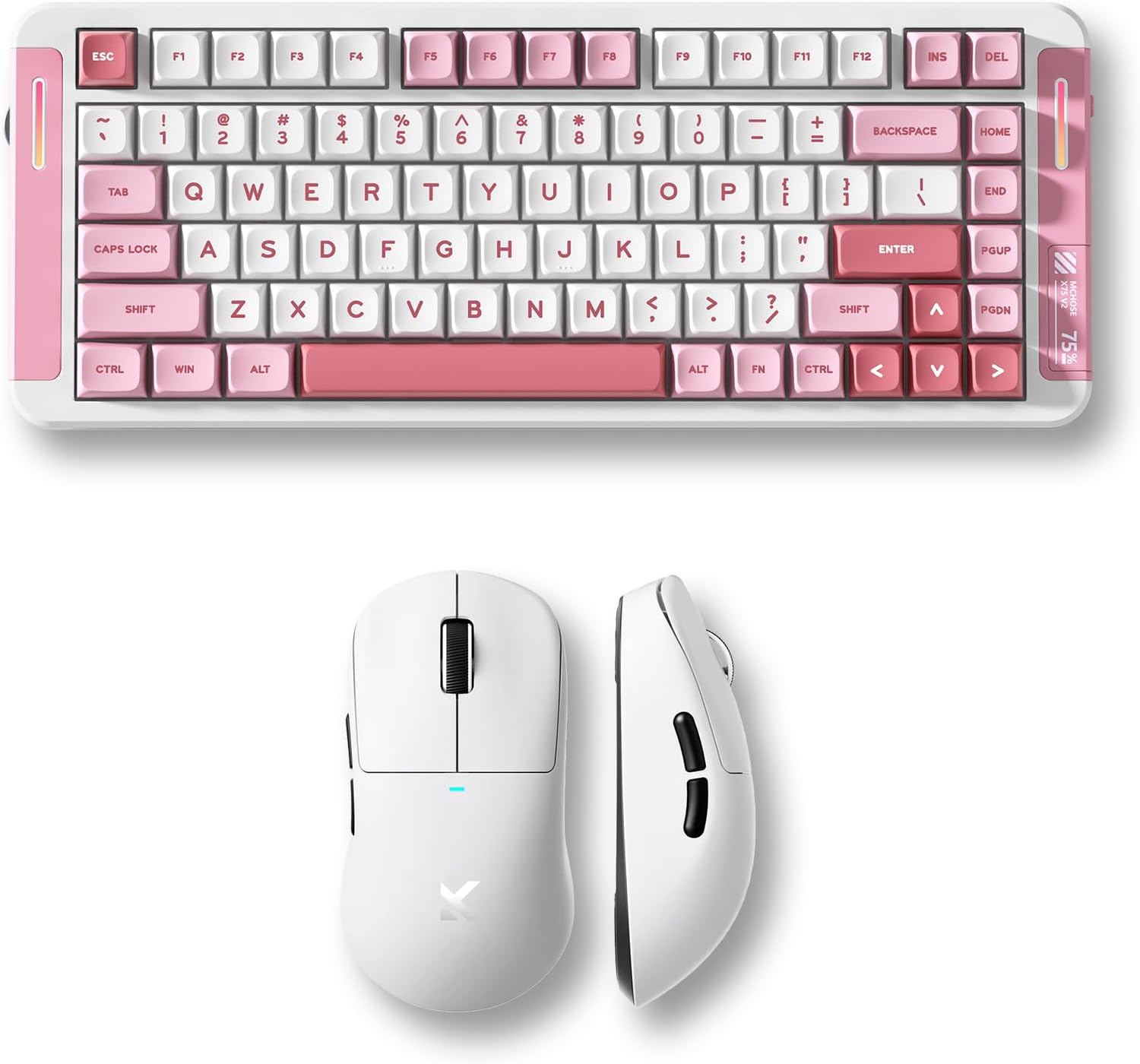
Image 1.1: MCHOSE X75 V2 Wireless Mechanical Keyboard (pink) and M7 Ultra Wireless Gaming Mouse (white) bundle.
2. Produktas baigtasview
2.1 MCHOSE X75 V2 Wireless Mechanical Keyboard
The MCHOSE X75 V2 is a 75% layout mechanical keyboard designed for both gaming and productivity. It features tri-mode connectivity, hot-swappable switches, and an ergonomic design.

2.1 vaizdas: Baigtaview of MCHOSE X75 V2 Mechanical Keyboard features, including 75% layout, full RGB backlit, 3 modes, 8000mAh battery, hot-swappable switches, 5-layer gasket, ergonomic design, MCHOSE HUB compatibility, and a multi-media knob.
Pagrindinės funkcijos:
- 75 % kompaktiškas išdėstymas: 82 keys, saving desktop space while retaining essential keys.
- Trijų režimų ryšys: Bluetooth 5.0, 2.4GHz wireless, and USB wired connection.
- Hot-Swappable PCBA: Allows for easy switch replacement without soldering.
- 8000 mAh baterija: High-capacity battery for extended wireless use.
- Embedded Multimedia Knob: For convenient media control.
- Ergonomiškas dizainas: Optimized typing angle for comfort.

2.2 pav.: Išsamus view of the MCHOSE X75 V2 Keyboard's ergonomic design, highlighting Type-C ports, embedded multimedia knob, USB receiver container, two-stage adjustable tilt legs, and 360-degree immersive lighting.

Image 2.3: Illustration of the MCHOSE X75 V2 Keyboard's hot-swappable PCBA, showing Hyacinth Linear Switches and compatibility with 3/5-pin switches and south-facing LEDs.
2.2 MCHOSE M7 itin belaidė žaidimų pelė
The MCHOSE M7 Ultra is a lightweight gaming mouse featuring TOPSPEED wireless technology and an 8K polling rate for precise and responsive control.

2.4 vaizdas: Baigtaview of MCHOSE M7 Ultra Gaming Mouse features, including 8K Hz Hyperpolling, Realtek Premium Processor, 55g ultra-lightweight design, PAW 3950 Sensor, MCHOSE Pro Optical Switches, 500mAh battery, ergonomic design, tri-mode connectivity, and MCHOSE CUSTOM DRIVER compatibility.
Pagrindinės funkcijos:
- TOPSPEED Wireless Technology: Ensures low latency wireless transmission.
- Dual 8K Polling Rate: Wired 1K and wireless 8K polling for ultra-low latency (0.125ms).
- 55 g itin lengvas: Ergonomiškas dizainas patogiam ilgalaikiam naudojimui.
- PAW 3950 jutiklis: High-precision optical sensor.
- MCHOSE Pro optiniai jungikliai: Durable and responsive switches.
- 500 mAh baterija: Provides reliable power for gaming sessions.

Image 2.5: Diagram illustrating the MCHOSE M7 Ultra Mouse's six programmable buttons: Left, Right, Middle, Mode Switch, Forward, Back, along with the Indicator Light, DPI Switch, and USB Dongle storage location.

2.6 paveikslas: Išsklaidytas view of the MCHOSE M7 Ultra Mouse, showing internal components such as MCHOSE Pro Optical Switches, Realtek Premium Processor, PAW 3950 Sensor, and 500mAh battery.

Image 2.7: MCHOSE M7 Ultra Mouse highlighting its 8K Hz Hyperpolling Rate and TOPSPEED Wireless Technology, with the NANO Wireless 8K Receiver shown.
3. Sąrankos instrukcijos
Before first use, ensure both the keyboard and mouse are fully charged.

Image 3.1: Illustration of the tri-mode connection options (BT 5.0, Wireless 2.4G, Type-C) and wide compatibility with various devices including phones, tablets, Switch, Xbox, and PS5.
3.1 MCHOSE X75 V2 Keyboard Setup
- Įkrovimas: Connect the keyboard to a USB power source using the provided Type-C cable. The indicator light will show charging status.
- Režimo pasirinkimas: Use the switch on the keyboard to select your desired connection mode:
- USB laidinis: Connect the Type-C cable directly to your computer.
- 2.4 GHz belaidis ryšys: Insert the 2.4GHz USB receiver (located in the keyboard's storage compartment) into your computer's USB port. Switch the keyboard to 2.4G mode.
- Bluetooth: Switch the keyboard to BT mode. Press and hold FN + 1/2/3 to enter pairing mode. The indicator light will flash. Select 'MCHOSE X75 V2' from your device's Bluetooth settings.
- Pradinis naudojimas: Once connected, the keyboard is ready for use.
3.2 MCHOSE M7 Ultra Mouse Setup
- Įkrovimas: Connect the mouse to a USB power source using the provided Type-C cable. The indicator light will show charging status.
- Režimo pasirinkimas: Use the switch on the bottom of the mouse to select your desired connection mode:
- USB laidinis: Connect the Type-C cable directly to your computer.
- 2.4 GHz belaidis ryšys: Remove the 2.4GHz USB dongle from its storage compartment on the mouse's underside and insert it into your computer's USB port. Switch the mouse to 2.4G mode.
- Bluetooth: Switch the mouse to BT mode. The indicator light will flash. Select 'MCHOSE M7 Ultra' from your device's Bluetooth settings.
- DPI reguliavimas: Press the DPI switch button on the bottom of the mouse to cycle through preset DPI levels.
- Veikimo režimai: The M7 series offers two operating modes: Game-Enhancement Mode and Esports Mode. Refer to the operating instructions for switching between these modes.
4. Naudojimo instrukcijos
4.1 MCHOSE X75 V2 Keyboard Operation
- Multimedia Knob: Rotate to adjust volume. Press to play/pause media. Specific functions may vary based on operating system.
- Function Keys (FN Combinations):
- FN + F1–F12: Access various multimedia and system functions. Refer to the keycap legends for specific actions.
- FN + Backlight Key: Cycle through RGB lighting effects.
- FN + rodyklių klavišai: Adjust backlight brightness and speed.
- FN + 1/2/3: Perjungti susietus „Bluetooth“ įrenginius.
- Tinkinimas: Atsisiųskite MCHOSE HUB programinę įrangą iš oficialios MCHOSE svetainės website for advanced key remapping, macro creation, and RGB lighting customization.
4.2 MCHOSE M7 Ultra Mouse Operation
- DPI perjungimas: Press the dedicated DPI button on the underside of the mouse to cycle through predefined DPI settings. The indicator light may change color to reflect the current DPI level.
- Veikimo režimai: The M7 Ultra features Game-Enhancement Mode and Esports Mode. The mode switch button (if present, refer to Image 2.5) or specific software settings can be used to toggle between these modes for optimized performance.
- Programuojami mygtukai: The six buttons (Left, Right, Middle, Mode Switch, Forward, Back) can be customized using the MCHOSE CUSTOM DRIVER software.
- Tinkinimas: Download the MCHOSE CUSTOM DRIVER software from the official MCHOSE website to customize button assignments, DPI levels, polling rate, and other performance settings.
5. Priežiūra
Proper maintenance ensures the longevity and performance of your MCHOSE devices.
- Valymas: Use a soft, dry cloth to wipe the surfaces of the keyboard and mouse. For stubborn dirt, a slightly damp Galima naudoti šluostę su švelniu muilu, užtikrinant, kad į įrenginį nepatektų skysčio. Venkite stiprių cheminių medžiagų ar abrazyvinių medžiagų.
- Keycap Cleaning (Keyboard): Keycaps can be carefully removed for deeper cleaning. Use a keycap puller to avoid damage. Clean keycaps with water and mild soap, then dry thoroughly before reattaching.
- Sensor Cleaning (Mouse): Švelniai nuvalykite vatos tamponuampened with isopropyl alcohol to gently clean the optical sensor on the underside of the mouse.
- Akumuliatoriaus priežiūra: Avoid fully discharging the battery frequently. For long-term storage, charge the devices to about 50% and store them in a cool, dry place.
- Saugykla: Store devices in a clean, dust-free environment when not in use.
6. Problemų sprendimas
If you encounter issues with your MCHOSE keyboard or mouse, refer to the following common solutions:
6.1 Keyboard Troubleshooting
- Klaviatūra nereaguoja:
- Įsitikinkite, kad klaviatūra įkrauta.
- Check the connection mode switch (USB, 2.4G, BT) and ensure it matches your connection method.
- Jei naudojate 2.4 GHz dažnį, įsitikinkite, kad USB imtuvas yra tvirtai prijungtas.
- For Bluetooth, re-pair the device.
- Pabandykite prijungti per USB kabelį, kad atmestumėte belaidžio ryšio problemas.
- Raktai neregistruojami:
- Check for physical obstructions under the keycap.
- If hot-swappable, ensure the switch is properly seated.
- Update keyboard firmware via MCHOSE HUB software.
- RGB apšvietimas neveikia:
- Ensure lighting is enabled via FN combinations or MCHOSE HUB software.
- Patikrinkite akumuliatoriaus lygį; žemas akumuliatoriaus lygis gali išjungti apšvietimą.
6.2 Mouse Troubleshooting
- Mouse not moving/responding:
- Įsitikinkite, kad pelė įkrauta.
- Check the connection mode switch (USB, 2.4G, BT) and ensure it matches your connection method.
- Jei naudojate 2.4 GHz dažnį, įsitikinkite, kad USB adapteris yra tvirtai prijungtas.
- For Bluetooth, re-pair the device.
- Išvalykite optinį jutiklį.
- Pabandykite prijungti per USB kabelį, kad atmestumėte belaidžio ryšio problemas.
- Inconsistent tracking:
- Išvalykite optinį jutiklį.
- Use on a clean, uniform mouse pad.
- Koreguokite DPI nustatymus.
- Mygtukai neveikia:
- Check button assignments in MCHOSE CUSTOM DRIVER software.
- Užtikrinkite, kad nebūtų fizinių kliūčių.
7. Specifikacijos
7.1 MCHOSE X75 V2 Wireless Mechanical Keyboard
| Funkcija | Specifikacija |
|---|---|
| Išdėstymas | 75 % (82 raktas) |
| Ryšys | Tri-Mode (USB-C, 2.4GHz Wireless, Bluetooth 5.0) |
| Jungikliai | Hot-Swappable (3/5-pin compatible) |
| Baterijos talpa | 8000 mAh |
| Foninis apšvietimas | Pilnas RGB |
| Apklausos rodiklis | Standard (wired/wireless) |
| Ypatingos savybės | Multimedia Knob, 5-Layer Gasket Structure, Ergonomic Design |
7.2 MCHOSE M7 itin belaidė žaidimų pelė
| Funkcija | Specifikacija |
|---|---|
| Svoris | 55 g (apytiksliai) |
| Jutiklis | PAW 3950 optinis jutiklis |
| Jungikliai | MCHOSE Pro optiniai jungikliai |
| Ryšys | Tri-Mode (USB-C, 2.4GHz Wireless, Bluetooth) |
| Apklausos rodiklis | Wired 1K, Wireless 8K Hz Hyperpolling |
| Baterijos talpa | 500 mAh |
| Ypatingos savybės | TOPSPEED Wireless Technology, Ergonomic Design, Programmable Buttons |
8. Garantija ir palaikymas
MCHOSE products come with a limited warranty. For detailed warranty information, please refer to the warranty card included with your product or visit the official MCHOSE website. For technical support, driver downloads, or further assistance, please visit the MCHOSE official support page or contact customer service.
Oficialus MCHOSE Websvetainė: „MCHOSE“ parduotuvė „Amazon“ platformoje


