1. Įvadas
The Divoom Dipow 35W GaN Fast Charger is a compact and efficient power adapter designed for a wide range of USB-C compatible devices. It features advanced Gallium Nitride (GaN) technology for fast and cool charging, along with a unique pixel screen that can be customized via the Divoom application. This manual provides essential information for the safe and effective use of your Dipow 35W charger.

Image: The Divoom Dipow 35W GaN Fast Charger, showcasing its compact design and pixel screen.
2. Pagrindinės savybės
- Adorable Pixel Display with DIY Clock: Features a retro diving helmet design with a customizable pixel screen. Users can personalize the display with over 1000 designs or create their own using the Divoom app. The screen activates when the charger is plugged in.
- Fast & Efficient GaN Charging: Equipped with 35W GaN technology, allowing for rapid charging of compatible devices. For example, an iPhone 15 Pro Max can charge to 56% in approximately 30 minutes. GaN technology ensures the charger remains compact and operates at a cooler temperature.
- Kompaktiškas ir patogus kelionėms: Designed to be pocket-sized with a 90° foldable plug, making it convenient for travel and use in tight outlets without obstructing adjacent sockets.
- Visuotinis suderinamumas: Supports various fast charging protocols including PD 3.0, QC, and PPS through its single USB-C port, ensuring compatibility with a wide range of devices such as iPhones (15/16 series), Samsung Galaxy, Xiaomi, iPads, MacBooks, and Nintendo Switch.
- Išmanioji saugos apsauga: Incorporates multiple protection features against overcurrent, overheating, overvoltage, and short circuits to ensure safe charging for your devices.
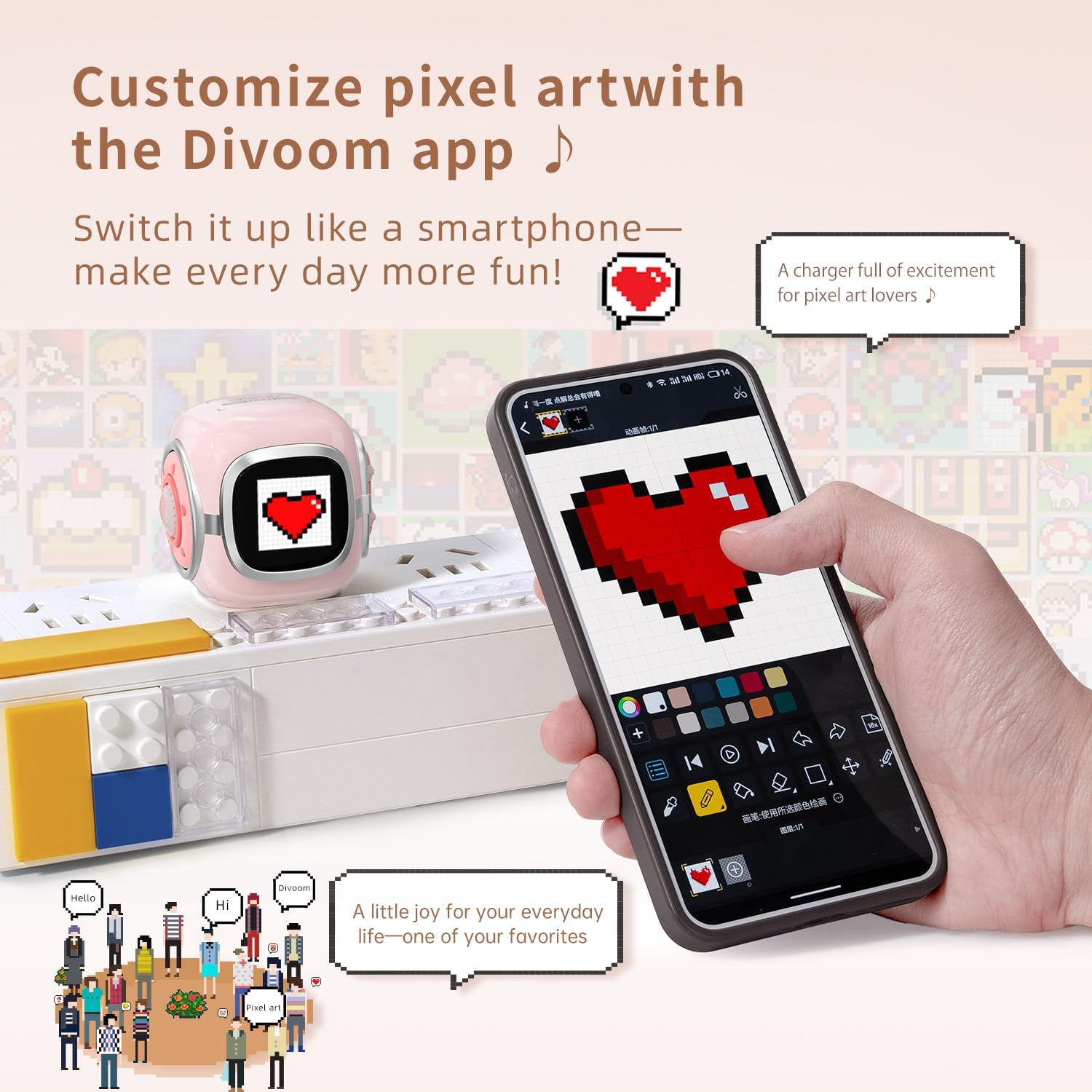
Image: The Divoom Dipow charger connected to a power strip, displaying pixel art, alongside a smartphone demonstrating the Divoom app's customization features.

Image: A visual comparison demonstrating the Divoom Dipow charger's 35W ultra-fast charging capability, achieving 56% charge in 30 minutes versus 20% with a typical charger.

Image: The Divoom Dipow charger demonstrating its compact size by fitting into a handbag and its foldable plug design when inserted into a wall outlet.
3. Sąranka
3.1 Pradinis prisijungimas
- Išskleiskite kištuką: Gently unfold the 90° foldable plug from the charger body.
- Įjunkite į maitinimo lizdą: Insert the charger into a standard wall outlet. The pixel screen will light up upon connection.
- Prijunkite savo įrenginį: Use a compatible USB-C charging cable (not included) to connect your device to the USB-C port on the charger. Ensure the connection is secure.
3.2 Divoom App Setup (for Pixel Screen Customization)
- Atsisiųskite programą: Ieškokite "Divoom" in your device's app store (iOS or Android) and download the official Divoom application.
- Suporuoti per Bluetooth: Open the Divoom app and follow the on-screen instructions to pair your smartphone with the Dipow 35W charger via Bluetooth. Ensure Bluetooth is enabled on your device.
- Access Customization: Once paired, you can access various customization options for the pixel screen, including pixel art, animations, and clock faces.
4. Naudojimo instrukcijos
4.1 Įrenginių įkrovimas
Once the charger is plugged into a power outlet and your device is connected via a USB-C cable, charging will begin automatically. The pixel screen may display charging status or a customized animation/clock face.
4.2 Customizing the Pixel Screen
The Divoom app provides extensive options for personalizing the pixel screen:
- Pikselių meno galerija: Browse a vast community gallery of pixel art designs. Select a design to instantly display it on your charger's screen.
- Create Your Own: Use the app's design tools to create custom pixel art or animations. These can be uploaded to your charger in real-time.
- Laikrodžio ciferblatai: Choose from a variety of dynamic clock faces to display time, date, and other information.
- Ryškumo reguliavimas: Adjust the screen brightness through the app to suit your environment.
Video: A demonstration of the Divoom Dipow 35W charger's functions, including pixel screen customization and fast charging capabilities.
5. Priežiūra
- Valymas: Disconnect the charger from the power outlet before cleaning. Use a soft, dry cloth to wipe the surface. Avoid using liquid cleaners or abrasive materials.
- Saugykla: When not in use, fold the plug and store the charger in a cool, dry place away from direct sunlight and moisture.
- Tvarkymas: Avoid dropping the charger or subjecting it to strong impacts, as this may damage internal components or the pixel screen.
6. Problemų sprendimas
6.1 Charger Not Powering On / Screen Not Lighting Up
- Ensure the charger is securely plugged into a functional power outlet.
- Try plugging another device into the same outlet to confirm the outlet is working.
6.2 Įrenginys neįkraunamas
- Patikrinkite, ar USB-C laidas tinkamai prijungtas prie įkroviklio ir įrenginio.
- Pabandykite naudoti kitą USB-C laidą, kad atmestumėte gedimo galimybę.
- Ensure your device is compatible with USB-C charging and the charger's output specifications.
6.3 Divoom App Connectivity Issues
- Make sure Bluetooth is enabled on your smartphone and the charger is powered on.
- Restart the Divoom app and attempt to reconnect.
- If issues persist, try unpairing and re-pairing the charger through your phone's Bluetooth settings and the Divoom app.
7. Specifikacijos
| Modelio numeris | Dipow-35 |
| Prekės ženklas | Divoom |
| Išėjimo galia | 35W |
| Jungties tipas | C tipo USB |
| Suderinami įrenginiai | Smartphones, Headphones, Tablets, Game Consoles (e.g., iPhone 16/16 Pro Max/16 Pro/15 Pro Max/15 Pro/15/14 Pro Max/14 Pro/14/13 Pro/13 Pro Max/13 Mini/13/12 Pro Max/12 Mini/12/11/11Pro/11Pro Max/X/XR/Xs/Xs Max/8/8 Plus/7/7/6/6S/Plus, iPad, iPad air/ 2, iPad mini 4 3 2 1, iPad Pro, Samsung Galaxy Note 20/10/S23/S24/S22 Ultra/S22+/S21/S20/Huawei, Xiaomi and other USB-C outlet devices) |
| Ypatinga funkcija | Fast Charging, Pixel Screen, Foldable Plug |
| Spalva | Rožinė |
| Įvesties tomastage | 240 voltų |
| Išėjimo srovė | 3 Amps |
| Išėjimas ttage | 5 voltų |
| Prekės svoris | 3.03 uncijos |
| Pakuotės matmenys | 3.54 x 3.15 x 2.56 colio |
8. Saugos informacija
- Saugokite įkroviklį nuo vandens, drėgmės ar ekstremalių temperatūrų.
- Stenkitės neišardyti ir nekeisti įkroviklio.
- Laikyti vaikams nepasiekiamoje vietoje.
- Įkraunant užtikrinkite tinkamą vėdinimą, kad išvengtumėte perkaitimo.
- Jei įkroviklis pažeistas, nedelsdami nutraukite jo naudojimą.
9. Garantija ir palaikymas
The Divoom Dipow 35W GaN Fast Charger is covered by a manufacturer's warranty. For specific warranty terms, conditions, and customer support, please refer to the official Divoom websvetainėje arba susisiekite tiesiogiai su jų klientų aptarnavimo tarnyba. Išsaugokite pirkimo įrodymą, jei galėtumėte pateikti pretenzijas dėl garantijos.


