1. Įvadas
Ačiū, kad pirkoteasing the iFFALCON 40S55T 40-inch Full HD Google TV. This manual provides essential information for the safe and efficient use of your television. Please read it thoroughly before operating the device and retain it for future reference.
The iFFALCON 40S55T is a tunerless smart TV designed for streaming content, offering a Full HD display, Google TV operating system, Chromecast built-in, and Dolby Audio for an immersive entertainment experience.
2. Saugos informacija
Naudodami šį televizorių, visada laikykitės pagrindinių saugos atsargumo priemonių, kad sumažintumėte gaisro, elektros smūgio ir sužalojimų riziką.
- Saugokite televizorių nuo lietaus ar drėgmės.
- Neatidarykite televizoriaus korpusoasing; visus techninės priežiūros darbus patikėkite kvalifikuotiems darbuotojams.
- Užtikrinkite tinkamą vėdinimą aplink televizorių.
- Laikykite televizorių atokiau nuo tiesioginių saulės spindulių, šilumos šaltinių ir stiprių magnetinių laukų.
- Use only the power cord and accessories supplied by the manufacturer.
- Atjunkite televizorių nuo elektros tinklo žaibuojant arba kai jis ilgą laiką nenaudojamas.
3. Pakuotės turinys
Patikrinkite, ar dėžutėje yra visi reikalingi daiktai:
- iFFALCON 40S55T 40-inch Full HD Google TV
- Nuotolinio valdymo pultas
- TV stovas (2 vnt.)
- TV stovo varžtai
- Maitinimo kabelis
- Garantijos kortelė
- Instrukcijų vadovas (šis dokumentas)
4. Sąranka
4.1 Televizoriaus stovo pritvirtinimas
- Atsargiai padėkite televizorių ekranu žemyn ant minkšto, lygaus paviršiaus, kad nepažeistumėte ekrano.
- Sulygiuokite kiekvieną stovo dalį su atitinkamais lizdais televizoriaus apačioje.
- Pritvirtinkite stovus pridėtais varžtais. Įsitikinkite, kad jie tvirtai priveržti.
4.2 Maitinimo prijungimas
Prijunkite maitinimo laidą prie televizoriaus maitinimo įvesties, o tada įjunkite jį į sieninį lizdą. Televizorius persijungs į budėjimo režimą.
4.3 Initial Setup (Google TV & Network)
Pirmą kartą įjungus televizorių, jis padės atlikti pradinį „Google TV“ nustatymo procesą. Tai apima:
- Kalbos pasirinkimas.
- Prisijungimas prie „Wi-Fi“ tinklo.
- Signing in with your Google account to access personalized content and apps.
- Sutikimas su sąlygomis ir nuostatomis.
4.4 Ryšys
The iFFALCON 40S55T offers various connection options for external devices.

Vaizdas: Viršview of the TV's connectivity options, including HDMI, USB, Bluetooth, and Wi-Fi.
- HDMI prievadai: Connect external devices like gaming consoles, Blu-ray players, or set-top boxes.
- USB prievadas: Skirta USB atmintinėms prijungti ir medijos atkūrimui files.
- „Wi-Fi“: For wireless internet connection to access streaming services and online features.
- Bluetooth: For connecting wireless headphones, speakers, or other Bluetooth-enabled accessories.
4.5 Tunerless Operation
This TV is designed as a tunerless model, meaning it does not have a built-in tuner for terrestrial (over-the-air) broadcasts. To watch terrestrial, BS, or CS broadcasts, an external tuner is required and must be purchased separately.

Image: The iFFALCON 40S55T TV showcasing its smart features, highlighting its tunerless design and ability to enjoy internet video content without an antenna connection.
5. Televizoriaus valdymas
5.1 Nuotolinio valdymo pultasview
The remote control provides access to all TV functions, including power, volume, channel navigation, and smart TV features. It also supports voice search via 'Hey Google'.

Image: The TV remote control, featuring quick access buttons for popular streaming services and a dedicated microphone button for voice commands.
- Maitinimo mygtukas: Įjungia arba išjungia televizorių.
- Naršymo mygtukai: Norėdami naršyti meniu, naudokite krypties mygtukus ir mygtuką „OK“.
- Garsumo / kanalo mygtukai: Adjust volume and change channels (if an external tuner is connected).
- Programėlės spartieji mygtukai: Direct access to popular streaming services like Netflix, YouTube, etc.
- Mikrofono mygtukas: Press and hold to activate 'Hey Google' voice search.
5.2 „Google TV“ funkcijos
Your iFFALCON TV runs on Google TV, providing a personalized and integrated entertainment experience.
- Turinio agregavimas: Google TV organizes movies, shows, and live TV from all your apps and subscriptions into one place.
- Asmeninės rekomendacijos: Remiantis jūsų viewing history and preferences, Google AI suggests content you might enjoy.
- Paieška balsu: Use the 'Hey Google' feature on your remote to quickly find content, get information, or control smart home devices.
- Įtaisytasis „Chromecast“: Easily cast content from your smartphone, tablet, or computer directly to your TV screen.

Image: A smartphone screen mirroring content to the iFFALCON TV, demonstrating the Chromecast built-in feature for enjoying mobile content on a larger display.
5.3 Vaizdo nustatymai
The TV incorporates advanced image processing technologies to deliver a superior viewpatirtį.
- AI PQ Processor: TCL's proprietary AiPQ Processor intelligently adjusts image quality at the pixel level, enhancing clarity, color, and contrast for a vivid and realistic picture.
- Full HD (FHD): Experience sharp and detailed images with Full High Definition resolution, offering 200% more detail than standard HD screens.

Image: A visual comparison illustrating the enhanced detail and clarity provided by Full HD resolution compared to standard HD.
- HDR10/HLG Support: Enjoy a wider range of colors and contrast with HDR10 and HLG compatibility, revealing stunning detail in both bright and dark scenes.

Paveikslėlis: Televizijos ekrano serialasasing the vibrant and detailed picture quality achieved with HDR10/HLG technology.
- Mikro pritemdymas: This technology analyzes the image in hundreds of separate zones to adjust brightness and darkness independently, enhancing contrast and picture quality.

Image: A visual representation of Micro Dimming technology, illustrating how it enhances contrast and picture depth by adjusting brightness in specific areas of the screen.
5.4 Sound Settings (Dolby Audio)
The TV features Dolby Audio for clear, rich, and immersive sound.
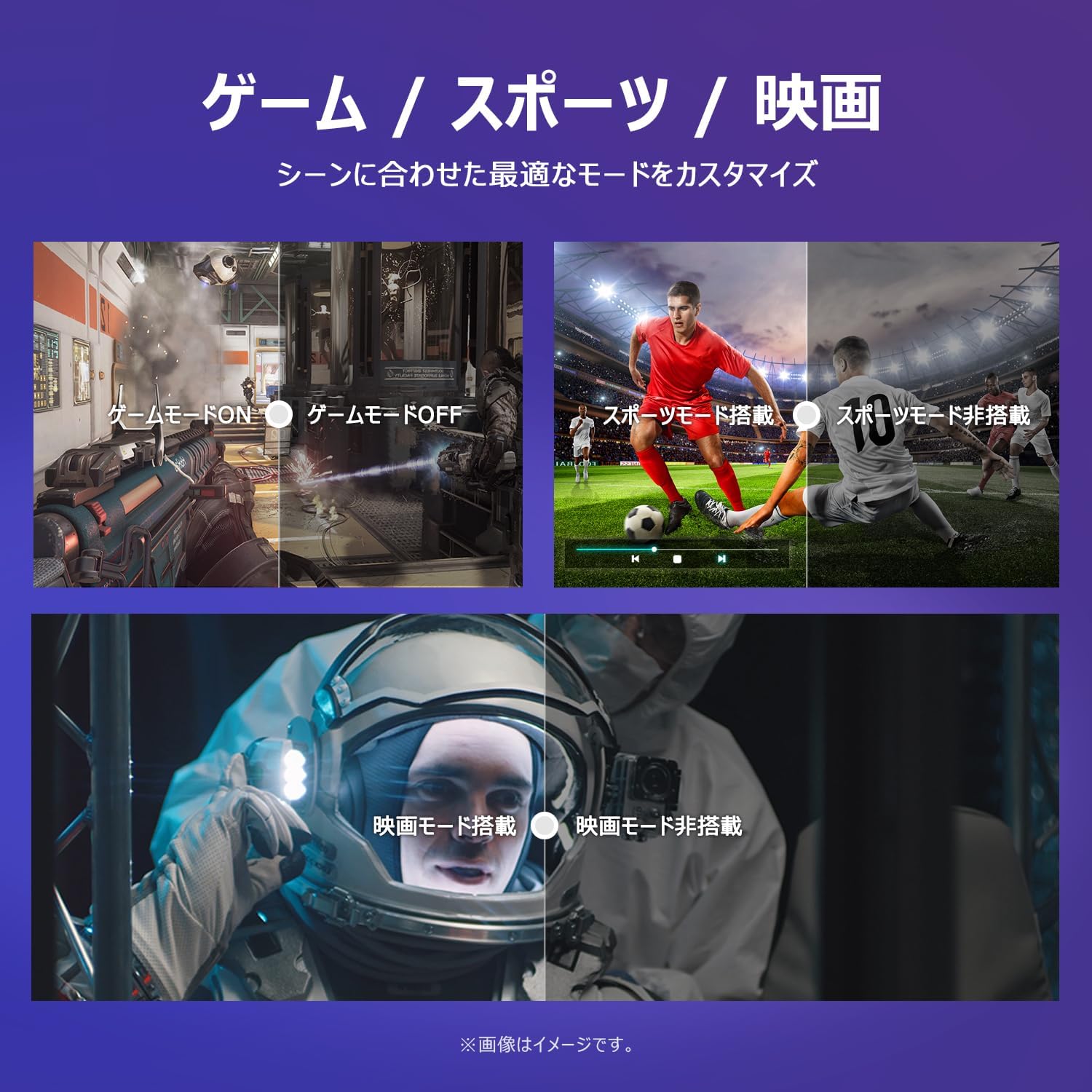
Image: The TV screen with a visual representation of sound, highlighting the immersive audio experience provided by Dolby Audio.
Access the sound settings menu to adjust modes like Standard, Music, Movie, or Custom to suit your preferences.
5.5 Žaidimo režimas
Activate Game Mode for an optimized gaming experience with reduced input lag.
Image: Visual comparisons demonstrating the optimized settings for Game Mode, Sports Mode, and Movie Mode, adapting the TV's performance to different content types.
The TV also offers dedicated Sports Mode and Movie Mode to enhance viewing for specific content types.
5.6 Sistemos nustatymai
The quick settings menu allows you to customize frequently used system settings and rearrange their order for intuitive and convenient access.

Vaizdas: A view of the TV's quick system settings interface, illustrating how users can easily access and customize various functions like brightness, picture mode, and network settings.
6. Priežiūra
Tinkama priežiūra ir remontas prailgins jūsų televizoriaus tarnavimo laiką.
- Ekrano valymas: Švelniai nuvalykite ekraną minkšta, nepūkuota šluoste. Įsisenėjusioms dėmėms valyti naudokite specialiai televizoriams skirtą ekrano valiklį, užtepkite ant šluostės, o ne tiesiai ant ekrano.
- C valymasasing: Televizoriaus vidų nuvalykite minkštu, sausu skudurėliu.asing. Nenaudokite abrazyvinių valiklių ar tirpiklių.
- Vėdinimas: Įsitikinkite, kad televizoriaus gale esančios ventiliacijos angos nėra užblokuotos, kad jis neperkaistų.
- Maitinimo laidas: Reguliariai tikrinkite maitinimo laidą, ar jis nepažeistas. Jei pažeistas, kreipkitės į klientų aptarnavimo tarnybą, kad jį pakeistų.
7. Problemų sprendimas
If you encounter issues with your TV, refer to the following common problems and solutions. If the problem persists, contact customer support.
| Problema | Galima priežastis | Sprendimas |
|---|---|---|
| Nėra galios | Maitinimo laidas neprijungtas; Maitinimo lizdas neveikia | Ensure power cable is securely plugged in; Test outlet with another device |
| Nėra vaizdo, bet yra garsas | Neteisingas įvesties šaltinis; išorinio įrenginio problema | Norėdami pasirinkti tinkamą šaltinį, paspauskite nuotolinio valdymo pulto mygtuką „Įvestis“; patikrinkite išorinių įrenginių jungtis. |
| Nėra garso, bet vaizdas yra | Garsas nutildytas arba per mažas; išorinės garso sistemos problema | Unmute or increase volume; Check audio cable connections to external sound system |
| Nuotolinio valdymo pultas neveikia | Išsikrovusios baterijos; kliūtis tarp nuotolinio valdymo pulto ir televizoriaus | Replace batteries; Remove any obstructions; Ensure remote is pointed at the TV's IR sensor |
| Nepavyksta prisijungti prie „Wi-Fi“. | Neteisingas slaptažodis; Maršrutizatoriaus problema; Televizorius per toli nuo maršrutizatoriaus | Verify Wi-Fi password; Restart router; Move TV closer to router or use a Wi-Fi extender |
8. Specifikacijos
Detailed technical specifications for the iFFALCON 40S55T TV:

Image: Dimensional drawing of the iFFALCON 40S55T TV, indicating its physical measurements.
| Funkcija | Specifikacija |
|---|---|
| Ekrano dydis | 40 colių |
| Ekrano tipas | VA Liquid Crystal |
| Rezoliucija | Full HD (1920 x 1080) |
| Atnaujinimo dažnis | 60 Hz |
| Krašto santykis | 16:9 |
| Kontrasto santykis | 1000:1 |
| Operacinė sistema | Google TV |
| Garso išvestis | 20 Watts (2.1 channels) |
| HDMI prievadai | 2 |
| USB prievadai | 1 |
| Belaidis ryšys | Wi-Fi, Bluetooth |
| Produkto matmenys (P x A x G) | 89.2 x 55.8 x 18.4 cm (su stovu) |
| Produkto svoris | 4.63 kg |
| Suderinamas su sieniniu laikikliu | Taip |
| Pridedami priedai | Stand, Remote Control, Warranty Card, Power Cable |
9. Garantija ir palaikymas
Your iFFALCON 40S55T TV comes with a manufacturer's warranty. Please refer to the included warranty card for specific terms, conditions, and duration of coverage.
For technical support, troubleshooting assistance beyond this manual, or warranty claims, please contact iFFALCON customer service. Contact information can typically be found on the warranty card or the official iFFALCON websvetainę.
Please have your model number (40S55T) and purchase date ready when contacting support.


