Įvadas
This manual provides detailed instructions for the operation, maintenance, and troubleshooting of your TOPTRO TP1 Smart Projector. Please read this manual thoroughly before using the product to ensure proper function and longevity.
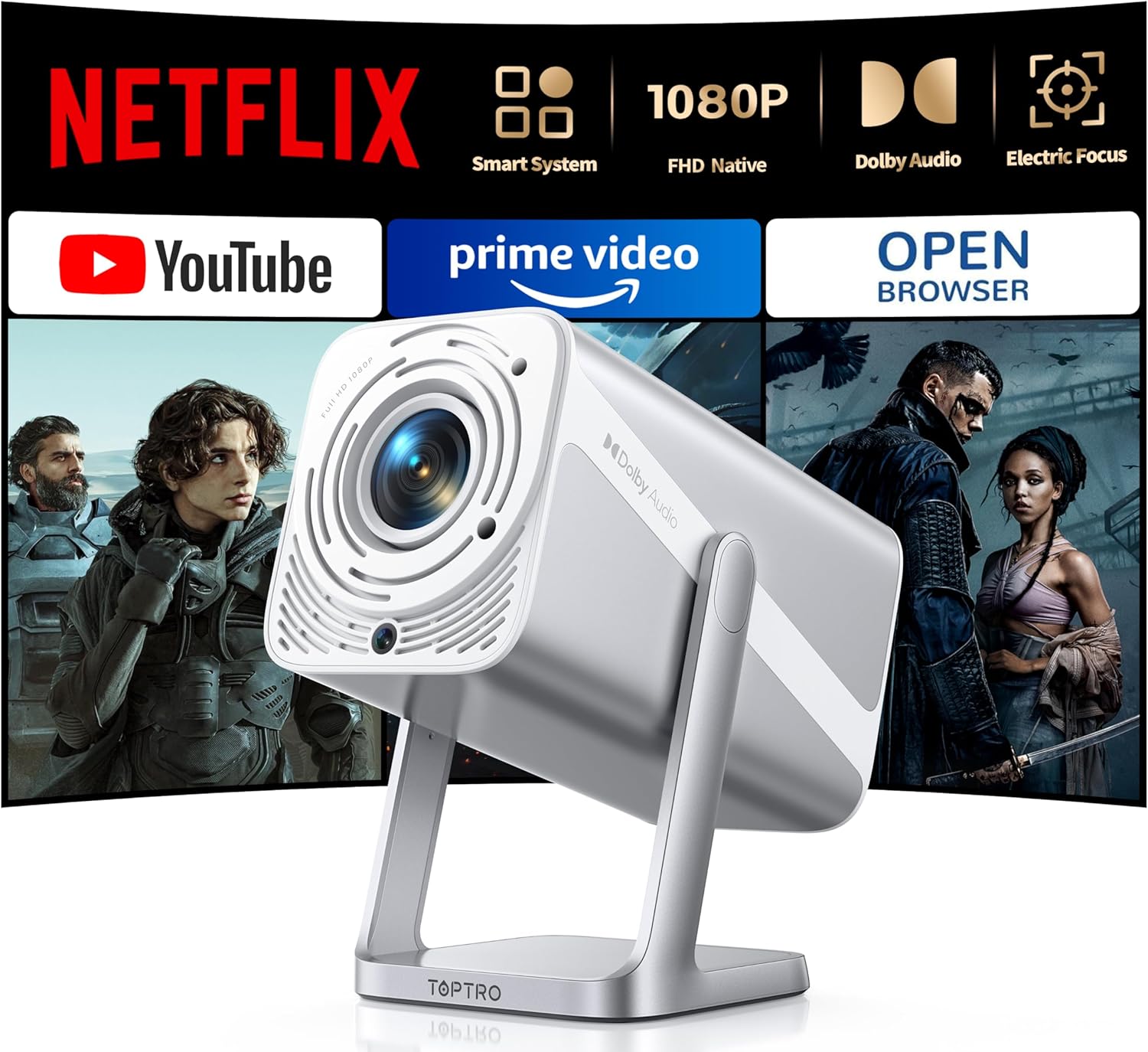
Image: The TOPTRO TP1 Smart Projector, a compact and portable device designed for versatile projection.
Kas yra dėžutėje
Patikrinkite, ar pakuotėje yra visi daiktai:
- Portable mini projector x 1
- Nuotolinio valdymo pultas x 1
- HDMI kabelis x 1
- Adapteris x 1
- Vartotojo vadovas x 1
- Valymo rinkinys x 1
- Greitas pradžios vadovas x 1
Produktas baigtasview ir Savybės
The TOPTRO TP1 Smart Projector is designed for a comprehensive entertainment experience, offering advanced features in a compact form factor.
Pagrindinės funkcijos:
- Netflix Officially Licensed: Breaks through HDCP restrictions, pre-loaded with Netflix, YouTube, and Prime Video. Supports OTA updates.
- Immersive Dolby Sound: Features Dolby technology and 2x10W speakers for 3D surround sound. Includes HDMI ARC and two-way Bluetooth 5.2.
- Native FHD 1080P & 4K Support: Delivers true native 1080p resolution, up to 600 ANSI lumens brightness, 4K video decoding, and HDR10 support with a 20000:1 contrast ratio.
- Smart Electric Focus & Auto Keystone: Automatic electric focus and 4D/4P keystone correction for clear, rectangular images. Supports 100%-50% digital zoom.
- 360° Adjustable Stand & Short Throw: Integrated 360° rotatable stand for multi-angle projection. Lightweight (2.4lb) with a 1.1:1 throw ratio, projecting 50-200 inches from short distances.
- No-Lag WiFi 6 & Universal Compatibility: Supports WiFi 6 and 2.4G dual-band WiFi for stable connections. Compatible with Miracast, DLNA, AirPlay, HDMI, USB, and 3.5mm Audio Jack interfaces.

Image: The projector's interface displaying pre-installed streaming applications like Netflix, YouTube, and Prime Video, highlighting its official licensing.

Image: A visual comparison demonstrating the superior clarity and detail of the TOPTRO TP1's native 1080P resolution compared to a 720P projector.

Image: An illustration of the projector's immersive Dolby Audio experience, with sound waves emanating from the device and filling a room.

Image: Depiction of the projector's WiFi 6 and two-way Bluetooth 5.2 capabilities, showing seamless connection to external speakers and mobile devices for screen mirroring.

Image: A diagram illustrating the automatic electric focus and auto vertical keystone correction features, ensuring a perfectly clear and rectangular image without manual adjustments.

Image: The projector positioned to project onto a ceiling, demonstrating its 360-degree adjustable stand for flexible viewkampų.
Sąranka
- Išpakavimas: Atsargiai išimkite visus komponentus iš pakuotės. Išsaugokite originalią pakuotę būsimam saugojimui ar transportavimui.
- Vieta: Position the projector on a stable, flat surface. Utilize the 360° adjustable stand to achieve the desired projection angle (e.g., wall, ceiling). Ensure adequate ventilation around the device.
- Maitinimo jungtis: Connect the provided power adapter to the projector's power input and then to a power outlet.
- Pradinis įjungimas: Norėdami įjungti įrenginį, paspauskite projektoriaus arba nuotolinio valdymo pulto maitinimo mygtuką.
- Automatiniai reguliavimai: The projector will automatically perform electric focus and auto vertical keystone correction to optimize the image clarity and shape.
- Tinklo prisijungimas: Navigate to the network settings and connect to your WiFi 6 or 2.4G network for access to streaming applications and updates.
Naudojimo instrukcijos
Navigation and Interface:
Use the remote control to navigate the projector's smart interface. The home screen provides access to pre-installed applications such as Netflix, YouTube, and Prime Video. Additional applications can be downloaded via the APP Assistant or OPEN BROWSER.
Išorinių įrenginių prijungimas:
- HDMI: Connect devices like TV sticks, Roku, laptops, or gaming consoles (Switch, PS5) using the HDMI cable to the HDMI ARC port.
- USB: Insert USB drives into the USB port for media playback. Note: Some 4K videos may not play over USB due to format compatibility; built-in streaming apps are recommended for 4K content.
- Bluetooth: Utilize two-way Bluetooth 5.2 to pair with mobile devices (iOS/Android) for screen mirroring or connect to external Bluetooth speakers/AirPods for enhanced audio.
- 3.5 mm garso lizdas: Prijunkite laidines ausines arba išorinius garsiakalbius.
Ekrano dubliavimas:
The projector supports Miracast, DLNA, and AirPlay for seamless screen mirroring from compatible devices. Access these functions through the projector's application menu.
Vaizdo koregavimas:
- Elektrinis fokusavimas: The projector automatically adjusts focus. If manual adjustment is needed, use the remote control.
- Auto Vertical Keystone: This feature automatically corrects image distortion.
- Skaitmeninis priartinimas: Adjust the screen size from 100% to 50% using the zoom function on the remote control without moving the projector.
Priežiūra
- Objektyvo valymas: Use the provided cleaning kit or a soft, lint-free cloth to gently wipe the projector lens. Avoid abrasive materials or harsh chemicals.
- Dulkių šalinimas: Reguliariai valykite projektoriaus ventiliacijos angas, kad nesikauptų dulkės, kurios gali turėti įtakos veikimui ir tarnavimo laikui. Naudokite minkštą šepetėlį arba suslėgtą orą.
- Saugykla: Kai projektorius ilgesnį laiką nenaudojamas, jį laikykite vėsioje, sausoje vietoje, geriausia – originalioje pakuotėje arba apsauginiame dėkle.
- Programinės įrangos atnaujinimai: Ensure the projector's software is kept up-to-date through regular OTA (Over-The-Air) updates to maintain security and stability.
Trikčių šalinimas
| problema | Galima priežastis | Sprendimas |
|---|---|---|
| Neprojektuojamas vaizdas | Power cable disconnected; Input source not selected; Lens cap on. | Patikrinkite maitinimo jungtį; Pasirinkite tinkamą įvesties šaltinį (HDMI, USB); Nuimkite objektyvo dangtelį. |
| Vaizdas neryškus arba nefokusuotas | Automatic focus issue; Projector too close/far from screen. | Allow auto-focus to complete; Manually adjust focus if needed; Adjust projection distance. |
| Image distorted (trapezoid shape) | Reikalinga trapecijos korekcija. | Allow auto keystone correction to complete; Manually adjust keystone if necessary. |
| Nėra garso ar mažas garsumas | Volume too low; External audio device not connected properly; Muted. | Increase volume; Check audio cable connections; Unmute device. |
| Nepavyksta prisijungti prie „Wi-Fi“ / „Bluetooth“ | Neteisingas slaptažodis; įrenginys už diapazono ribų; trukdžiai. | Verify password; Move projector closer to router/device; Reduce interference. |
| Netflix/Streaming app issues (black screen, not loading) | Network issues; App cache; App update needed. | Check internet connection; Clear app cache/data; Update app via OTA or APP Assistant. |
For further assistance, please refer to the video tutorials available on YouTube by searching for "@TOPTRO-R" or contact customer support.
Specifikacijos
| Funkcija | Detalė |
|---|---|
| Prekės ženklas | TOPTRO |
| Modelio numeris | TP1 |
| Ekrano raiška | Native 1920 x 1080 (FHD), 4K Support |
| Ryškumas | 600 ANSI liumenai |
| Kontrasto santykis | 20000:1 |
| Ypatingos savybės | Netflix Officially Licensed, Dolby Audio, 360° Rotatable Stand, Electric Focus, Auto Keystone, HDR10 |
| Ryšio technologija | Wi-Fi 6, USB, Bluetooth 5.2 (Two-way), 3.5mm Audio Jack, HDMI ARC |
| Garsiakalbiai | 2x10W |
| Projekcijos dydis | Nuo 50 iki 200 colių |
| Metimo santykis | 1.1:1 |
| Skaitmeninis priartinimas | 100–50 % |
| Prekės svoris | 2.2 svaro |
| Gaminio matmenys | 4.57 x 4.8 x 9.45 colio |
Garantija ir palaikymas
TOPTRO is committed to providing excellent customer service and product reliability.
- Garantija: The TOPTRO TP1 Smart Projector comes with a 3-year repair coverage.
- Grąžinimo politika: Enjoy a 2-year hassle-free return policy.
- Techninė pagalba: Teikiama visą gyvenimą trunkanti techninė pagalba.
- Susisiekite: For any inquiries or support, please contact service@toptro.com.
- Internetiniai ištekliai: Quick start guides and video tutorials are available on YouTube by searching for "@TOPTRO-R". A detailed electronic manual is also available on the TOPTRO official websvetainę.

Image: The TOPTRO brand logo, representing quality and customer commitment.


