1. Įvadas
Thank you for choosing the GOBOULT Astra Neo Bluetooth In-Ear Earbuds. This manual provides essential information for setting up, operating, and maintaining your earbuds to ensure optimal performance and longevity. Please read this manual thoroughly before use.
2. Saugos informacija
- Saugokite ausines ar įkrovimo dėklą nuo ekstremalių temperatūrų, drėgmės ar skysčių.
- Venkite įrenginio numetimo, smūgio ar ardymo.
- Įkrovimui naudokite tik pridedamą įkrovimo laidą arba sertifikuotą C tipo laidą.
- Klausykitės vidutiniu garsumu, kad nepažeistumėte klausos.
- Laikyti vaikams ir naminiams gyvūnėliams nepasiekiamoje vietoje.
3. Pakuotės turinys
Patikrinkite, ar pakuotėje yra visi reikalingi daiktai:
- GOBOULT Astra Neo Earbuds (Left and Right)
- Įkrovimo dėklas
- C tipo įkrovimo laidas
- Ausų pagalvėlės (įvairių dydžių)
- Vartotojo vadovas
- Garantijos kortelė
4. Produktas baigtasview
The GOBOULT Astra Neo earbuds feature a sleek design with touch controls and a compact charging case. The case includes breathing LED lights for status indication.

Image: GOBOULT Astra Neo Earbuds and Charging Case. The image displays the black earbuds removed from their charging case, which features a glowing blue LED strip.

Image: GOBOULT Astra Neo Comfort Grip Case and Earbuds. This image highlights the textured surface of the charging case and earbuds, along with the breathing case lights.
5. Sąranka
5.1 Ausinių ir dėklo įkrovimas
Prieš pirmą kartą naudodami, visiškai įkraukite ausines ir įkrovimo dėklą.
- Įdėkite ausines į įkrovimo dėklą. Įsitikinkite, kad jos tinkamai įstatytos.
- Prijunkite C tipo įkrovimo laidą prie dėklo įkrovimo prievado ir prie maitinimo šaltinio.
- The LED indicator on the case will illuminate during charging and turn off or change color when fully charged.
A 10-minute charge provides approximately 100 minutes of playtime.

Image: GOBOULT Astra Neo Fast Charging Feature. This image illustrates the 70-hour playtime and the fast charging capability: 10 minutes of charge equals 100 minutes of playtime.
5.2 Pairing with a Device (Bluetooth 5.4)
The Astra Neo uses Bluetooth 5.4 with Blink & Pair technology for quick and stable connections.
- Atidarykite įkrovimo dėklą. Ausinės automatiškai įsijungs susiejimo režimu.
- Savo įrenginyje (išmaniajame telefone, planšetiniame kompiuteryje, nešiojamajame kompiuteryje) įjunkite „Bluetooth“.
- Ieškokite available Bluetooth devices and select "GOBOULT Astra Neo" from the list.
- Prijungus, balso pranešimas patvirtins sėkmingą susiejimą.

Image: GOBOULT Astra Neo Bluetooth 5.4 Pairing. This image shows a smartphone screen displaying a successful Bluetooth 5.4 connection to 'Astra Neo', emphasizing power efficiency and stable connection.
6. Naudojimo instrukcijos
6.1 Jutikliniai valdikliai
The Astra Neo earbuds feature intuitive touch controls on each earbud:
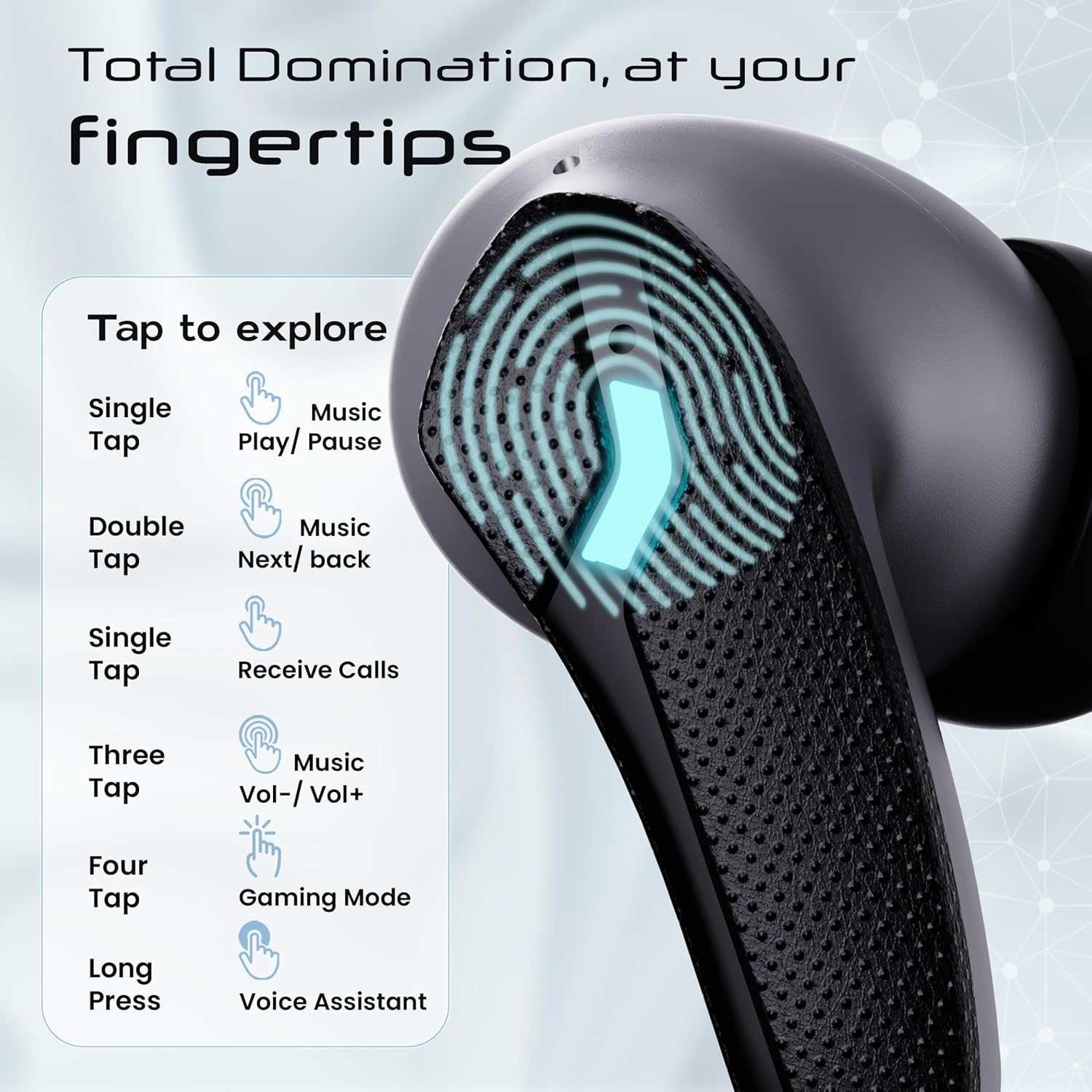
Image: GOBOULT Astra Neo Touch Controls Guide. This graphic details the various touch gestures for controlling music, calls, gaming mode, and voice assistant.
- Vienas palietimas: Play/Pause music, Receive Calls.
- Dukart paspausti: Music Next/Back (specific earbud for each function).
- Three Tap: Music Volume Up/Down (specific earbud for each function).
- Four Tap: Activate Gaming Mode.
- Ilgas paspaudimas: Activate Voice Assistant (Google Assistant/Siri).
6.2 Gaming Mode (40ms Low Latency)
Activate Gaming Mode for a synchronized audio experience during gameplay, reducing audio delay to 40ms.
- To activate: Four tap on either earbud.
- To deactivate: Four tap again on either earbud.

Image: GOBOULT Astra Neo Gaming Mode with 40ms Low Latency. This image depicts a user playing a mobile game with the earbuds, highlighting the ultra-low latency feature for an immersive gaming experience.
6.3 ZEN Quad Mic ENC for Calls
The ZEN Quad Mic Environmental Noise Cancellation (ENC) system ensures clear voice calls by filtering out background noise.

Image: GOBOULT Astra Neo ZEN Quad Mic ENC Technology. This image illustrates the internal components and the function of the 4 microphones for clear in-game communication and crystal-clear calling with Acoustic Echo Cancellation (AEC).
6.4 EQ režimai
The Astra Neo earbuds support 4 EQ modes for customized audio experiences. Refer to the product packaging or official GOBOULT website for specific instructions on how to switch between these modes, as this functionality is typically managed via a companion app or specific touch gestures not detailed here.
7. Priežiūra
7.1 Valymas
- Švelniai nuvalykite ausines ir įkrovimo dėklą minkštu, sausu, nepūkuotu skudurėliu.
- Nenaudokite stiprių cheminių medžiagų, valymo tirpiklių ar stiprių ploviklių.
- Reguliariai valykite ausinių ir dėklo įkrovimo kontaktus, kad užtikrintumėte tinkamą įkrovimą.
7.2 Atsparumas vandeniui (IPX5)
The Astra Neo earbuds are IPX5 water-resistant, meaning they are protected against sweat, rain, and splashes. They are not designed for submersion in water.
- Nenardinkite ausinių į vandenį tyčia.
- If exposed to sweat or rain, wipe them dry before placing them back in the charging case.

Image: GOBOULT Astra Neo IPX5 Water Resistance and Voice Assistant. This image highlights the earbuds' sweatproof, rainproof, and splashproof capabilities, along with compatibility with Google Assistant and Hey Siri.
7.3 Saugykla
Kai nenaudojate, laikykite ausines įkrovimo dėkle, kad jos būtų apsaugotos ir įkrautos.
8. Problemų sprendimas
- Ausinės nesusijungia: Įsitikinkite, kad abi ausinės yra įkrovimo dėkle, tada atidarykite dangtelį, kad vėl įjungtumėte susiejimo režimą. Patikrinkite savo įrenginio „Bluetooth“ nustatymus ir bandykite prisijungti iš naujo.
- Veikia tik viena ausinė: Įdėkite abi ausines atgal į dėklą, uždarykite dangtelį, palaukite kelias sekundes ir vėl atidarykite. Tai dažnai jas iš naujo sinchronizuoja.
- Nėra garso: Patikrinkite garsumo lygį tiek savo įrenginyje, tiek ausinėse. Įsitikinkite, kad ausinės tinkamai prijungtos prie jūsų įrenginio.
- Įkrovimo problemos: Clean the charging contacts on the earbuds and inside the case. Ensure the charging cable is securely connected and the power source is active.
- Prasta skambučio kokybė: Ensure the microphones are not obstructed. Try moving to a quieter environment.
9. Specifikacijos
Key technical specifications for the GOBOULT Astra Neo Earbuds:
| Funkcija | Specifikacija |
|---|---|
| Modelio pavadinimas | Astra Neo |
| Bluetooth versija | 5.4 |
| Žaidimo laikas | Iki 70 valandų (su įkrovimo dėklu) |
| Greitas įkrovimas | 10 min. įkrovimas = 100 min. grojimo laiko |
| Mažas delsos laikas | 40 ms (žaidimų režimas) |
| Vairuotojo dydis | 13mm BoomX Drivers |
| Mikrofonas | ZEN Quad Mic ENC |
| Atsparumas vandeniui | IPX5 |
| Kontrolės metodas | Palieskite |
| Ryšio technologija | „Bluetooth“, belaidis |
| Ausinės Jack | C tipo greito įkrovimo lizdas |
| Prekės svoris | 47 gramų |
| Gaminio matmenys | 6.2 x 5.3 x 3.2 cm |
| Baterijos tipas | Ličio polimeras |
| Bluetooth diapazonas | 10 metrų |
| Varža | 32 omų |

Image: GOBOULT Astra Neo 13mm BoomX Drivers. This image highlights the 13mm BoomX drivers, emphasizing crystal clear sound and support for MSBC, SBC, and AAC codecs.
10. Garantija ir palaikymas
The GOBOULT Astra Neo Earbuds come with a 1 metų gamintojo garantija from the date of purchase. This warranty covers manufacturing defects. For warranty claims or technical support, please refer to the contact information provided on your warranty card or visit the official GOBOULT websvetainę.


