1. Įvadas
This user manual provides comprehensive instructions for the safe and efficient operation of your pTron Dynamo Bolt 20000mAh Power Bank. Please read this manual thoroughly before using the device to ensure optimal performance and longevity.
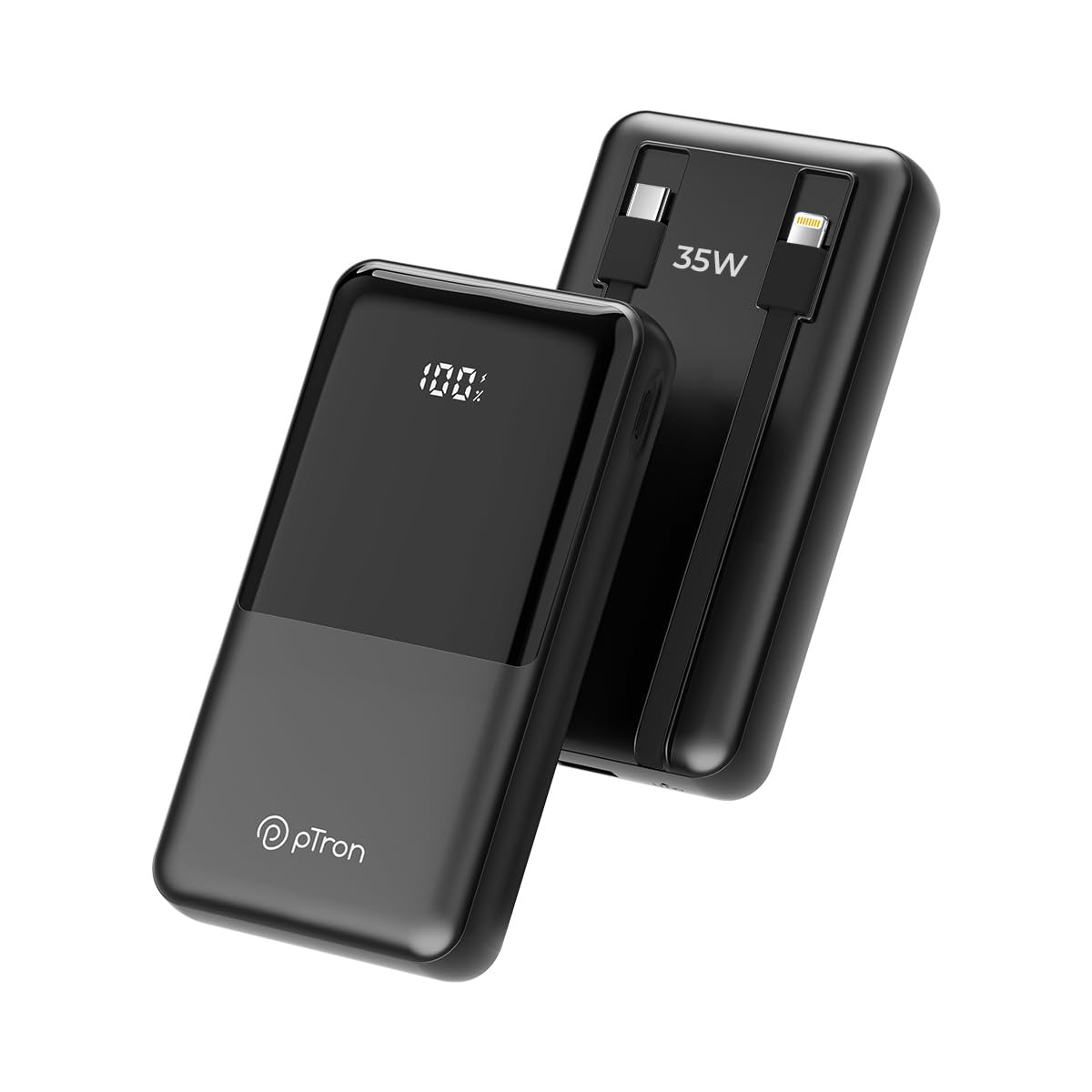
1.1 vaizdas: priekis view of the pTron Dynamo Bolt 20000mAh Power Bank.
2. Pakuotės turinys
Patikrinkite, ar pakuotėje yra visi reikalingi daiktai:
- 1N pTron Dynamo Bolt 20000mAh Power Bank
- 1N Charging Cable (USB-A to USB-C)
- Vartotojo vadovas (šis dokumentas)
3. Produktas baigtasview
The pTron Dynamo Bolt is a high-capacity power bank designed for fast and efficient charging of multiple devices. It features built-in cables and a digital display for convenience.

Image 3.1: Diagram illustrating the multiple input and output ports of the power bank.
- A. 22.5W USB-A Output: Standartinis USB prievadas įrenginiams įkrauti.
- B. 35W Type-C Input & Output: Versatile Type-C port for both charging the power bank and charging devices.
- C. 10W iOS Output Cable: Built-in cable for Apple devices.
- D. 35W Type-C Output Cable: Built-in cable for Type-C devices.
- E. Digital Display: Rodo tikslų akumuliatoriaus procentątage.

3.2 vaizdas: Baigtaview of key features including 35W Type-C Fast Charging, QC3.0 and PD3.0 compatibility, 20000mAh capacity, Digital LED Indicator, ability to charge 4 devices simultaneously, multiple layers of protection, and travel-friendly design.
4. Sąranka ir pirmasis naudojimas
4.1 Išorinės baterijos įkrovimas
Before first use, fully charge the power bank. Connect the provided charging cable to the Type-C Input/Output port (B) on the power bank and the other end to a compatible USB wall adapter (not included). The digital display (E) will show the charging progress. Charging is complete when the display shows "100%".
- Use a 35W PD compatible adapter for fastest charging.
- Charging time may vary based on the adapter's output.
5. Naudojimo instrukcijos
5.1 Įrenginių įkrovimas
The pTron Dynamo Bolt offers multiple ways to charge your devices:
- Naudojant įmontuotus kabelius:
- For iOS devices, connect the built-in iOS cable (C) to your device.
- For Type-C devices, connect the built-in Type-C cable (D) to your device.
- USB prievadų naudojimas:
- Connect your device's charging cable to the 22.5W USB-A Output port (A) or the 35W Type-C Input & Output port (B).
Išorinė baterija automatiškai aptiks prijungtą įrenginį ir pradės krauti. Skaitmeniniame ekrane bus rodomas likęs akumuliatoriaus įkrovos procentas.tage.

Image 5.1: The power bank simultaneously charging three different mobile devices using its various output options.
5.2 Baterijos lygio tikrinimas
The digital display (E) on the power bank shows the precise remaining battery percentage. Briefly press the power button (if available, otherwise it activates automatically upon connection) to illuminate the display and check the battery status.

Image 5.2: The compact design of the pTron Dynamo Bolt makes it highly portable and easy to carry in a bag.

Image 5.3: The power bank is compatible with a wide range of devices including Android smartphones, iPhones, tablets, iPads, TWS earbuds, and smartwatches.
6. Priežiūra ir priežiūra
- Laikykite išorinę bateriją sausą. Saugokite ją nuo drėgmės ar skysčių.
- Prietaisą valykite minkštu, sausu skudurėliu. Nenaudokite stiprių cheminių medžiagų ar abrazyvinių medžiagų.
- Laikykite išorinę bateriją vėsioje, sausoje vietoje, toliau nuo tiesioginių saulės spindulių ir ekstremalių temperatūrų.
- Saugokitės, kad maitinimo blokas nenukristų arba nepaveiktų stipraus smūgio.
- Norint optimalaus baterijos veikimo laiko, jei nenaudojate jos reguliariai, visiškai įkraukite ir iškraukite išorinę bateriją bent kartą per tris mėnesius.

Image 6.1: The power bank incorporates multiple safety features including Overcharge Protection, Short Circuit Protection, Overload Protection, and Advanced Temperature Control, and is BIS Certified.
7. Problemų sprendimas
| Problema | Galima priežastis | Sprendimas |
|---|---|---|
| Maitinimo bankas neįkraunamas | Loose cable connection, faulty adapter, damaged cable. | Ensure cables are securely connected. Try a different charging cable or wall adapter. |
| Įrenginys neįkraunamas iš maitinimo bloko | Power bank battery low, incorrect cable, device not compatible, loose connection. | Check power bank battery level. Ensure correct cable is used. Reconnect the device. Try a different port. |
| Lėtas įkrovimas | Non-fast charging cable/adapter, device not supporting fast charging. | Use original or certified fast-charging cables. Ensure your device supports fast charging protocols (QC3.0/PD3.0). |
| Skaitmeninis ekranas neveikia | Power bank is off, temporary glitch. | Press the power button briefly. If problem persists, contact customer support. |
8. Specifikacijos
| Funkcija | Detalė |
|---|---|
| Modelio numeris | Dynamo Bolt |
| Baterijos talpa | 20000 mAh |
| Įvestis (C tipas) | 35W PD |
| Išvestis (C tipo prievadas) | 35W PD |
| Išvestis (USB-A prievadas) | 22.5W |
| Išvestis (įmontuotas C tipo kabelis) | 35W |
| Išvestis (įmontuotas iOS kabelis) | 10W |
| Ypatingos savybės | Digital Display, Short Circuit Protection, Built-in Cables, Fast Charging, Pocket Size |
| Matmenys | 15.6 x 10.5 x 3.8 cm |
| Svoris | 422 g |
| Spalva | Jet Black |
| Gamintojas | Palred Electronics Pvt. Ltd. |
| Kilmės šalis | Indija |
9. Informacija apie garantiją
The pTron Dynamo Bolt Power Bank comes with a 1 metų gamintojo garantija from the date of purchase. This warranty covers manufacturing defects only. Please retain your purchase receipt as proof of purchase for warranty claims.
Garantija neapima žalos, atsiradusios dėl:
- Accidental damage, misuse, abuse, neglect, or improper installation.
- Neleistinas remontas ar modifikavimas.
- Normalus nusidėvėjimas.
- Žala, padaryta dėl stichinių nelaimių ar Dievo veiksmų.
10. Pagalba klientams
For any queries, technical support, or warranty claims, please contact pTron customer service:
- Telefonas: 040-67138888
- El. paštas: support@ptron.in
- Gamintojo adresas: 56 NAMAS, 1 AUKŠTAS, GUNDLAPOCHASAMPALLY VILLAGE, TECHNOLOGIJŲ PARKAS MTP, TSIIC-IALA NACHARAM, HAIDARABADAS - 500076, TELANGANA, INDIJA
Please have your product model number and purchase details ready when contacting support.


