Įvadas
Thank you for choosing the Trevi XF 3150 KB Portable Karaoke Speaker. This powerful 130W speaker is designed to deliver high-quality audio with a Bass Reflex system, two 8-inch speakers, and a 1-inch tweeter. It features wireless audio connectivity, USB/SD card playback, AUX input, and dedicated inputs for microphones and guitars. Enjoy the integrated multicolor LED disco lights and the True Wireless Stereo (TWS) function for an enhanced audio experience. The speaker operates on an integrated rechargeable battery or via the included power adapter, offering versatility for any occasion. This manual provides essential information for safe and efficient use of your device.

Priekyje view of the Trevi XF 3150 KB portable karaoke speaker, showcasing its design and active multicolor LED lights.
Sąranka ir pirmasis naudojimas
1. Išpakavimas ir komponentai
Atsargiai išimkite visus komponentus iš pakuotės. Įsitikinkite, kad yra šie elementai:
- Trevi XF 3150 KB Portable Karaoke Speaker
- Mikrofonas
- Nuotolinio valdymo pultas
- Maitinimo kabelis
- Garantijos kortelė
2. Įjungimas ir įkrovimas
The speaker can be powered by its internal rechargeable 7.4V battery or by connecting it to a power outlet using the included power adapter. For first use, it is recommended to fully charge the battery.
- Įkrovimas: Connect the power cable to the DC IN port on the rear panel of the speaker and then to a power outlet. The charging indicator will illuminate.
- Maitinimo įjungimas/išjungimas: Paspauskite ir palaikykite GALIA button on the control panel or remote control to turn the speaker on or off.
3. Valdymo skydelis baigtasview
Familiarize yourself with the main controls located on the top panel of the speaker.

Išsamus view of the speaker's control panel, showing various input and sound adjustment knobs, along with function buttons.
4. Nuotolinio valdymo funkcijos
The included remote control allows convenient operation from a distance.

The remote control for the Trevi XF 3150 KB speaker, featuring buttons for mute, mode, record, playback, volume, channel selection, scan, EQ, and power.
5. Wireless (Bluetooth) Connection
Connect your smartphone, tablet, or laptop wirelessly to the speaker.
- Įjunkite garsiakalbį.
- Paspauskite REŽIMAS mygtuką, kol ekrane pasirodys „BLUE“, rodantis „Bluetooth“ režimą.
- Enable Bluetooth on your device and search for "Trevi XF 3150 KB".
- Pasirinkite garsiakalbį, kurį norite susieti. Patvirtinimo garsas rodys sėkmingą ryšį.

Illustration of connecting a smartphone to the speaker via Bluetooth for wireless music streaming.
6. TWS (tikrojo belaidžio stereo) funkcija
For an enhanced stereo experience, you can connect two Trevi XF 3150 KB speakers wirelessly.
- Ensure both speakers are turned on and in Bluetooth mode.
- On one speaker (the primary), press and hold the TWS/REP mygtuką.
- The primary speaker will search for and connect to the secondary speaker. A confirmation sound will indicate successful pairing.
- Prijungę, susiekite įrenginį su pagrindiniu garsiakalbiu per „Bluetooth“, kaip aprašyta aukščiau.

Diagram illustrating the True Wireless Stereo (TWS) function, allowing two speakers to connect for a wider soundstage.
7. USB / SD kortelės atkūrimas
Leisti garsą files directly from a USB flash drive or micro-SD card.
- Įdėkite USB atmintinę į USB port or a micro-SD card into the SD slot on the rear panel.
- Paspauskite REŽIMAS mygtuką, kad pasirinktumėte USB arba SD režimą.
- Playback will start automatically. Use the playback controls (Play/Pause, Next/Previous Track) on the control panel or remote.
8. AUX įvestis
Prijunkite išorinius garso įrenginius naudodami 3.5 mm garso kabelį.
- Connect one end of a 3.5mm audio cable to the Aux in port on the speaker and the other end to the audio output of your external device.
- Paspauskite REŽIMAS mygtuką, kad pasirinktumėte AUX režimą.
- Valdykite atkūrimą ir garsumą iš išorinio įrenginio.
9. Mikrofono ir gitaros įėjimai
Connect the included microphone or a guitar for karaoke or live performances.
- Prijunkite mikrofoną prie MIC IN port (6.3mm jack) or a guitar to the GITARA IN port (6.3mm jack) on the rear panel.
- Sureguliuokite mikrofono garsumą naudodami MIC VOL rankenėlę ir gitaros garsumą naudodami GITARA VOL rankenėlę valdymo skydelyje.
- Naudokite MIC BASS, MIC TREBLE, ECHO, ir ATLAIKYMAS knobs to fine-tune the microphone sound.
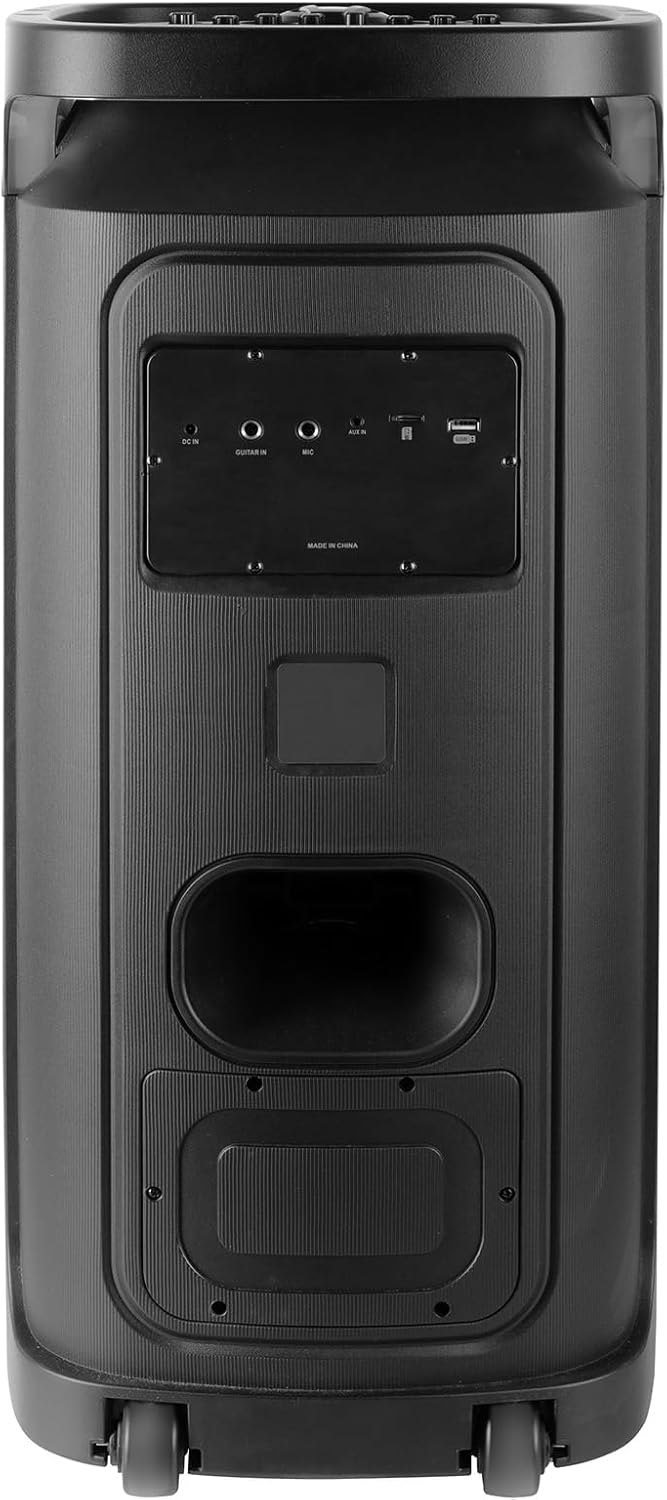
Rear panel of the Trevi XF 3150 KB speaker, displaying the various input ports including DC IN, AUX IN, MIC IN, GUITAR IN, USB, and SD card slot.
Naudojimo instrukcijos
1. Pagrindinis garso atkūrimas
Once an audio source is connected (Bluetooth, USB, SD, AUX), use the following controls:
- Apimtis: Adjust the main volume using the large central knob or the VOL + / VOL- nuotolinio valdymo pulto mygtukai.
- Leisti / pristabdyti: Paspauskite PALEISTI / PAUZĖ mygtuką.
- Kitas / ankstesnis takelis: Naudokite KITAS ir ANKSTESNĖ mygtukai.
- Išlyginimas: Paspauskite EQ button on the remote to cycle through preset equalization modes (e.g., Pop, Rock, Jazz, Classic, Flat).
- Žemieji / aukštieji dažniai: Naudokite BASS ir TREBLE knobs on the control panel for manual sound adjustment.
- Papildomi bosai: Paspauskite PAPILDOMAS BASAS button for enhanced bass output.
2. Karaoke funkcija
Utilize the included microphone and dedicated controls for karaoke sessions.
- Connect the microphone as described in the Setup section.
- Sureguliuoti MIC VOL iki jūsų norimo lygio.
- Naudokite ECHO ir ATLAIKYMAS knobs to add vocal effects.
- The PRI (Microphone Priority) button can be pressed to lower the music volume automatically when speaking into the microphone.
3. Disco Light Effects
Enhance your listening experience with dynamic multicolor LED lights.
- Paspauskite LED button on the control panel to turn the disco lights on or off.
- The lights will cycle through various colors and patterns automatically.

The Trevi XF 3150 KB speaker displaying its dynamic multicolor LED disco light effects, creating a party atmosphere.
Priežiūra
1. Valymas
Norėdami išlaikyti garsiakalbio išvaizdą ir funkcionalumą:
- Prieš valydami visada atjunkite maitinimo laidą.
- Išoriniams paviršiams valyti naudokite minkštą, sausą šluostę.
- Nenaudokite abrazyvinių valiklių, vaško ar tirpiklių, nes jie gali pažeisti apdailą.
- Venkite drėgmės patekimo į bet kokias angas.
2. Akumuliatoriaus priežiūra
To prolong the life of the integrated rechargeable battery:
- Prieš pirmąjį naudojimą visiškai įkraukite akumuliatorių.
- Venkite dažnai visiškai iškrauti akumuliatorių.
- If storing the speaker for an extended period, charge the battery to approximately 50% and recharge every few months.
- Do not expose the speaker to extreme temperatures, as this can affect battery performance.
Trikčių šalinimas
If you encounter issues with your Trevi XF 3150 KB speaker, refer to the following common problems and solutions:
| Problema | Galima priežastis | Sprendimas |
|---|---|---|
| Garsiakalbis neįsijungia. | Išsikrovęs akumuliatorius arba neprijungtas maitinimo laidas. | Connect the power cable and charge the battery. Ensure the power button is pressed correctly. |
| Nėra garso išvesties. | Volume is too low, incorrect input mode, or audio source issue. | Padidinkite garsumą. Paspauskite REŽIMAS button to select the correct input. Check the audio source device. |
| „Bluetooth“ įrenginio nepavyksta susieti. | Speaker is not in Bluetooth mode, device is too far, or already paired to another device. | Ensure speaker is in Bluetooth mode. Move device closer. Disconnect from other devices and try again. |
| Mikrofonas neveikia. | Microphone not connected properly, MIC VOL is low, or microphone is faulty. | Ensure microphone is securely plugged into the MIC IN port. Increase MIC VOL. Test with another microphone if available. |
| TWS ryšys nutrūksta. | Speakers are too far apart, or one speaker is not in Bluetooth mode. | Ensure both speakers are in Bluetooth mode and within close proximity. Repeat the TWS pairing steps. |
Specifikacijos
| Modelio pavadinimas | XF 3150 KB |
| Prekės ženklas | Trevi |
| Išėjimo galia | 130 W (maks.) |
| Garsiakalbio dydis | 2 x 8-inch woofers, 1 x 1-inch tweeter |
| Ryšio technologija | Bluetooth, USB, SD, AUX |
| Belaidžio ryšio technologija | Bluetooth |
| Maitinimo šaltinis | Battery, Corded Electric (7.4V rechargeable battery) |
| Ypatingos savybės | Built-in Microphone, Wireless Connectivity, Disco Lights, TWS Function |
| Gaminio matmenys | 34 cm gylio x 32.6 cm pločio x 74 cm aukščio |
| Prekės svoris | 1 kilogramai |
| Kontrolės metodas | Nuotolinis |
| Garso išvesties režimas | Stereo |
| Montavimo tipas | Grindų stovėjimas |
| Rekomenduojami naudojimo būdai | For smartphones or tablets, For computers, For home parties, For karaoke |
| Suderinami įrenginiai | Smartphone, Tablet, Laptop, MP3 Player, Computer, Karaoke System |
Informacija apie garantiją
Šis produktas tiekiamas su a Ribota garantija. Please refer to the included warranty card for detailed terms and conditions, including coverage period and claim procedures. Keep your proof of purchase for warranty service.
Palaikymas
For further assistance, product information, or to explore other Trevi products, please visit the official Trevi brand store:


