1. Įvadas
This manual provides detailed instructions for the proper use and maintenance of your havit OWS915 Open Ear Headphones. Please read this manual thoroughly before using the product to ensure optimal performance and longevity. Keep this manual for future reference.
2. Pakuotės turinys
Patikrinkite, ar pakuotėje yra visi toliau išvardyti daiktai:
- havit OWS915 Open Ear Headphones (Left and Right earbuds)
- Įkrovimo dėklas
- USB įkrovimo laidas
- Vartotojo vadovas
Image: Contents of the havit OWS915 package, showing the earbuds, charging case, USB cable, and user manual.
3. Produktas baigtasview
The havit OWS915 headphones feature an open-ear design for comfort and situational awareness. Each earbud is lightweight (7.9 grams) and equipped with a flexible TPU ear hook for a secure fit. The charging case provides extended battery life.
Pagrindiniai komponentai:
- Earbuds: Left and Right, with integrated ear hooks and touch control areas.
- Įkrovimo dėklas: Houses and charges the earbuds, with a USB-C charging port.
- LED indikatoriai: On earbuds and charging case for status updates.
- Mikrofonai: Four built-in microphones with ENC technology for clear calls.
- Garsiakalbiai: 14.2mm dynamic drivers for audio output.

Image: The havit OWS915 Open Ear Headphones and their charging case.

Paveikslėlis: sprogęs view of the havit OWS915 earbud and charging case, detailing internal components and features.
4. Sąranka
4.1. Ausinių įkrovimas
Before first use, fully charge the headphones and charging case. Place the earbuds into the charging case. Connect the USB charging cable to the USB-C port on the case and to a power source. The LED indicator on the case will show charging status.
A full charge of the case takes approximately 2.5 hours. The earbuds provide up to 8.5 hours of playtime at 60% volume on a single charge, with the charging case extending total playtime to 64 hours.
Video: Demonstration of how to use the HAVIT LIFE app with wireless earbuds, including a visual of the charging indicator on the case.
4.2. „Bluetooth“ poravimas
To pair your havit OWS915 headphones with your device:
- Atidarykite įkrovimo dėklą. Ausinės automatiškai įsijungs susiejimo režimu.
- Savo įrenginyje (išmaniajame telefone, planšetiniame kompiuteryje ir kt.) įjunkite „Bluetooth“.
- Ieškokite "HAVIT OWS915" in the list of available Bluetooth devices.
- Select "HAVIT OWS915" to connect. A voice prompt will confirm successful pairing.
Ausinės automatiškai prisijungs prie paskutinio suporuoto įrenginio, kai bus išimtos iš dėklo, jei įrenginyje įjungtas „Bluetooth“ ryšys.

Image: A diagram illustrating the Bluetooth 5.4 chip, emphasizing stable and easy pairing with various operating systems.
5. Dėvėjimo instrukcijos
To ensure a comfortable and secure fit, follow these steps:
- Atpažinkite kairįjį (L) ir dešinįjį (R) ausinių antgalius.
- Gently hook the earbud over your ear, positioning the speaker part towards your ear canal.
- Adjust the ear hook and earbud until it rests comfortably and securely on your ear. The flexible TPU material allows for slight adjustments.

Image: A visual guide demonstrating the correct method for wearing the havit OWS915 headphones.
6. Ausinių valdymas
6.1. Palieskite Valdikliai
The havit OWS915 headphones feature intuitive touch controls on each earbud:
- Leisti / pristabdyti: Dukart palieskite bet kurią ausinę.
- Ankstesnė daina: Touch and hold the left earbud for 1 second.
- Kita daina: Touch and hold the right earbud for 1 second.
- Atsiliepti / Baigti skambutį: Dukart palieskite bet kurią ausinę.
- Atmesti skambutį: Touch and hold either earbud for 1 second.
- Padėjėjas balsu: Tap the left earbud thrice.
- Žaidimo režimas / muzikos režimas: Tap the right earbud thrice.

Image: A visual representation of the touch control functions on the havit OWS915 earbuds.
6.2. HAVIT LIFE App
Enhance your listening experience by customizing settings via the HAVIT LIFE App:
- Ekvalaizerio nustatymai: Sureguliuokite garso profilepagal jūsų pageidavimus.
- Customize Touch Settings: Personalize earbud touch controls.
- Headphone Battery Display: Stebėkite akumuliatoriaus lygį.
- Žaidimo režimas: Optimize audio for gaming with reduced latency.
- Keisti įrenginio pavadinimą: Rename your headphones for easy identification.
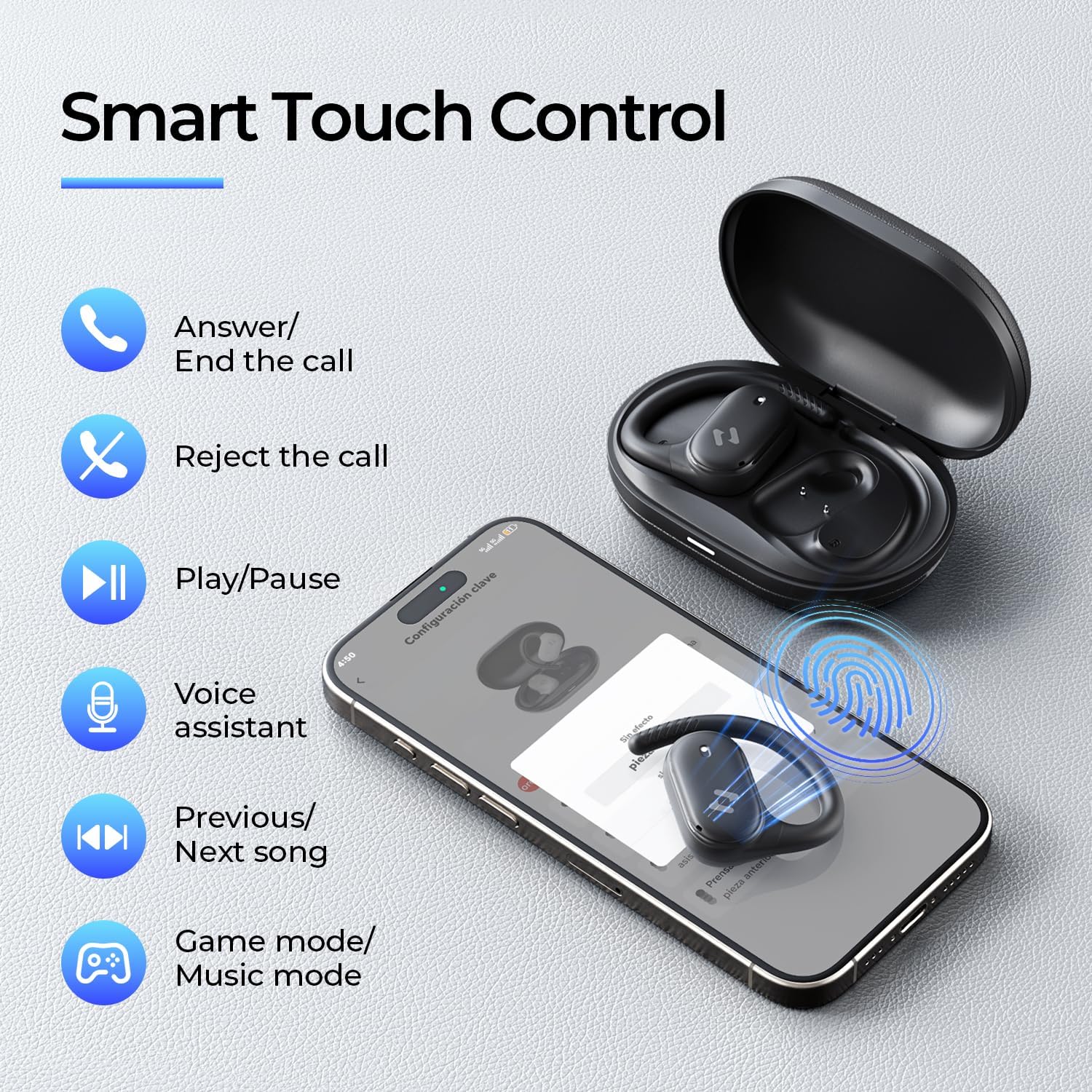
Image: Screenshots of the HAVIT LIFE App demonstrating various customization options.
Video: A guide on how to download, connect to, and customize settings within the HAVIT LIFE App.
7. Priežiūra
Norėdami išlaikyti ausinių veikimą ir išvaizdą:
- Valymas: Ausinėms ir įkrovimo dėklui valyti naudokite minkštą, sausą šluostę. Venkite naudoti stiprias chemines medžiagas ar abrazyvines medžiagas.
- Saugykla: Kai nenaudojate, laikykite ausines įkrovimo dėkle, kad apsaugotumėte jas nuo dulkių ir pažeidimų.
- Akumuliatoriaus priežiūra: Charge the headphones regularly, even if not in frequent use, to prolong battery life. Avoid extreme temperatures.
- Atsparumas vandeniui: The headphones are IPX5 waterproof, meaning they are resistant to sweat and splashes. Do not submerge them in water. Ensure they are dry before placing them back in the charging case.

Image: The havit OWS915 headphones demonstrating their IPX5 water resistance.
8. Problemų sprendimas
If you encounter issues with your havit OWS915 headphones, refer to the following common solutions:
| Problema | Sprendimas |
|---|---|
| Nepavyksta susieti su įrenginiu | Ensure Bluetooth is enabled on your device. Make sure the earbuds are charged and in pairing mode. Try restarting your device and the headphones. |
| Nėra garso ar mažas garsumas | Check the volume level on both your device and the headphones. Ensure the headphones are properly connected. Clean any debris from the speaker grilles. |
| Ausinės neįkraunamos | Ensure the charging cable is securely connected to both the case and the power source. Check if the charging contacts on the earbuds and case are clean. Try a different charging cable or power adapter. |
| Ryšys nestabilus | Ensure your device is within the Bluetooth range (10 meters). Avoid obstacles between the headphones and your device. Disconnect and re-pair the headphones. |
| HAVIT LIFE App connection fails | Ensure you have the latest version of the HAVIT LIFE App installed. Check your device's internet connection. Restart the app and your headphones. |
9. Specifikacijos
| Funkcija | Detalė |
|---|---|
| Modelio pavadinimas | OWS915 |
| Bluetooth versija | 5.4 |
| Bluetooth diapazonas | 10 metrai |
| Baterijos veikimo laikas (ausinės) | 8.5 valandų (60 % tūrio) |
| Bendras grojimo laikas (su dėklu) | 64 valandų |
| Įkrovimo dėklas Akumuliatorius | 1000 mAh |
| Įkrovimo dėklo laikas | 2.5 valandų |
| Garso tvarkyklės dydis | 14.2 milimetrų |
| Atsparumo vandeniui lygis | IPX5 (atsparus vandeniui) |
| Prekės svoris (ausinės) | 7.9 gramo (kiekvienas) |
| Medžiaga | PC+ABS+TPU |
| Kontrolės metodas | App, Touch |
| Triukšmo valdymas | Nėra (skambučiams yra ENC) |
| Dažnio atsakas | 20 KHz |
| Jautrumas | 118 dB |
| Varža | 32 omai |
10. Garantija ir palaikymas
Your havit OWS915 Open Ear Headphones come with a standard manufacturer's warranty. Please refer to the warranty card included in your package for specific terms and conditions. For technical support or customer service inquiries, please contact havit customer support through their official websvetainėje arba kontaktinę informaciją, pateiktą jūsų garantijos dokumentuose.
11. Svarbi saugos informacija
- Klausos apsauga: To protect your hearing, avoid listening at high volume levels for extended periods.
- Aplinkosauginis sąmoningumas: The open-ear design allows you to hear your surroundings. However, always exercise caution when using headphones in situations requiring full attention, such as driving or cycling.
- Vaikai: Keep the headphones and accessories out of reach of children under three years of age to prevent choking hazards.
- Įkrovimas: Use only the provided charging cable and a certified power adapter. Do not attempt to charge the device if it is wet.
- Išardymas: Do not attempt to disassemble or modify the headphones or charging case, as this may void the warranty and cause damage.


