1. Įvadas
The IRRADIO IR-203 Sound+ is a compact and portable wireless speaker designed for high-quality audio playback. Featuring Bluetooth 5.0 connectivity and a USB port for external media, it offers versatile listening options. Its robust design and long-lasting battery make it ideal for both home use and on-the-go entertainment.

1.1 paveikslas: IRRADIO IR-203 Sound+ Wireless Speaker. This image shows the speaker from an angled perspective, highlighting its compact size and fabric grille.
2. Saugos informacija
Prieš naudodami įrenginį, atidžiai perskaitykite visas saugos instrukcijas. Išsaugokite šį vadovą ateičiai.
- Saugokite garsiakalbį nuo vandens ar per didelės drėgmės. Šis gaminys nėra atsparus vandeniui.
- Avoid extreme temperatures. Do not place near heat sources or in direct sunlight.
- Neardykite, neremontuokite ir nemodifikuokite įrenginio. Tai panaikins garantiją ir gali sukelti žalos ar sužalojimų.
- Naudokite tik nurodytą įkrovimo tūrįtage (DC 5V/2A).
- Laikyti vaikams nepasiekiamoje vietoje.
3. Pakuotės turinys
Įsitikinkite, kad pakuotėje yra visi daiktai:
- IRRADIO IR-203 Sound+ Wireless Speaker
- USB įkrovimo laidas
- Vartotojo vadovas (šis dokumentas)
4. Produktas baigtasview
4.1. Valdikliai ir prievadai

4.1 paveikslas: Šoninė view of the speaker showing control buttons. From left to right: Mode button (M), Volume Down (-), Volume Up (+), Play/Pause/Next Track button (▶).

4.2 paveikslas: Atgal view of the speaker showing connectivity ports. From left to right: TF (MicroSD) card slot, USB-A port, ON/OFF switch, DC 5V charging port.
The speaker features intuitive controls on its top edge and essential connectivity ports on its rear panel.
- Režimo mygtukas (M): Press to switch between Bluetooth and USB playback modes.
- Sumažinti garsumą (-): Paspauskite, kad sumažintumėte garsumą.
- Garsumo padidinimas (+): Paspauskite norėdami padidinti garsumą.
- Play/Pause/Next Track (▶): Press to play or pause audio. Long press to skip to the next track.
- TF kortelės lizdas: Insert a MicroSD card for direct audio playback.
- USB-A prievadas: Insert a USB flash drive for direct audio playback.
- ĮJUNGIMO/IŠJUNGIMO jungiklis: Slide to power the speaker on or off.
- DC 5V prievadas: Prijunkite USB įkrovimo laidą čia, kad įkrautumėte garsiakalbį.
5. Sąranka
5.1. Įkraukite garsiakalbį
Before first use, fully charge the speaker. The battery capacity is 400 mAh.
- Prijunkite pridedamą USB įkrovimo laidą prie garsiakalbio DC 5V prievado.
- Connect the other end of the USB cable to a compatible USB power adapter (DC 5V/2A recommended) or a computer USB port.
- Įsijungs įkrovimo indikatoriaus lemputė (spalva gali skirtis), rodanti, kad garsiakalbis kraunamas.
- Įkrovimas paprastai trunka maždaug 2 valandos. Kai įkrovimas bus baigtas, indikatoriaus lemputė pasikeis arba užges.
A full charge provides approximately 2 hours and 40 minutes of continuous playback at 50% volume.
5.2. Įjungimas/išjungimas
To power on the speaker, slide the ON/OFF switch to the 'ON' position. You will hear an audible prompt. To power off, slide the switch to the 'OFF' position.
6. Naudojimo instrukcijos
6.1. „Bluetooth“ poravimas
The speaker uses Bluetooth 5.0 for stable wireless connection up to 10 meters.
- Ensure the speaker is powered on and in Bluetooth mode. If not, press the 'M' (Mode) button to switch to Bluetooth mode. The speaker will enter pairing mode, indicated by a flashing LED light and an audible prompt.
- Savo įrenginyje (išmaniajame telefone, planšetiniame kompiuteryje, nešiojamajame kompiuteryje) įjunkite „Bluetooth“ ir ieškokite galimų įrenginių.
- Select "IRRADIO IR-203 Sound+" from the list of found devices.
- Kai garsiakalbis bus susietas, pasigirs garsinis patvirtinimas ir LED lemputė nustos mirksėti.
- Dabar galite leisti garsą iš savo įrenginio per garsiakalbį.
Pastaba: Įjungus garsiakalbį, jis automatiškai bandys prisijungti prie paskutinio suporuoto įrenginio.
6.2. USB/TF kortelių atkūrimas
The speaker supports direct audio playback from a USB flash drive or a MicroSD (TF) card.
- Insert a USB flash drive into the USB-A port or a MicroSD card into the TF card slot.
- The speaker will automatically switch to USB/TF card mode and begin playing audio files (MP3, WAV, etc.) from the inserted storage device. If it does not switch automatically, press the 'M' (Mode) button to select the correct mode.
- Use the Play/Pause/Next Track button (▶) to control playback.
6.3. Garsumo valdymas
Garsumui reguliuoti naudokite garsiakalbio mygtukus „+“ ir „-“. Garsumą taip pat galite valdyti prijungtu įrenginiu.
7. Priežiūra
Norėdami užtikrinti garsiakalbio ilgaamžiškumą ir optimalų veikimą, laikykitės šių priežiūros nurodymų:
- Valymas: Garsiakalbio paviršių nuvalykite minkšta, sausa šluoste. Nenaudokite abrazyvinių valiklių, alkoholio ar cheminių tirpiklių.
- Saugykla: Kai garsiakalbio nenaudojate ilgesnį laiką, laikykite jį vėsioje, sausoje vietoje, toliau nuo tiesioginių saulės spindulių ir ekstremalių temperatūrų.
- Akumuliatoriaus priežiūra: Norėdami išsaugoti baterijos veikimo laiką, venkite jos dažnai visiškai iškrauti. Reguliariai įkraukite garsiakalbį, net jei jo nenaudojate.
8. Problemų sprendimas
If you encounter issues with your IRRADIO IR-203 Sound+ speaker, refer to the following common problems and solutions:
| Problema | Galima priežastis | Sprendimas |
|---|---|---|
| Garsiakalbis neįsijungia. | Baterija išsikrovusi. | Įkraukite garsiakalbį bent 30 minučių. |
| Nėra garso. | Garsumas per mažas arba nutildytas. Pasirinktas neteisingas režimas. | Increase volume on both speaker and connected device. Press 'M' button to switch modes. |
| Nepavyksta susieti per „Bluetooth“. | Garsiakalbis neįjungtas susiejimo režimu. Įrenginys per toli. Trukdžiai. | Ensure speaker is in Bluetooth pairing mode (flashing LED). Move device closer to speaker (within 10m). Turn off other Bluetooth devices. |
| USB/TF kortelė neveikia. | Neteisinga file formatuoti. Kortelė / diskas įdėtas netinkamai. | Užtikrinkite garsą files are in supported format (e.g., MP3). Reinsert the USB drive or TF card firmly. Press 'M' button to select USB/TF mode. |
Jei problema išlieka ir išbandžius šiuos sprendimus, susisiekite su klientų aptarnavimo tarnyba.
9. Specifikacijos
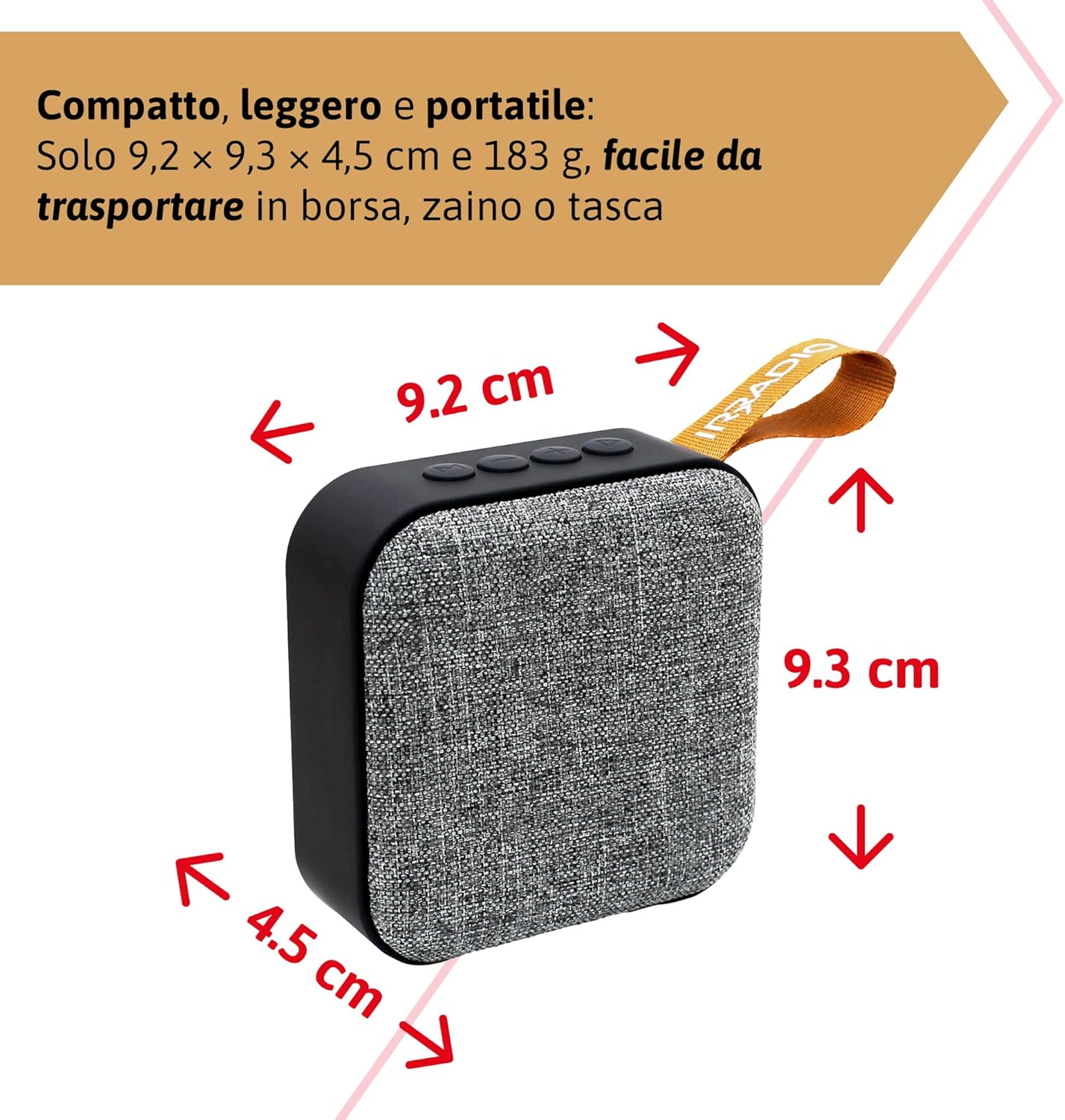
9.1 paveikslas: Dimensions of the IRRADIO IR-203 Sound+ speaker: 9.2 cm (width) x 9.3 cm (height) x 4.5 cm (depth).
| Funkcija | Detalė |
|---|---|
| Modelio pavadinimas | IR-203 Sound+ |
| Prekės modelio numeris | 550922126 |
| Prekės ženklas | IRADIJAS |
| Gaminio matmenys | 9.2 x 9.3 x 4.5 cm |
| Svoris | 183 gramų |
| Garsiakalbio tipas | Woofer (Full Range 50mm Driver + Passive Radiator) |
| Maksimali garsiakalbio išvesties galia | 3.5 vatų efektinė vertė |
| Ryšio technologija | Bluetooth 5.0, USB |
| Belaidžio perdavimo atstumas | Iki 10 metrų (be kliūčių) |
| Garso išvesties režimas | Stereo |
| Baterijos talpa | 400 3.7 mAh (1.48 V, XNUMX Wh) |
| Baterijos veikimo laikas | Approx. 2 hours 40 minutes (at 50% volume) |
| Įkrovimo laikas | apytiksliai 2 valandas |
| Įkrovimo įvestis | DC 5V/2A |
| Suderinami įrenginiai | Smartphones, Tablets, Laptops, Desktop Computers, MP3 Players, USB Flash Drives |
| Spalva | Pilka |
| Atsparus vandeniui | Nr |
10. Garantija ir palaikymas
10.1. Informacija apie garantiją
For information regarding warranty and returns, please refer to the purchase platform's policies. Typically, products purchased on Amazon.it can be returned within 30 days of receipt if you change your mind. For defective or damaged products, specific return policies apply.
For specific information on purchases made through the Marketplace, please consult the relevant help page on the platform.
10.2. Pagalba klientams
For further assistance, technical support, or inquiries about your IRRADIO IR-203 Sound+ speaker, please visit the official IRRADIO store page:


