1. Saugos informacija
Please read all safety instructions carefully before using your iFFALCON TV. Retain this manual for future reference.
- Elektros sauga: Do not expose the TV to rain or moisture. Ensure the power cord is securely plugged into a grounded outlet. Do not overload electrical outlets.
- Vieta: Place the TV on a stable, level surface or mount it securely to a wall. Ensure adequate ventilation around the TV to prevent overheating. Do not block ventilation openings.
- Valymas: Prieš valydami atjunkite televizorių nuo elektros tinklo. Naudokite minkštą, sausą šluostę. Nenaudokite skystų ar aerozolinių valiklių.
- Vaikai: Prižiūrėkite vaikus, kad jie neliptų ant televizoriaus ar stovo. Mažos dalys gali kelti pavojų užspringti.
- Aptarnavimas: Nebandykite patys taisyti televizoriaus. Visus techninės priežiūros darbus patikėkite kvalifikuotiems techninės priežiūros specialistams.
2. Kas yra dėžutėje
Išpakuodami patikrinkite, ar yra visi komponentai:
- iFFALCON 85-Inch U85 Series QD-Mini LED 4K UHD Google Smart TV
- Maitinimo kabelis
- 2 x AAA baterijos nuotolinio valdymo pultui
- 6 x stovo varžtai
- Table stands (2 pieces)
- 5 x kabelių laikikliai
- Greitos pradžios vadovas
- TV pultelis
3. Sąranka
3.1 Fizinė konfigūracija
Before powering on, ensure the TV is securely placed or mounted.
- Stovo montavimas: If using the table stands, carefully attach them to the designated slots at the bottom of the TV using the provided stand screws. Ensure they are tightened securely.
- Montavimas ant sienos: If wall mounting, follow the instructions provided with your wall mount kit. Ensure the mount is compatible with VESA standards for the 85U85 model.
- Maitinimo jungtis: Prijunkite maitinimo laidą prie televizoriaus maitinimo įvesties, o tada – prie sieninio lizdo.
- Išoriniai įrenginiai: Connect any external devices (e.g., cable box, gaming console, Blu-ray player) to the appropriate HDMI or other input ports on the TV.

Image: The iFFALCON 85-Inch U85 Series TV, showcasindėl savo plono dizaino ir ryškaus ekrano.
3.2 Pradinis įjungimas ir „Google TV“ sąranka
After connecting power, press the power button on the remote control or TV to turn it on.
- Nuotolinio valdymo pulto poravimas: If the remote does not respond, insert the AAA batteries and follow on-screen instructions to pair it via Bluetooth.
- Kalbos pasirinkimas: Pasirinkite pageidaujamą kalbą.
- Tinklo prisijungimas: Select your Wi-Fi network and enter the password. A stable internet connection is required for Google TV features.
- Prisijungimas prie „Google“ paskyros: Sign in with your Google account to access Google TV features, personalized recommendations, and app downloads.
- „Google“ asistento sąranka: Follow prompts to set up Google Assistant for voice control.

Image: A user interacting with the iFFALCON TV using hands-free voice control, demonstrating the integrated Google TV interface.
4. Televizoriaus valdymas
4.1 Nuotolinio valdymo pulto funkcijos
The provided remote control allows full navigation and control of your iFFALCON TV.
- Maitinimo mygtukas: Įjungia arba išjungia televizorių.
- Naršymo skydelis: Meniu naršymui naudokite krypties mygtukus, o pasirinkimui – mygtuką Gerai.
- Tūris +/-: Reguliuoja garsumo lygį.
- Kanalas +/-: Keičia televizijos kanalus.
- Įvestis: Pasirenka įvesties šaltinį (HDMI 1, HDMI 2 ir kt.).
- „Google“ asistento mygtukas: Activates voice control. Press and speak your command.
- Namų mygtukas: Grąžinama į „Google TV“ pagrindinį ekraną.
- Programėlės spartieji mygtukai: Greita prieiga prie populiarių transliacijos paslaugų.
4.2 Išmaniosios funkcijos ir „Google TV“
Your iFFALCON U85 Series TV runs on Google TV, offering a personalized and integrated smart experience.
- Google TV Home Screen: Provides access to movies, shows, and apps from all your subscriptions, organized for easy discovery.
- Valdymas balsu: Use Google Assistant or Alexa (via compatible devices) to search for content, control smart home devices, and manage TV settings hands-free.
- Programėlių biblioteka: Atsisiųskite ir įdiekite įvairias programas iš „Google Play“ parduotuvės.
- Įtaisytasis „Chromecast“: Transliuokite turinį iš suderinamo išmaniojo telefono, planšetinio kompiuterio ar kompiuterio tiesiai į televizorių.
4.3 Vaizdo ir garso nustatymai
Tinkinkite savo viewklausymosi patirtį per televizoriaus nustatymų meniu.
- Vaizdo režimai: Pasirinkite iš įvairių iš anksto nustatytų vaizdo režimų (pvz., standartinis, ryškus, filmas, žaidimas) arba tinkinkite tokius nustatymus kaip ryškumas, kontrastas, spalvos ir ryškumas.
- Mini LED Precision: The TV features 352 local dimming zones and 1000 nits peak brightness for enhanced contrast and detail.
- Dolby Vision IQ: Automatically adjusts HDR brightness based on the room's ambient light for optimal viewing.
- Garso režimai: Pasirinkite iš išankstinių garso nustatymų (pvz., Standartinis, Muzika, Filmas, Kalba) arba koreguokite ekvalaizerio nustatymus.
- Dolby Atmos & DTS Virtual X: Experience immersive spatial audio with the integrated 2.1-channel 50W sound system.

Image: Visual comparison illustrating the superior contrast and detail of Mini LED technology compared to conventional TVs.

Image: Depiction of the immersive audio experience with the TV's 2.1 speaker system and Dolby Atmos technology.
4.4 Žaidimų funkcijos
The iFFALCON U85 Series TV is equipped with features designed for an enhanced gaming experience.
- 144 Hz žaidimo režimas profesionalams: Provides a high refresh rate for smooth, responsive gameplay.
- 288Hz DLG Acceleration: Dar labiau pagerina judesio aiškumą, kad būtų galima žaisti konkurencingus žaidimus.
- „FreeSync Premium Pro“: Sumažina ekrano plyšinėjimą ir mirgėjimą, kad vaizdai būtų sklandūs.
- Automatinis mažos delsos režimas (ALLM): Automatically switches to a low-latency mode when a gaming console is detected.
- Žaidimų juosta: Access and adjust key gaming settings quickly during gameplay.
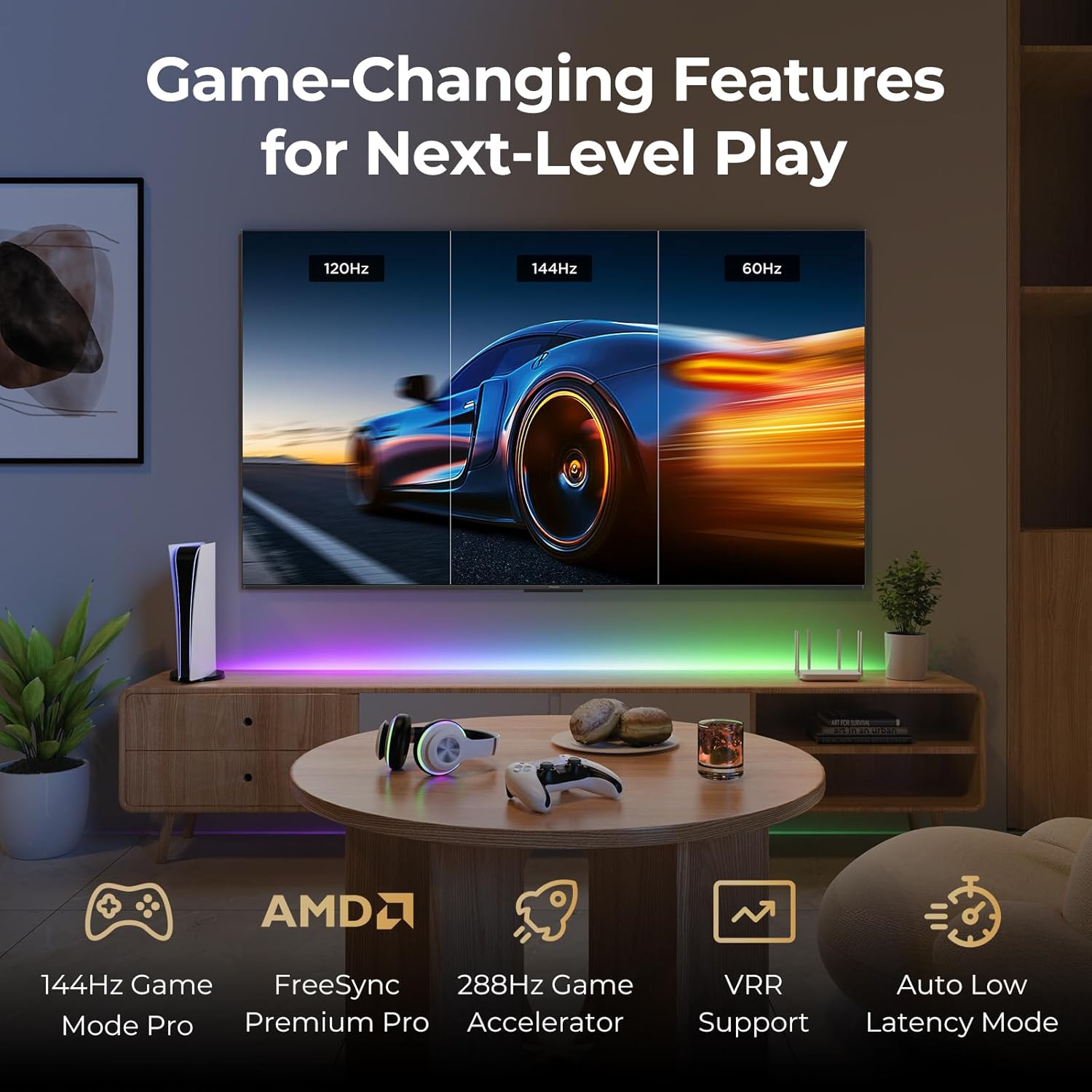
Image: A gaming setup featuring the iFFALCON TV, illustrating its high refresh rate and gaming-specific features for an optimized experience.
5. Priežiūra
5.1 Televizoriaus valymas
Reguliarus valymas padeda išlaikyti televizoriaus išvaizdą ir veikimą.
- Ekranas: Švelniai nuvalykite ekraną minkštu, nepūkuotu skudurėliu. Jei dėmės sunkiai įveikiamos, švelniai nuvalykiteampNuvalykite šluostę vandeniu arba ekranui skirtu valymo tirpalu (nepurkškite tiesiai ant ekrano).
- Korpusas: Use a soft, dry cloth to wipe the TV's frame and back panel. Avoid abrasive materials or harsh chemicals.
- Prievadai: Ensure ports are free of dust. Use compressed air if necessary, holding the can upright.
5.2 Programinės įrangos naujiniai
Your TV may receive automatic software updates to improve performance and add new features. Ensure your TV is connected to the internet for these updates.
- You can check for updates manually in the TV's settings menu under System > About > System update.
6. Problemų sprendimas
Jei kyla problemų, prieš kreipdamiesi į palaikymo tarnybą, išbandykite šiuos įprastus sprendimus.
- Nėra galios: Įsitikinkite, kad maitinimo laidas yra tvirtai prijungtas prie televizoriaus ir sieninio lizdo. Patikrinkite lizdą su kitu įrenginiu.
- Nėra vaizdo / garso: Check the selected input source. Ensure all cables to external devices are connected correctly. Restart the TV and connected devices.
- Nuotolinio valdymo pultas neveikia: Replace the batteries. Ensure there are no obstructions between the remote and the TV. Re-pair the remote if it uses Bluetooth.
- Tinklo ryšio problemos: Restart your Wi-Fi router. Check TV network settings to ensure correct Wi-Fi password and connection.
- Vaizdo kokybės problemos: Sureguliuokite vaizdo nustatymus (ryškumą, kontrastą, spalvas). Įsitikinkite, kad turinio šaltinis yra aukštos kokybės.
- Gamykliniai nustatymai: If problems persist, a factory reset can resolve many software-related issues. Navigate to Settings > System > About > Reset. Įspėjimas: Tai ištrins visus asmeninius duomenis ir nustatymus.
7. Specifikacijos
| Funkcija | Aprašymas |
|---|---|
| Prekės ženklas | iFFALCON |
| Modelio numeris | 85U85 |
| Ekrano dydis | 85 colių |
| Ekrano technologija | QD-Mini LED |
| Rezoliucija | 4K UHD (3840 2160 x XNUMX XNUMX) |
| Atnaujinimo dažnis | 144 Hz (Native), 288Hz DLG |
| Didžiausias ryškumas | Iki 1000 nitų |
| Kontrasto santykis | Iki 6500:1 |
| Vietinės pritemdymo zonos | 352 |
| Procesorius | AiPQ Pro procesorius |
| Operacinė sistema | Google TV |
| Balso asistentas | Suderinamas su „Google Assistant“, „Alexa“ |
| Garso sistema | 2.1-channel 50W, Dolby Atmos, DTS Virtual X |
| HDR palaikymas | HDR10+, Dolby Vision IQ |
| Žaidimų ypatybės | 144Hz VRR, FreeSync Premium Pro, ALLM, Game Bar |
| Ryšys | „Bluetooth“, „Wi-Fi“ |
| Gaminio matmenys (D x P x A) | 15.2 x 74.4 x 45.5 colio |
| Prekės svoris | 76.7 svaro |
8. Garantija ir palaikymas
Your iFFALCON U85 Series TV is covered by a manufacturer's warranty. Please refer to the warranty card included with your product for specific terms and conditions.
For technical support, service inquiries, or additional information, please visit the official iFFALCON support website or contact their customer service. Keep your purchase receipt and product serial number handy for warranty claims.
Daugiau informacijos ir pagalbos išteklių galite rasti apsilankę iFFALCON Store on Amazon.


