1. Produktas baigtasview
The JONSBO V12 is a Micro ATX Mid Tower PC Case designed for compact yet powerful computer builds. It features a unique hyperboloid glass desktop design and walnut wood accents, offering both aesthetic appeal and functional design. This manual provides essential information for the proper installation, operation, and maintenance of your V12 PC case.
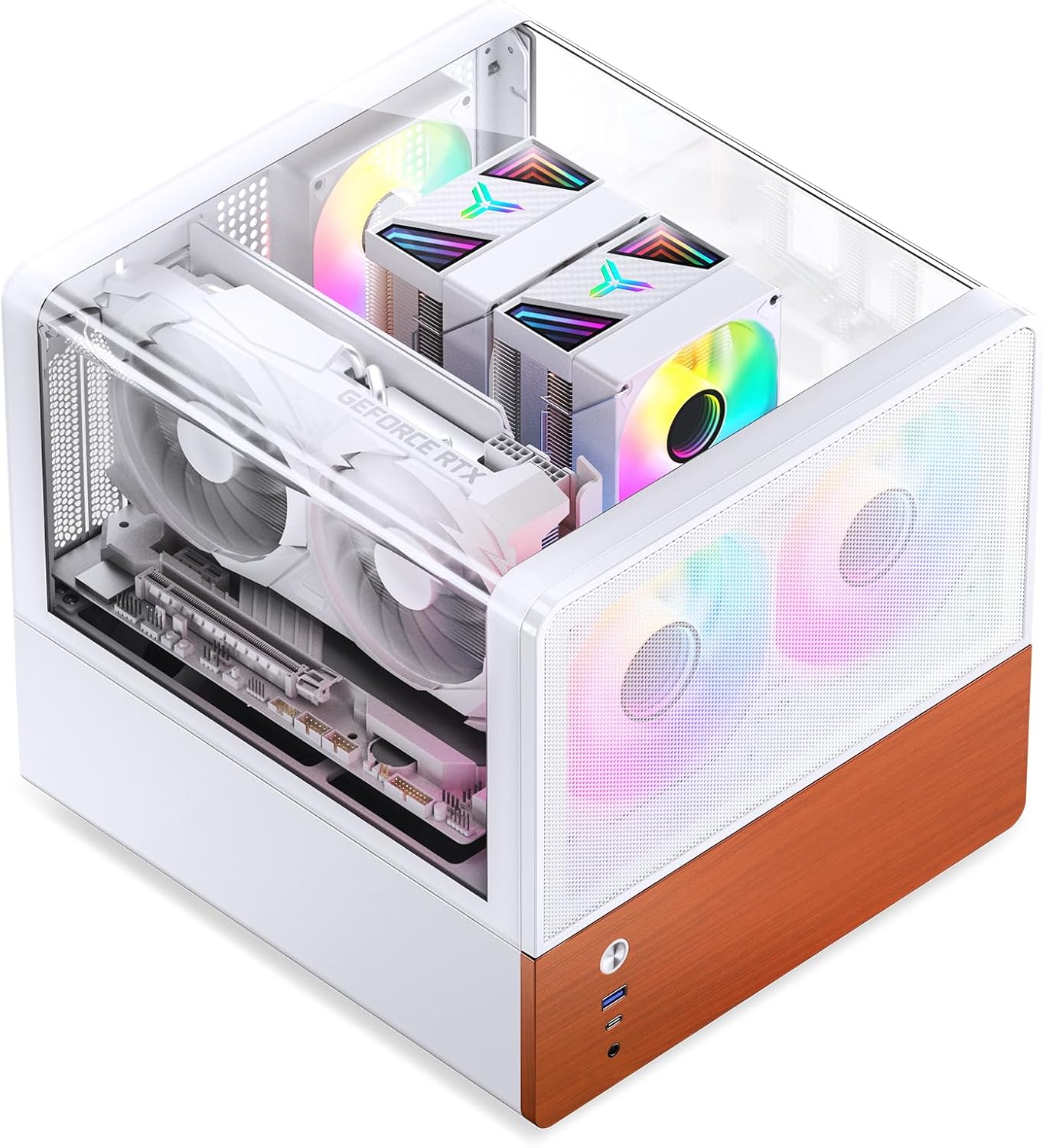
Image 1.1: JONSBO V12 Micro ATX PC Case with internal components.

1.2 vaizdas: Baigtaview of JONSBO V12 PC Case, showing both white and black variants.
1.1 vaizdo įrašas: oficialus produkto vaizdo įrašasasing the JONSBO V12 Micro ATX PC Case, its features, and internal layout. This video provides a visual guide to the case's design and component compatibility.
2. Pagrindinės savybės
- Double Bending Integrated Glass: Features a 270° dual-curved side perspective for multi-angle hardware display. A 2H hardness glass protective film is applied to the glass surface and does not need to be removed during use.
- Walnut Wood Decorative Panels: Incorporates 8mm thick North American black walnut solid wood material, providing a natural texture and seamless integration with home decor. Note that the natural texture of each panel may vary slightly.
- Separated Cabinet Structure: The internal layout is divided into upper and lower compartments, optimizing space and airflow for various components.
- Kompaktiški matmenys: Measuring 280mm (W) x 301mm (D) x 275.5mm (H), this case offers a small footprint suitable for desktop environments.

Image 2.1: The double bending integrated glass panel, designed for easy access and display.

Image 2.2: Detail of the walnut wood decorative panel and front I/O ports.

Image 2.3: Dimensional diagram of the JONSBO V12 case.
3. Sąranka ir diegimas
This section outlines the compatibility and installation guidelines for various PC components within the JONSBO V12 case.
3.1 Motherboard and CPU Cooler
- Pagrindinės plokštės suderinamumas: Supports M-ATX and ITX motherboards.
- Maks. CPU aušintuvo aukštis: Iki 140 mm.
3.2 maitinimo blokas (PSU)
- PSU palaikymas: ATX power supplies with a length of 140mm to 220mm.
3.3 Vaizdo plokštė (GPU)
- Maks. Vaizdo kortelės ilgis: Iki 260 mm.
3.4 Drive Bays
The case offers flexible storage options:
- Option 1: Two 3.5" HDDs and one 2.5" SSD.
- Option 2: One 3.5" HDD and two 2.5" SSDs.

Image 3.1: Illustration of drive bay installation.
3.5 Priekiniai įvesties / išvesties prievadai
- USB 3.2 Gen2 Type-C x 1
- USB 3.0 x 1
- AUDIO x 1 + MIC x 1 (2-in-1 port)
4. Aušinimo sistema
The JONSBO V12 is designed with an efficient cooling system to maintain optimal component temperatures.
- Priekinis skydelis: Comes standard with two 120mm fans for intake.
- Galinis skydas: Supports one 92mm fan and one 80mm fan (optional) for exhaust.

Image 4.1: Cooling system diagram showing fan locations and airflow.
5. Specifikacijos
| Funkcija | Specifikacija |
|---|---|
| Modelis Nr. | V12 |
| Spalva | Baltas |
| Medžiaga | SGCC 1.0mm / Mediena 8mm / Stiklas 4mm |
| Gaminio matmenys (I x P x A) | 301 mm x 280 mm x 275.5 mm |
| Pagrindinės plokštės suderinamumas | M-ATX / ITX |
| Maks. CPU aušintuvo aukštis | ≤140 mm |
| PSU palaikymas | ATX (Length ≤140-220mm) |
| Maks. Vaizdo kortelės ilgis | ≤260 mm |
| Drive Bays | 3.5" HDD*2 + 2.5" SSD*1 or 3.5" HDD*1 + 2.5" SSD*2 |
| Priekinės įvesties / išvesties prievadai | USB3.2 Gen2 Type-C*1 / USB3.0*1 / AUDIO*1+MIC*1(2 IN 1) |
| Priekiniai ventiliatoriai | 2x 120mm (Built-in) |
| Galiniai ventiliatoriai | 92mm*1 + 80mm*1 (Optional) |
| Prekės svoris | 14.27 svaro (apie 6.47 kg) |
6. Priežiūra
Regular maintenance helps ensure the longevity and optimal performance of your PC case and its components.
- Dulkių valymas: Periodically clean dust from the case interior and fan filters. The JONSBO V12 features a magnetic dust-proof bottom mesh for easy removal and cleaning.
- Išorinis valymas: Naudokite minkštą, damp cloth to clean the exterior surfaces. Avoid abrasive cleaners or solvents that may damage the finish or wood panels.
- Stiklo plokštė: Clean the glass panel with a glass cleaner and a microfiber cloth to avoid scratches.

Image 6.1: Magnetic dust-proof bottom mesh for easy cleaning.
7. Problemų sprendimas
If you encounter issues with your PC build within the JONSBO V12 case, consider the following general troubleshooting steps:
- Nėra galios: Ensure all power cables (motherboard, CPU, GPU, storage) are securely connected. Verify the PSU is switched on and connected to a working power outlet.
- Nėra ekrano: Check that the monitor is connected to the graphics card (not the motherboard integrated graphics, unless intended) and that the monitor is powered on and set to the correct input.
- Perkaitimas: Confirm all fans are spinning correctly and are oriented for proper airflow (front intake, rear exhaust). Ensure CPU cooler is properly seated and thermal paste is applied. Check for any obstructions to airflow.
- Komponentų tinkamumo problemos: Refer to the specifications section (Section 5) to ensure all components (GPU, CPU cooler, PSU) are within the maximum supported dimensions.
- Atsipalaidavę jungtys: Re-seat all cables and components (RAM, GPU, storage drives) to ensure they are firmly in place.
For specific component-related issues, consult the instruction manuals provided with your motherboard, CPU, GPU, and other hardware.
8. Garantija ir palaikymas
The JONSBO V12 PC Case is covered by a manufacturer's warranty. For detailed information regarding warranty terms, conditions, and duration, please refer to the warranty card included with your product or visit the official JONSBO website. For technical support or assistance, please contact JONSBO customer service through their official channels.
Daugiau informacijos ir palaikymo išteklių galite rasti adresu „Jonsbo“ parduotuvė „Amazon“ platformoje.


