1. Įvadas
Welcome to the King Lucky i121 Open Ear Clip-On Wireless Bluetooth Earbuds user manual. These earbuds are designed to provide a comfortable audio experience while maintaining awareness of your surroundings. This manual provides essential information for setting up, operating, and maintaining your new earbuds.
2. Pakuotės turinys
Prašome patikrinti, ar pakuotėje yra visi reikalingi daiktai:
- King Lucky i121 Open Ear Earbuds (L/R)
- Įkrovimo dėklas
- USB-C įkrovimo laidas
- Vartotojo vadovas
- Detachable Decorative Clips (optional, may vary by package)

2.1 pav.: Pakuotės turinys. This image displays the King Lucky i121 earbuds, their charging case, a USB-C charging cable, and a pair of decorative clips.
3. Sąranka
3.1. Ausinių ir dėklo įkrovimas
Before first use, fully charge the earbuds and charging case. Connect the provided USB-C cable to the charging port on the case and a compatible USB power source. The indicator light on the case will show charging status.

Figure 3.1: Battery Life and Charging. The earbuds offer approximately 6 hours of playback on a single charge, with the charging case providing up to 50 hours of total battery life.
3.2. „Bluetooth“ poravimas
- Įsitikinkite, kad ausinės yra įkrautos.
- Atidarykite įkrovimo dėklą. Ausinės automatiškai įsijungs susiejimo režimu.
- Savo įrenginyje (išmaniajame telefone, planšetiniame kompiuteryje ir kt.) įjunkite „Bluetooth“ ir ieškokite galimų įrenginių.
- Select "King Lucky i121" from the list of devices to connect.
- Prijungus, balso pranešimas patvirtins sėkmingą susiejimą.
4. Ausinių dėvėjimas
The King Lucky i121 earbuds feature an open-ear clip-on design for comfort and situational awareness.
- Atpažinkite kairįjį (L) ir dešinįjį (R) ausinių antgalius.
- Gently open the ear clip and position it over the top of your ear, allowing the speaker part to rest near your ear canal without entering it.
- Pritaikykite, kad priglustų saugiai ir patogiai.
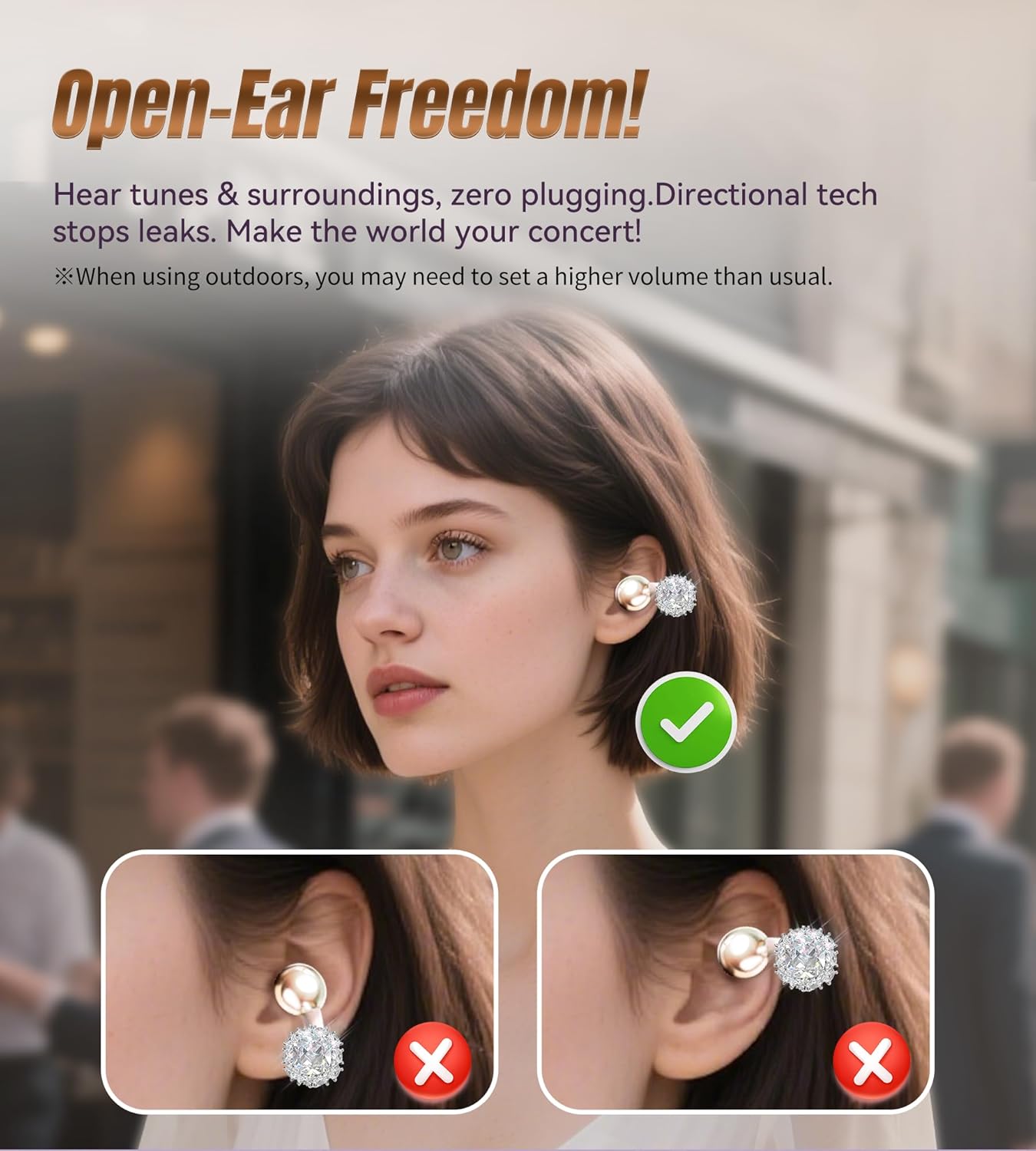
Figure 4.1: Open-Ear Design. This diagram shows how the earbuds sit on the ear, providing audio without blocking ambient sounds.
4.1. Attaching Detachable Decorative Clips
If your package includes detachable decorative clips, follow these steps to attach them:
- Išimkite ausines iš įkrovimo dėklo.
- Carefully clip the decorative element onto the ear hook of the earbud.
- Ensure the clip is securely fastened.
Pastaba: The charging case may not close properly with the decorative clips attached. It is recommended to remove them before placing the earbuds back into the case for charging or storage.

Figure 4.2: Attaching Decorative Clips. This visual guide demonstrates the process of attaching the decorative clips to the earbuds for a customized look.

Figure 4.3: Earbuds with Decorative Clips. A woman is shown wearing the King Lucky i121 earbuds with the detachable jewelry, illustrating their integration as a fashion accessory.
5. Veikimo valdikliai
The King Lucky i121 earbuds feature touch controls for easy management of audio and calls.
| Veiksmas | Funkcija |
|---|---|
| 1 bakstelėjimas (K/D) | Atsiliepti į skambutį |
| 2 bakstelėjimas (K/D) | End Call / Play/Pause Music |
| 1 čiaupai (K) | Sumažinti garsumą |
| Palieskite x1 (D) | Padidinti garsumą |
| 3 čiaupai (K) | Suaktyvinti balso asistentą („Siri“, „Google“ padėjėjas) |
| Palieskite x3 (D) | Žaidimo režimas |
| Long Press 2" (L/R) | Atmesti skambutį |
| Long Press 2" (L) | Ankstesnis takelis |
| Long Press 2" (R) | Kitas takelis |
| 5 bakstelėjimas (K/D) | Atstatyti gamyklinius nustatymus |
6. Pagrindinės savybės
- Atvirų ausų dizainas: Allows you to hear your audio content while remaining aware of your surroundings, ideal for outdoor activities or office environments.
- Įtraukiantis garsas: Equipped with 12mm dynamic drivers for clear audio and enhanced bass.
- Išvalyti skambučius: Features Environmental Noise Cancellation (ENC) microphones for clear voice transmission during calls.
- "Bluetooth 5.4": Užtikrina stabilų ir mažo delsos laiko belaidį ryšį.
- IPX5 atsparumas vandeniui: Protects against sweat and light rain, suitable for workouts and outdoor use.
- Ilgas baterijos veikimo laikas: Up to 6 hours of listening time per charge, with the charging case extending total playtime to 50 hours.
- Lengvas: Each earbud weighs approximately 5.2g for comfortable extended wear.

Figure 6.1: 12mm Dynamic Driver. Vidinis view of the earbud highlighting the 12mm dynamic driver, which contributes to the audio quality.
7. Priežiūra
- Valymas: Ausinėms ir įkrovimo dėklui valyti naudokite minkštą, sausą šluostę. Venkite naudoti stiprias chemines medžiagas ar abrazyvines medžiagas.
- Saugykla: Kai nenaudojate, laikykite ausines įkrovimo dėkle, kad apsaugotumėte jas nuo dulkių ir pažeidimų.
- Vandens ekspozicija: While IPX5 rated, avoid submerging the earbuds in water. Dry them thoroughly if exposed to sweat or rain before placing them back in the charging case.
8. Problemų sprendimas
| Problema | Sprendimas |
|---|---|
| Ausinės nesusiejamos | Ensure earbuds are charged. Turn off and on Bluetooth on your device. Perform a factory reset (Tap x5 on either earbud). |
| Nėra garso | Check device volume and earbud volume. Ensure earbuds are properly connected to your device. |
| Prasta garso kokybė | Ensure earbuds are clean and free of debris. Move closer to your connected device to avoid interference. |
| Įkrovimo problemos | Verify the USB-C cable and power source are working. Ensure earbuds are correctly seated in the charging case. |
9. Specifikacijos
- Modelis: i121
- Prekinis ženklas: Karalius Lucky
- Ryšys: Bluetooth 5.4
- Atsparumas vandeniui: IPX5
- Ausinių svoris: Maždaug 5.2 g vienai ausinei
- Vairuotojo dydis: 12 mm dinaminis
- Baterijos veikimo laikas (ausinės): Iki 6 valandų
- Battery Life (with Case): Iki 50 valandų
- Įkrovimo prievadas: USB-C
10. Oficialus produkto vaizdo įrašas
Video 10.1: King Lucky Jewelry Clip-on Earbuds with Detachable Aurora. This official video from King Lucky showcases the design and features of the earbuds, including the detachable decorative elements and their versatile use.
11. Garantija ir palaikymas
King Lucky products come with a manufacturer's warranty. For detailed warranty information, product support, or service inquiries, please refer to the contact information provided in your product packaging or visit the official King Lucky website. The seller, KING LUCKY 100-Day Return Guarantee, offers a return policy as specified at the point of purchase.


