Įvadas
Welcome to your Angrox Universal Replacement Remote Control. This manual provides detailed instructions for setting up and operating your new remote, designed for seamless compatibility with various Philips Smart 4K UHD Android TVs. Please read this manual thoroughly to ensure optimal performance and longevity of your remote control.
1. Sąranka
1.1 Akumuliatoriaus įdėjimas
Nuotolinio valdymo pultui reikalingos dvi AAA šarminės baterijos (nepridedamos).
- Nuotolinio valdymo pulto gale raskite baterijų skyriaus dangtelį.
- Paspauskite skirtuką žemyn ir pastumkite dangtelį žemyn, kad atidarytumėte.
- Įdėkite dvi AAA tipo baterijas, užtikrindami, kad teigiamas (+) ir neigiamas (-) poliai teisingai sutaptų su žymėjimais baterijų skyriuje.
- Stumkite akumuliatoriaus dangtelį atgal į vietą, kol jis patikimai užsifiksuos.
1.2 Pradinis prisijungimas
This Angrox replacement remote control is designed for immediate use with compatible Philips Smart TVs. No programming or pairing is required. Simply insert the batteries, and the remote is ready to operate your television.
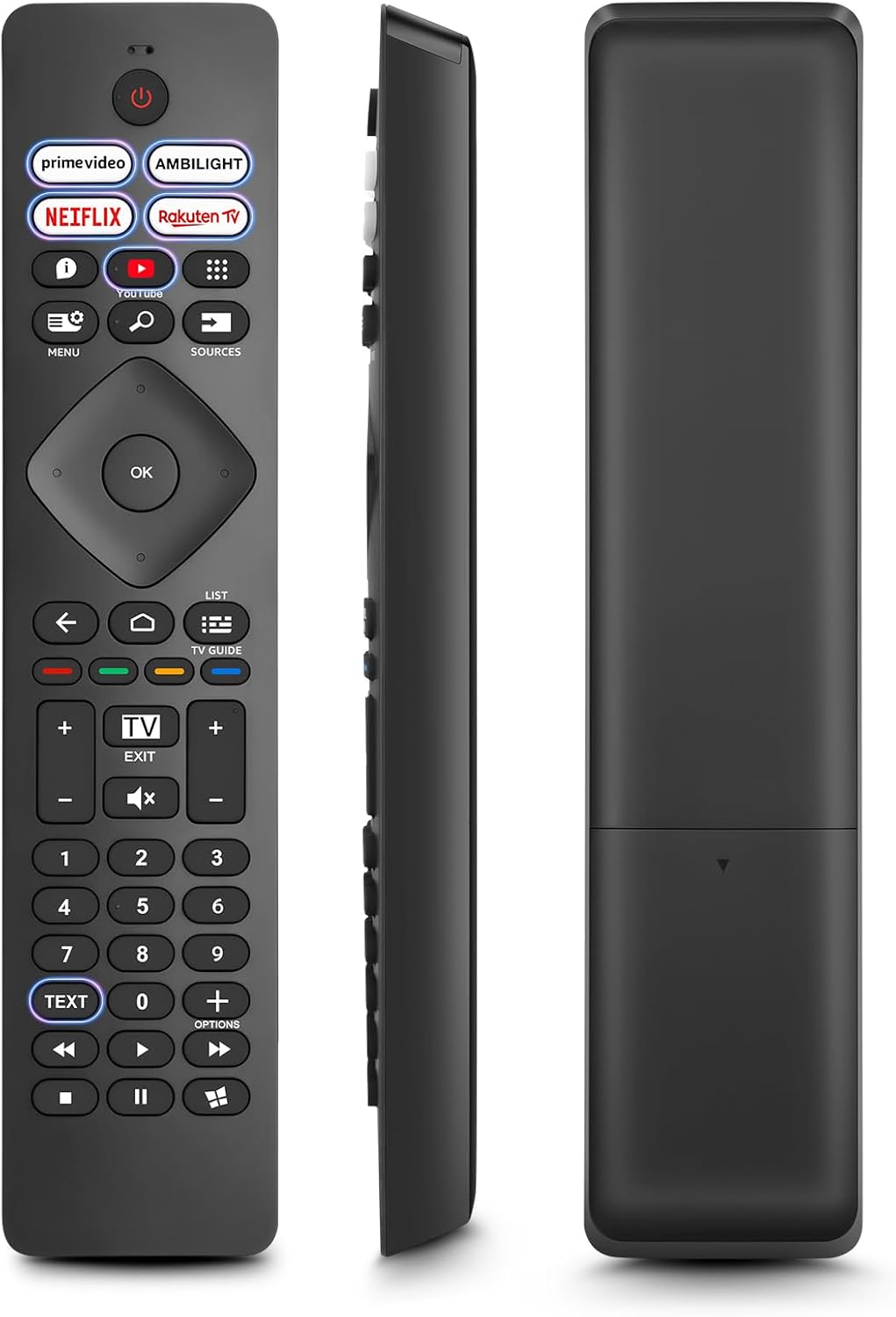
Vaizdas: priekis, šonas ir galas views of the Angrox Universal Replacement Remote Control. This image illustrates the physical design and battery compartment location.
2. Naudojimo instrukcijos
2.1 Mygtukų funkcijosview
Familiarize yourself with the remote control's buttons and their primary functions.
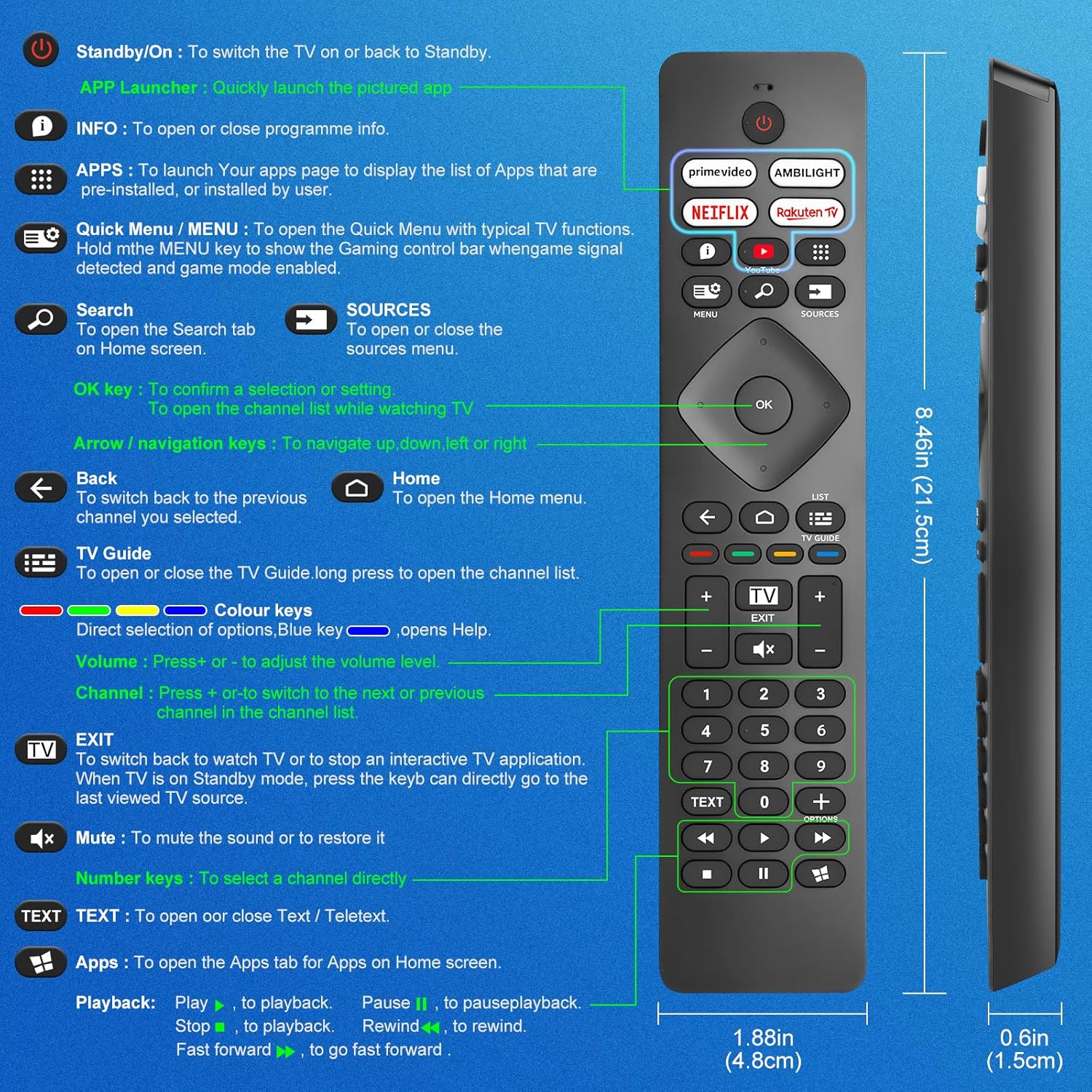
Image: A detailed diagram illustrating each button on the Angrox remote control and its corresponding function.
Detailed Button Descriptions:
- Standby/On (Power Button): Norėdami įjungti televizorių arba grįžti į budėjimo režimą.
- APP Launcher: Quickly launch the pictured app.
- INFORMACIJA: To open or close programme info.
- PROGRAMOS: To launch your apps page to display the list of apps that are pre-installed or installed by the user.
- Quick Menu / MENU: To open the Quick Menu with typical TV functions. Hold the MENU key to show the Gaming control bar when game signal detected and game mode enabled.
- Paieška: To open the Search tab on Home screen.
- ŠALTINIAI: To open or close the sources menu.
- Gerai klavišas: To confirm a selection or setting. To open the channel list while watching TV.
- Arrow/Navigation keys: Norėdami naršyti aukštyn, žemyn, į kairę arba į dešinę.
- Atgal: Norėdami grįžti į ankstesnį pasirinktą kanalą.
- Pagrindinis puslapis: To open the Home menu.
- TV gidas: To open or close the TV Guide. Long press to open the channel list.
- Colour keys (Red, Green, Yellow, Blue): Direct selection of options. Blue key opens Help.
- Tūris +/-: Norėdami reguliuoti garsumo lygį.
- Kanalas +/-: Norėdami perjungti į kitą arba ankstesnį kanalą kanalų sąraše.
- UŽDARYTI: To switch back to watch TV or to stop an interactive TV application. When TV is on Standby mode, press the key to directly go to the last viewed TV source.
- Nutildyti: Norėdami nutildyti arba atkurti garsą.
- Skaičių klavišai (0–9): Norėdami tiesiogiai pasirinkti kanalą.
- TEKSTAS: To open or close Text / Teletext.
- Apps (Netflix, Prime Video, Rakuten TV, YouTube): Quick access to dedicated streaming applications.
- Atkūrimo valdikliai (leisti, pristabdyti, sustabdyti, atsukti atgal, persukti pirmyn): Medijos atkūrimui.
2.2 spartieji mygtukai
The remote features dedicated shortcut buttons for popular streaming services and Ambilight control.

Image: The Angrox remote control with highlighted shortcut buttons for Prime Video, Ambilight, Netflix, Rakuten TV, and YouTube.
- Pagrindinis vaizdo įrašas: Direct access to Amazon Prime Video.
- Ambilight: Control Philips Ambilight features.
- „Netflix“: Tiesioginė prieiga prie „Netflix“.
- Rakuten TV: Direct access to Rakuten TV.
- YouTube: Tiesioginė prieiga prie „YouTube“.
3. Suderinamumas
This Angrox replacement remote control is universally compatible with a wide range of Philips Smart TVs, including:

Image: Visual representation of the Angrox remote's compatibility with Philips 4K Ambilight TV, 4K Ultra HD TV, LED 4K TV, and OLED 4K TV.
- 4K „Ambilight“ televizorius
- 4K Ultra HD televizorius
- LED 4K televizorius
- OLED 4K televizorius
It is designed to function with all Philips Smart TV models that utilize an infrared remote control.
4. Veikimo ypatybės

Image: Graphics indicating a 0.2-second fast response and a 10-meter transmitting distance for the remote control.
- Greitas atsakymas: Enjoy a quick response time of approximately 0.2 seconds for button presses.
- Perdavimo atstumas: Effective operating range up to 10 meters (approximately 33 feet).
5. Priežiūra
- Valymas: Nuotolinio valdymo pultą valykite minkšta, sausa šluoste. Venkite naudoti skystus valiklius ar abrazyvines medžiagas.
- Akumuliatoriaus priežiūra: If the remote will not be used for an extended period, remove the batteries to prevent leakage and potential damage. Replace batteries when the remote's response becomes sluggish or inconsistent.
- Saugykla: Nuotolinio valdymo pultą laikykite vėsioje, sausoje vietoje, apsaugotoje nuo tiesioginių saulės spindulių ir ekstremalių temperatūrų.
6. Problemų sprendimas
6.1 Nuotolinio valdymo pultas nereaguoja
- Patikrinkite baterijas: Ensure batteries are inserted correctly with the correct polarity (+/-). Replace old or depleted batteries with new AAA alkaline batteries.
- Matymo linija: Įsitikinkite, kad tarp nuotolinio valdymo pulto ir televizoriaus infraraudonųjų spindulių jutiklio yra aiškus matomumas. Kliūtys gali blokuoti signalą.
- Nuotolinis jutiklis: Įsitikinkite, kad televizoriaus infraraudonųjų spindulių jutiklis nėra užblokuotas ar nešvarus.
6.2 Limited Functionality
- While this remote is broadly compatible, some specific advanced functions unique to certain original Philips remote models might not be replicated. Verify the button functions against the provided diagram.
6.3 Ambilight Functionality
Kai kurie vartotojaiviews indicate that Ambilight functionality might vary. If your Ambilight button does not work as expected, ensure your TV's Ambilight feature is enabled and configured correctly in your TV settings.
7. Specifikacijos
| Funkcija | Detalė |
|---|---|
| Prekės ženklas | Angrox |
| Modelis | pour Philips TV |
| Suderinami įrenginiai | Philips Smart TV (4K Ambilight, 4K UHD, LED 4K, OLED 4K) |
| Ypatinga funkcija | Universalus |
| Jungties tipas | Infraraudonųjų spindulių |
| Baterijos tipas | 2 x AAA šarminės baterijos (nepridedamos) |
| Prekės matmenys | 22.7 x 6.2 x 2.4 cm |
| Prekės svoris | 60 g |
| Spalva | Juoda |
Pastaba: specifikacijos gali būti keičiamos be išankstinio įspėjimo.
8. Garantija ir palaikymas
For product support or warranty inquiries, please contact your retailer or the manufacturer, Angrox, directly. Please refer to your purchase documentation for specific warranty terms and contact information.
Gamintojas: Angrox
ASIN: B0F83X2FQG


