1. Įvadas
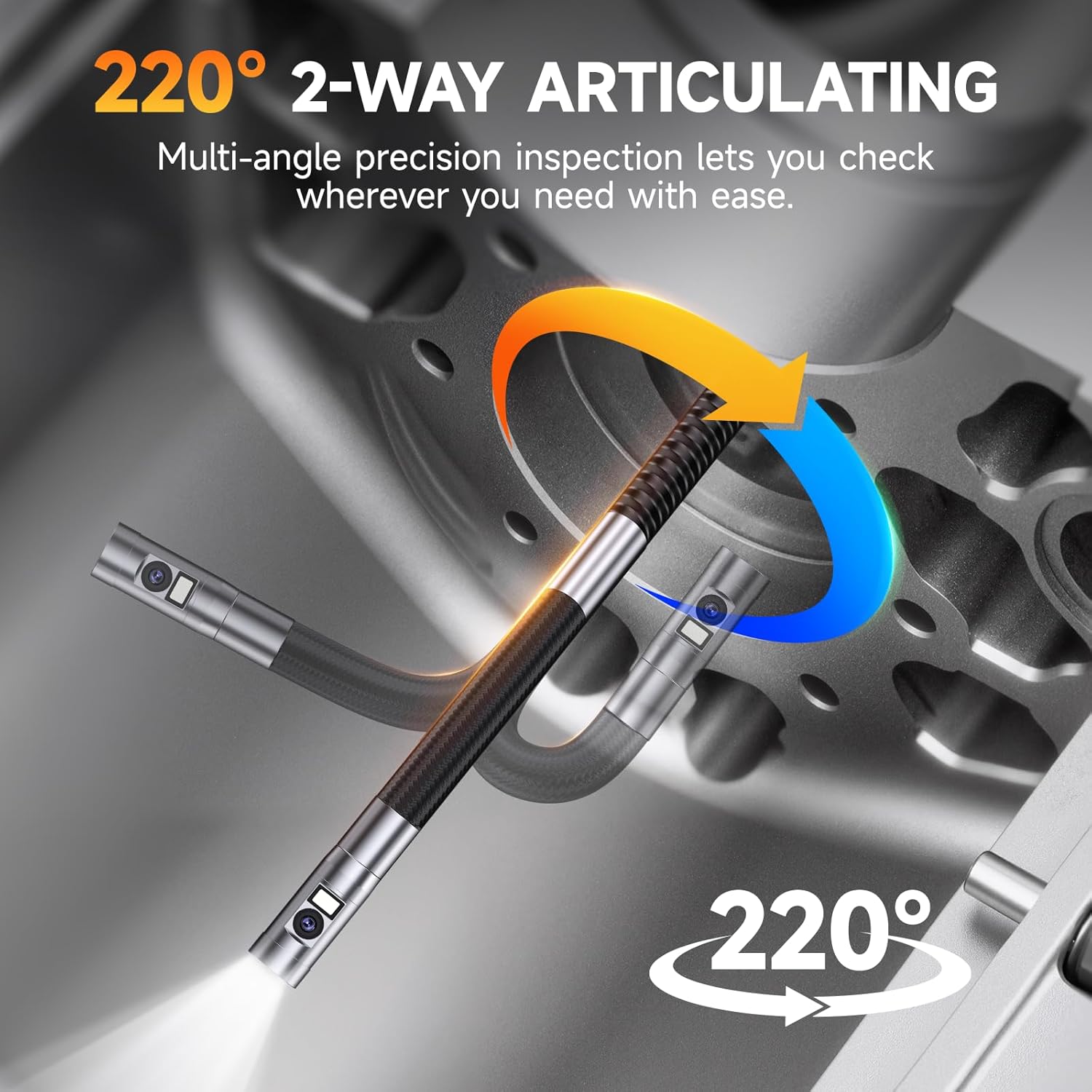
The FOXWELL FY406D is an advanced industrial endoscope designed for precise inspections in confined or hard-to-access areas. This device features dual lenses and a 2-way 220° articulating camera, providing multi-angle visibility with exceptional clarity. It is suitable for professionals in automotive, HVAC, plumbing, and general home inspection applications. This manual provides essential information for the safe and effective operation of your FY406D borescope.
2. Kas yra dėžutėje
Carefully unpack your FOXWELL FY406D borescope and verify that all items listed below are present:
- 1x Articulating Borescope (Main Unit)
- 1x 2-in-1 Charging and Data Transfer Cable (USB-C)
- 1x Carrying Case Bag
- 1x User’s Manual (This Document)
- 2x Small Tips (Accessories for probe)
3. Produktas baigtasview ir Savybės
The FOXWELL FY406D is engineered for high-performance inspection. Familiarize yourself with its key components and capabilities.
3.1. Dual Lens System for Enhanced Visibility

The borescope features a dual-lens system, allowing users to switch between a front view, a side view, or a split-screen dual view for comprehensive inspection without changing probes.
3.2. 2-Way 220° Articulation Control

The probe offers 2-way 220° articulation, enabling precise navigation around corners and obstacles in tight spaces. This feature is crucial for detailed inspections of engine components or wall cavities.
3.3. Ultra-Slim 6.5mm Probe
The 6.5mm (0.25 inch) diameter probe allows for easier entry into very tight spaces, such as spark plug holes or small pipe openings, compared to larger standard probes.
3.4. 4.3" IPS HD True Color Display

The device features a 4.3-inch IPS screen that provides clear, high-definition images with accurate color reproduction. It also displays real-time temperature readings.
3.5. Adjustable LED Illumination and IP67 Waterproof Probe

Equipped with 6 front LEDs (5000 lux) and 1 side LED (8000 lux), all with 3 adjustable brightness levels, the probe ensures optimal visibility in dark or damp environments. The IP67 waterproof rating protects the probe from water ingress, and overheat protection automatically shuts off the device if temperatures exceed 70°C.
3.6. Multi-Zoom Functionality

The borescope supports 2x and 4x digital zoom, allowing users to magnify details for closer examination of defects or features.
3.7. Įrašymas ir saugojimas
The device includes 32GB of onboard memory, capable of storing over 50 videos or 10,000 photos. It supports video recording with audio and high-resolution image capture. Files can be transferred via the USB-C cable.
4. Sąranka
4.1. Įrenginio įkrovimas
- Connect the provided 2-in-1 USB-C cable to the charging port on the borescope.
- Kitą USB-C laido galą prijunkite prie suderinamo USB maitinimo adapterio (nepridedamas) arba kompiuterio USB prievado.
- The charging indicator on the device will illuminate. A full charge typically takes approximately 4 hours, providing up to 4 hours of continuous operation.
4.2. Attaching Small Tips (Optional)
The borescope comes with two small tips (e.g., hook, magnet). These can be screwed onto the end of the probe for retrieving lost items or manipulating objects in tight spaces. Ensure the device is powered off before attaching or detaching tips.
5. Naudojimo instrukcijos
5.1. Įjungimas/išjungimas
- To power on: Press and hold the power button until the screen illuminates.
- To power off: Press and hold the power button until the screen shuts down.
5.2. Naršymas sąsajoje
The device features intuitive buttons for navigation and control:
- Gerai mygtukas: Confirms selections or takes photos/starts video recording.
- Meniu mygtukas: Accesses settings and playback modes.
- Rodyklės aukštyn/žemyn: Navigate menus, adjust zoom, or control articulation.
- Artikuliacijos vairasvirtė: Controls the bending of the probe tip.
5.3. LED ryškumo reguliavimas
Press the dedicated LED button to cycle through the three brightness levels (Low, Medium, High) or to turn the lights off. This helps optimize visibility and reduce glare in various inspection environments.
5.4. Switching Camera Views
Paspauskite fotoaparatą view button to toggle between front camera view, šoninė kamera viewarba padalinto ekrano režimą view displaying both simultaneously.
5.5. Nuotraukų ir vaizdo įrašų fiksavimas
- Norėdami nufotografuoti: Gyvai view, press the OK button once.
- Norėdami įrašyti vaizdo įrašą: Gyvai view, press and hold the OK button to start recording. Press and hold again to stop.
- Užfiksuota medija išsaugoma vidinėje 32 GB atmintyje.
5.6. Zoom and Image Rotation
- Use the designated zoom buttons (or arrow keys in some modes) to apply 2x or 4x digital zoom.
- The device supports 360° image rotation, accessible via the menu, to adjust the orientation of the live feed or captured images.
5.7. File Perdavimas
Connect the borescope to a computer using the provided USB-C cable. The device will appear as a removable storage device, allowing you to access and transfer photos and videos.
6. Priežiūra
6.1. Cleaning the Probe and Lenses
- After each use, especially in dirty or oily environments, gently wipe the probe and camera lenses with a soft, damp audinys.
- For stubborn grime, use a small amount of isopropyl alcohol on a cotton swab. Ensure no liquid enters the main unit.
- Nenaudokite abrazyvinių valiklių ar tirpiklių.
6.2. Akumuliatoriaus priežiūra
- Reguliariai įkraukite bateriją, net jei įrenginys nenaudojamas dažnai, kad palaikytumėte baterijos būklę.
- Venkite ilgesnį laiką visiškai iškrauti akumuliatorių.
- Prietaisą laikykite vėsioje, sausoje vietoje, apsaugotoje nuo tiesioginių saulės spindulių.
6.3. Sandėliavimas
When not in use, store the borescope and its accessories in the provided carrying case to protect it from dust, impacts, and environmental damage.
7. Problemų sprendimas
If you encounter issues with your FOXWELL FY406D, refer to the following common problems and solutions:
| Problema | Galima priežastis | Sprendimas |
|---|---|---|
| Įrenginys neįsijungia | Low battery; Faulty power button | Visiškai įkraukite įrenginį. Jei problema išlieka, susisiekite su palaikymo tarnyba. |
| Poor image quality / Dark image | Dirty lens; Insufficient lighting | Clean the camera lens. Increase LED brightness. |
| Probe articulation not working | Mechanical obstruction; Internal issue | Ensure no physical obstruction. Do not force articulation. Contact support if damaged. |
| Negalima perkelti files į kompiuterį | Incorrect cable; Driver issue; Corrupted memory | Use the provided USB-C cable. Try a different USB port or computer. |
| Prietaisas perkaista | Ilgalaikis naudojimas aukštoje temperatūroje | The device has overheat protection and will shut down automatically. Allow it to cool before resuming use. |
8. Specifikacijos
| Funkcija | Detalė |
|---|---|
| Modelis | 406 finansinių metų |
| Zondo skersmuo | 6.5 mm (0.25 coliai) |
| Artikuliacija | 2-Way, 220° |
| Ekranas | 4.3 Inches IPS HD |
| Vaizdo įrašymo raiška | 720p |
| Optinis priartinimas | 4x (Digital) |
| LED apšvietimas | 6 Front LEDs (5000 lux), 1 Side LED (8000 lux), 3 adjustable levels |
| Atsparumo vandeniui lygis | IP67 (zondas) |
| Baterijos tipas | Ličio jonų (2600 mAh) |
| Vidutinis akumuliatoriaus veikimo laikas | Iki 4 valandų |
| Vidinė atmintis | 32 GB |
| Techninės įrangos sąsaja | C tipo USB |
| Prekės svoris | 1.04 kg |
| Gaminio matmenys | 21.89 x 12.78 x 5.03 cm |
| Garso įrašymas | Taip |
9. Saugos informacija
- This device is for industrial and home inspection use only. It is NE intended for medical or human body use.
- Nebandykite ardyti ar modifikuoti įrenginio. Tai panaikins garantiją ir gali sukelti žalos ar sužalojimų.
- Keep the device away from extreme temperatures, open flames, and corrosive substances.
- Ensure the probe is clean and free of debris before insertion into any cavity.
- Always handle the probe and articulation mechanism gently to prevent damage.
10. Garantija ir palaikymas
FOXWELL products are designed for reliability and performance. For warranty information, technical support, or service inquiries, please refer to the warranty card included with your product or visit the official FOXWELL website. Please have your product model (FY406D) and purchase details ready when contacting support.


