1. Įvadas
This manual provides detailed instructions for the setup, operation, and maintenance of your HISTTON H4-T Industrial Mini PC. Please read this manual thoroughly before using the device to ensure proper functionality and safety.
2. Saugos informacija
- Užtikrinkite maitinimo šaltinio ttage atitinka įrenginio reikalavimus.
- Nelaikykite įrenginio drėgmės, tiesioginių saulės spindulių ar ekstremalių temperatūrų veikiamo.
- Venkite užkimšti ventiliacijos angas.
- Nebandykite patys atidaryti ar taisyti įrenginio. Kreipkitės į kvalifikuotus techninės priežiūros darbuotojus.
- Saugokite įrenginį nuo stiprių magnetinių laukų.
3. Pakuotės turinys
Patikrinkite, ar pakuotėje yra visi reikalingi daiktai:
- 1 x HISTTON Mini PC
- 1x maitinimo adapteris
- 1 x Naudotojo vadovas (šis dokumentas)
- 1x HDMI laidas
- Screws (for mounting/storage installation)
- WiFi antenos
- VESA Mount (if included with specific models)
- SATA Cable (for 2.5-inch drive installation)

4. Produktas baigtasview
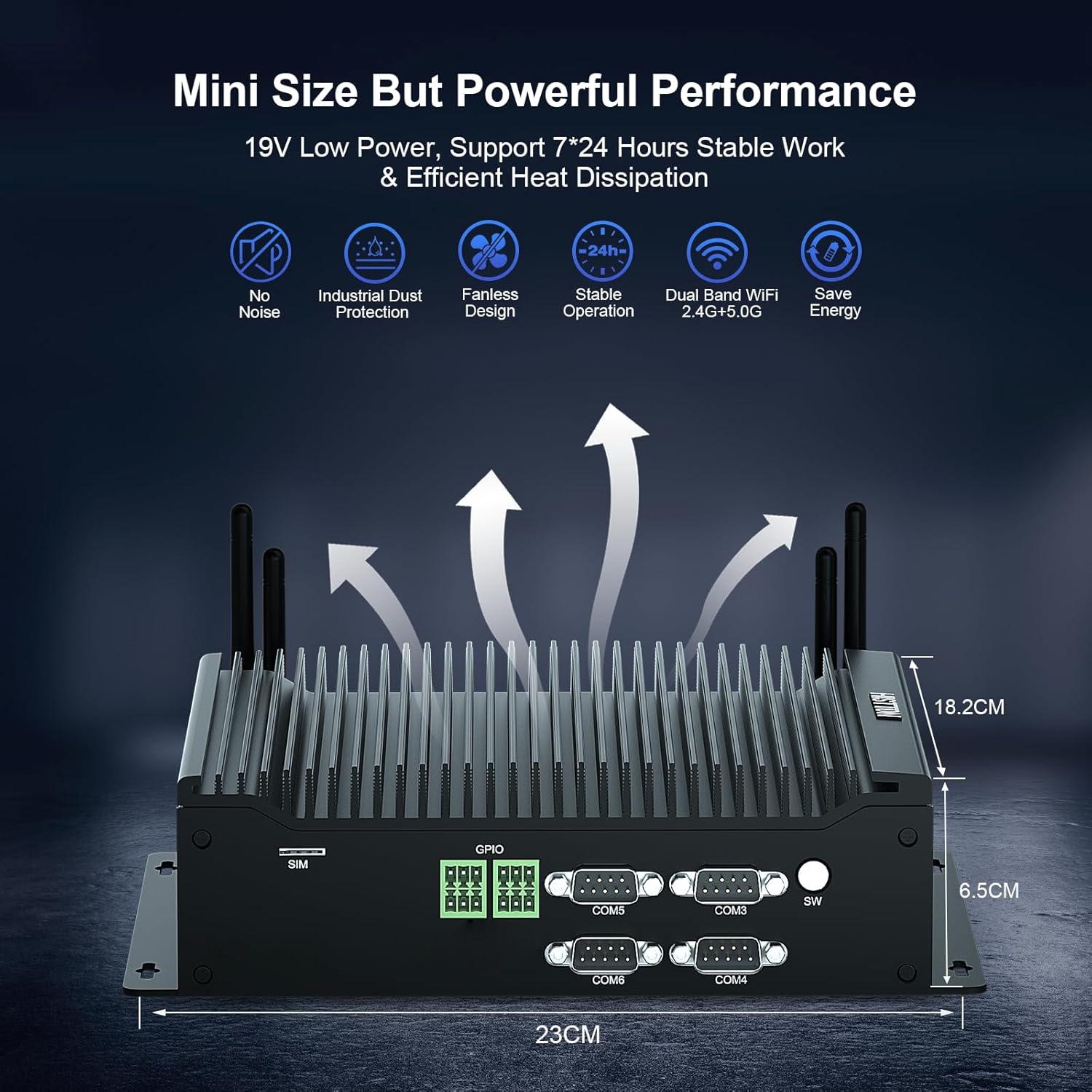
The HISTTON H4-T Mini PC is a compact, fanless industrial computer designed for various applications requiring stable performance and extensive connectivity. It features an Intel Core i7-10710U processor and supports multiple display outputs.
4.1 Priekiniai ir galiniai skydai

The device features a comprehensive set of ports for various industrial and general computing needs. These include multiple USB ports, LAN ports, COM ports, and video outputs.
4.2 Pagrindinės savybės
- Procesorius: Intel Core i7-10710U (10th Gen) with up to 4.70 GHz turbo frequency.
- Grafika: Intel UHD Graphics for 10th Gen Processors, supporting 4K resolution.
- Atmintis: Dual DDR4 SO-DIMM slots, expandable up to 64GB.
- Saugykla: M.2 2280 NVME PCIe 3.0x4 / SATA 3 SSD slot and a 2.5-inch SATA HDD/SSD bay.
- Ekrano išvestis: HD, DisplayPort (DP), and Type-C for triple 4K display support.
- Tinklas: 2 x RJ45 Intel I210/211 Gigabit LAN, Dual-band WiFi 5 (2.4G+5.0G), Bluetooth 4.2.
- Ryšys: 4 x USB 3.0, 4 x USB 2.0, 6 x DB9pin COM ports (configurable for RS232/RS422/RS485), 2 x 6pin GPIO, 1 x SIM card slot.
- Aušinimas: Fanless design for silent operation and industrial dust protection.
- Operacinė sistema: Pre-installed Windows 11 Pro (64-bit, activated) with support for Ubuntu.


5. Sąrankos instrukcijos
5.1 Išorinių įrenginių prijungimas
- Prijungti ekraną: Use the provided HDMI cable or a DisplayPort/Type-C cable to connect your monitor(s) to the Mini PC. The device supports up to three 4K displays simultaneously.
- Prijunkite klaviatūrą ir pelę: Plug your USB keyboard and mouse into any available USB ports (USB 2.0 or USB 3.0).
- Prijunkite tinklą: For a wired connection, connect an Ethernet cable to one of the RJ45 LAN ports. For wireless, attach the included WiFi antennas to the designated ports.
- Prijungti garsą: If using external speakers or headphones, connect them to the SPK (speaker) port. A microphone can be connected to the MIC port.

5.2 Įjungimas
- Prijunkite maitinimo adapterį: Plug the power adapter into the DC 19V 5A input port on the Mini PC, then plug the adapter into a power outlet.
- Maitinimo mygtukas: Press the power button located on the front panel to turn on the Mini PC.
- The system will boot into Windows 11 Pro. Follow the on-screen instructions for initial setup if prompted.
6. Naudojimo instrukcijos
6.1 Operacinė sistema
Your HISTTON H4-T Mini PC comes with Windows 11 Pro (64-bit) pre-installed and activated. It also supports other operating systems like Ubuntu, allowing for flexible deployment in various environments.
- „Windows 11 Pro“: Utilize standard Windows features for productivity, multimedia, and internet browsing.
- Ubuntu Support: For users preferring Linux-based systems, the hardware is compatible with Ubuntu installations. Refer to Ubuntu's official documentation for installation procedures.
6.2 Tinklo ryšys
- Laidinis LAN: The two Gigabit Ethernet ports provide stable and high-speed wired network access.
- Wireless (WiFi & Bluetooth): The dual-band WiFi 5 (2.4G+5.0G) and Bluetooth 4.2 modules enable wireless internet access and connection to Bluetooth peripherals. Ensure antennas are securely attached for optimal performance.

6.3 Industrial Features
The H4-T is designed for industrial applications, offering robust connectivity:
- COM prievadai: Six DB9pin COM ports support RS232, with four of them configurable for RS422/RS485, suitable for connecting industrial control devices.
- GPIO: Two 6pin GPIO interfaces provide programmable input/output capabilities for custom applications.
- SIM kortelės lizdas: Supports 4G/5G modules (module not included by default) for mobile network connectivity in remote locations.
7. Priežiūra
The fanless design of the HISTTON H4-T Mini PC significantly reduces maintenance requirements by eliminating moving parts and minimizing dust accumulation. However, regular care is still recommended.
- Valymas: Periodically wipe the exterior of the Mini PC with a soft, dry cloth. Avoid using liquid cleaners or solvents.
- Programinės įrangos atnaujinimai: Siekiant užtikrinti optimalų našumą ir saugumą, nuolat atnaujinkite operacinę sistemą ir tvarkykles.
- Aplinkos sąlygos: Ensure the device is operated within recommended temperature and humidity ranges to prolong its lifespan.
- Saugyklos išplėtimas: If installing additional storage (2.5-inch HDD/SSD or M.2 SSD), ensure the device is powered off and disconnected from power. Follow proper anti-static procedures.
8. Problemų sprendimas
If you encounter issues with your HISTTON H4-T Mini PC, refer to the following common problems and solutions:
| Problema | Galima priežastis | Sprendimas |
|---|---|---|
| Nėra maitinimo / Įrenginys neįsijungia | Power adapter not connected or faulty; Power outlet issue; Power button not pressed correctly. | Ensure power adapter is securely connected to both the PC and a working power outlet. Try a different outlet. Press the power button firmly. |
| Monitoriuje nėra vaizdo | Display cable loose or faulty; Incorrect input selected on monitor; Monitor off or faulty. | Check display cable connections. Ensure monitor is on and set to the correct input source (HDMI, DP, Type-C). Test with a different monitor or cable if possible. |
| Nėra interneto ryšio (laidinio) | Atsilaisvinęs arba sugedęs eterneto kabelis; maršrutizatoriaus / modemo problema; tinklo tvarkyklės problema. | Verify Ethernet cable is securely connected. Restart your router/modem. Check network adapter status in OS. |
| Nėra interneto ryšio (belaidžio) | WiFi antennas not connected; WiFi disabled; Incorrect WiFi password; Router issue. | Ensure WiFi antennas are attached. Check WiFi settings in OS. Verify WiFi password. Restart your router. |
| Peripherals (USB devices) not working | Loose connection; Driver issue; Faulty peripheral. | Try a different USB port. Reinstall or update drivers for the peripheral. Test the peripheral on another computer. |
9. Specifikacijos
| Funkcija | Detalė |
|---|---|
| Modelio pavadinimas | H4-T |
| Procesorius | Intel Core i7-10710U (10th Gen), 6 Cores, 12 Threads, 12M Cache, up to 4.70 GHz |
| Grafikos koprocesorius | „Intel“ UHD grafika, skirta 10-osios kartos „Intel“ procesoriams |
| RAM | 32GB DDR4 SO-DIMM (Expandable up to 64GB) |
| Kietasis diskas | 512GB M.2 NVMe SSD (Supports M.2 2280 NVME PCIe 3.0x4 / SATA 3 SSD and 2.5 inch SATA HDD/SSD) |
| Operacinė sistema | Windows 11 Pro (64-bit, activated), Supports Ubuntu |
| Ekrano išvestis | HD, DisplayPort (DP), Type-C (Supports Triple 4K Display) |
| LAN | 2 x RJ45 Intel I210/211 Gigabit LAN |
| Belaidis ryšys | Dual-band WiFi 5 (2.4G+5.0G), Bluetooth 4.2 |
| USB prievadai | 4x USB 3.0, 4x USB 2.0 |
| COM prievadai | 6 x DB9pin (2 x RS232, 4 x RS422/RS485 configurable) |
| Kitos sąsajos | 2 x 6pin GPIO, 1 x SIM card slot, 1 x SPK, 1 x MIC |
| Maitinimo šaltinis | DC19V 5A |
| Energijos suvartojimas | 15W-20W |
| Aušinimas | Ventiliatoriaus dizainas |
| Matmenys (IxPxH) | 9.06 x 7.17 x 2.56 colio (23 x 18.2 x 6.5 cm) |
| Prekės svoris | 6.38 svaro (apie 2.9 kg) |
10. Informacija apie garantiją
HISTTON products are covered by a standard manufacturer's warranty. Please refer to the warranty card included with your product or visit the official HISTTON webIšsamias garantijos sąlygas ir nuostatas rasite svetainėje. Išsaugokite pirkimo įrodymą, jei prireiktų pateikti garantijos pretenzijas.
11. Pagalba klientams
For technical assistance, troubleshooting, or any questions regarding your HISTTON H4-T Mini PC, please contact HISTTON customer support. Contact information can typically be found on the official HISTTON webvietoje arba ant pakavimo medžiagų.
Internetiniai ištekliai: For additional support and driver downloads, visit the official HISTTON websvetainę.


