1. Įvadas
Thank you for choosing the Novodesk AZ5130 6-in-1 Automatic Vacuum Sealer Machine. This manual provides essential information for the safe and efficient operation, maintenance, and troubleshooting of your new appliance. Please read these instructions thoroughly before first use and retain them for future reference.

Image 1.1: The Novodesk AZ5130 Vacuum Sealer in operation, sealing food for preservation.
2. Svarbios saugos instrukcijos
Naudojant elektros prietaisus, visada reikia laikytis pagrindinių saugos priemonių, kad būtų sumažinta gaisro, elektros smūgio ir žmonių sužalojimo rizika, įskaitant:
- Prieš naudodami šį prietaisą perskaitykite visas instrukcijas.
- Do not operate the appliance with a damaged power cord or plug. If the cord or plug is damaged, contact customer support for assistance.
- Nemerkite prietaiso, maitinimo laido ar kištuko į vandenį ar kitus skysčius.
- Šis prietaisas nėra skirtas naudoti asmenims (įskaitant vaikus), kurių fizinės, jutimo ar psichinės galimybės yra ribotos arba kurie neturi patirties ir žinių, nebent už jų saugumą atsakingas asmuo juos prižiūrėtų arba instruktuotų, kaip naudoti prietaisą. .
- Atidžiai prižiūrėti būtina, kai bet kurį prietaisą naudoja vaikai arba jį naudoja šalia vaikų.
- Ištraukite kištuką iš elektros lizdo, kai nenaudojate ir prieš valydami. Prieš uždėdami ar nuimdami dalis ir prieš valydami prietaisą, leiskite atvėsti.
- Nenaudokite priedų, kurių nerekomenduoja gamintojas.
- Nenaudoti lauke.
- Nedėkite ant įkaitusios dujinės ar elektrinės viryklės ar šalia jos, taip pat į įkaitintą orkaitę.
- Always ensure the lid is properly latched before operating.
- Use only vacuum sealer bags designed for vacuum sealing.
3. Pakuotės turinys
Carefully unpack your Novodesk AZ5130 Vacuum Sealer and check that all items are present and in good condition. If any items are missing or damaged, please contact customer support.
- 1 x Novodesk AZ5130 Vacuum Sealer Machine
- 1 x maitinimo laidas
- 1 x Vacuum Hose (for external vacuuming)
- 2 x Sealing Foam Gaskets (replacement)
- 6 x Pre-cut Vacuum Bags (3.9" x 7.8")
- 6 x Pre-cut Vacuum Bags (7.8" x 11.8")

Image 3.1: All components included in the Novodesk AZ5130 Vacuum Sealer package.
4. Produktas baigtasview
Familiarize yourself with the various parts and functions of your vacuum sealer.

Image 4.1: Control panel and function buttons of the vacuum sealer.
Valdymo skydelio funkcijos:
- Process Indicator Light: Illuminates to show operating status.
- Sausas režimas: For vacuum sealing dry foods like nuts and grains.
- Drėgnas režimas: For vacuum sealing foods with a small amount of liquid.
- Pulso funkcija: Allows manual control of the vacuum process, ideal for fragile foods.
- Seal Function: Seals bags without vacuuming.
- Stop mygtukas: Sustabdo esamą operaciją.
Image 4.2: Internal components of the vacuum sealer.
Pagrindiniai komponentai:
- Vakuuminė kamera: Vieta, iš kurios iš maišelio pašalinamas oras.
- Silicone Strip: Helps create a tight seal.
- Sandarinimo juosta: Heats to create the bag seal (4mm wide).
- Foam Seal Ring: Ensures proper vacuum.
- Cover Slaps: Prevents the vacuum bag from coming out of the vacuum chamber.
- External Sliding Cutter: Integrated cutter for custom bag sizes.
- External VAC Port: For connecting the vacuum hose to jars and containers.
5. Sąranka
Before first use, ensure the appliance is clean and dry. Place the vacuum sealer on a flat, stable surface.
Pradiniai sąrankos žingsniai:
- Connect the power cord to the appliance and then to a suitable electrical outlet.
- Prepare your vacuum bag with food, ensuring the open end is clean and dry. Leave at least 2-3 inches of space between the food and the top of the bag.
6. Naudojimo instrukcijos
6.1. Basic Vacuum Sealing (Dry & Moist Modes)
Follow these steps for standard vacuum sealing of food bags:
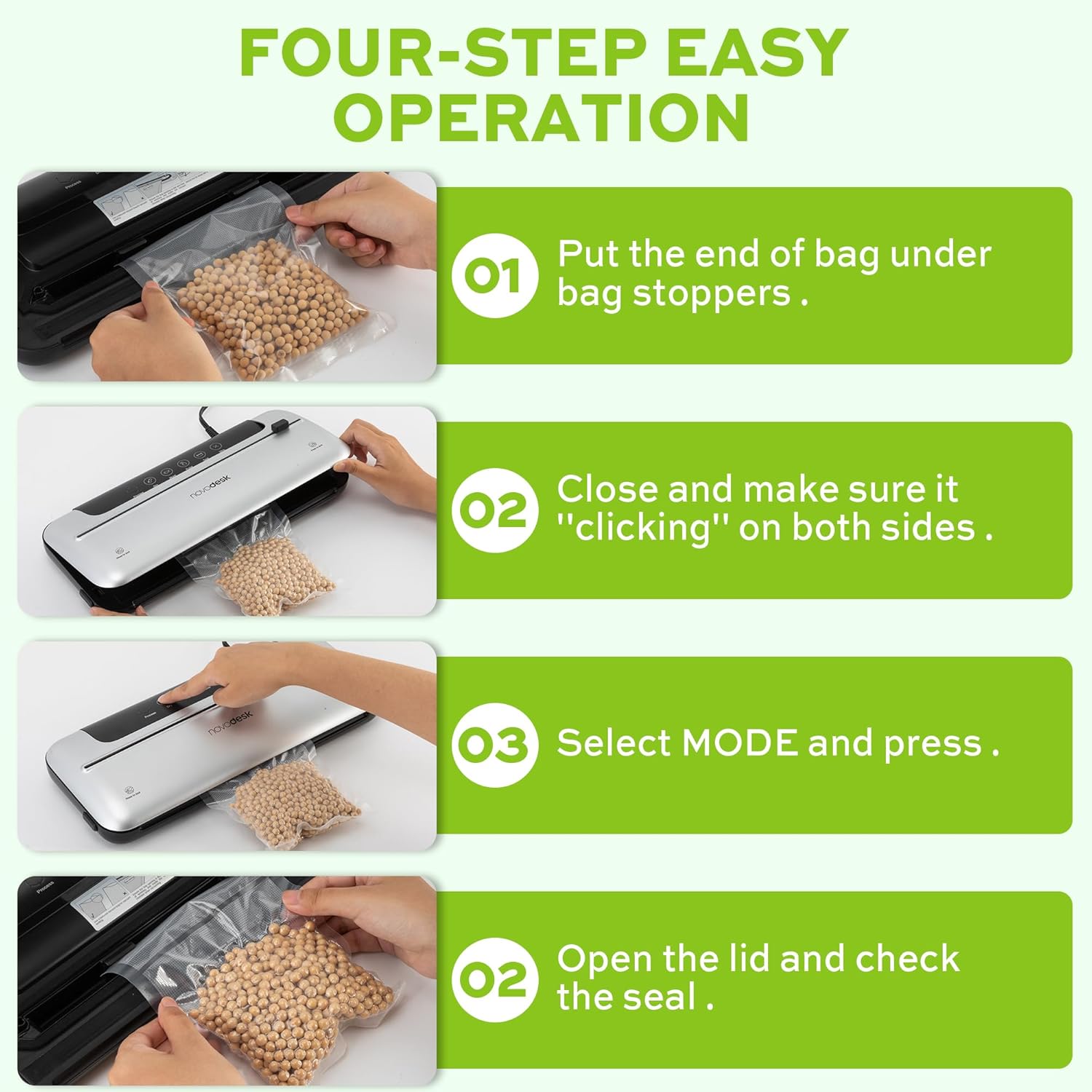
Image 6.1: Four-step easy operation for vacuum sealing.
- Paruoškite maišelį: Place the open end of the vacuum bag under the bag stoppers, ensuring it is flat and centered within the vacuum chamber.
- Uždarykite dangtį: Firmly close the lid of the vacuum sealer. Press down on both sides until you hear a "clicking" sound, indicating that the lid is securely latched.
- Pasirinkite režimą: Choose the appropriate mode for your food:
- Paspauskite Sausas button for dry foods.
- Paspauskite Drėgnas button for moist foods.
- Patikrinkite antspaudą: Once the process is complete and the indicator light turns off, open the lid and remove the sealed bag. Inspect the seal to ensure it is airtight.
6.2. Impulso funkcija
The Pulse function provides manual control over the vacuum process, which is ideal for delicate or fragile foods that could be crushed by full vacuum pressure.
- Follow steps 1 and 2 from "6.1. Basic Vacuum Sealing".
- Paspauskite ir palaikykite Pulsas button. The machine will begin to vacuum.
- Atleiskite Pulsas button when the desired vacuum level is reached.
- Paspauskite Antspaudas button to seal the bag.
- Atidarykite dangtelį ir išimkite sandarų maišelį.
6.3. Tik sandarinimo funkcija
Use the Seal function to create a seal without vacuuming, useful for making custom-sized bags from a roll or resealing snack bags.
- Place the open end of the bag onto the sealing strip.
- Tvirtai uždarykite dangtelį, kol jis spragtelės.
- Paspauskite Antspaudas button. The machine will heat and seal the bag.
- Once the sealing process is complete, open the lid and remove the sealed bag.
6.4. External Vacuum Function (for Jars/Containers)
Your vacuum sealer includes an external vacuum hose for use with compatible vacuum-sealable jars, containers, and wine stoppers.

Image 6.2: Using the external vacuum system with various containers.
- Prepare your vacuum-sealable jar or container with food. Ensure the lid is properly placed.
- Insert one end of the vacuum hose into the external VAC port on the vacuum sealer.
- Insert the other end of the vacuum hose into the port on your vacuum-sealable jar or container.
- Close the lid of the vacuum sealer (no bag needed inside).
- Paspauskite External VAC button (if available, otherwise use Dry/Moist mode to activate vacuum pump). The machine will begin to remove air from the container.
- Once the vacuum process is complete, remove the hose. The container should now be sealed.
6.5. Using the External Sliding Cutter
The integrated sliding cutter allows you to create custom-sized bags from a roll of vacuum sealer material.
- Place the vacuum bag roll across the cutting area.
- Slide the cutter blade across the bag material to achieve the desired length.
7. Priežiūra ir valymas
Reguliarus valymas ir priežiūra užtikrins jūsų vakuuminio pakavimo aparato ilgaamžiškumą ir optimalų veikimą.
Valymo instrukcijos:
- Prieš valydami prietaisą visada ištraukite iš elektros tinklo.
- Nuvalykite mašinos išorę minkšta, damp audinys. Nenaudokite abrazyvinių valiklių ar tirpiklių.
- Clean the vacuum chamber and sealing strip area with a damp cloth. Ensure no food particles or liquids remain.
- The foam seal rings can be removed for cleaning if necessary. Wash with mild soap and water, rinse thoroughly, and allow to air dry completely before reinserting.
- Prieš padėdami prietaisą saugoti arba vėl naudodami, įsitikinkite, kad visos dalys yra visiškai sausos.
Saugykla:
Store the vacuum sealer in a clean, dry place. For best results, store with the lid unlatched to prevent compression of the foam seal rings, which can affect sealing performance over time.
8. Problemų sprendimas
Jei kyla problemų dėl vakuuminio sandariklio, žr. šias dažniausiai pasitaikančias problemas ir sprendimus:
| Problema | Galima priežastis | Sprendimas |
|---|---|---|
| Mašina neįsijungia. | Nėra maitinimo. | Patikrinkite, ar maitinimo laidas tvirtai įjungtas į lizdą ir aparatą. Išbandykite lizdą su kitu prietaisu. |
| Machine vacuums but does not seal. | Sealing strip or foam gasket is dirty/damaged. Bag is not positioned correctly. | Clean the sealing strip and foam gaskets. Ensure the bag is flat and centered over the sealing strip. Replace gaskets if damaged. |
| Machine seals but does not vacuum. | Lid not properly latched. Foam gaskets are dirty or worn. Bag has holes or is not suitable. | Ensure the lid is firmly closed and latched on both sides. Clean or replace foam gaskets. Use proper vacuum sealer bags and check for damage. |
| Vacuum is weak or inconsistent. | Foam gaskets are dirty or worn. Too much liquid in the bag (for Dry mode). | Clean or replace foam gaskets. Use Moist mode for foods with liquid, or pre-freeze liquids. |
| Bag melts during sealing. | Sealing time too long (unlikely for automatic models). | Ensure you are using appropriate vacuum sealer bags. If issue persists, contact customer support. |
If the problem persists after attempting these solutions, please contact Novodesk customer support for further assistance.
9. Specifikacijos
| Prekės ženklas | Novodesk |
| Modelio numeris | AZ5130 |
| Galia / Vattage | 120 vatų |
| ttage | 120 V |
| Medžiaga | Akrilnitrilo butadieno stirenas (ABS) |
| Prekės svoris | 980 g (2.16 svaro) |
| Spalva | Sidabrinis |
| Veikimo režimas | Automatinis |
| Maksimali siurbimo galia | 75 KPa |
| Sandarinimo juostos plotis | 4 mm |
10. Garantija ir palaikymas
Novodesk products are manufactured to high-quality standards. For information regarding warranty coverage, product support, or to purchase replacement parts, please refer to the warranty card included with your product or visit the official Novodesk website. If you have any questions or require assistance, please contact Novodesk customer service.

