1. Įvadas
This manual provides detailed instructions for the safe and efficient use of your Gembird TWST-01-W Transparent Bluetooth Earbuds. These earbuds feature a unique transparent design, offering up to 4 hours of listening time per charge. Key functionalities include automatic music muting for incoming calls, an LCD battery indicator, and a color-changing backlight. Please read this manual thoroughly before operating the device.
2. Pakuotės turinys
Įsitikinkite, kad jūsų siuntinyje yra visi toliau išvardyti daiktai:
- Gembird TWST-01-W Transparent Bluetooth Earbuds (Left and Right)
- Įkrovimo dėklas
- Įkrovimo laidas arba jungtis
- Instrukcijų vadovas
3. Produktas baigtasview
Familiarize yourself with the components of your Gembird TWST-01-W earbuds.

3.1 paveikslas: The Gembird TWST-01-W Transparent Bluetooth Earbuds shown within their charging case. The case features a clear design, revealing the internal components and an LCD display indicating battery levels for both earbuds (L and R) and the case itself.
Pagrindinės funkcijos:
- Skaidrus dizainas: Unique clear housing for both earbuds and charging case.
- Ilgesnis klausymasis: Up to 4 hours of continuous listening per charge.
- Skambučių valdymas: Automatically mutes music for incoming calls.
- Baterijos indikatorius: LCD display on the charging case shows battery levels.
- Dinaminis foninis apšvietimas: Charging case features a color-changing backlight.
- Jutiklinis valdymas: Intuitive touch-sensitive controls for various functions.
- Atsparus vandeniui: Sukurta atlaikyti vandens purslus ir prakaitą.
4. Sąranka
4.1 Pradinis įkrovimas
Prieš pirmą kartą naudodami, visiškai įkraukite ausines ir įkrovimo dėklą.
- Įdėkite abi ausines į įkrovimo dėklą.
- Prijunkite įkrovimo laidą prie dėklo įkrovimo prievado ir prie USB maitinimo šaltinio.
- The LCD display on the case will show the charging status. Allow sufficient time for a full charge.

4.1 paveikslas: Šoninė view of the Gembird TWST-01-W charging case, highlighting its transparent construction and the integrated LCD battery display. The charging port is typically located at the bottom or rear of the case.
4.2 Bluetooth poravimas
Norėdami prijungti ausines prie įrenginio:
- Įsitikinkite, kad ausinės yra įkrautos ir įdėtos į įkrovimo dėklą.
- Atidarykite įkrovimo dėklą. Ausinės automatiškai įsijungs susiejimo režimą (tai nurodys mirksinčios ausinių lemputės).
- Savo įrenginyje (išmaniajame telefone, planšetiniame kompiuteryje ir kt.) eikite į „Bluetooth“ nustatymus ir įjunkite „Bluetooth“.
- Ieškokite available devices and select "Gembird TWST-01-W" from the list.
- Prijungus ausines, bus rodomas sėkmingas susiejimas (pvz., balso pranešimas arba nuolat šviečianti lemputė).
- Vėlesniam naudojimui ausinės automatiškai prisijungs prie paskutinio suporuoto įrenginio, kai bus išimtos iš dėklo.
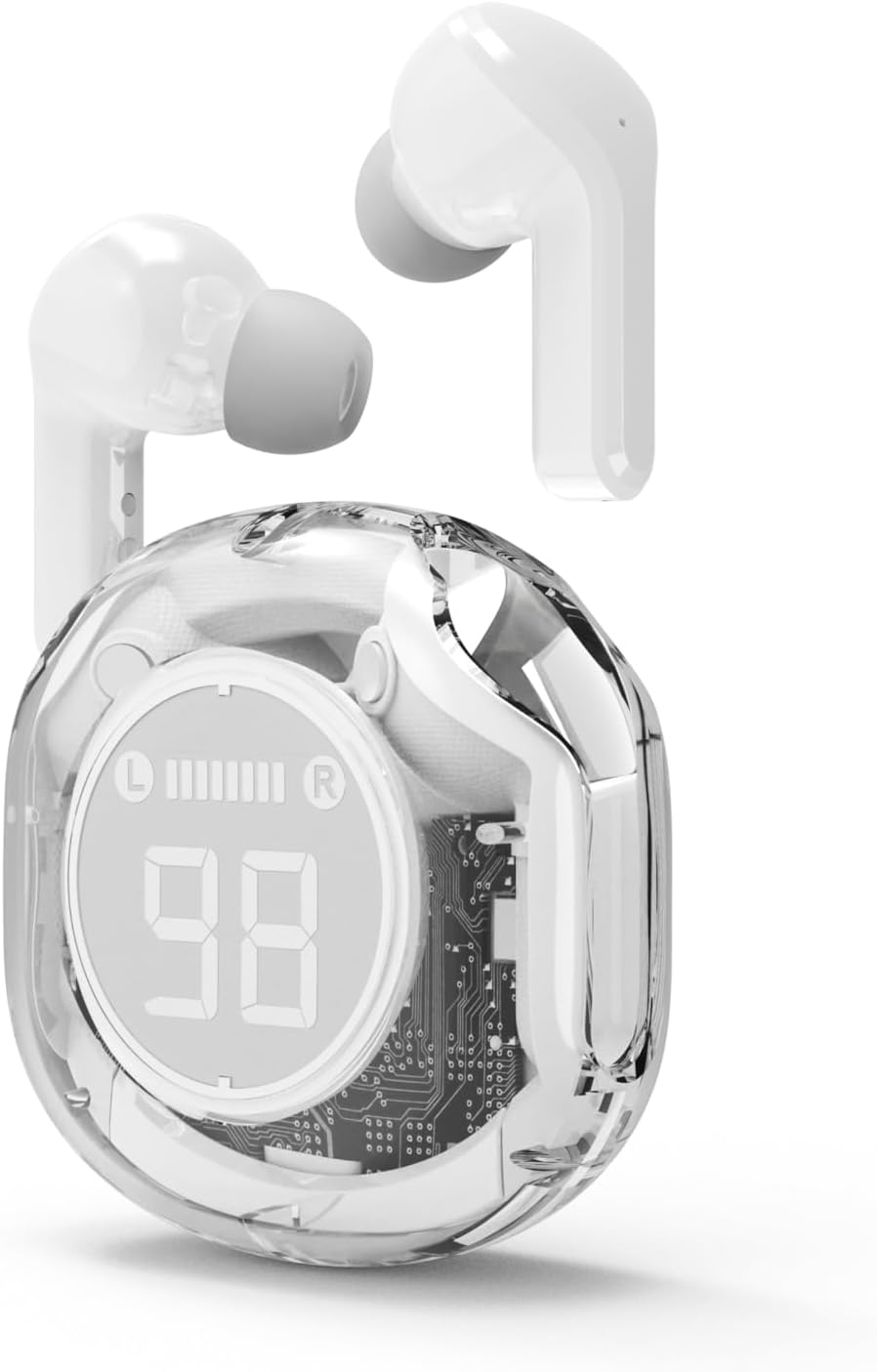
4.2 paveikslas: The Gembird TWST-01-W Transparent Bluetooth Earbuds shown outside their charging case, ready for use or pairing. The transparent design of the earbuds themselves is visible.
5. Naudojimo instrukcijos
The Gembird TWST-01-W earbuds utilize touch controls. Specific gestures may vary slightly; refer to the quick start guide included in your package for precise commands.
| Funkcija | Action (Touch Control) |
|---|---|
| Maitinimas | Išimkite iš įkrovimo dėklo. |
| Išjungti | Įdėkite atgal į įkrovimo dėklą. |
| Leisti / pristabdyti muziką | Vieną kartą bakstelėkite bet kurią ausinę. |
| Kitas takelis | Dukart palieskite dešinįjį ausinės antgalį. |
| Ankstesnis takelis | Dukart palieskite kairįjį ausinės antgalį. |
| Atsiliepti / Baigti skambutį | Vieną kartą bakstelėkite bet kurią ausinę įeinančio skambučio metu. |
| Atmesti skambutį | Įeinančio skambučio metu paspauskite ir 2 sekundes palaikykite nuspaudę bet kurią ausinę. |
| Suaktyvinkite balso padėjėją | Triple tap on either earbud (functionality depends on device support). |
Note: Touch control sensitivity and specific functions may vary. Experiment to find the optimal touch points.
6. Įkrovimas
6.1 Ausinių įkrovimas
To charge the earbuds, simply place them into their designated slots within the charging case. Ensure the charging contacts align. The LCD display on the case will show the individual battery levels of the left (L) and right (R) earbuds.
6.2 Dėklo įkrovimas
When the charging case battery is low, connect the provided charging cable to the case's charging port and to a standard USB power adapter (not included) or a computer's USB port. The LCD display will show the charging progress of the case. The color-changing backlight indicates active charging.
A full charge for the case typically takes a few hours. The earbuds provide up to 4 hours of listening time, and the fully charged case can provide multiple additional charges, extending total playback time.
7. Priežiūra
7.1 Valymas
- Ausinėms ir įkrovimo dėklui valyti naudokite minkštą, sausą, nepūkuotą šluostę.
- Nenaudokite abrazyvinių valiklių, alkoholio ar cheminių tirpiklių.
- Švelniai nuvalykite ausinių ir dėklo įkrovimo kontaktus, kad užtikrintumėte tinkamą prijungimą.
7.2 Saugykla
- Kai nenaudojate, laikykite ausines įkrovimo dėkle, kad apsaugotumėte ir liktų įkrautos.
- Venkite laikyti ekstremalioje temperatūroje (karštyje arba šaltyje) arba labai drėgnoje aplinkoje.
7.3 Atsparumas vandeniui
The earbuds are water resistant, meaning they can withstand splashes and sweat. They are not designed for submersion in water. Do not use them while swimming or showering. Ensure the earbuds are dry before placing them back into the charging case to prevent damage.
8. Problemų sprendimas
Jei kyla problemų, išbandykite šiuos sprendimus:
| Problema | Sprendimas |
|---|---|
| Ausinės nesusiejamos |
|
| Nėra garso iš vienos ausinės |
|
| Įkrovimo problemos |
|
| Prasta garso kokybė |
|
9. Specifikacijos
| Funkcija | Detalė |
|---|---|
| Modelis | TWST-01-W |
| Prekės ženklas | Gembird |
| Medžiaga | Plastikiniai |
| Svoris | 80 g |
| Baterijos tipas | Lithium Ion (1 AAAA battery included) |
| Klausymosi laikas | Iki 4 valandų vienu įkrovimu |
| Kontrolės metodas | Palieskite |
| Garsiakalbio skersmuo | 5 cm |
| Atsparumas vandeniui | Water resistant (splash and sweat proof) |
| Ryšys | Bluetooth (USB for charging) |
| Rekomenduojamas naudojimas | Vidinis |
10. Garantija ir palaikymas
Your Gembird TWST-01-W Transparent Bluetooth Earbuds come with a trejų metų garantija nuo gamybos defektų. Ši garantija taikoma medžiagų ir gamybos defektams, atsiradusiems įprasto naudojimo sąlygomis.
For warranty claims or technical support, please contact your retailer or the official Gembird support channels. Keep your proof of purchase for warranty validation.


