Įvadas
Thank you for choosing the ProtoArc Wireless Number Pad EK04 N. This ergonomic numeric keypad is designed to enhance your productivity and comfort with its versatile connectivity options and thoughtful design. Please read this manual carefully to ensure proper use and to maximize your experience with the product.

Image: The ProtoArc Wireless Number Pad EK04 N, featuring a full 34-key layout and integrated wrist rest, positioned on a wooden desk alongside a laptop.
Pakavimo sąrašas
Įsitikinkite, kad pakuotėje yra visi daiktai:
- Number Pad * 1
- USB imtuvas * 1
- C tipo įkrovimo laidas * 1
- Vartotojo vadovas*1

Image: The ProtoArc EK04 N numeric keypad, USB receiver, and Type-C charging cable laid out next to the product box and user manual.
Produkto savybės
- 34 Keys Full-Size Number Pad: Includes calculator key, PgUp, PgDn, Insert, Delete, Backspace, etc.
- Dvigubas ryšys: Supports Bluetooth 5.1 and 2.4G wireless connection, allowing connection to 2 devices simultaneously.
- Hard Palm Rest: Features a leather surface for extended typing comfort and wrist support. (Note: Not removable or soft cushioned).
- „Low Pro“file Scissor-switch Keys: Provides a quiet and responsive typing experience.
- USB-C įkrovimas: Built-in rechargeable lithium battery with 250 hours of standby time after 2 hours of full charge.
- Platus suderinamumas: Compatible with Windows 8, 10, 11 and Mac OS.
Pagrindinės savybės Vizualiniai elementai

Image: The EK04 N numeric keypad wirelessly connected to a laptop via 2.4G and a tablet via Bluetooth, demonstrating dual device connectivity.

Image: A hand comfortably resting on the hard, flat palm rest with a leather surface, highlighting the ergonomic design for wrist support.

Image: The numeric keypad shown with its adjustable tilt legs, offering two different angles for comfortable use while sitting or standing.

Image: A detailed diagram illustrating the full 34-key layout of the number pad, including special function keys like Insert, Home, PgUp, PgDn, NumLK, Delete, End, and arrow keys.

Vaizdas: Stambus planas view revealing the low-profile scissor-switch mechanism beneath a keycap, indicating quiet and comfortable typing.

Image: The ProtoArc EK04 N numeric keypad being charged via its USB-C port, with an indicator showing 2-3 hours for full charge and 100 days standby time.
Sąranka ir prijungimas
The EK04 N offers two connection methods: 2.4G USB and Bluetooth. You can connect up to two devices simultaneously.
2.4G USB jungtis
- Turn the power switch on the number pad to ON.
- Press the 2.4G indicator button (usually marked with a Wi-Fi-like icon) until the indicator light illuminates.
- Išimkite USB imtuvą iš skaičių klaviatūros apačios.
- Plug the USB receiver into your computer's USB port. The number pad should connect automatically.

Image: A quick start guide diagram illustrating the steps to connect the EK04 N via 2.4G USB, including turning on power, pressing the 2.4G button, inserting the USB receiver into a computer, and confirming connection.
Bluetooth ryšys
- Turn the power switch on the number pad to ON.
- Press and hold the Bluetooth channel indicator button (usually marked with a Bluetooth icon) for 3-5 seconds until the indicator light flashes rapidly (Bluetooth pairing mode).
- Enable Bluetooth on your device (computer, tablet, or laptop). Ieškokite and select "ProtoArc EK04 N" to complete pairing and connection.

Image: A quick start guide diagram illustrating the steps to connect the EK04 N via Bluetooth, including turning on power, holding the Bluetooth button for 3 seconds, and pairing with a device.
Perjungimas tarp įrenginių
After channels are connected, press the corresponding channel button (2.4G or Bluetooth) to switch between the two connected devices.
Naudojimo instrukcijos
The EK04 N numeric keypad provides a full range of numeric and function keys for efficient data entry and navigation.
Pagrindinės funkcijos
| Raktas | „Windows“ funkcija | „Mac OS“ funkcija |
|---|---|---|
| 2.4G Channel Button | 2.4G kanalas | / |
| Bluetooth Channel Button | „Bluetooth“ kanalas | „Bluetooth“ kanalas |
| Calculator/Search Button | Skaičiuoklė | Paieška |
| NumLK/Clear Button | NumLK | Aišku |
The integrated wrist rest is designed to provide comfort and reduce strain during prolonged use. The low-profile scissor-switch keys offer a quiet and tactile typing experience.
Vaizdo įrašas: Viršijimasview of the EK04 N Ergonomic Number Pad, showcasing its design and key features in a 30-second clip.
Įkrovimo vadovas
- Kai baterija išsikrauna, raudonas indikatorius, rodantis žemą baterijos įkrovą, mirksi tol, kol išsijungia skaičių klaviatūra.
- To charge, insert the Type-C end into the number pad and the USB-A end into your computer's USB port or a compatible USB charger. The red indicator remains solid during charging.
- A full charge takes 2-3 hours. The indicator turns green when charging is complete.
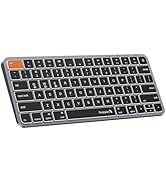
Image: A diagram illustrating how to charge the EK04 N numeric keypad using the provided USB-C cable, showing the charging port and indicator light status.
Maintenance and Safety Warnings
- Įkrovimo sauga: Naudokite tik pridėtą laidą. Kraukite gerai vėdinamoje, sausoje vietoje, atokiau nuo degių medžiagų.
- Baterijos valdymas: Do not attempt to replace the item's lithium battery. Battery replacement should be conducted by qualified personnel to prevent hazards.
- Šilumos poveikis: Venkite palikti daiktą aukštoje temperatūroje arba tiesioginiuose saulės spinduliuose, nes tai gali sukelti gaisro pavojų.
- Skysčio ekspozicija: Laikykite gaminį atokiau nuo vandens ir skysčių. Nenaudokite, jei jis šlapias, kol visiškai neišdžius.
- Pažeidimai ir nuotėkis: Nustokite naudoti ir kreipkitės į klientų aptarnavimo tarnybą, jei gaminys pažeistas arba iš akumuliatoriaus teka.
- Teisingas šalinimas: Laikykitės vietinių elektroninių prietaisų ir baterijų utilizavimo taisyklių. Nemeskite jų kartu su buitinėmis atliekomis.
- Radijo dažnio trukdžiai: Šis prietaisas gali trikdyti kitų elektroninių prietaisų veikimą. Laikykitės saugaus atstumo nuo jautrių prietaisų.
- Vaiko sauga: Laikykite gaminį ir jo dalis vaikams nepasiekiamoje vietoje, kad išvengtumėte užspringimo ar baterijų prarijimo pavojaus. Niekada neleiskite vaikams liesti gaminio be priežiūros.
- ATSARGIAI: Nesilaikant aukščiau pateiktų įspėjimų, galima sunkiai susižaloti arba sugadinti turtą.
Trikčių šalinimas (Klausimai ir atsakymai)
How to deal with disconnection issues, keys repeating or typing delay?
- Please ensure that the number pad is fully charged. A low battery can affect the performance of the number pad.
- If using a USB dongle to connect the number pad to the device, unplug and replug the USB dongle, trying a different USB port if necessary.
- If connecting the number pad to the device via Bluetooth, delete the Bluetooth connection from your device's Bluetooth connection list, and restart your device and re-pair the number pad by following the steps in the user manual.
- If the issues persist, try to connect the number pad to other devices to check if the same issues occur and don't hesitate to contact our customer service for assistance.
How to deal with the number pad can not charge?
- Nominali įkrovimo apimtistage for the number pad is 5V. It is recommended to use the computer's USB port for charging, and using a charger is not recommended.
- Try to change another USB-C cable to recharge, in order to confirm whether it is a cable issue or a fault with the number pad.
How to deal with the key falls off the number pad?
If the key falls off the number pad and can't be installed back, please don't hesitate to contact our customer service for assistance.
Gaminio specifikacijos
| Parametras | Vertė |
|---|---|
| Baterijos talpa | 280 mAh |
| Darbo ttage | 3.7 V |
| Darbo srovė | ≤2.5 mA |
| Miego srovė | ≤0.03 mA |
| Budėjimo laikas | 100 dienų |
| Darbo laikas | 112 valandų |
| Įkrovimo laikas | 2-3 valandos |
| Wake Up Way | Paspauskite bet kurį klavišą |
| Matmenys | 152*206*16.4 mm / 5.98*8.11*0.65 colio |
| 2.4G Channel System Compatibility | Windows 7 to 11 |
| Bluetooth Channel System Compatibility | MacOS 10.10 or later, Windows 7 to 11 |
Miego režimas
1. When the number pad is not used for more than 60 minutes, it will automatically enter into sleep mode and the indicator light will turn off.
2. When using the number pad again, just press any key, the number pad will wake up within 3 seconds, and the lights come back on and the number pad starts working.
Garantija ir palaikymas
ProtoArc offers a 2 metų garantija on this product, ensuring 100% coverage for manufacturing defects.
Jei turite klausimų ar pagalbos, susisiekite su mumis adresu:
- El. paštas: support@protoarc.com
- Telefonas: (+1) 866-287-6188
- Darbo valandos: Monday-Friday: 10am-1pm, 2pm-7pm (Eastern Time)
- *Švenčių metu nedirbame

Image: A card detailing ProtoArc's 2-year warranty and customer support contact information, including email and phone number.


