Įvadas
This manual provides essential information for setting up, operating, and maintaining your TCL 32S5K 32-inch QLED Smart TV. Please read these instructions carefully before using your television to ensure proper functionality and safety. Keep this manual for future reference.

Priekyje view of the TCL 32S5K 32-inch QLED Smart TV. This image shows the television screen displaying vibrant colors, supported by two sleek stands.
Kas yra dėžutėje
Patikrinkite, ar pakuotėje yra visi komponentai:
- TCL 32S5K Television
- Maitinimo adapteris
- Maitinimo kabelis
- Nuotolinio valdymo pultas
- TV stovas (2 vnt.)
- Vartotojo vadovas (šis dokumentas)
Sąranka
1. Televizoriaus stovo pritvirtinimas
- Atsargiai padėkite televizorių ekranu žemyn ant minkšto, lygaus paviršiaus, kad nepažeistumėte.
- Sulygiuokite kiekvieną stovą su atitinkamais lizdais televizoriaus apačioje.
- Pritvirtinkite stovus pridėtais varžtais. Įsitikinkite, kad jie tvirtai pritvirtinti.

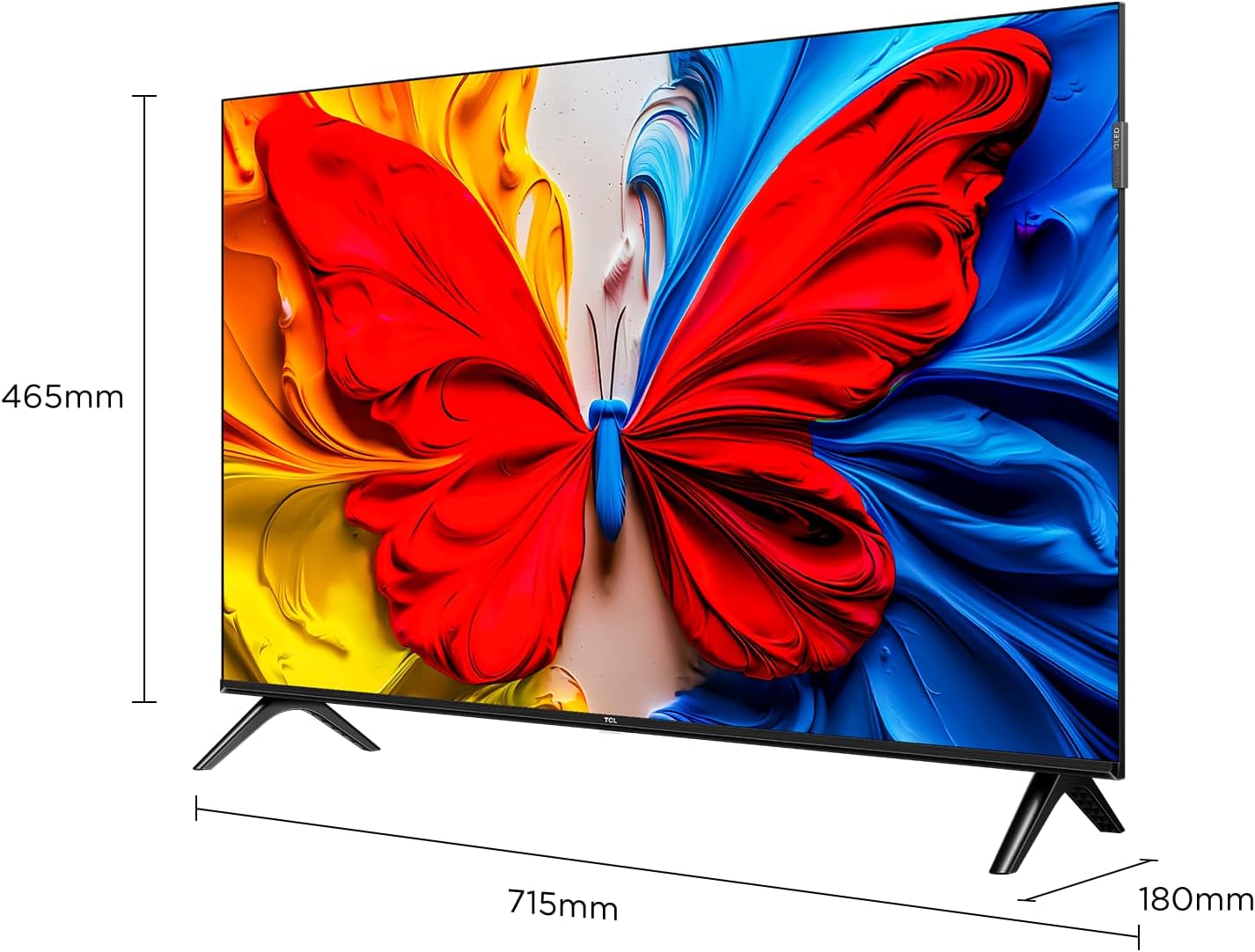
Image illustrating the dimensions of the TCL 32S5K TV and how the stands are attached to the bottom of the unit. The image shows measurements for width (715mm) and height (465mm).
2. Tvirtinimas prie sienos (neprivaloma)
If you choose to wall mount your TV, refer to the instructions provided with your wall mount kit. Ensure the wall mount is compatible with the VESA mounting pattern of the TCL 32S5K TV. Professional installation is recommended for wall mounting.
Galinis view of the TCL 32S5K TV, showing the VESA mounting points and various input ports. This view is useful for understanding wall mount compatibility and cable management.
3. Išorinių įrenginių prijungimas
Televizoriuje yra keli prievadai išoriniams įrenginiams prijungti:
- HDMI prievadai: Connect Blu-ray players, game consoles, cable/satellite boxes, etc. (Total 2 HDMI ports).
- USB prievadai: Prijunkite USB atmintines, kad galėtumėte atkurti medijos failus.
- „Wi-Fi“: Prisijunkite prie namų tinklo, kad galėtumėte naudotis internetu ir transliuoti.
- Bluetooth: Connect compatible wireless accessories.

Šoninė view of the TCL 32S5K TV, highlighting the accessible input ports including HDMI and USB. This image helps users locate the connectivity options.
4. Maitinimo prijungimas
Connect the power cable to the TV's power input, then plug the other end into a suitable electrical outlet.
5. Pradinė sąranka
Pirmą kartą įjungus televizorių, jis atliks pradinės sąrankos procesą, įskaitant:
- Kalbos pasirinkimas.
- Network connection (Wi-Fi).
- Google Account sign-in (for Google TV features).
- Channel scanning (if connecting an antenna).
Naudojimo instrukcijos
Nuotolinio valdymo pultas
The included remote control allows you to navigate the TV's interface and control various functions. Insert two AAA batteries (not included) into the remote control, observing polarity.
- Maitinimo mygtukas: Įjungia arba išjungia televizorių.
- Įvesties mygtukas: Pasirenka įvesties šaltinius (HDMI 1, HDMI 2, USB ir kt.).
- Naršymo mygtukai: Up, Down, Left, Right arrows to move through menus.
- Gerai mygtukas: Patvirtina pasirinkimus.
- Atgal mygtukas: Grįžta į ankstesnį ekraną.
- Namų mygtukas: Pasiekia „Google TV“ pagrindinį ekraną.
- Garsumo mygtukai: Reguliuoja garsumo lygį.
- Kanalo mygtukai: Keičia televizijos kanalus (jei taikoma).
- „Google“ asistento mygtukas: Įjungia balso valdymą.
„Google TV“ sąsaja
Your TCL 32S5K TV runs on the Google TV operating system, providing access to a wide range of streaming apps, movies, and shows. Navigate using the remote control to browse content, search, and manage settings.
- Pagrindinis ekranas: Displays personalized content recommendations, installed apps, and quick access to inputs.
- Programos: Atsisiųskite ir tvarkykite programas iš „Google Play“ parduotuvės.
- Nustatymai: Access TV settings for picture, sound, network, system, and more.
Pagrindinės savybės
QLED Display Technology
The TCL 32S5K features QLED (Quantum Dot LED) technology, which enhances color volume and accuracy, delivering a more vibrant and lifelike viewing experience compared to conventional LED TVs.

Diagram explaining the difference between Colorful Quantum Crystal (TCL QLED) and Conventional Quantum Crystal, highlighting the layers and efficiency.
HDR 10 Support
With HDR 10 support, the TV can display a wider range of brightness and contrast, revealing more detail in both the darkest and brightest areas of the picture. This results in a more dynamic and immersive visual experience.

Comparison image showing a scene with HDR (left) and without HDR (right), demonstrating the enhanced detail and dynamic range provided by HDR 10.
Dolby Audio
Experience rich, clear, and powerful sound with Dolby Audio. This technology optimizes the TV's audio output for an immersive listening experience, whether you're watching movies, sports, or playing games.

Image depicting a TV screen displaying a dynamic ocean wave, with visual elements suggesting enhanced audio quality, representing Dolby Audio.
Žaidimo režimas
Game Mode automatically optimizes display settings for gaming, reducing input lag and improving responsiveness. This provides a smoother and more enjoyable gaming experience.

Split-screen image comparing "Game Mode Off" (left) and "Game Mode On" (right) during a video game scene, illustrating the visual improvements and reduced lag.
Plonas dizainas
The TCL 32S5K features a modern, slim design with a metallic bezel-less display, allowing the screen to blend seamlessly into your living space and providing a more immersive viewpatirtį.

Vaizdų demonstravimasasing plonas profesionalasfile and metallic bezel-less design of the TCL 32S5K TV, emphasizing its modern aesthetic.
Priežiūra
- Ekrano valymas: Švelniai nuvalykite ekraną minkšta, nepūkuota šluoste. Įsisenėjusioms dėmėms valyti naudokite specialiai televizoriams skirtą ekrano valiklį, užtepkite ant šluostės, o ne tiesiai ant ekrano.
- Spintos valymas: Televizoriaus korpusą valykite minkšta, sausa šluoste. Venkite naudoti abrazyvinius valiklius ar tirpiklius.
- Vėdinimas: Įsitikinkite, kad televizoriaus ventiliacijos angos nėra užblokuotos, kad jis neperkaistų.
- Maitinimo laidas: Reguliariai tikrinkite maitinimo laidą, ar jis nepažeistas. Jei pažeistas, kreipkitės į klientų aptarnavimo tarnybą, kad jį pakeistų.
Trikčių šalinimas
Prieš kreipdamiesi į klientų aptarnavimo tarnybą, išbandykite šiuos dažniausiai pasitaikančių problemų sprendimus:
| Problema | Galimas sprendimas |
|---|---|
| Nėra elektros / Televizorius neįsijungia. |
|
| Nėra vaizdo, bet garsas yra. |
|
| Garso nėra, bet vaizdas yra. |
|
| Nuotolinio valdymo pultas neveikia. |
|
| TV turns on for a few seconds then shuts off. |
|
Specifikacijos
| Funkcija | Detalė |
|---|---|
| Modelio pavadinimas | 32S5K |
| Ekrano dydis | 32 colių |
| Ekrano technologija | QLED |
| Rezoliucija | 1920 1080 x XNUMX XNUMX (FHD) |
| Atnaujinimo dažnis | 60 Hz |
| Palaikomas HDR formatas | HDR10 |
| Garso technologija | Dolby Audio, DTS, Dolby Atmos |
| Operacinė sistema | Google TV |
| Ryšys | Wi-Fi, Bluetooth, 2x HDMI, USB |
| Gaminio matmenys (D x P x A) | 2.95 "D x 28.15" P x 16.61" A |
| Prekės svoris | 4.42 kilogramo |
| Montavimo tipas | Table Mount, Wall Mount |
| Įtraukti komponentai | Power Adapter, Power Cable, Remote Control, Stand, User Manual |
Garantija ir palaikymas
Informacijos apie garantiją ieškokite prie gaminio pridėtoje garantijos kortelėje arba apsilankykite oficialioje TCL svetainėje. website. For technical support or service inquiries, please contact TCL customer service through their official channels. Keep your purchase receipt as proof of purchase for warranty claims.
Daugiau informacijos ir pagalbos galite rasti adresu TCL parduotuvė „Amazon“ platformoje.


