Įvadas
The MCHOSE Mix 87 is a wired magnetic switch TKL gaming keyboard designed for high-performance gaming and efficient daily use. It features advanced Hall effect switches, rapid trigger technology, and extensive customization options to enhance your computing experience.

Figure 1: MCHOSE Mix 87 Magnetic Switch Rapid Trigger Gaming Keyboard (Red variant).
Kas yra dėžutėje
- MCHOSE Mix 87 Keyboard
- USB-C Wired Cable
- Klaviatūros traukiklis
- Vartotojo vadovas
- Extra Switches (2 pieces)
Sąranka
- Išpakuokite klaviatūrą: Carefully remove the MCHOSE Mix 87 keyboard and all accessories from the packaging.
- Prijunkite USB kabelį: Insert the USB-C end of the provided cable into the keyboard's USB-C port. Connect the other end (USB-A) to an available USB port on your computer.
- Sistemos atpažinimas: Your computer should automatically detect and install the necessary drivers for the keyboard. No additional software download is required for basic functionality.
- Pradinis bandymas: Atidarykite teksto redaktorių arba naršyklę ir patikrinkite, ar visi klavišai veikia tinkamai.

Figure 2: MCHOSE Mix 87 keyboard connected via USB-C to a computer setup.
Naudojimo instrukcijos
Pagrindinės savybės ir našumas
- Rapid Trigger (RT) Technology: The Mix 87 supports Rapid Trigger, allowing keys to react instantly upon actuation and reset immediately upon release. This feature is crucial for competitive gaming, enabling faster repeated inputs.
- Reguliuojamas valdymas: Equipped with Hall effect Apollo magnetic switches, the keyboard offers ultra-precise 0.001 mm adjustment of the trigger point, ranging from 0.01-3.4 mm. Key travel is dynamically calibrated with each trigger.
- Itin didelis apklausų rodiklis: Experience minimal input latency with an 8000 Hz polling rate and a 256K ultra-high scan rate, ensuring every keystroke is registered with extreme speed.
- Advanced Gaming Functions: Supports SOCD (Simultaneous Opposite Cardinal Directions), DKS (Dynamic Keystrokes), MT (Macro Toggle), TGL (Toggle), and RS (Rapid Stop) functions for enhanced control and customization beyond traditional macros.

Figure 3: Visual representation of the MCHOSE Mix 87's high performance metrics including 0.001mm precision and 8K Hz polling rate.
Layout and Controls
The Mix 87 features a compact 80% TKL (Tenkeyless) layout with 87 keys, balancing functionality with a smaller footprint. It includes a multi-function knob and three practical function keys.
- Daugiafunkcinė rankenėlė: Located on the top right, this knob primarily controls volume.
- Funkciniai klavišai: Three dedicated keys provide quick access to:
- One-click return to desktop (customizable)
- Mode switching (e.g., gaming/office)
- Adjusting light brightness
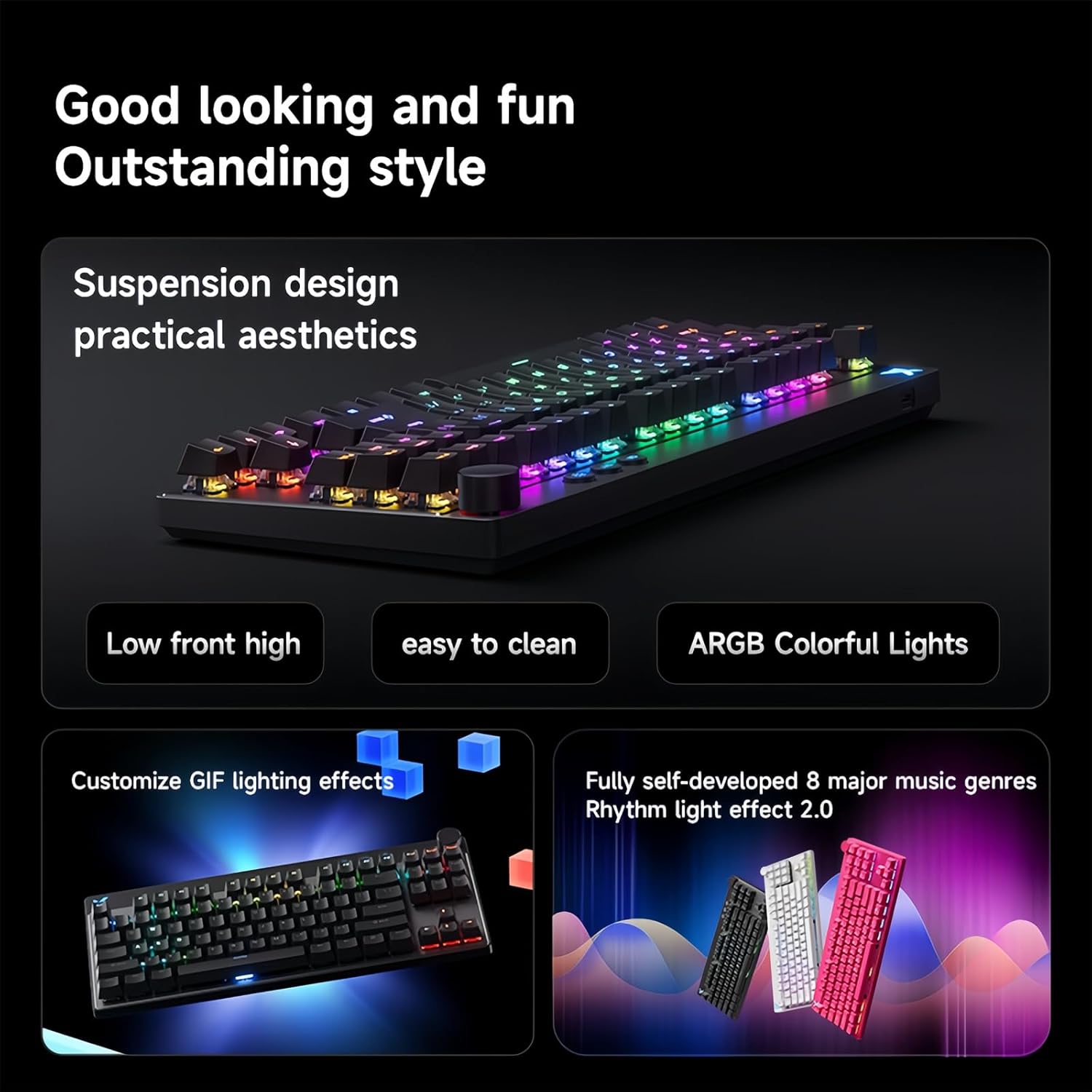
Figure 4: The MCHOSE Mix 87 keyboard seamlessly transitions between office and game modes.
RGB foninio apšvietimo pritaikymas
The keyboard features 16 million colors with north-facing LEDs. You can personalize lighting effects using FN shortcut keys or the webpagrįstas vairuotojas.
- FN Shortcut Keys: Use combinations of the FN key with other keys to cycle through various lighting modes, adjust brightness, and change colors. Refer to the included quick start guide for specific combinations.
- Music Rhythm Support: The RGB lighting can be synchronized with music for an immersive experience.

Figure 5: MCHOSE Mix 87 keyboard showcasindėl ryškių RGB apšvietimo efektų.
Programuojamas Web Driver (MCHOSE HUB)
The MCHOSE Mix 87 supports customization via a web-based HUB driver, eliminating the need for software downloads. This ensures compatibility across various operating systems.
- Accessing the Driver: Visit the official MCHOSE websvetainę, kad galėtumėte pasiekti web- pagrįstas konfigūravimo įrankis.
- Tinkinimo parinktys: Within the driver, you can:
- Personalize individual key functions.
- Adjust actuation points for each key.
- Configure macros and advanced gaming functions.
- Customize RGB lighting effects and brightness.
Figure 6: Screenshot of the MCHOSE HUB web-based driver for advanced keyboard settings.
Priežiūra
- Klaviatūros dangtelių valymas: Use the provided keycap puller to carefully remove keycaps. Clean them with a soft, damp šluoste ir, jei reikia, švelniu muilu. Prieš pritvirtindami, įsitikinkite, kad jie yra visiškai sausi.
- Klaviatūros korpuso valymas: Use a soft, lint-free cloth to wipe down the keyboard body. For dust between keys, use compressed air.
- Jungiklio priežiūra: The Hall effect switches are designed for durability. Avoid exposing them to excessive moisture or dust.
Trikčių šalinimas
- Klaviatūra nereaguoja:
- Įsitikinkite, kad USB-C laidas yra tvirtai prijungtas prie klaviatūros ir kompiuterio.
- Pabandykite prijungti klaviatūrą prie kito kompiuterio USB prievado.
- Išbandykite klaviatūrą kitame kompiuteryje, kad atmestumėte su sistema susijusias problemas.
- RGB lemputės neveikia / veikia netinkamai:
- Check FN key combinations for lighting control (refer to quick start guide).
- Įsitikinkite, kad klaviatūra tinkamai prijungta ir gauna maitinimą.
- Access the MCHOSE HUB web driver to verify lighting settings.
- Keys Not Actuating Correctly:
- Verify actuation point settings in the MCHOSE HUB web vairuotojas.
- Įsitikinkite, kad jungiklio mechanizmui netrukdo jokios šiukšlės.
- If a specific switch is faulty, replace it with one of the provided extra switches using the keycap/switch puller.
Specifikacijos
| Modelio pavadinimas | Mix 87 Keyboard |
| Ryšys | USB-C laidinis |
| Raktų skaičius | 87 keys (80% TKL Layout) |
| Jungiklio tipas | Hall Effect Apollo Magnetic Switch |
| Reguliuojamas paleidimas | 0.01-3.4 mm (0.001 mm precision) |
| Nuskaitymo greitis | 256 tūkst |
| Apklausos rodiklis | 8K Hz |
| Latencija | 0.08 ms |
| RGB foninis apšvietimas | 16 million colors, North-facing LEDs |
| Struktūra | Gasket Mount Keyboard |
| NKRO | Palaikoma |
| Sistemos suderinamumas | „Windows“ / „Mac“ / „iOS“ / „Android“. |
| Gaminio matmenys | 14.1 x 6 x 1.4 colio |
| Prekės svoris | 2 svaro |
Oficialus produkto vaizdo įrašas
1 vaizdo įrašas: metimas per sekundęview of the MCHOSE Mix 87 TKL Wired Magnetic Keyboard, demonstrating its features and functionality.
Garantija ir palaikymas
For warranty information, technical support, or further assistance, please refer to the official MCHOSE websvetainėje arba susisiekite tiesiogiai su jų klientų aptarnavimo tarnyba. Išsaugokite pirkimo kvitą garantiniams reikalavimams.


