1. Produktas baigtasview
The ICERIVER AE2 is a high-performance ALEO miner designed for efficient cryptocurrency mining. It features a robust power supply unit (PSU) and is engineered for stable operation within a wide voltage range. This manual provides essential information for setting up, operating, and maintaining your AE2 miner.

1 pav.: priekis view of the ICERIVER AE2 ALEO Miner, showcasindėl kompaktiško dizaino ir integruotų aušinimo ventiliatorių.
Pagrindinės funkcijos:
- ALEO Hashrate: 720MH/S (±5%) for optimal mining performance.
- Wall Power: 1300W/h (±10%) power consumption.
- Ryšys: Standard Ethernet for network connectivity.
- ttage Įvestis: 100-240V AC, ensuring compatibility with various power grids.
- Darbinė temperatūra: Designed to operate efficiently between 0~40 ℃.
2. Sąrankos vadovas
2.1 Išpakavimas
- Carefully open the packaging and remove the miner.
- Inspect the miner for any visible damage during transit. If damage is found, contact your vendor immediately.
- Verify that all components are present: the ICERIVER AE2 miner unit and the power supply cable.
2.2 Fizinis ryšys
Before powering on, ensure all necessary cables are securely connected.

2 pav.: galinis view of the ICERIVER AE2 ALEO Miner, showing the power input and Ethernet port.
- Maitinimo jungtis: Connect the provided power cable to the power input port on the miner. Ensure the other end is connected to a grounded power outlet (100-240V AC).
- Tinklo prisijungimas: Connect an Ethernet cable from your router or network switch to the Ethernet port on the miner. A stable internet connection is crucial for mining operations.
2.3 Pradinis įjungimas
- Once all cables are securely connected, switch on the power supply to the miner.
- Observe the indicator lights on the miner. Typically, a green light indicates power, and a blinking light indicates network activity.
- Allow a few minutes for the miner to boot up and acquire an IP address from your network.
3. Operacija
3.1 Tinklo konfigūracija
The miner is configured to obtain an IP address automatically via DHCP by default. For advanced users, static IP configuration is possible via the web sąsaja.
- Finding the Miner's IP Address:
- Check your router's connected devices list.
- Use an IP scanner tool on your network.
- Prieiga prie Web Sąsaja: Atidarykite a web browser and enter the miner's IP address into the address bar. You will be prompted for login credentials (refer to the default credentials provided with your unit or contact support if not found).
- Baseino konfigūracija: Per web interface, navigate to the "Miner Settings" or "Pool Configuration" section to enter your ALEO mining pool details (pool URL, worker name, password).
3.2 Stebėsena ir kontrolė
The web interface provides real-time monitoring of the miner's status, hashrate, temperature, and fan speed.
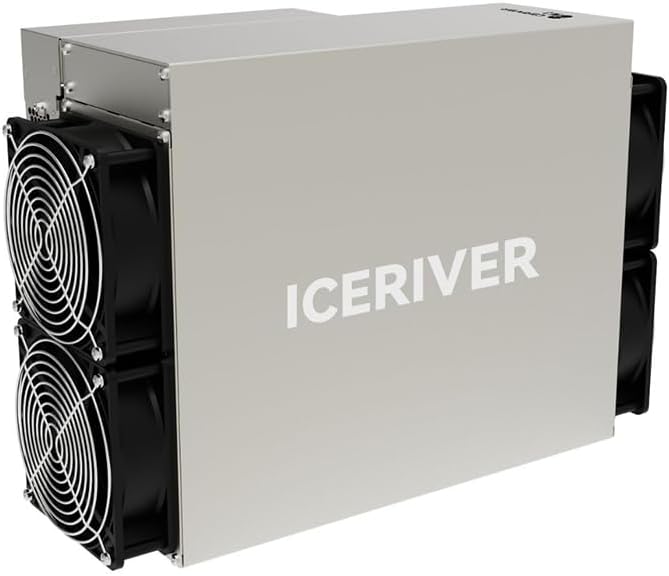
Figure 3: Close-up of the ICERIVER AE2 control panel, showing status indicator lights.
- Būklės rodikliai:
- Žalias šviesos diodas: Power on / Normal operation.
- Raudonas šviesos diodas: Error / Warning (check web interface for details).
- Tinklo šviesos diodas: Blinking indicates network activity.
- Restart/Reboot: The web interface allows for remote rebooting of the miner if necessary.
4. Priežiūra
4.1 Valymas
Regular cleaning is essential to ensure optimal performance and longevity of your miner.
- Dažnis: Clean the miner every 1-3 months, depending on the operating environment.
- Procedūra:
- Power off and unplug the miner before cleaning.
- Use compressed air to remove dust from the fans and heatsinks.
- Wipe the exterior with a dry, soft cloth. Do not use liquid cleaners.
4.2 Firmware atnaujinimai
Periodically check the official ICERIVER website for firmware updates. Updates can improve performance, stability, and security.
- Download the latest firmware from the official source.
- Follow the update instructions provided on the web interface or with the firmware package.
- Do not power off the miner during a firmware update.
4.3 Aplinkosaugos aspektai
- Ensure the operating environment is well-ventilated to prevent overheating.
- Maintain ambient temperature within the specified range (0~40 ℃).
- Avoid high humidity and direct exposure to water or corrosive substances.
5. Problemų sprendimas
This section addresses common issues you might encounter with your ICERIVER AE2 miner.
| Problema | Galima priežastis | Sprendimas |
|---|---|---|
| Kalnakasys neįsijungia. | Power cable loose; Power outlet issue; PSU failure. | Check power cable connections. Test power outlet. Contact support if PSU is suspected. |
| Nėra tinklo ryšio. | Ethernet cable loose/faulty; Router/switch issue; Incorrect IP configuration. | Verify Ethernet cable. Restart router/switch. Check network settings in web sąsaja. |
| Low hashrate or no mining. | Incorrect pool settings; Network instability; Overheating; Firmware issue. | Verify pool URL, worker name, and password. Check network stability. Ensure proper ventilation. Update firmware. |
| Perkaitimas. | Poor ventilation; Dust accumulation on fans/heatsinks; High ambient temperature. | Improve airflow around the miner. Clean fans and heatsinks. Relocate to a cooler environment. |
If the issue persists after attempting these solutions, please refer to the support section or contact technical assistance.
6. Techninės specifikacijos
| Funkcija | Vertė |
|---|---|
| Modelio pavadinimas | AE2 720MH/S |
| ALEO Hashrate | 720MH/S (±5%) |
| Sienų galia | 1300W/h (±10%) |
| Ryšys | Ethernet |
| ttage Įvestis | 100-240V kintamosios srovės |
| Darbinė temperatūra | 0 ~ 40 ℃ |
| Gaminio matmenys (I x P x A) | 19.5 x 29 x 43 cm |
| Prekės svoris | 13 kg |
| Aušinimo būdas | Oras |
| Maitinimo bloko dizainas | Ne modulinis |
7. Garantija ir palaikymas
7.1 Informacija apie garantiją
Due to the specialized nature of mining equipment, the product's daily revenue is influenced by total network computing power and cryptocurrency price fluctuations. In principle, returns are not accepted unless due to product failure. If a return is accepted for reasons other than product failure, a 30% return fee may be charged. Please retain your proof of purchase for warranty claims.
7.2 Techninė pagalba
For technical assistance, troubleshooting beyond this manual, or warranty inquiries, please contact your vendor or the manufacturer, ICERIVER, through their official support channels. Ensure you have your product model number and purchase details ready when contacting support.
Pastaba: Always refer to the latest information on the official ICERIVER websvetainę, kurioje rasite naujausius palaikymo išteklius ir kontaktinę informaciją.


