1. Įvadas
Ačiū, kad pirkoteasing the Matbip Switch2 Controller. This advanced model is designed to enhance your gaming experience across multiple platforms, including Nintendo Switch (1st and 2nd generations), Android, iOS (16.0 and above), and Windows PC. Featuring cutting-edge technology such as Hall Sensor sticks, a 6-axis gyro sensor, and customizable functions, this controller offers precise control and immersive feedback.
Please read this manual carefully before use to ensure proper operation and to fully utilize all features.
2. Pakuotės turinys
- Matbip Switch2 Pro Controller x 1
- C tipo įkrovimo laidas x 1
- Vartotojo vadovas x 1
3. Produktas baigtasview

1 pav.: priekis view of the Matbip Switch2 Controller.
Pagrindinės funkcijos:
- Kelių platformų suderinamumas: Supports Switch (1st & 2nd Gen), Android, iOS (16.0+), and Windows PC.
- Stabilus belaidis ryšys: Utilizes Bluetooth 5.0 for zero-latency communication up to 10 meters.
- Drift-Zero Hall Sensor Sticks: Non-contact Hall sensors for both joysticks and triggers eliminate drift, offering over 5 million operations durability and ±0.5% high precision.
- Programuojami grįžimo mygtukai (M1, M2): Customize complex actions with macro programming for enhanced gameplay.
- 6 ašių giroskopinis jutiklis: High-sensitivity gyro sensor detects subtle movements for precise motion control and aiming.
- Adjustable TURBO Function: Three-speed continuous fire (5/12/20 shots/sec) for rapid actions in games.
- 4-Level HD Vibration: Adjustable vibration intensity (0%/30%/70%/100%) provides immersive tactile feedback.
- Ilgai veikianti baterija: Built-in 1000mAh battery provides up to 20 hours of continuous play on a 4-hour charge, with low battery alerts.
- Ergonomiškas dizainas: Streamlined shape with premium faux leather material and anti-slip coating ensures comfortable grip and reduces fatigue during long gaming sessions.
4. Sąranka ir prijungimas
4.1 Valdiklio įkrovimas
Before first use, fully charge the controller. Connect the included Type-C cable to the controller's charging port and the other end to a USB power source (e.g., Switch dock, PC, USB wall adapter). The indicator lights will show charging status. A full charge takes approximately 4 hours.

Figure 2: Battery capacity and charging details.
4.2 Prisijungimas prie įrenginių
The controller supports wireless Bluetooth 5.0 connection across various platforms.
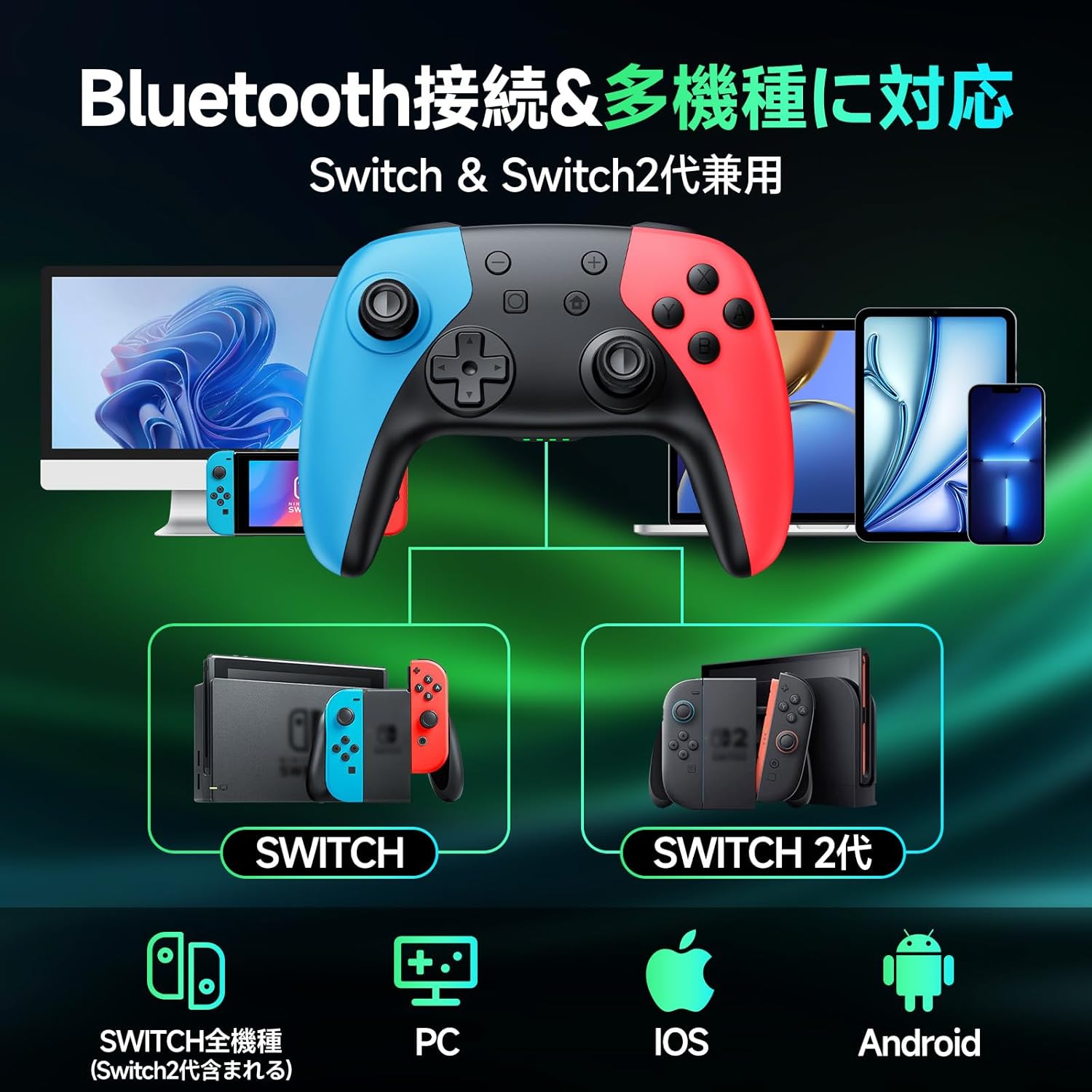
3 pav.: Kelių platformų suderinamumas per „Bluetooth“.
4.2.1 Nintendo Switch / Switch 2 Connection:
- On your Switch console, go to the HOME Menu.
- Select "Controllers" > "Change Grip/Order".
- Press and hold the HOME button on the Matbip controller for 3 seconds until the indicator lights flash rapidly.
- The controller will automatically pair with the Switch. Once connected, the corresponding player indicator light(s) will remain solid.
4.2.2 Android / iOS / PC Connection:
- Ensure Bluetooth is enabled on your Android/iOS device or PC.
- Press and hold the HOME button on the Matbip controller for 3 seconds to enter pairing mode.
- On your device, search for Bluetooth devices and select "Matbip Controller" (or similar name) from the list.
- Prijungus, valdiklio indikatoriaus lemputės ims šviesti nuolat.
5. Naudojimo instrukcijos
5.1 Hall Sensor Sticks and Triggers
The controller features advanced Hall Sensor technology for both joysticks and triggers, providing superior precision and durability compared to traditional analog sticks. This design prevents stick drift and ensures accurate input with a response speed of just 5ms.

Figure 4: Hall Sensor technology for precise, drift-free control.
5.2 Macro Function (M1/M2 Buttons)
The M1 and M2 buttons on the back of the controller can be programmed to execute a sequence of button presses (macro). This is useful for repetitive actions or complex combos.

Figure 5: Location of programmable M1 and M2 buttons.
Programavimo žingsniai:
- Press and hold the M button (located between M1 and M2) and the M1 or M2 button you wish to program simultaneously. The indicator lights will flash slowly.
- Press the sequence of buttons you want to record (e.g., A, B, X, Y, L, R, D-pad directions, etc.).
- Press the M button again to save the macro. The indicator lights will stop flashing.
- Now, pressing the programmed M1 or M2 button will execute the recorded sequence.
Makrokomandos išvalymas:
To clear a macro, press and hold the M button and the M1 or M2 button simultaneously, then press the M button again without recording any sequence.
5.3 TURBO funkcija
The TURBO function allows for continuous rapid firing of a button. There are three adjustable speeds: 5, 12, and 20 shots per second.

Figure 6: TURBO function for automatic rapid fire.
Activating TURBO:
- Press and hold the TURBO button (T button).
- While holding TURBO, press the button you want to set for continuous fire (e.g., A, B, X, Y, L, R, ZL, ZR). The button will now continuously fire when held down.
Adjusting TURBO Speed:
- While holding the TURBO button, move the Right Analog Stick Up or Down to cycle through the three speeds (5/12/20 shots/sec).
Deactivating TURBO:
To deactivate TURBO for a specific button, repeat the activation steps. To deactivate TURBO for all buttons, press and hold the TURBO button for 5 seconds.
5.4 Vibracijos reguliavimas
The controller features 4 levels of HD vibration intensity: 0% (None), 30% (Weak), 70% (Normal), and 100% (Strong).

Figure 7: Four-stage vibration adjustment.
Vibracijos intensyvumo reguliavimas:
- While holding the TURBO button, move the Left Analog Stick Up or Down to cycle through the vibration levels.
5.5 Gyro Sensor Calibration
If you experience issues with motion control or aiming, you may need to calibrate the 6-axis gyro sensor.

Figure 8: 6-axis gyro sensor for directional, viewpoint, and target recognition.
Kalibravimo žingsniai:
- Place the controller on a flat, level surface.
- Simultaneously press and hold the X button, Square button, and HOME button until the indicator lights flash, then release.
- The controller will calibrate itself. Once calibration is complete, the indicator lights will stop flashing and return to their normal state.
6. Priežiūra
- Valdiklį valykite minkštu, sausu skudurėliu. Venkite naudoti stiprias chemines medžiagas ar abrazyvines medžiagas.
- Nelaikykite valdiklio ekstremalioje temperatūroje, drėgmėje ar tiesioginiuose saulės spinduliuose.
- Venkite valdiklio numetimo ir stiprių smūgių.
- Press buttons gently. Excessive force is not required and may cause damage over time.
- Nenaudojamą valdiklį laikykite vėsioje, sausoje vietoje.
7. Problemų sprendimas
| Problema | Galima priežastis | Sprendimas |
|---|---|---|
| Valdiklis neįsijungia. | Senka baterija. | Visiškai įkraukite valdiklį. |
| Nepavyksta prisijungti per „Bluetooth“. | Valdiklis neporavimo režime; „Bluetooth“ trukdžiai; įrenginio „Bluetooth“ išjungtas. | Ensure controller is in pairing mode (hold HOME button); restart controller and device; check device Bluetooth settings. |
| Stick drift or inaccurate motion control. | Gyro sensor needs calibration. | Perform gyro calibration as described in Section 5.5. |
| TURBO/Vibration not working. | Function not activated or incorrectly set. | Refer to Sections 5.3 and 5.4 for proper activation and adjustment. |
| Mygtukai nereaguoja. | Žema akumuliatoriaus įtampa; programinės įrangos triktis. | Charge controller; try resetting the controller (if applicable, usually by holding a small reset button or specific button combo). |
Jei problema išlieka ir išbandžius aukščiau pateiktus sprendimus, susisiekite su klientų aptarnavimo tarnyba.
8. Specifikacijos
- Prekinis ženklas: Matbip
- Modelio numeris: AB1
- Spalva: Daugiaspalvis
- Ryšys: Belaidis „Bluetooth 5.0“
- Baterijos talpa: 1000 mAh
- Įkrovimo laikas: apytiksliai 4 valandas
- Nuolatinis grojimo laikas: Iki 20 valandų
- Matmenys: 17.2 x 11.7 x 7.3 cm
- Svoris: 310 g
- Mygtukų skaičius: 16
- Ypatingos savybės: 6-axis Gyro Sensor, Macro Function, TURBO Continuous Fire, 4-stage HD Vibration, Hall Sensor Sticks
- Palaikomos platformos: Nintendo Switch (all generations), Android, iOS, PC
9. Garantija ir palaikymas
This product comes with a 1-year quality warranty from the date of purchase. All products undergo strict quality inspection before shipment and have obtained international certifications including TELEC, CE, FCC, and RoHS.
For any questions, concerns, or technical support, please do not hesitate to contact our customer service. We are committed to providing you with the best possible gaming experience.
When operating buttons, please press gently to ensure longevity of the product.


