Įvadas
This manual provides comprehensive instructions for the installation, operation, and maintenance of your ANRAN 5MP 4G LTE Solar Security Camera. Please read this manual thoroughly before using the product to ensure proper functionality and safety. Keep this manual for future reference.
Produktas baigtasview
Pagrindinės funkcijos:
- 5MP HD Video & 360° Pan/Tilt: Captures clear 5MP (2560x1920) video with 355° horizontal and 140° vertical rotation. Features 4X digital zoom.
- Dienos ir nakties matymas: Equipped with infrared (IR) night vision and 2.5K color night vision via four spotlights for comprehensive coverage.
- Solar Powered & Wire-Free: Integrated 9600mAh battery and high-efficiency solar panel provide continuous power, eliminating the need for external wiring.
- 4G LTE Cellular Connectivity: Operates independently without Wi-Fi, ideal for remote locations. Includes a pre-installed ANRAN SIM card with 100MB data.
- PIR judesio aptikimas: Advanced sensor detects persons, pets, vehicles, and parcels, reducing false alarms. Customizable alarm plans and sensitivity levels.
- Dvipusis garsas: Built-in speaker and microphone enable real-time communication through the companion application.
Pakuotės turinys:
- ANRAN 5MP 4G LTE Solar Security Camera
- Saulės skydas
- Montavimo laikiklis ir varžtai
- USB įkrovimo laidas
- Vartotojo vadovas
- Pre-installed ANRAN SIM Card (with 100MB data)
- 32 GB „Micro SD“ kortelė (iš anksto įdiegta)

Image: The ANRAN 5MP 4G LTE Solar Security Camera, shown with its accompanying solar panel and mounting hardware.
Sąrankos vadovas
1. Pradinis įkrovimas
Before first use, fully charge the camera's internal battery using the provided USB cable. Connect the cable to the camera's charging port and a standard 5V/2A USB power adapter (not included). The charging indicator light will show the charging status.
2. SIM kortelės montavimas
The camera comes with a pre-installed ANRAN SIM card. Ensure it is properly seated in the SIM card slot. Pastaba: Only the provided ANRAN SIM card is compatible. Self-replacement of SIM cards is not supported.

Paveikslėlis: detalus view of the camera's SIM card slot, indicating where the pre-installed ANRAN SIM card should be located.
3. Programėlės atsisiuntimas ir paskyros registravimas
- Scan the QR code in the manual or search for "ANRAN" in your mobile app store (iOS App Store or Google Play Store).
- Download and install the ANRAN application.
- Atidarykite programėlę ir užregistruokite naują paskyrą naudodami savo el. pašto adresą arba telefono numerį.
4. Kameros pridėjimas prie programėlės
- Įjunkite fotoaparatą.
- ANRAN programėlėje palieskite piktogramą „+“, kad pridėtumėte naują įrenginį.
- Select "4G Camera" or the appropriate device type.
- Follow the on-screen instructions to scan the QR code on the camera or manually enter its device ID.
- Prisijungę galite pavadinti savo kamerą ir pradėti tiesioginį transliavimą. viewing.
5. Kameros ir saulės baterijos montavimas
Pasirinkite vietą, kurioje saulės baterijos veikia optimaliai ir yra skaidrios šviesos. view for the camera. Ensure the camera is within range of a strong 4G LTE signal.
- Gręžimo pozicijų žymėjimas: Naudokite tvirtinimo laikiklį kaip šabloną, kad pažymėtumėte varžtų skyles norimame paviršiuje.
- Gręžimo skylės: Išgręžkite bandomąsias skylutes pažymėtose vietose.
- Saugus laikiklis: Attach the mounting bracket to the surface using the provided screws and anchors.
- Prijunkite kamerą: Secure the camera to the mounting bracket. Adjust the angle for optimal coverage.
- Saulės baterijos padėtis: Mount the solar panel in a location that receives direct sunlight for most of the day. Connect the solar panel cable to the camera's charging port.

Image: The ANRAN camera and solar panel mounted on an exterior wall, demonstrating a flexible wireless setup.
Naudojimo instrukcijos
1. Gyvai View ir PTZ valdymas
Open the ANRAN app and select your camera to access the live view. Use the on-screen controls to pan (355° horizontally) and tilt (140° vertically) the camera. You can also use the digital zoom feature to get a closer look.

Image: The ANRAN camera demonstrating its 355° pan and 90° tilt capabilities, controlled via the mobile application interface.
2. Judesio aptikimas ir įspėjimai
- Enable PIR Motion Detection: In the app settings, navigate to "Motion Detection" and enable the PIR sensor.
- Sureguliuokite jautrumą: Set the detection sensitivity level to minimize false alarms. Higher sensitivity detects smaller movements.
- Set Alarm Plan: Configure schedules for when motion detection should be active.
- Gaukite įspėjimus: When motion is detected, the camera will send instant push notifications to your phone and can trigger a smart siren alarm.

Image: An illustration of the ANRAN camera detecting a person, triggering a push notification and siren alarm on a mobile device.
3. Dvipusis garsas
Iš tiesioginio view, tap the microphone icon to speak through the camera's speaker. Tap the speaker icon to listen to audio from the camera's surroundings. This feature allows for real-time communication.

Image: People interacting with the ANRAN camera's two-way audio feature, communicating with individuals near the camera through the mobile app.
4. Naktinio matymo režimai
The camera supports both infrared (IR) black and white night vision and 2.5K color night vision. In low-light conditions, the camera automatically switches to night vision. You can configure the night vision mode in the app settings.
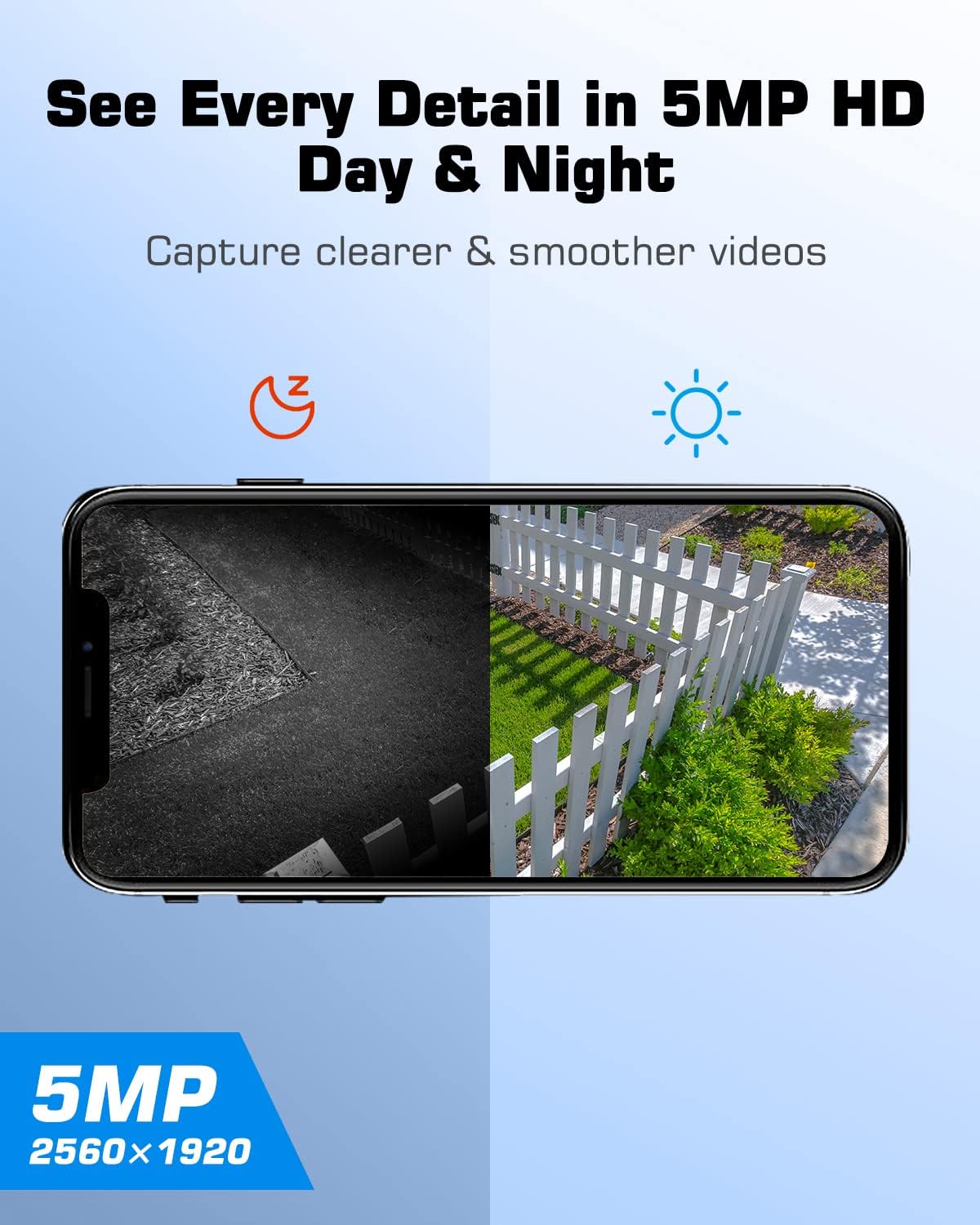
Paveikslėlis: Padalijimas view demonstrating the ANRAN camera's 5MP HD clarity in both daytime (color) and nighttime (infrared black and white) conditions.
5. Vaizdo įrašymas ir atkūrimas
Recorded videos are stored on the inserted SD card or in cloud storage (subscription may be required). Access recorded footage through the "Playback" or "History" section in the ANRAN app. You can filter by date and time to review konkrečius įvykius.
Priežiūra
- Saulės baterijų valymas: Regularly clean the surface of the solar panel to ensure maximum sunlight absorption. Use a soft, damp šluoste, kad pašalintumėte dulkes, nešvarumus ar šiukšles.
- Kameros objektyvo valymas: Gently wipe the camera lens with a microfiber cloth to maintain clear image quality. Avoid abrasive cleaners.
- Baterijos būklė: While the solar panel provides continuous charging, ensure the camera receives adequate sunlight. If the camera is in a shaded area for extended periods, occasional manual charging via USB may be necessary.
- Firmware atnaujinimai: Check the ANRAN app periodically for firmware updates. Keeping the camera's firmware updated ensures optimal performance and security.
Trikčių šalinimas
| Problema | Galima priežastis | Sprendimas |
|---|---|---|
| Kamera neprisijungia prie 4G tinklo. | Weak 4G signal; SIM card not properly inserted or activated; incorrect APN settings. | Relocate the camera to an area with better 4G coverage. Ensure the ANRAN SIM card is correctly inserted. Contact ANRAN support if issues persist. |
| Baterija neįkraunama per saulės bateriją. | Insufficient sunlight; dirty solar panel; faulty connection. | Ensure the solar panel is in direct sunlight and free from obstructions. Clean the solar panel surface. Check the connection cable between the panel and camera. |
| Dažni klaidingi judesio signalai. | High PIR sensitivity; environmental factors (e.g., moving branches, insects). | Adjust the PIR motion detection sensitivity in the app settings. Ensure the camera's field of view is clear of common false alarm triggers. |
| No two-way audio. | Microphone/speaker disabled in app; app permissions not granted; network issues. | Check app settings to ensure microphone and speaker are enabled. Verify app permissions on your mobile device. Ensure a stable 4G connection. |
| Camera offline. | No 4G signal; battery depleted; camera powered off. | Check 4G signal strength. Recharge the camera battery. Power cycle the camera (turn off and on). |
Specifikacijos
- Rezoliucija: 5 MP (2560 x 1920)
- Pakreipimo / pasukimo diapazonas: Horizontaliai 355°, vertikaliai 140°
- Mastelio keitimas: 4X skaitmeninis priartinimas
- Naktinis matymas: IR Night Vision, 2.5K Color Night Vision (via spotlights)
- Ryšys: 4G LTE Cellular (does not support Wi-Fi)
- Baterija: 9600 XNUMX mAh įkraunama baterija
- Maitinimo šaltinis: Solar Panel, USB Charging
- Judesio aptikimas: PIR humanoidų aptikimas
- Garsas: Dvipusis garsas (įmontuotas mikrofonas ir garsiakalbis)
- Saugykla: Supports Micro SD Card (32GB included) and Cloud Storage
- SIM kortelė: ANRAN SIM card included (100MB data)
Garantija ir palaikymas
ANRAN products typically come with a limited warranty. Please refer to the warranty card included with your product or visit the official ANRAN website for detailed warranty information and terms. For technical support, product inquiries, or assistance with troubleshooting, please contact ANRAN customer service through their official websvetainėje arba kontaktinę informaciją, pateiktą ant produkto pakuotės.
You can visit the ANRAN Store for more information: ANRAN Official Store


