1. Įvadas
Ačiū, kad pirkoteasing the SENCOR SPT 3907 Bluetooth Radio Player. This compact and versatile device offers multiple audio playback options, including CD, Bluetooth, USB, and FM radio. This manual provides essential information for safe and efficient use of your new player. Please read it thoroughly before operation and retain it for future reference.
2. Saugos instrukcijos
- Maitinimo šaltinis: Užtikrinkite maitinimo šaltinio ttage matches the rating indicated on the unit. Use only the provided power cable.
- Vanduo ir drėgmė: Saugokite įrenginį nuo lietaus, drėgmės ar lašančių/taškomų skysčių. Nestatykite ant įrenginio daiktų, pripildytų skysčių, pavyzdžiui, vazų.
- Vėdinimas: Neužblokuokite jokių ventiliacijos angų. Užtikrinkite pakankamai vietos aplink įrenginį tinkamam oro cirkuliavimui.
- Šiluma: Laikykite įrenginį atokiau nuo šilumos šaltinių, tokių kaip radiatoriai, šildytuvai, viryklės ar kiti prietaisai (įskaitant ampkeltuvai), kurie gamina šilumą.
- Valymas: Prieš valydami atjunkite įrenginį nuo elektros lizdo. Naudokite minkštą, sausą šluostę. Nenaudokite skystų ar aerozolinių valiklių.
- Aptarnavimas: Nemėginkite patys aptarnauti šio gaminio. Visą techninę priežiūrą patikėkite kvalifikuotam aptarnavimo personalui.
- Baterijos: When using batteries, ensure correct polarity. Do not mix old and new batteries, or different types of batteries. Remove batteries if the unit is not used for extended periods.
3. Pakuotės turinys
Patikrinkite, ar pakuotėje yra visi reikalingi daiktai:
- SENCOR SPT 3907 Radio Player
- Nuotolinio valdymo pultas
- Kintamosios srovės laidas
- Dokumentacija (šis vadovas)
4. Produkto ypatybės
The SENCOR SPT 3907 is designed for versatile audio entertainment:
- Išėjimo galia: 4W RMS for clear sound.
- CD grotuvas: Supports CD-R/RW discs with programmable playback for up to 20 songs.
- Bluetooth ryšys: Bluetooth V2.1 + EDR for wireless audio streaming from compatible devices.
- USB atkūrimas: USB connection for MP3 file playback with programmable playback for up to 99 songs.
- FM radijas: Stereo FM radio receiver with digital tuning and 30 station presets.
- AUX IN: 3.5mm auxiliary input for connecting external audio sources.
- Ekranas: Backlight LCD display for easy navigation.
- Nuotolinio valdymo pultas: Pilnai veikiantis nuotolinio valdymo pultas patogiam valdymui.
- Maitinimo parinktys: Operates on AC 100-240V or D/LR20 batteries for portability.
- Papildomos funkcijos: Repeat and random playback modes.
5. Valdikliai ir funkcijos
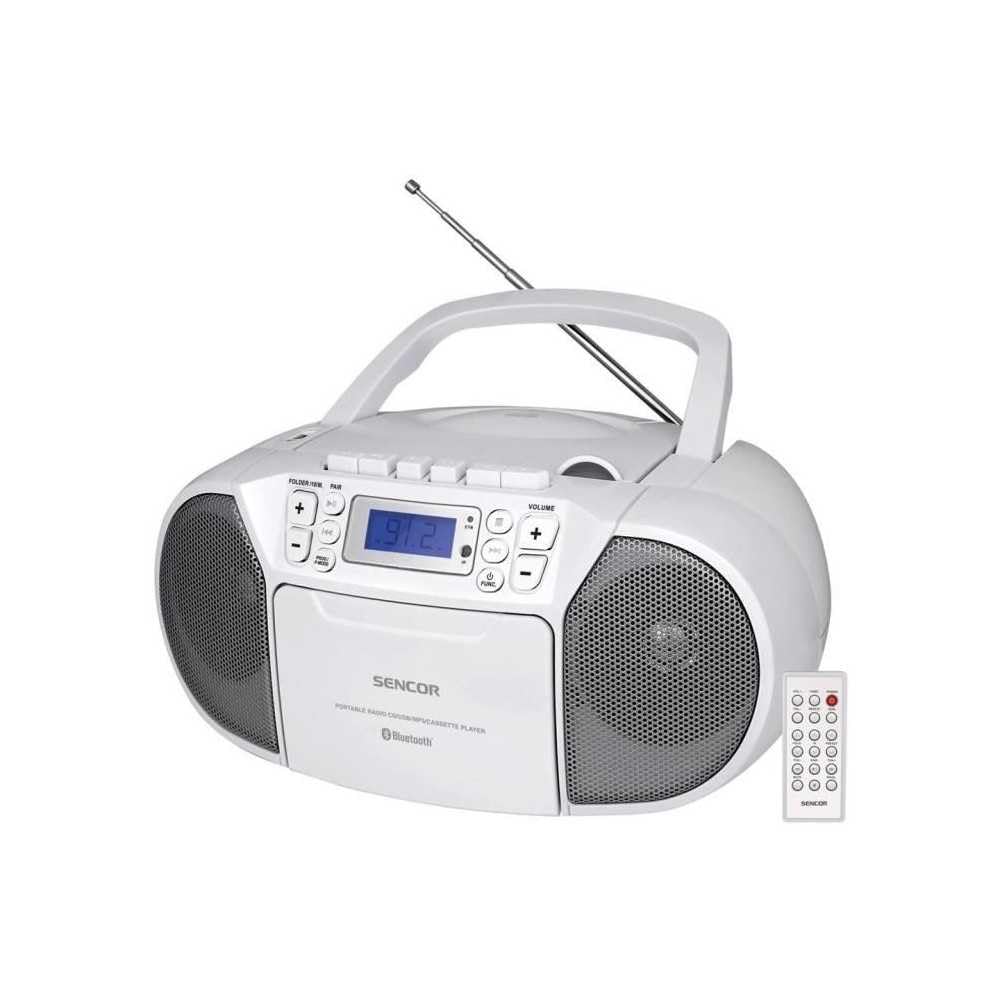
Priekyje view of the SENCOR SPT 3907 unit, highlighting the control buttons, LCD screen, CD tray, and speakers. The remote control is also visible.
Priekinio skydelio valdikliai:
- Įjungimo mygtukas: Įjungia arba išjungia įrenginį.
- MODE mygtukas: Switches between CD, Bluetooth, USB, FM Radio, and AUX-IN modes.
- GARSUMO +/- mygtukai: Reguliuoja garso išvesties lygį.
- PLAY/PAUSE (►/▮▮) Button: Starts or pauses playback in CD, Bluetooth, or USB mode.
- SKIP (◀◀ / ►►) Buttons: Peršoka prie ankstesnio arba kito takelio / stoties.
- STOP (■) mygtukas: Sustabdo atkūrimą.
- FOLDER / PAIR Button: Navigates folders in USB mode; initiates Bluetooth pairing.
- FUNC mygtukas: Accesses additional functions (e.g., program, repeat, random).
- LCD ekranas: Shows current mode, track number, frequency, and other information.
- CD skyrius: Garso kompaktinių diskų įdėjimui.
- USB prievadas: Skirta USB atminties įrenginiams prijungti.
- AUX-IN lizdas: Skirtas prijungti išorinius garso įrenginius.
- Ausinių išvestis: Privačiam pasiklausymui.
Galinio skydelio valdikliai:
- Kintamosios srovės įvestis: Connects the AC power cable.
- FM antena: Ištraukiama teleskopinė antena FM priėmimui.
Nuotolinio valdymo pultas:
The remote control duplicates most of the front panel functions for convenient operation from a distance. Refer to the remote control diagram in the included documentation for specific button layouts.
6. Sąranka
6.1 Maitinimo jungtis
The SENCOR SPT 3907 can be powered by AC mains or batteries.
Kintamosios srovės maitinimas:
- Įsitikinkite, kad įrenginys išjungtas.
- Connect the supplied AC power cable to the AC input jack on the rear of the unit.
- Plug the other end of the AC power cable into a standard wall outlet (AC 100-240V, 50/60Hz).
Baterijos galia:
- Atidarykite baterijos skyriaus dangtį, esantį įrenginio apačioje.
- Insert 6 x D/LR20 size batteries (not included), ensuring correct polarity (+/-) as indicated inside the compartment.
- Saugiai uždarykite akumuliatoriaus skyriaus dangtelį.
Note: When the AC power cable is connected, battery power is automatically disconnected. Remove batteries if the unit will not be used for an extended period to prevent leakage.
6.2 Antenos sąranka
For optimal FM radio reception, fully extend the telescopic FM antenna located on the rear of the unit. Adjust its position for the best signal.
7. Naudojimo instrukcijos
7.1 Įjungimas / išjungimas ir režimo pasirinkimas
- Paspauskite GALIA button to turn the unit on. The LCD display will light up.
- Paspauskite REŽIMAS button repeatedly to cycle through available modes: CD, Bluetooth, USB, FM Radio, AUX-IN. The selected mode will be shown on the LCD display.
- Paspauskite GALIA mygtuką dar kartą, kad išjungtumėte įrenginį.
7.2 CD atkūrimas
- Paspauskite REŽIMAS mygtuką, norėdami pasirinkti CD režimą.
- Atidarykite CD skyriaus dangtelį.
- Place a CD (CD-R/RW compatible) with the label side facing up onto the spindle.
- Close the CD compartment cover. The unit will read the disc, and the total number of tracks will appear on the display.
- Paspauskite PALEISTI / PAUZĖ mygtuką, norėdami pradėti atkūrimą.
- Naudokite SKIP (◀◀ / ►►) mygtukai, norėdami praleisti takelius.
- Paspauskite STOP (■) mygtuką sustabdyti atkūrimą.
- Programos atkūrimas: While in STOP mode, press the FUNKCIJA mygtuką, kad įjungtumėte programos režimą. PRALEISTI buttons to select tracks and FUNKCIJA again to confirm. Up to 20 CD songs can be programmed.
7.3 Bluetooth veikimas
- Paspauskite REŽIMAS button to select Bluetooth mode. The display will show 'BT' and flash, indicating it's in pairing mode.
- Savo „Bluetooth“ įrenginyje (pvz., išmaniajame telefone, planšetiniame kompiuteryje) įjunkite „Bluetooth“ ir ieškokite galimų įrenginių.
- Select 'SPT 3907' from the list of devices. Once paired, the 'BT' indicator on the display will stop flashing and remain solid.
- Start playing audio on your connected device. The sound will be streamed through the SENCOR SPT 3907.
- Naudokite PALEISTI / PAUZĖ ir PRALEISTI mygtukais ant įrenginio arba nuotolinio valdymo pulto, kad valdytumėte atkūrimą.
7.4 USB atkūrimas
- Insert a USB flash drive (containing MP3 files) į USB prievadą.
- Paspauskite REŽIMAS button to select USB mode. The unit will automatically read the files.
- Paspauskite PALEISTI / PAUZĖ mygtuką, norėdami pradėti atkūrimą.
- Naudokite SKIP (◀◀ / ►►) mygtukai, norėdami praleisti takelius.
- Paspauskite APLANKAS button to navigate between folders on the USB drive.
- Programos atkūrimas: While in STOP mode, press the FUNKCIJA mygtuką, kad įjungtumėte programos režimą. PRALEISTI buttons to select tracks and FUNKCIJA again to confirm. Up to 99 MP3 songs can be programmed.
7.5 FM radijo veikimas
- Paspauskite REŽIMAS button to select FM Radio mode. The current frequency will appear on the display.
- Ištieskite teleskopinę anteną, kad signalas būtų geresnis.
- Automatinis derinimas: Paspauskite ir palaikykite SKIP (◀◀ / ►►) mygtukus kelias sekundes, kad automatiškai būtų ieškoma kitos prieinamos stoties.
- Rankinis derinimas: Trumpai paspauskite SKIP (◀◀ / ►►) buttons to fine-tune the frequency step-by-step.
- Iš anksto nustatytos stotys: To save a station, tune to the desired frequency, then press the FUNKCIJA mygtuką. Naudokite PRALEISTI buttons to select a preset number (P01-P30), then press FUNKCIJA dar kartą patvirtinti.
- Norėdami iškviesti iš anksto nustatytą stotį, paspauskite FUNKCIJA mygtuką pakartotinai, kad peržiūrėtumėte išsaugotas stotis.
7.6 AUX-IN jungtis
- Connect one end of a 3.5mm audio cable (not included) to the AUX-IN jack on the SENCOR SPT 3907.
- Kitą laido galą prijunkite prie išorinio garso įrenginio (pvz., MP3 grotuvo, išmaniojo telefono) ausinių lizdo arba garso išvesties.
- Paspauskite REŽIMAS mygtuką, norėdami pasirinkti AUX-IN režimą.
- Start playback on your external device. The audio will be played through the SENCOR SPT 3907.
- Reguliuokite garsumą naudodami TŪRIS +/- buttons on the unit or remote control, and also on your external device.
8. Priežiūra
8.1 Įrenginio valymas
Wipe the exterior of the unit with a soft, dry cloth. Do not use abrasive cleaners, waxes, or solvents as they may damage the finish. Ensure the unit is unplugged from the power source before cleaning.
8.2 CD objektyvo priežiūra
If the CD player experiences reading errors, the lens may need cleaning. Use a commercially available CD lens cleaner disc. Do not touch the lens directly.
8.3 Akumuliatoriaus keitimas
When the unit operates on batteries and the sound becomes distorted or the unit stops functioning, replace all batteries with new D/LR20 batteries, ensuring correct polarity.
9. Problemų sprendimas
| Problema | Galima priežastis | Sprendimas |
|---|---|---|
| Nėra galios | Neprijungtas maitinimo laidas; Baterijos išsikrovusios arba neteisingai įdėtos. | Check AC power connection; Replace batteries, ensuring correct polarity. |
| Nėra garso | Per mažas garsumas; pasirinktas neteisingas režimas; prijungtos ausinės. | Increase volume; Select correct mode (CD, BT, USB, FM, AUX); Disconnect headphones. |
| CD negroja / praleidžia garsą | CD dirty or scratched; CD inserted incorrectly; CD lens dirty. | Clean or replace CD; Insert CD with label side up; Use a CD lens cleaner. |
| Bluetooth neprisijungia | Unit not in pairing mode; Device too far; Bluetooth not enabled on external device. | Ensure unit is in BT pairing mode; Move device closer; Enable Bluetooth on your device. |
| Prastas FM priėmimas | Antena neištiesta arba netinkamai pastatyta; silpnas signalas. | Visiškai ištieskite ir sureguliuokite teleskopinę anteną; Pabandykite perkelti įrenginį į kitą vietą. |
10. Specifikacijos
| Funkcija | Specifikacija |
|---|---|
| Modelis | 3907 XNUMX SPT |
| Išėjimo galia | 4W RMS |
| Palaikoma laikmena | CD-R, CD-RW, Bluetooth, MP3, USB |
| Bluetooth versija | V2.1 + EDR |
| FM radijo išankstiniai nustatymai | 30 stočių |
| Ryšys | Auxiliary (3.5mm), USB |
| Maitinimo šaltinis | AC 100-240V, 50/60Hz; 6 x D/LR20 batteries |
| Prekės svoris | 1 kg 960 g |
| Matmenys | (Not specified in provided data) |
11. Garantija ir palaikymas
SENCOR products are manufactured to high-quality standards and are warranted against manufacturing defects. For specific warranty terms and conditions, please refer to the warranty card included with your purchase or visit the official SENCOR website. For technical support, service, or inquiries, please contact your local SENCOR distributor or authorized service center.