Įvadas
Welcome to your new NIMO 15.6" FHD Laptop N151. This manual provides essential information to help you get started, operate, maintain, and troubleshoot your device. Please read through these instructions carefully to ensure optimal performance and longevity of your laptop.
Sąranka
1. Išpakavimas ir pirminė apžiūra
Atsargiai išimkite visus daiktus iš pakuotės. Įsitikinkite, kad yra šie komponentai:
- 1 x Nimo N151 nešiojamas kompiuteris
- 1 x C tipo 65 W PD greitasis įkroviklis
- 1 x Naudotojo vadovas (šis dokumentas)
- „Windows 11 Home“ (iš anksto įdiegta)
Inspect the laptop for any physical damage. If any components are missing or damaged, contact customer support immediately.
2. Charging the Laptop
Before first use, fully charge your laptop. Connect the provided Type-C 65W PD Fast Charger to the Type-C charging port on your laptop and then to a power outlet. The charge LED indicator will illuminate.

Image: The NIMO laptop connected to its Type-C PD fast charger, illustrating the charging process.
3. Įjungimas ir pradinė sąranka
Press the power button located on the keyboard. The laptop will boot up and guide you through the initial Windows 11 Home setup process. Follow the on-screen instructions to configure your language, region, network, and user account.
Nešiojamojo kompiuterio valdymas
Ekranas
Your NIMO laptop features a 15.6-inch Full HD (1920x1080) Anti-Glare IPS display. This display offers clear visuals and reduced eye strain, suitable for various tasks from work to entertainment.

Image: The NIMO laptop's 15.6-inch FHD IPS display, highlighting its narrow bezels and vibrant visual capabilities.
Keyboard and Fingerprint Sensor
The laptop is equipped with a backlit keyboard for comfortable typing in various lighting conditions and a numeric keypad for efficient data entry. A fingerprint sensor is integrated for secure and quick login.

Image: Close-up of the NIMO laptop's backlit keyboard, showcasing the fingerprint sensor and numeric keypad.
Webkumštelis
A 2MP webcam is integrated for video calls and online meetings.
Prievadai ir jungtys
The NIMO N151 offers a variety of ports for versatile connectivity:
- USB 3.0 prievadai: Dėl didelės spartos duomenų perdavimo.
- USB 2.0 prievadas: Periferinių įrenginių prijungimui.
- HDMI prievadas: Skirta prijungti išorinius ekranus.
- C tipo prievadai: One for charging (PD Fast Charger) and one for multifunction use.
- „Micro SD“ kortelės lizdas: Dėl saugyklos išplėtimo arba perkėlimo files.
- Ausinių jungties lizdas: Garso įvesties / išvesties jungtims.
- Kensingtono užrakto lizdas: Dėl fizinio saugumo.
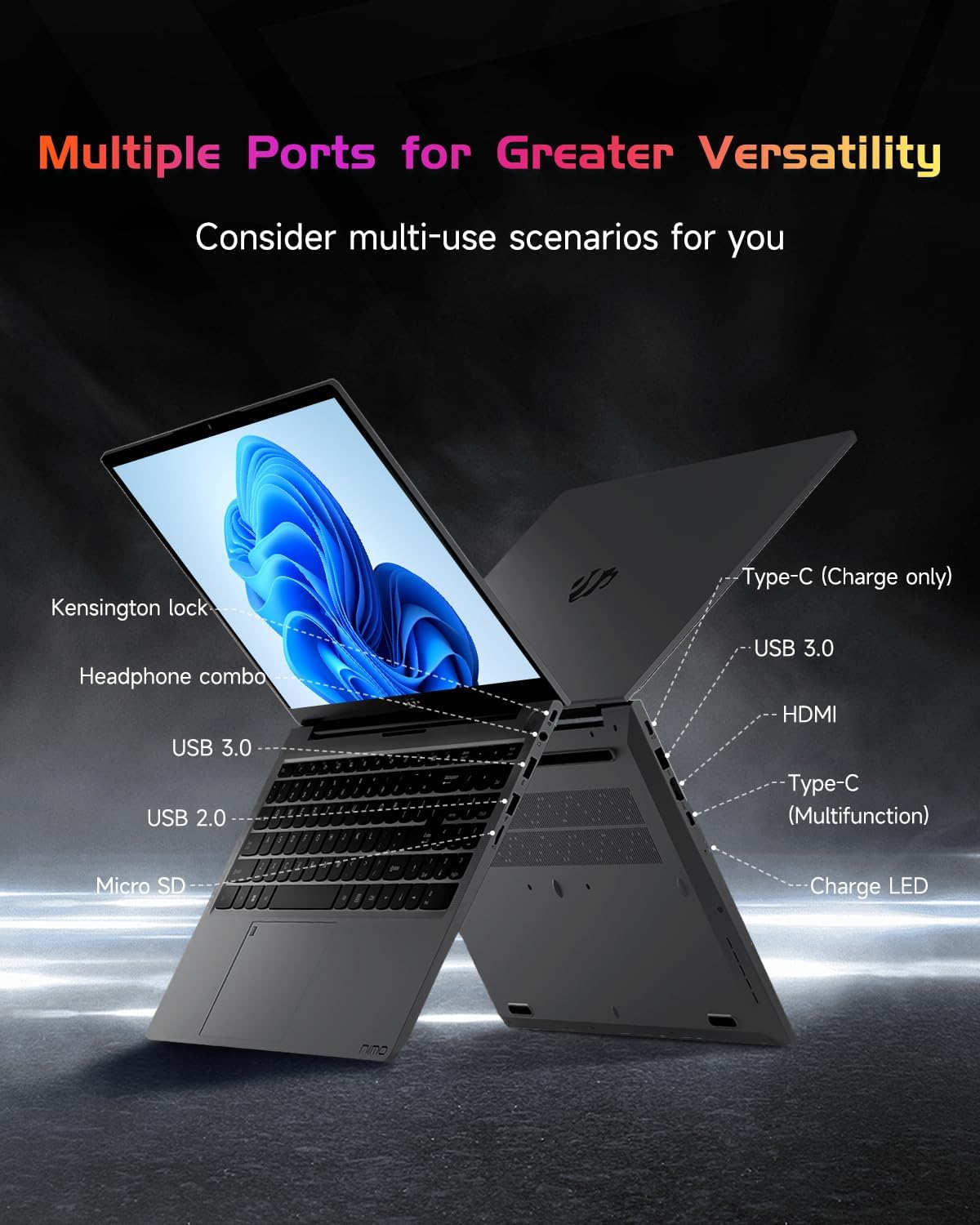
Paveikslėlis: Šoninis profesionalasfile of the NIMO laptop, displaying its array of ports for diverse connectivity needs.
Stay connected with integrated Wi-Fi 6 for fast wireless internet and Bluetooth 5.2 for connecting wireless accessories.
Procesorius ir našumas
Powered by the Intel Alder Lake-N100 12th Gen processor, the NIMO N151 delivers reliable performance for multitasking, streaming, and everyday computing tasks. It comes with 16GB DDR4 RAM and a 256GB PCIe SSD for fast startups and seamless operation.

Image: A visual representation of the Intel Alder Lake-N100 12th Gen processor, highlighting its role in the laptop's performance.
Operacinė sistema
The laptop comes pre-installed with Windows 11 Home, offering a modern and intuitive user experience.
Priežiūra
Bendroji priežiūra
- Keep the laptop in a clean, dry environment away from extreme temperatures.
- Venkite skysčių išsiliejimo ant klaviatūros ar ekrano.
- Use a soft, lint-free cloth to clean the screen and exterior. Do not use harsh chemicals.
- Užtikrinkite tinkamą vėdinimą neužkimšdami vėdinimo angų.
Akumuliatoriaus priežiūra
To prolong battery life, avoid fully discharging the battery frequently. It is recommended to keep the battery charge between 20% and 80% when possible.
Trikčių šalinimas
Bendros problemos ir sprendimai
- Nešiojamasis kompiuteris neįsijungia: Ensure the charger is properly connected and the battery has sufficient charge. Try holding the power button for 10-15 seconds to perform a hard reset.
- Ekranas tuščias: Connect an external monitor to check if the display is the issue. Restart the laptop.
- „Wi-Fi“ ryšio problemos: Patikrinkite, ar „Windows“ nustatymuose įjungtas „Wi-Fi“. Paleiskite maršrutizatorių ir nešiojamąjį kompiuterį iš naujo.
- Lėtas veikimas: Close unnecessary applications, check for malware, and ensure Windows is up to date.
For persistent issues, refer to the online support resources or contact NIMO customer service.
Specifikacijos
| Funkcija | Detalė |
|---|---|
| Prekės ženklas | NIMO |
| Modelio pavadinimas | Nimo N151 |
| Ekrano dydis | 15.6 colių |
| Ekrano raiška | 1920 x 1080 pikselių (Full HD) |
| Procesorius | Intel Pentium Quad Core N100 (up to 3.4 GHz) |
| RAM | 16 GB DDR4 |
| Atminties greitis | 3200 MHz |
| Kietasis diskas | 256 GB SSD (PCIe) |
| Grafikos koprocesorius | Integruota grafika |
| Operacinė sistema | Windows 11 Home |
| Belaidis tipas | 802.11a/b/g/n/ac (Wi-Fi 6) |
| Bluetooth | Bluetooth 5.2 |
| USB 2.0 prievadai | 1 |
| USB 3.0 prievadai | 3 |
| Vidutinis baterijos veikimo laikas | 5 valandų |
| Prekės svoris | 3.8 svaro |
| Gaminio matmenys | 14.07 x 8.98 x 0.76 colio |
| Ypatingos savybės | Apšviesta klaviatūra, pirštų atspaudų skaitytuvas, HD garsas, atminties kortelės lizdas, skaitmeninė klaviatūra |
Garantija ir palaikymas
Jūsų NIMO nešiojamąjį kompiuterį dengia 2 metų gamintojo garantija, ensuring peace of mind for your purchase. Additionally, NIMO offers a 90 dienų grąžinimo politika be jokių rūpesčių.
For technical assistance, warranty claims, or returns, please contact NIMO customer support through their official channels. Refer to the contact information provided with your product or on the NIMO websvetainę.
Produktų vaizdo įrašai
Peržiūrėkite šiuos oficialius vaizdo įrašus, kad gautumėte išsamų vaizdąview and demonstration of your NIMO laptop's features.
Išsamus NIMO 15.6 nešiojamojo kompiuterio įvadas
Video: A detailed introduction to the NIMO 15.6" FHD Laptop, showcasing jo dizainą ir pagrindines funkcijas.
NIMO nešiojamas kompiuteris: puikiai tinka darbui ir mokymuisi bet kada ir bet kur
Video: This video highlights the NIMO laptop's versatility for both work and study environments, emphasizing its portability.
NIMO 15.6 FHD nešiojamas kompiuteris studentams, skirtas namų darbams
Video: A demonstration of the NIMO 15.6" FHD Laptop's suitability for students and home-based work tasks.
Efektyvumas ir patogumas: „Nimo“ nešiojamas kompiuteris
Video: This video showcases the NIMO laptop's efficiency and convenient features for daily use.
NIMO Laptop UGC
Video: User-generated content featuring the NIMO laptop, demonstrating real-world usage scenarios.
NIMO 15.6 FHD nešiojamojo kompiuterio reklaminis vaizdo įrašas
Video: A promotional video for the NIMO 15.6" FHD Laptop, showcasing jo savybes ir privalumus.


