Įvadas
This manual provides essential information for setting up, operating, maintaining, and troubleshooting your NIMO 15.6" IPS FHD Business Laptop. Please read this manual thoroughly before using your device to ensure optimal performance and longevity.
Kas yra dėžutėje
- 1 x Nimo N154 nešiojamas kompiuteris
- 1 x C tipo 65 W PD greitasis įkroviklis
- 1 x Naudotojo vadovas (šis dokumentas)
- „Windows 11 Home“ (iš anksto įdiegta)
- Garantijos informacija (2 metų garantija, 90 dienų grąžinimas)
Produktas baigtasview
Familiarize yourself with the key components and features of your NIMO laptop.

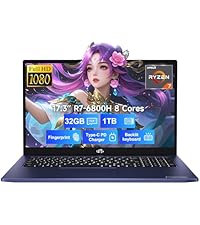
1 paveikslas: NIMO 15.6" Laptop Front View su pagrindinėmis savybėmis
This image displays the NIMO 15.6-inch laptop from the front, showcasing its full HD IPS display. Icons on the screen highlight key features including the Intel Core i3-1215U 6-core processor, 8GB RAM, 256GB SSD, fingerprint reader, Type-C PD charger, and backlit keyboard. An eagle graphic is prominently featured on the screen.
Prievadai ir jungtys

2 paveikslas: Laptop Ports and Connectors
This image illustrates the various ports available on the NIMO laptop. On the left side, from left to right, are the Micro SD card slot, USB 2.0 port, USB 3.0 port, headphone combo jack, and Kensington lock slot. On the right side, from left to right, are a Type-C (charge only) port, USB 3.0 port, HDMI port, Type-C (multifunction) port, and a Charge LED indicator.
- Kairė pusė: Micro SD Card Slot, USB 2.0, USB 3.0, Headphone Combo Jack, Kensington Lock
- Dešinė pusė: Type-C (Charge Only), USB 3.0, HDMI, Type-C (Multifunction), Charge LED
Sąrankos vadovas
1. Pradinis įkrovimas
Before first use, fully charge your laptop. Connect the provided 65W Type-C PD fast charger to the Type-C (Charge only) port on the right side of the laptop and to a power outlet. The Charge LED will indicate charging status.

3 paveikslas: 65 W C tipo PD greitasis įkroviklis
This image shows the compact NIMO 65W Type-C PD fast charger with its accompanying Type-C cable. It highlights the charger's versatility, indicating it can be used for laptops, tablets, and iPhones. Below, a comparison graphic contrasts the single, organized Type-C charger with a cluttered power strip filled with multiple, tangled chargers, emphasizing the convenience of the NIMO charger.
2. Įjungimas
Open the laptop lid. Press the power button, typically located on the top right of the keyboard, to turn on the device. The laptop will boot into Windows 11 Home.
3. Pradinė „Windows“ sąranka
Follow the on-screen prompts to complete the Windows 11 Home setup. This includes selecting your region, language, connecting to a Wi-Fi network, creating a user account, and setting up security features like the fingerprint reader.
4. Pirštų atspaudų skaitytuvo sąranka
During Windows setup or later via Windows Settings, configure the integrated fingerprint reader for secure and quick login. This feature is located on the touchpad area.

4 paveikslas: Pirštų atspaudų skaitytuvas ir Webkameros privatumo skydas
This image highlights two security features of the NIMO laptop. The upper left section shows a close-up of the touchpad with a glowing fingerprint icon, indicating the integrated fingerprint scanner for seamless security integration. The lower right section displays the laptop's webcam with a physical privacy shield, emphasizing privacy-focused camera convenience.
Naudojimo instrukcijos
Klaviatūra ir jutiklinė dalis
Your NIMO laptop features a full-size keyboard with a numeric keypad and a backlit function for use in low-light conditions. The large trackpad supports multi-touch gestures.

5 paveikslas: Klaviatūros ypatybės
This image displays the NIMO laptop's keyboard, highlighting its features for effortless typing in any environment. Icons above the keyboard represent the backlit keyboard, webcam shield, fingerprint reader, and numeric keypad. Insets show the backlit keyboard in use in a dimly lit setting.
Ekranas
The 15.6" Full HD (1920x1080) IPS display offers vibrant colors and wide viewing angles. Adjust brightness and display settings through Windows settings.

6 paveikslas: Ryškus Full HD ekranas
This image showcases the NIMO laptop's vivid Full HD display, featuring a vibrant image of a jellyfish on the screen. Icons above the display highlight its key attributes: FHD 1920x1080 resolution, IPS technology, Bright View, and Eye Protection. The screen-to-body ratio is indicated as 85%.
Ryšys
- „Wi-Fi 6“: Prisijunkite prie didelės spartos belaidžių tinklų.
- Bluetooth: Pair with Bluetooth-enabled devices such as headphones or mice.
- USB prievadai: Utilize the USB 2.0 and USB 3.0 ports for connecting external devices.
- HDMI: Prijunkite prie išorinių monitorių arba projektorių.
Priežiūra
Nešiojamojo kompiuterio valymas
- Šiek tiek naudokite minkštą, be pūkelių šluostę dampvandeniu arba ekrano valikliu ekranui valyti.
- Klaviatūrai ir korpusui valyti naudokite minkštą šluostę. Venkite stiprių cheminių medžiagų.
- Periodically use compressed air to clear dust from vents to ensure proper cooling.
Akumuliatoriaus priežiūra
- Venkite dažnai visiškai iškrauti akumuliatorių.
- Jei ilgesnį laiką nenaudojate nešiojamojo kompiuterio, laikykite jį vėsioje, sausoje vietoje.
- Use only the provided NIMO 65W Type-C PD charger.
Storage and Upgrades
The laptop comes with 8GB DDR4 RAM and a 256GB SSD. Both RAM and SSD are upgradeable, offering flexibility for future performance enhancements.

7 paveikslas: RAM and SSD Configuration
This image shows the NIMO laptop screen displaying various applications, illustrating its multitasking capabilities. Below the laptop, three boxes highlight its memory and storage specifications: 8GB DDR4 RAM, 256GB PCIe 4.0 SSD, and the presence of Dual RAM Channels, indicating support for upgrades and expansion.
Trikčių šalinimas
Šiame skyriuje aptariamos dažniausiai pasitaikančios problemos, su kuriomis galite susidurti naudodami NIMO nešiojamąjį kompiuterį.
Nešiojamasis kompiuteris neįsijungia
- Įsitikinkite, kad įkroviklis yra tvirtai prijungtas tiek prie nešiojamojo kompiuterio, tiek prie veikiančio maitinimo lizdo.
- Check if the Charge LED illuminates when connected to power.
- Pabandykite palaikyti maitinimo mygtuką 10–15 sekundžių, kad atliktumėte griežtą atkūrimą.
Baterija greitai išsikrauna
- Sumažinkite ekrano ryškumą.
- Uždarykite nereikalingas programas, veikiančias fone.
- Ensure Windows is updated, as updates often include power management improvements.
- Check power settings in Windows to optimize battery usage.
Applications Freeze or Laptop is Slow
- Close any applications that are not in use.
- Iš naujo paleiskite nešiojamąjį kompiuterį.
- Patikrinkite užduočių tvarkytuvę (Ctrl + Shift + Esc), ar nėra procesų, kurie naudoja daug procesoriaus arba RAM.
- Įsitikinkite, kad jūsų operacinė sistema ir tvarkyklės yra atnaujintos.
- Consider upgrading RAM or SSD if performance issues persist, as the laptop supports upgrades.
„Wi-Fi“ ryšio problemos
- Iš naujo paleiskite „Wi-Fi“ maršrutizatorių ir modemą.
- Disable and re-enable Wi-Fi on your laptop.
- Ensure Wi-Fi drivers are up to date.
- Pamirškite tinklą ir vėl prijunkite.
Specifikacijos
Detailed technical specifications for your NIMO N154 laptop.
| Funkcija | Specifikacija |
|---|---|
| Prekės ženklas | NIMO |
| Modelio pavadinimas | Nimo N154 |
| Ekrano dydis | 15.6 colių |
| Ekrano raiška | 1920 x 1080 Pixels (Full HD IPS) |
| Procesorius | „Intel Core i3-1215U“ (6 branduolių, iki 4.4 GHz) |
| RAM | 8 GB DDR4 (Upgradeable) |
| Atminties greitis | 3200 MHz |
| Kietasis diskas | 256 GB SSD (Upgradeable) |
| Grafikos koprocesorius | Integruota Intel Graphics |
| Operacinė sistema | Windows 11 Home |
| Belaidis tipas | „Wi-Fi 6“ (802.11a/b/g/n/ac), „Bluetooth 5.2“ |
| USB prievadai | 1x USB 2.0, 3x USB 3.0, 2x Type-C (1x Charge Only, 1x Multifunction) |
| Kiti uostai | HDMI, Headphone Combo Jack, Micro SD Card Slot, Kensington Lock |
| Ypatingos savybės | Fingerprint Reader, HD Audio, Memory Card Slot, Numeric Keypad, Backlit Keyboard, Webkameros skydas |
| Prekės svoris | 3.8 svaro |
| Gaminio matmenys | 14.07 x 8.98 x 0.76 colio |
| Vidutinis baterijos veikimo laikas | 5 Hours (54Wh Smart Battery) |
| Maitinimo šaltinis | Battery Powered, 65W Type-C PD Charger |
Garantija ir palaikymas
NIMO yra įsipareigojusi tiekti patikimus produktus ir puikų klientų aptarnavimą.
- Garantija: Your NIMO laptop is covered by a 2-year warranty.
- Grąžinimai: You may return the product within 90 days of purchase.
- Klientų aptarnavimas: Our 24/7 support team is available to provide assistance.
- Susisiekite: For support inquiries, please visit the official NIMO websvetainę arba kontaktą service@nimopc.com.

8 paveikslas: Professional Customer Assistance
This image depicts a customer service representative wearing a headset, symbolizing the availability of professional customer assistance via phone and live chat.
9 paveikslas: 2 metų palaikymas
This image shows a technician working on a laptop's internal components with tools, representing the 2-year support coverage for Nimo products.

10 paveikslas: 90 dienų grąžinimo politika
This image illustrates a delivery person handing a package to a customer, signifying the 90-day return policy for Nimo products.


