Įvadas
This manual provides detailed instructions for the setup, operation, maintenance, and troubleshooting of your OnePlus Buds 4 wireless earbuds. Please read this manual thoroughly to ensure proper use and to maximize your listening experience.
Pakuotės turinys
Patikrinkite, ar jūsų prekės pakuotėje yra visi šie daiktai:
- „OnePlus Buds 4“ ausinės (kairė ir dešinė)
- Įkrovimo dėklas
- USB-C įkrovimo laidas
- Įvairūs ausų antgalių dydžiai (S, M, L)
- Vartotojo vadovas (šis dokumentas)
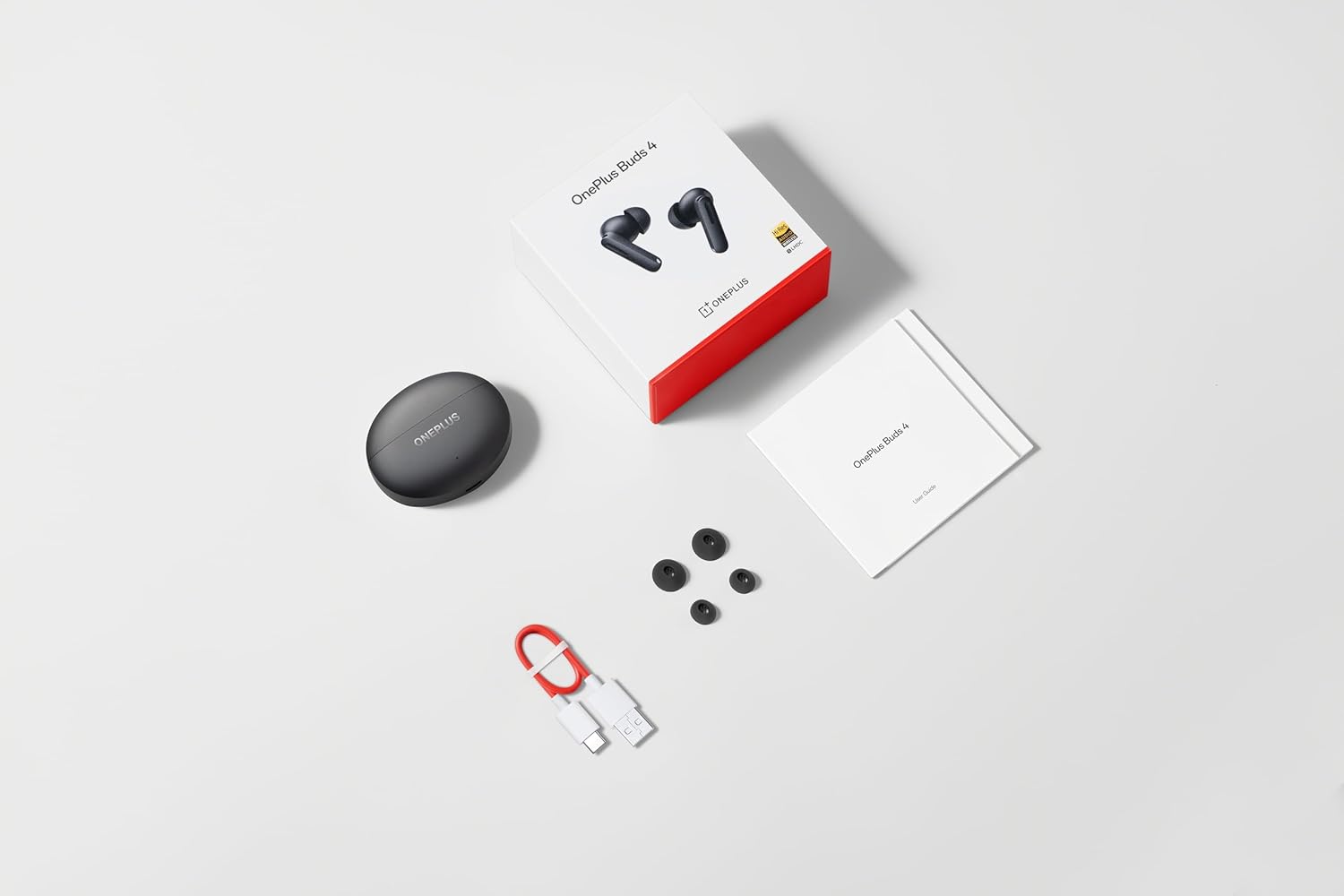
Image: The retail package contents for the OnePlus Buds 4, showing the earbuds, charging case, USB-C cable, and various ear tip sizes.
Produktas baigtasview
The OnePlus Buds 4 are advanced wireless in-ear headphones designed for high-quality audio and active noise cancellation. They feature an ergonomic design for comfort and secure fit, housed in a compact charging case.

Image: The OnePlus Buds 4 earbuds resting inside their open charging case. The earbuds and case are in Storm Gray, with the OnePlus logo visible on the case.

Image: This image shows the front perspective of the OnePlus Buds 4 earbuds and their charging case, highlighting the sleek Storm Gray finish.

Image: The image features the two OnePlus Buds 4 earbuds separated from their charging case, showcasing jų dizainą.
Sąranka
Pradinis įkrovimas
Before first use, place both earbuds into the charging case and connect the case to a power source using the provided USB-C cable. Ensure the indicator light on the case illuminates, signifying charging. A full charge is recommended for optimal battery performance.
Susiejimas su jūsų įrenginiu
- Įsitikinkite, kad įkrovimo dėklas turi pakankamai įkrovos.
- Atidarykite įkrovimo dėklą su viduje esančiomis ausinėmis. Indikatoriaus lemputė mirksės baltai, rodydama susiejimo režimą.
- Išmaniajame telefone arba „Bluetooth“ įrenginyje eikite į „Bluetooth“ nustatymus.
- Select "OnePlus Buds 4" from the list of available devices.
- Prijungus, korpuso indikatoriaus lemputė užges.
For subsequent connections, the earbuds will automatically connect to the last paired device when the case is opened.
Installing the HeyMelody App
For advanced features, customization, and firmware updates, download and install the HeyMelody app from your device's app store. This app allows you to personalize touch controls, adjust sound profiles, and manage noise cancellation settings.
Tinkamų ausų antgalių pasirinkimas
Choosing the correct ear tip size is crucial for sound quality, noise cancellation, and comfort. Experiment with the included small, medium, and large ear tips to find the best fit for your ears. A good seal will enhance bass response and active noise cancellation effectiveness.

Image: This image illustrates the different sizes of silicone ear tips included with the OnePlus Buds 4, essential for a comfortable and secure fit.
Naudojimo instrukcijos
Palieskite valdiklius
The OnePlus Buds 4 feature intuitive touch controls on the stem of each earbud. These controls can be customized via the HeyMelody app.

Image: A close-up image of a single OnePlus Buds 4 earbud, indicating the specific area for touch controls on the stem.
- Vienas palietimas: Groti / pristabdyti muziką, atsiliepti / baigti skambutį.
- Dukart paspausti: Kitas takelis, Atmesti skambutį.
- „Triple Tap“: Ankstesnis takelis.
- Paspauskite ir palaikykite: Switch between Active Noise Cancellation, Transparency Mode, and Noise Cancellation Off.
- Swipe Up/Down (on stem): Sureguliuokite garsumą.
Aktyvus triukšmo slopinimas (ANC) ir skaidrumo režimas
The earbuds offer advanced noise control features:
- Aktyvus triukšmo slopinimas (ANC): Sumažina aplinkos triukšmą, kad klausymosi patirtis būtų įtraukianti.
- Skaidrumo režimas: Leidžia girdėti aplinką ir tuo pačiu mėgautis garsu, taip pagerinant situacijos suvokimą.
Switch between these modes by pressing and holding the touch area on either earbud, or through the HeyMelody app.

Image: This graphic depicts the concept of Active Noise Cancellation, showing how the OnePlus Buds 4 reduce ambient sound for an immersive listening experience.
Garso funkcijos
The OnePlus Buds 4 are equipped with features to deliver high-fidelity audio:
- Hi-Res Audio and LHDC 5.0: Supports high-resolution audio codecs for detailed and clear sound reproduction.
- Įtraukiantis 3D erdvinis garsas: Provides a multi-directional sound experience, enhancing immersion in music and videos.

Image: An image highlighting the Hi-Res Audio and LHDC 5.0 capabilities of the OnePlus Buds 4, indicating high-fidelity sound reproduction.
Image: This graphic illustrates the immersive 3D Spatial Audio feature, suggesting a multi-directional sound experience provided by the earbuds.
Calls and Gaming
The earbuds feature enhanced voice cancellation for clear calls and low-latency connectivity for an optimized gaming and video watching experience.
Ausinių ir dėklo įkrovimas
To charge the earbuds, place them into the charging case. The earbuds will begin charging automatically. To charge the case, connect the provided USB-C cable to the charging port on the back of the case and to a power adapter (not included).

Image: The rear of the OnePlus Buds 4 charging case, clearly showing the USB-C port for charging.
The charging case provides extended battery life, allowing for over 24 hours of total listening time with multiple recharges of the earbuds.
Priežiūra ir priežiūra
- Valymas: Reguliariai valykite ausines ir įkrovimo dėklą minkštu, sausu, nepūkuotu skudurėliu. Nenaudokite stiprių cheminių medžiagų ar abrazyvinių medžiagų.
- Ausų patarimai: Remove and clean ear tips with water and mild soap if necessary. Ensure they are completely dry before reattaching.
- Saugykla: Kai nenaudojate, laikykite ausines įkrovimo dėkle, kad jos būtų apsaugotos ir įkrautos.
- Atsparumas vandeniui: The earbuds are water-resistant (IP55 rated), meaning they can withstand splashes and sweat. They are not designed for swimming or submersion in water. Ensure the earbuds are dry before placing them back in the charging case.
Trikčių šalinimas
If you encounter issues with your OnePlus Buds 4, refer to the table below for common problems and solutions.
| Problema | Galima priežastis | Sprendimas |
|---|---|---|
| Nėra garso iš ausinių | Low battery; Not paired; Volume too low. | Charge earbuds; Re-pair with device; Increase device volume. |
| Ausinės nesusiejamos | Out of range; Pairing mode not active; Interference. | Ensure earbuds are in pairing mode (open case); Move closer to device; Turn off other Bluetooth devices. |
| Aktyvus triukšmo slopinimas neveikia | Improper ear tip fit; ANC mode not active. | Try different ear tip sizes for a better seal; Ensure ANC is enabled via touch control or app. |
| Įkrovimo dėklas neįkraunamas | Laido problema; Maitinimo šaltinio problema. | Check USB-C cable connection; Try a different power adapter or USB port. |
| Viena ausinė neturi garso | Earbud not connected; Low battery. | Place both earbuds in the case, close, then reopen; Ensure both earbuds are charged. |
Specifikacijos
| Funkcija | Detalė |
|---|---|
| Modelio pavadinimas | OnePlus Buds 4 |
| Modelio numeris | E513A |
| Ryšio technologija | Bluetooth 5.4 |
| Triukšmo valdymas | Aktyvus triukšmo slopinimas |
| Garso tvarkyklės dydis | 11 milimetrų |
| Dažnių diapazonas | 40 Hz–20 000 Hz |
| Jautrumas | 100 dB |
| Varža | 18 omų |
| Kontrolės metodas | Palieskite valdiklius |
| Atsparumo vandeniui lygis | IP55 (ausinės) |
| Baterijos veikimo laikas (ausinės + dėklas) | Per 24 valandas (su įkrovimo dėklu) |
| Suderinami įrenginiai | Smartphones, Laptops, Desktops, Gaming Consoles, Tablets, Televisions |
Saugos informacija
Please observe the following safety guidelines to prevent damage to your device or personal injury:
- Klausos apsauga: Venkite klausytis dideliu garsu ilgą laiką, kad nepažeistumėte klausos.
- Vairavimo sauga: Do not use earbuds while driving or cycling in situations where it may distract you or pose a hazard.
- Akumuliatoriaus priežiūra: Do not attempt to replace the battery yourself. Do not expose the device to extreme temperatures or direct sunlight.
- Šalinimas: Dispose of the device and its batteries according to local regulations. Do not dispose of with household waste.
Garantija ir palaikymas
Your OnePlus Buds 4 are covered by a limited warranty. For detailed warranty terms and conditions, please refer to the warranty card included in your package or visit the official OnePlus support website. For technical assistance or customer service, please contact OnePlus customer support.