1. Įvadas
This manual provides comprehensive instructions for the installation, operation, and maintenance of your B2 Audio SixTen 10-Channel Digital Signal Processor (DSP). Please read this manual thoroughly before using the device to ensure proper functionality and to maximize its performance.
2. Produktas baigtasview
The B2 Audio SixTen DSP is an advanced digital signal processor designed for precise audio customization in car audio systems. It features 6 inputs and 10 outputs, offering extensive control over your sound environment.
Pagrindinės funkcijos:
- Advanced Digital Signal Processing: 6-input, 10-output DSP with 96 kHz, 32-bit resolution for clear audio and precise tuning.
- Belaidis valdymas: Adjust settings via Bluetooth using the dedicated iOS & Android application for real-time customization.
- Didelės apimtiestage Išėjimas: Each of the 10 output channels delivers a 4-volt signal for optimal performance.
- Kompaktiškas dizainas: Engineered for seamless integration with a space-saving form factor of 4.5” x 5.75” x 1.5”.
- Profesionalus garsas: Designed for precise frequency control, low distortion, and superior sound staging.

Vaizdas: kampuotas view of the B2 Audio SixTen DSP, highlighting its compact design and various connection points.
Kas yra dėžutėje:
- (1) B2 Audio SixTen 6-Input, 10-Output 4V DSP

Image: The retail packaging for the B2 Audio SixTen DSP, indicating the product is ready for installation.
3. Saugos informacija
Montuodami ir eksploatuodami laikykitės šių saugos priemonių:
- Prieš pradėdami bet kokius elektros darbus, visada atjunkite automobilio akumuliatorių.
- Užtikrinkite tinkamą įžeminimą, kad išvengtumėte elektros pavojaus.
- Do not expose the DSP to moisture or extreme temperatures.
- Jei nesate tikri dėl kurios nors montavimo proceso dalies, pasitarkite su profesionaliu montuotoju.
- Use appropriate gauge wiring for power and signal connections.
4. Sąranka ir diegimas
Proper installation is crucial for optimal performance. This section outlines the steps for physically installing and connecting the DSP.
4.1 Fizinis įrengimas
- Choose a dry, well-ventilated location in your vehicle, away from direct heat sources or moving parts.
- Mount the DSP securely using appropriate fasteners to prevent vibration.
- Ensure sufficient space around the unit for air circulation and cable management.
4.2 Laidų jungtys
The B2 Audio SixTen DSP features 6 RCA inputs and 10 RCA outputs, along with a power terminal block.
- Maitinimo jungtis: Connect the power terminal block to a fused 12V constant power source, ground, and a remote turn-on lead from your head unit.
- Įvesties jungtys: Connect your audio source (e.g., head unit, auxiliary input) to the RCA input jacks (AUX1-AUX6).
- Išvesties jungtys: Connect the RCA output jacks (OUT1-OUT10) to your amplifiers. Each output can be configured for specific channels (e.g., front left, front right, subwoofer).

Image: Front panel of the DSP, illustrating the RCA input connections (AUX1-AUX6) and the power terminal block.

Image: Rear panel of the DSP, displaying the 10 RCA output connections (OUT1-OUT10).
5. Naudojimo instrukcijos
The B2 Audio SixTen DSP is primarily controlled via a dedicated mobile application available for iOS and Android devices.
5.1 Bluetooth ryšys
- Ensure the DSP is powered on. The "BT" indicator light on the unit should be active.
- Išmaniajame telefone arba planšetiniame kompiuteryje įjunkite Bluetooth ir ieškokite galimų įrenginių.
- Select the B2 Audio SixTen DSP from the list of devices. Follow any on-screen prompts to complete pairing.
- Open the B2 Audio DSP application. The app should automatically detect and connect to the paired DSP.
5.2 Mobiliosios programėlės naudojimas
The application provides a graphical interface for all DSP functions, including:
- Input/Output Routing: Assign specific inputs to desired output channels.
- Išlyginimas (EQ): Adjust the frequency response for each channel using a multi-band equalizer.
- Crossovers: Set high-pass, low-pass, and band-pass filters for each output to direct specific frequency ranges to appropriate speakers.
- Laiko derinimas: Adjust the delay for each channel to ensure sound from all speakers arrives at the listening position simultaneously.
- Gain Control: Fine-tune the output level for each channel.
- Ribotuvas: Monitor and manage output levels to prevent clipping and speaker damage. The unit features "CLIP L" and "CLIP R" indicators.
- Iš anksto nustatytas valdymas: Save and recall multiple audio configurations for different listening preferences or music genres.
Refer to the in-app help or tutorials for detailed guidance on specific tuning parameters.
6. Priežiūra
The B2 Audio SixTen DSP requires minimal maintenance to ensure long-term performance.
- Laikykite įrenginį švarų, be dulkių ir šiukšlių. Valymui naudokite minkštą, sausą šluostę.
- Ensure all connections remain secure. Periodically check wiring for any signs of wear or corrosion.
- Venkite ilgą laiką laikyti įrenginį tiesioginiuose saulės spinduliuose arba itin aukštose temperatūrose.
- Ensure adequate ventilation around the unit to prevent overheating, especially during prolonged operation.
7. Problemų sprendimas
If you encounter issues with your B2 Audio SixTen DSP, refer to the following common problems and solutions:
| Problema | Galima priežastis | Sprendimas |
|---|---|---|
| Nėra maitinimo / Įrenginys neįsijungia | Neteisingas laidų prijungimas, perdegęs saugiklis, nepakankamas maitinimo šaltinis. | Check power, ground, and remote connections. Verify fuse integrity. Ensure vehicle battery is charged. |
| Nėra garso išvesties | Incorrect input/output routing, muted channels, incorrect gain settings, faulty RCA cables. | Verify input source and output connections. Check app settings for muted channels or low gain. Test RCA cables. |
| Iškreiptas garsas | Input signal too high, output gain too high, clipping. | Reduce input sensitivity or output gain. Monitor "CLIP L/R" indicators and adjust levels to prevent clipping. |
| Bluetooth ryšio problemos | DSP not in pairing mode, interference, app issues. | Ensure DSP is powered on. Restart the app and your mobile device. Try re-pairing the device. Move closer to the DSP. |
| Įrenginys įkaista | Insufficient ventilation, prolonged high-power operation. | Ensure adequate airflow around the unit. Reduce output levels if operating at maximum for extended periods. |
If the problem persists after attempting these solutions, contact B2 Audio customer support for further assistance.
8. Specifikacijos
The following are the technical specifications for the B2 Audio SixTen DSP:
| Funkcija | Specifikacija |
|---|---|
| Modelio numeris | B2-DSP-SIXTEN-BK |
| Įėjimai | 6 (3 Left / 3 Right) |
| Įvesties jungtys | RCA |
| Maksimalus įvesties lygis | 4.00 Vrms (+14dBu) |
| Išėjimai | 10 |
| Maksimalus išvesties lygis | 3.50 Vrms (+13dBu) |
| Dažnio atsakas | nuo 10 Hz iki 24 KHz (-1 dB) |
| Visiškas harmoninis iškraipymas + triukšmas (THD + N) | <0.01 % |
| Signalo delsa | <0.6 ms |
| Bitų sparta | 32 bitų |
| Sampling dažnis | 96kHz |
| Veiklos ttage DC | 9.5–15 V nuolatinė srovė |
| Didžiausias dabartinis suvartojimas | 350 mA |
| Ryšio technologija | Bluetooth, RCA |
| Valdiklio tipas | Bluetooth |
| Suderinami įrenginiai | Smartphone, Speaker, Tablet, iPhone |
| Gaminio matmenys (I x P x A) | 4.5 x 5.75 x 1.5 colio |
| Prekės svoris | 1.06 svaro |
| Spalva | Juoda |
| Garso išvesties režimas | Mono (Note: Configurable for multi-channel output via DSP software) |
| Erdvinio garso kanalo konfigūracija | 5.1 (Note: Configurable for various channel setups via DSP software) |
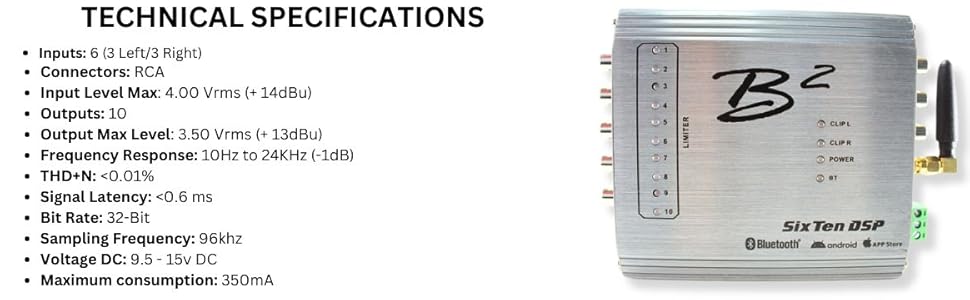
Image: A visual representation of the B2 Audio SixTen DSP's technical specifications, including input/output details and performance metrics.
9. Garantija ir palaikymas
For warranty information and technical support, please refer to the official B2 Audio websvetainėje arba susisiekite su įgaliotuoju pardavėju. Išsaugokite pirkimo kvitą kaip pirkimo įrodymą garantijos pretenzijoms.
Gamintojas: B2 Audio
Websvetainė: www.b2audio.com


