1. Įvadas ir pabaigaview
Thank you for choosing the Ninkear L12Pro Gaming Mini PC. This compact yet powerful desktop computer is designed to deliver exceptional performance for a wide range of applications, from demanding gaming and 4K video editing to business productivity and multi-display setups. Featuring an Intel Core i9-12900HK processor, 32GB of RAM, and a 1TB NVMe SSD, the L12Pro offers a seamless and responsive computing experience. This manual provides essential information for setting up, operating, maintaining, and troubleshooting your new Mini PC.
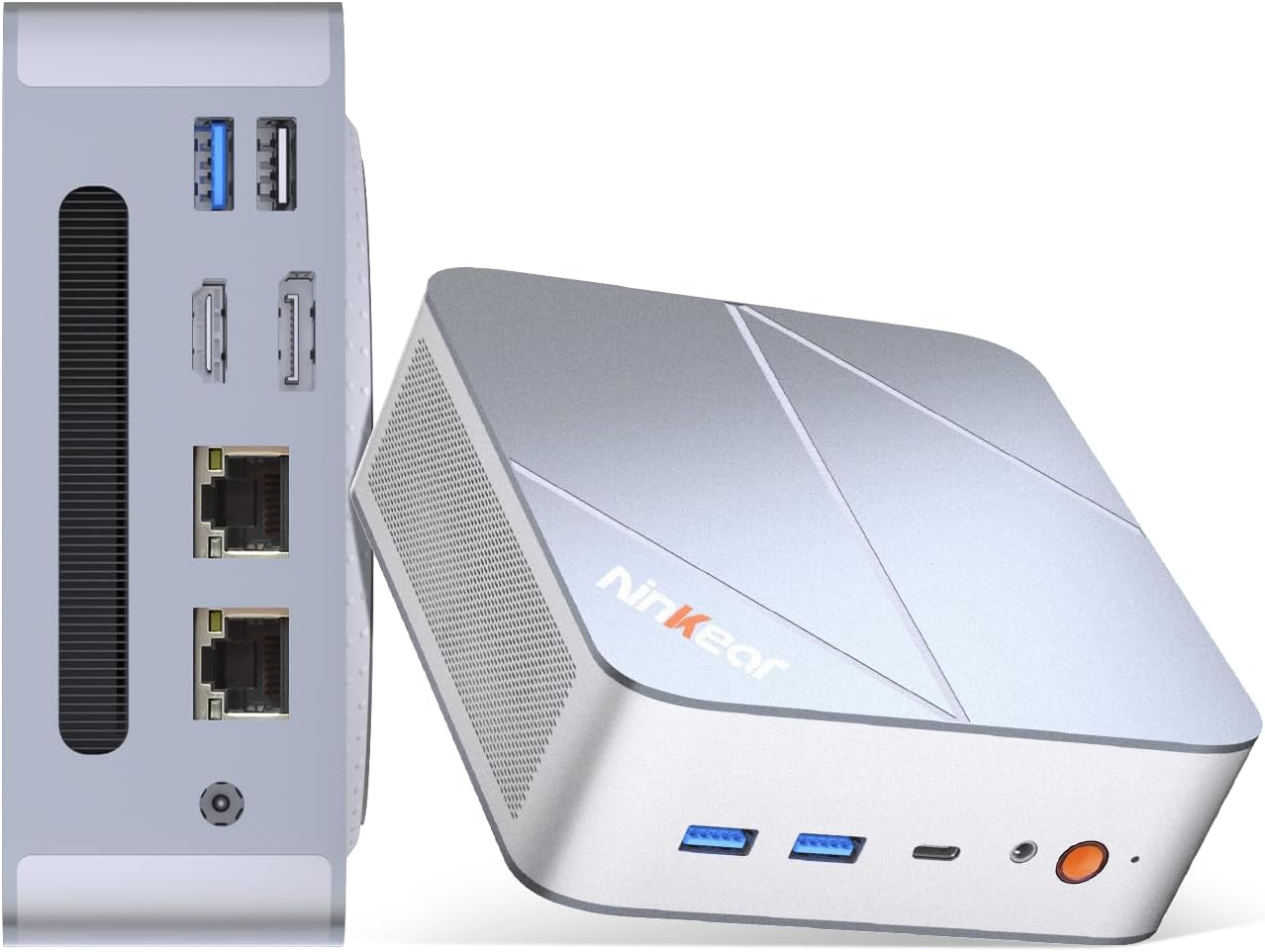
Figure 1.1: Ninkear L12Pro Mini PC - Front and Side View su uostais.
2. Produkto ypatybės
- Lightning-Fast Performance: Powered by Intel’s 12th Gen i9-12900HK processor (14 cores, 20 threads, up to 5.0GHz), capable of handling 4K video editing, coding, and intensive multitasking.
- Didelės spartos atmintis ir saugykla: Equipped with 32GB DDR4 RAM and an ultra-fast 1TB NVMe SSD for instant file access, smooth application performance, and rapid boot times.
- Triple 8K UHD Display Support: Create an immersive multi-screen setup with HDMI 2.0 (up to 4K@60Hz), DisplayPort 1.4 (up to 8K@60Hz), and USB4/Thunderbolt 4 (up to 8K@60Hz) outputs.
- Kompaktiškas ir lankstus dizainas: Small form factor allows for versatile placement behind monitors, under desks, or in backpacks, offering powerful desktop capabilities in a portable size.
- Išplėstinis ryšys: Features USB4.0, USB-C, WiFi 6, Bluetooth 5.2, dual 2.5G LAN ports, and multiple USB 3.2 Gen 2 and USB 2.0 ports for comprehensive peripheral support and high-speed data transfer.
- Efektyvi aušinimo sistema: Designed with an all-metal cooling system for quiet and efficient operation, ensuring stable performance even under heavy loads.
- Išplečiama saugykla: Supports additional M.2 NVMe PCIe SSD (up to 4TB) and an optional 2.5-inch HDD for expanded storage capacity.

2.1 pav.: Pagrindinės savybės ir specifikacijosview.

Figure 2.2: Triple 8K Display Setup for Enhanced Productivity.

Figure 2.3: Comprehensive Connectivity Options.
3. Kas yra dėžutėje
Atidarius pakuotę, įsitikinkite, kad yra visi šie daiktai:
- Ninkear L12Pro Mini PC
- HDMI kabelis
- Maitinimo adapteris
- Vartotojo vadovas (šis dokumentas)
4. Sąrankos vadovas
Follow these steps to set up your Ninkear L12Pro Mini PC:
- Išpakuokite mini kompiuterį: Atsargiai išimkite mini kompiuterį ir visus priedus iš pakuotės.
- Prijunkite prie ekrano:
- Connect one end of the HDMI cable (included) to the HDMI port on the Mini PC and the other end to an available HDMI input on your monitor or TV.
- For DisplayPort or USB4/Thunderbolt 4 connections, use appropriate cables (not included) to connect to compatible displays.
- For triple display setup, connect additional monitors using the available DisplayPort, USB4/Thunderbolt 4, or a USB-C to HDMI/DP adapter (not included).
- Prijunkite išorinius įrenginius:
- Plug your USB keyboard and mouse into any available USB ports on the Mini PC.
- If using wireless peripherals, ensure their receivers are plugged into a USB port.
- Prijunkite prie maitinimo: Plug the power adapter into the DC-in port on the Mini PC, then plug the other end into a power outlet.
- Tinklo ryšys (neprivaloma):
- For a wired connection, connect an Ethernet cable from your router or modem to one of the 2.5G LAN ports on the Mini PC.
- For a wireless connection, the Mini PC supports WiFi 6. You will configure this after the initial boot.
- Pradinis paleidimas: Press the power button on the front of the Mini PC. The system will power on and begin the initial setup process for Windows 11 Pro. Follow the on-screen instructions to complete the operating system setup.
5. Naudojimo instrukcijos
5.1 Maitinimo įjungimas/išjungimas
- Maitinimas: Vieną kartą paspauskite maitinimo mygtuką.
- Išjungti: „Windows“ sistemoje spustelėkite mygtuką „Pradėti“, tada pasirinkite „Maitinimas“ > „Išjungti“.
- Paleisti iš naujo: „Windows“ sistemoje spustelėkite mygtuką „Pradėti“, tada pasirinkite „Maitinimas“ > „Paleisti iš naujo“.
- Priverstinis išjungimas: If the system is unresponsive, press and hold the power button for approximately 5-7 seconds until the unit powers off. Use this only as a last resort.
5.2 Ekrano konfigūracija
The Ninkear L12Pro supports up to three independent displays simultaneously. After connecting your monitors, Windows will typically detect them automatically. If not, or to configure display settings:
- Right-click on an empty area of your desktop.
- Pasirinkite „Rodymo nustatymai“.
- From here, you can detect displays, arrange them, change resolution, and set display modes (Extend, Duplicate, Second screen only).
5.3 Tinklo ryšys
- Laidinis (eternetas): Ensure an Ethernet cable is connected to one of the 2.5G LAN ports. Windows will automatically establish a connection.
- Belaidis ryšys („Wi-Fi“):
- Click the Wi-Fi icon in the system tray (bottom right of the taskbar).
- Iš sąrašo pasirinkite norimą „Wi-Fi“ tinklą.
- Jei būsite paraginti, įveskite tinklo slaptažodį ir spustelėkite „Prisijungti“.
5.4 Išorinių įrenginių prijungimas
The Mini PC offers a variety of ports for connecting external devices:
- USB prievadai: Use USB 3.2 Gen 2 ports for high-speed devices like external hard drives or SSDs, and USB 2.0 for standard peripherals like keyboards, mice, or printers.
- USB4/Thunderbolt 4: This versatile port supports high-speed data transfer (40Gbps), video output, and power delivery (with compatible devices).
- Garso lizdas: Prijunkite ausines arba išorinius garsiakalbius prie 3.5 mm garso lizdo.
6. Priežiūra
Proper maintenance ensures the longevity and optimal performance of your Ninkear L12Pro Mini PC:
- Laikykite vėdinimo angas laisvas: Ensure the ventilation openings on the Mini PC are not obstructed. Blocked vents can lead to overheating and reduced performance.
- Reguliarus valymas: Mini kompiuterio išorę valykite minkšta, sausa šluoste. Dulkėms ventiliacijos angose valyti naudokite suslėgtą orą. Nenaudokite skystų valiklių tiesiai ant įrenginio.
- Programinės įrangos atnaujinimai: Regularly update your Windows operating system, drivers, and applications to ensure security, stability, and performance.
- Saugus išjungimas: Visada tinkamai išjunkite „Mini PC“ per operacinę sistemą, kad išvengtumėte duomenų sugadinimo.
- Aplinkos sąlygos: Operate the Mini PC in a clean, dry environment, away from direct sunlight, excessive heat, and humidity.

Figure 6.1: Smart Cooling System for Quiet Operation.
7. Problemų sprendimas
If you encounter issues with your Ninkear L12Pro Mini PC, refer to the following common problems and solutions:
| Problema | Galima priežastis | Sprendimas |
|---|---|---|
| Nėra galios | Power adapter not connected; Power outlet issue; Faulty power adapter. | Ensure power adapter is securely connected to the Mini PC and a working power outlet. Try a different outlet. |
| Nėra ekrano | Monitor not connected; Incorrect input selected on monitor; Faulty cable; Display driver issue. | Check display cable connections. Ensure monitor is on and set to the correct input source (HDMI, DP, USB-C). Try a different cable or monitor. Update display drivers in Windows. |
| Nėra interneto ryšio (laidinis) | Atjungtas Ethernet kabelis; Maršrutizatoriaus / modemo problema; Tinklo tvarkyklės problema. | Check Ethernet cable connection. Restart your router/modem. Check network adapter settings in Windows Device Manager. |
| Nėra interneto ryšio („Wi-Fi“) | Wi-Fi disabled; Incorrect password; Router too far; Driver issue. | Ensure Wi-Fi is enabled in Windows. Re-enter Wi-Fi password. Move closer to the router. Update Wi-Fi drivers. |
| Lėtas našumas | Too many applications running; Overheating; Low disk space; Malware. | Close unnecessary applications. Ensure vents are clear. Free up disk space. Run a malware scan. |
8. Specifikacijos
Detailed technical specifications for the Ninkear L12Pro Mini PC:
| Funkcija | Detalė |
|---|---|
| Prekės ženklas | Ninkear |
| Modelio numeris | L12Pro |
| Procesorius | Intel Core i9-12900HK (14 Cores, 20 Threads, up to 5.0GHz) |
| RAM | 32 GB DDR4 (išplečiama iki 64 GB) |
| Sandėliavimas | 1TB NVMe SSD (M.2 PCIe 3.0, Expandable up to 4TB) |
| Grafikos koprocesorius | „Intel Iris Xe“ grafika (96EU) |
| Maksimali ekrano skiriamoji geba | 8K (7680x4320) via DisplayPort/USB4, 4K (4096x2160) via HDMI |
| Vaizdo išvestys | 1x HDMI 2.0, 1x DisplayPort 1.4, 1x USB4/Thunderbolt 4 |
| USB prievadai | 3x USB 3.2 Gen 2, 1x USB 2.0, 1x USB4/Thunderbolt 4 (Type-C) |
| Tinklas | Dual 2.5G LAN (RJ45), WiFi 6 (802.11ax) |
| Bluetooth | Bluetooth 5.2 |
| Operacinė sistema | Windows 11 Pro |
| Prekės svoris | 2.51 svaro (apie 1.14 kg) |
| Matmenys | 10.44 x 6.73 x 2.79 colio (paketo matmenys) |
| Spalva | Premium Brushed Silver |
9. Garantija ir palaikymas
The Ninkear L12Pro Mini PC comes with a standard manufacturer's warranty. For specific warranty terms and conditions, please refer to the documentation included with your purchase or visit the official Ninkear websvetainę.
For technical support, troubleshooting assistance, or any inquiries regarding your product, please contact Ninkear customer service through their official channels.
Palaikymas internetu: Aplankykite Ninkear Store on Amazon DUK ir kontaktinės informacijos ieškokite čia.


