Įvadas
This manual provides essential information for setting up, operating, maintaining, and troubleshooting your NIMO 15.6" FHD IPS Student-Laptop-Computer. Please read this guide thoroughly to ensure optimal performance and longevity of your device.

The NIMO 15.6" FHD IPS Student-Laptop-Computer, featuring a vibrant display and sleek design.
Kas įtraukta
Patikrinkite, ar pakuotėje yra visi daiktai:
- 1 x Nimo N157 nešiojamas kompiuteris
- 1 x C tipo 65 W GaN PD greitasis įkroviklis
- 1 x Vartotojo vadovas
- „Windows 11 Home“ (iš anksto įdiegta)
- 2 metų garantija, 90 dienų grąžinimo informacija
Pagrindinės savybės
Your NIMO laptop is equipped with advanced features designed for productivity and convenience:
Vibrant FHD IPS Display
Experience stunning visuals on the 15.6" FHD IPS (1920x1080) Anti-Glare Display. With an 85% screen-to-body ratio and 16:9 aspect ratio, enjoy precise color accuracy and sharp detail for all your tasks.

The 15.6-inch FHD IPS display provides a bright and clear visual experience.
Galingas pasirodymas
Equipped with a 13th Gen Intel N150 processor (up to 3.6GHz), 16GB DDR4 RAM, and a 512GB PCIe SSD, this laptop delivers lightning-fast performance, rapid startup times, and accelerated data transfer for seamless multitasking and storage.
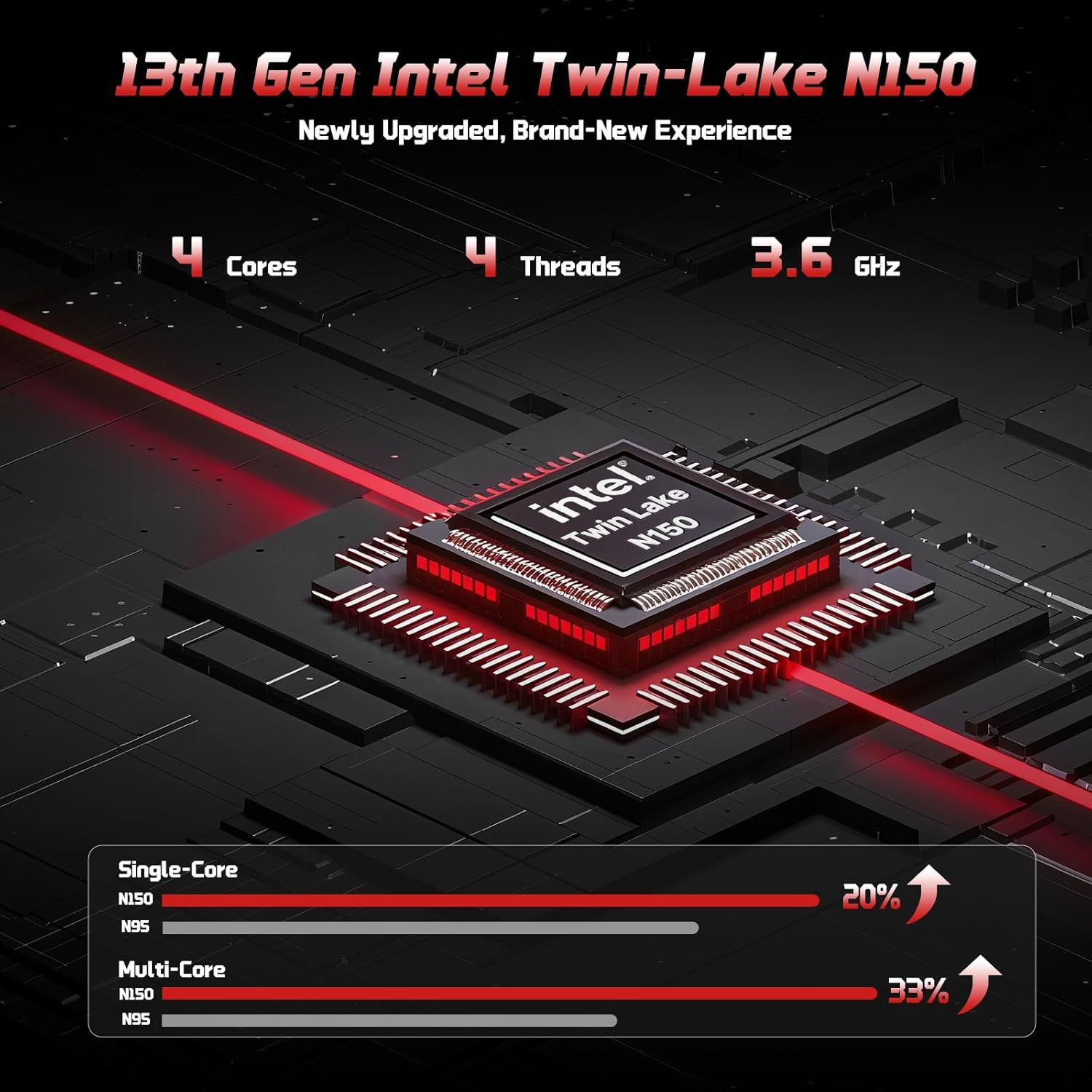
The 13th Gen Intel Twin-Lake N150 processor ensures efficient performance.

The laptop supports user-upgradable RAM and SSD for future expansion.
Fast Charging with GaN PD Charger
The included 65W GaN PD fast charger and 6.56ft USB-C to USB-C cable allow for quick power-ups. Charge for 15 minutes to get 2 hours of standby time. This versatile charger can also power your iPad, phone, and other compatible devices.

The 65W GaN PD charger provides fast and convenient charging for multiple devices.
Humanized Design & Security
Features a built-in fingerprint reader on the touchpad for secure, one-touch login. The backlit keyboard allows for easy typing in dim or dark environments, with adjustable brightness. The touchpad supports scroll and multi-touch gestures.

Secure fingerprint login and a comfortable backlit keyboard enhance usability.
Visapusiškas ryšys
The laptop includes a variety of ports for all your peripheral needs, including USB 3.0, USB 2.0, HDMI, and multiple Type-C ports (one for PD Charge Only, one for Multifunction). It also features Wi-Fi 6 and Bluetooth 5.2 for robust wireless connections.

Išsamus view of the laptop's ample ports for various connections.
Privatumas Webkumštelis
A 720p HD camera with a physical privacy switch ensures your personal space is always secure. Easily slide the switch to cover the camera when not in use.

The physical privacy switch on the webcam provides enhanced security.
Sąrankos vadovas
1. Pradinis įjungimas
- Unpack your NIMO laptop and all accessories.
- Connect the Type-C 65W GaN PD Fast Charger to the laptop's Type-C PD Charge Only port and plug it into a power outlet.
- Open the laptop lid. The laptop may power on automatically, or you may need to press the power button (located on the top-right of the keyboard).
- Vykdykite ekrane pateikiamus nurodymus, kad užbaigtumėte „Windows 11 Home“ sąranką, įskaitant kalbos, regiono, tinklo ryšio ir vartotojo paskyros kūrimą.
2. Išorinių įrenginių prijungimas
Išoriniams įrenginiams prijungti naudokite turimus prievadus:
- USB įrenginiai: Connect USB drives, external keyboards, or mice to the USB 3.0 or USB 2.0 ports.
- Išorinis ekranas: Use an HDMI cable to connect to an external monitor or projector via the HDMI port.
- Garso įrenginiai: Plug in headphones or external speakers into the 3.5mm headphone jack.
- „MicroSD“ kortelė: Insert a MicroSD card into the dedicated slot for expanded storage.
Naudojimo instrukcijos
Klaviatūros ir jutiklinės dalies naudojimas
- Apšviesta klaviatūra: Paspauskite Fn + F10 (arba klavišą su klaviatūros foninio apšvietimo piktograma), kad perjungtumėte foninio apšvietimo ryškumo lygius arba jį išjungtumėte.
- Skaitmeninė klaviatūra: The integrated numeric keypad provides convenient data entry.
- Jutiklinė dalis: Supports standard Windows gestures, including two-finger scroll, pinch-to-zoom, and multi-finger taps for various functions.
Pirštų atspaudų prisijungimas
To set up fingerprint login for enhanced security:
- Eikite į „Windows“ nustatymus > Paskyros > Prisijungimo parinktys.
- Select "Fingerprint Recognition (Windows Hello)" and follow the on-screen prompts to register your fingerprint.
- Once registered, you can simply touch the fingerprint sensor on the touchpad to log in.
Ekrano nustatymai
Sureguliuokite ekrano nustatymus, kad būtų optimalūs viewing:
- Rezoliucija: Right-click on the desktop, select "Display settings", and choose "1920 x 1080" for the best resolution.
- Ryškumas: Ekrano ryškumą reguliuokite naudodami funkcinius klavišus (Fn + F5 / F6) or through Display settings.
Garsas ir vaizdo įrašas
- Garsumo valdymas: Use the function keys (Fn + F2/F3/F4) or the Windows volume mixer to adjust audio levels.
- WebKameros privatumas: Slide the physical switch next to the webkamera, kad uždengtumėte arba atidengtumėte kameros objektyvą privatumo užtikrinimui.
Priežiūra
Nešiojamojo kompiuterio valymas
- Šiek tiek naudokite minkštą, be pūkelių šluostę dampekraną nuvalykite vandeniu arba ekrano valikliu.
- Klaviatūrai ir korpusui valyti naudokite minkštą, sausą šluostę. Venkite stiprių cheminių medžiagų ar abrazyvinių medžiagų.
- Periodically use compressed air to clear dust from the vents to ensure proper heat dissipation.
Akumuliatoriaus priežiūra
To maximize your laptop's battery life and health:
- Venkite dažnai visiškai iškrauti akumuliatorių.
- Laikykite nešiojamąjį kompiuterį vėsioje, sausoje vietoje, kai jo ilgesnį laiką nenaudojate.
- Use the provided NIMO 65W GaN PD Fast Charger for optimal charging performance.

The laptop features smart battery optimization for extended lifespan and safe charging.
RAM and SSD Upgrades
Your NIMO laptop supports detachable RAM and SSD, allowing for user upgrades. Consult a qualified technician or refer to detailed upgrade guides on the NIMO support website before attempting any internal component changes.
Įprastų trikčių šalinimas
If you encounter problems with your laptop, try the following solutions:
- Nėra galios: Ensure the charger is securely connected to both the laptop and a working power outlet. Try a different outlet. If the battery is completely drained, allow it to charge for at least 30 minutes before attempting to power on.
- Rodymo problemos: Jei ekranas tuščias, pabandykite paspausti Fn + F7 (or the display toggle key) to switch display outputs. Check external monitor connections if applicable.
- Lėtas našumas: Close unnecessary applications. Check for Windows updates. Ensure sufficient free space on the SSD. Restarting the laptop can often resolve temporary slowdowns.
- „Wi-Fi“ / „Bluetooth“ ryšys: Ensure Wi-Fi and Bluetooth are enabled in Windows settings. Restart your router/modem. Update network drivers if necessary.
- Klaviatūra / jutiklinė planšetė nereaguoja: Paleiskite nešiojamąjį kompiuterį iš naujo. Įrenginių tvarkytuvėje patikrinkite, ar nėra tvarkyklių atnaujinimų.
If problems persist, please contact NIMO customer support for further assistance.
Techninės specifikacijos
| Funkcija | Specifikacija |
|---|---|
| Prekės ženklas | NIMO |
| Modelio pavadinimas | Nimo N157 |
| Ekrano dydis | 15.6 colių |
| Ekrano raiška | 1920 x 1080 pikselių (Full HD IPS) |
| Procesorius | 13th Gen Intel N150 (up to 3.6 GHz) |
| RAM | 16 GB DDR4 (3200 MHz) |
| Kietasis diskas | 512 GB PCIe SSD |
| Grafikos koprocesorius | Integruota grafika (Intel) |
| Operacinė sistema | Windows 11 Home |
| Belaidis tipas | 802.11a/b/g/n/ac (Wi-Fi 6), „Bluetooth 5.2“ |
| USB prievadai | 3 x USB 3.0, 1 x USB 2.0, 2 x Type-C (1 PD Charge Only, 1 Multifunction) |
| HDMI prievadas | Taip |
| Vidutinis baterijos veikimo laikas | 5 valandų |
| Prekės svoris | 3.8 svaro |
| Gaminio matmenys | 14.07 x 8.98 x 0.76 colio |
| Ypatingos savybės | Backlit Keyboard, Fingerprint Reader, HD Audio, Numeric Keypad, Privacy Webkumštelis |
Garantija ir palaikymas
NIMO is committed to providing excellent customer service and support for your product.
Gamintojo garantija
Jūsų NIMO nešiojamajam kompiuteriui taikoma išsami garantija 2 metų gamintojo garantija. This warranty ensures that your device is free from defects in materials and workmanship under normal use.

NIMO products are covered by a 2-year support period.
90 dienų grąžinimas be rūpesčių
NIMO siūlo 90 dienų grąžinimo ir keitimo paslauga be rūpesčių. If you have any concerns or are not satisfied with your product within 90 days of purchase, you may return it for any reason.

Bet kurį NIMO produktą galite grąžinti dėl bet kokios priežasties per 90 dienų nuo įsigijimo datos.
Susisiekimas su palaikymo tarnyba
Our dedicated support team is ready to assist you. If any concerns arise or you have product-related questions, you can contact us through our official website, email, or telephone. We strive to swiftly resolve issues or facilitate replacements.

Susisiekite su mūsų profesionalia aptarnavimo komanda telefonu ir tiesioginiu pokalbių lange.
NIMO Direct Inc. is a family-owned small business founded in New Castle DE. We are committed to providing affordable, high-quality, and innovative products, while also supporting US manufacturing and local employment.


