1. Įvadas
This manual provides detailed instructions for the installation, operation, and maintenance of your BESTTEN 24W USB Wall Outlet, Model BAA-015. This device integrates a standard 15 Amp electrical outlet with both Type C and Type A USB charging ports, offering a total output of 4.8A (5VDC, 24W). It is designed for convenient charging of various electronic devices while maintaining a clean aesthetic with its screwless wallplate.

1.1 vaizdas: Baigtaview of the BESTTEN 24W USB Wall Outlet.
2. Saugos informacija
Please read all safety instructions carefully before installation and use. Failure to follow these instructions may result in electric shock, fire, or property damage.
- UL/cUL įtraukta į sąrašą: This product is UL/cUL Listed, ensuring it meets recognized safety standards.
- Tamper-Resistant (TR) Shutters: The outlet features tamper-resistant shutters to prevent foreign objects from being inserted, enhancing electrical safety, especially in homes with children.
- Medžiaga: Constructed from fire and impact-resistant polycarbonate thermoplastic material for enhanced durability and safety.
- Perspėjimai montuojant:
- Prieš montuodami visada išjunkite maitinimą grandinės pertraukikliu.
- Do not unscrew the terminal screws too far or with excessive force.
- Do not use power tools to loosen or tighten terminal screws.
- The USB receptacle can only be wired to one circuit.
- This USB outlet cannot charge laptops.

Image 2.1: Tamper-Resistant feature for enhanced safety.

Image 2.2: Multiple safety protections integrated into the outlet.
3. Pakuotės turinys
Prieš pradėdami diegti, patikrinkite, ar yra visi komponentai:
- USB Outlets (quantity as per pack)
- Screwless Wallplates
- Tvirtinimo varžtai
4. Specifikacijos
| Funkcija | Specifikacija |
|---|---|
| Modelio numeris | BAA-015 |
| USB įvertinimas | Two USB Ports with 4.8 Amp, 5VDC (24W total) |
| Kintamosios srovės lizdo vardinė vertė | 15 Amp, 125VAC |
| Vielos terminalai | #14 - #12 AWG for Side, #14 AWG for Back |
| Darbinė temperatūra | -4 iki 140 °F (nuo -20 iki 60 °C) |
| USB suderinamumas | USB 1.1/2.0/3.0 Devices, including Apple Products (excluding laptops) |
| Sertifikavimas | UL/cUL įtraukta į sąrašą |
| Medžiaga | Polikarbonatas (PC) |
| Gaminio matmenys | 4.69"L x 2.91"W x 1.75"D (11.91cm x 7.39cm x 4.45cm) |
| Prekės svoris | 6.3 uncijos |
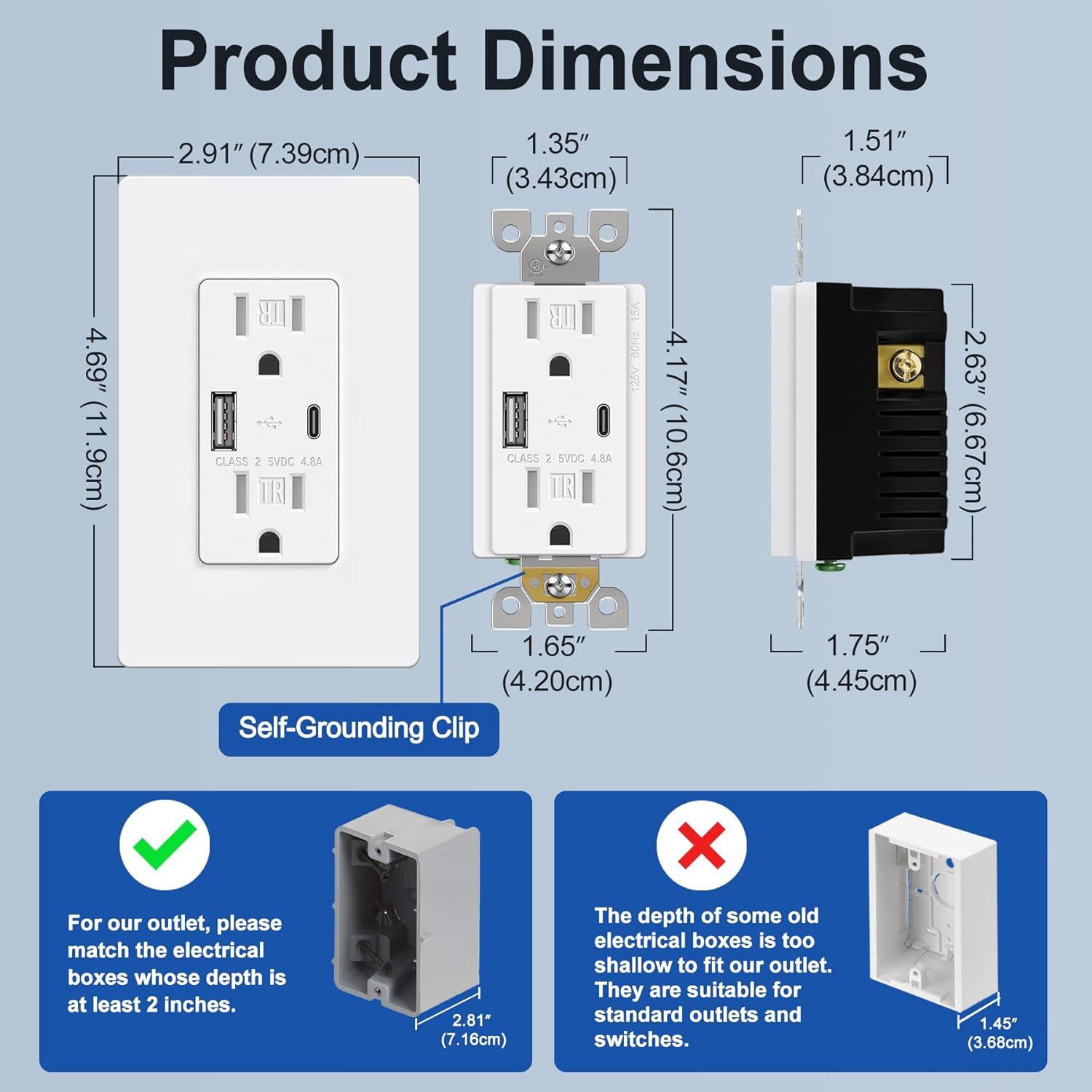
Image 4.1: Product dimensions and electrical box depth requirement.

Image 4.2: Comprehensive product specifications and dimensions.
5. Sąranka (diegimas)
Installation should be performed by a qualified electrician or a knowledgeable individual following all local electrical codes and safety guidelines. Always ensure power is OFF at the circuit breaker before starting.
Laidų sujungimo instrukcijos
The outlet supports both back and side wiring options.

Image 5.1: Wiring diagram and installation steps.

Image 5.2: Back wire vs. Side wire connection methods.
Steps for Back Wiring:
- Gently loosen the screw holding it against the terminal.
- Press the screw, insert the bare wire into the terminal hole.
- Tighten the terminal screw to 12-14 in-lbs.
Steps for Side Wiring:
- Strip approximately 1 inch of insulation from the wire.
- Wrap the wire clockwise around the screw terminal, ensuring 2/3 of the way around.
- Tighten the terminal screw securely.
Svarbūs įspėjimai:
- Ensure the electrical box depth is at least 2 inches for proper fitment.
- Connect the Black/Hot wire to the Brass screw, White/Neutral wire to the Silver screw, and Green/Ground wire to the Green screw.
- After wiring, carefully push the outlet into the electrical box and secure it with mounting screws.
- Attach the screwless wallplate by snapping it into place.
- Atkurkite maitinimą prie grandinės pertraukiklio.
6. Naudojimo instrukcijos
Once installed and power is restored, the BESTTEN USB Wall Outlet is ready for use.
- AC lizdai: Plug standard electrical devices into the two 15 Amp AC receptacles.
- USB įkrovimo prievadai: Use the Type C or Type A USB ports to charge compatible electronic devices. The total output for both USB ports is 4.8A (5VDC, 24W).
- Vienalaikis įkrovimas: You can charge two USB devices simultaneously without needing adapters, while still having access to the two AC outlets.
- Suderinamumas: Compatible with a wide range of electronic devices including smartphones, tablets, e-readers, digital cameras, and MP3 players. Note: This USB outlet cannot charge laptops.

Image 6.1: High-speed charging with Type C and Type A USB ports.

Image 6.2: Wide compatibility with various electronic devices.
7. Priežiūra
The BESTTEN USB Wall Outlet requires minimal maintenance.
- Valymas: To clean the surface, wipe with a soft, damp šluoste. Nenaudokite abrazyvinių valiklių ar tirpiklių. Prieš valydami įsitikinkite, kad prietaisas išjungtas.
- Patikra: Periodically inspect the outlet and wallplate for any signs of damage, wear, or loose connections. If any issues are found, turn off power at the breaker and consult a qualified electrician.
8. Problemų sprendimas
If you encounter issues with your USB wall outlet, refer to the following table:
| Problema | Galima priežastis | Sprendimas |
|---|---|---|
| No power from AC outlets | Circuit breaker tripped; Loose wiring connection | Check and reset the circuit breaker. Verify wiring connections are secure (power off first). |
| USB prievadai neįkraunami | Device incompatibility; Faulty USB cable; USB ports failed; Overload | Ensure device is compatible (not a laptop). Try a different USB cable. Reduce number of devices charging. If USB ports fail after extended use, replacement may be necessary. |
| Įrenginys įkraunamas lėtai | High power demand from multiple devices; Faulty USB cable | Ensure total USB current draw does not exceed 4.8A. Try a different, high-quality USB cable. |
| Sieninė plokštė netelpa į paviršių | Electrical box too shallow; Obstruction | Ensure electrical box depth is at least 2 inches. Check for any wires or debris obstructing the fit. |
9. Garantija ir palaikymas
This BESTTEN product is backed by a standard return policy, typically 30 days from the date of purchase for refund or replacement, as per retailer terms. For specific warranty details and duration, please refer to the product packaging or contact BESTTEN customer support.
For technical assistance or further inquiries, please visit the official BESTTEN websvetainėje arba susisiekite su jų klientų aptarnavimo skyriumi. Išsaugokite pirkimo kvitą, jei prireiktų pateikti pretenziją dėl garantijos.
Kontaktinė informacija:
Please refer to the BESTTEN official websvetainę, kurioje rasite naujausią klientų aptarnavimo kontaktinę informaciją.


