
1. Įvadas
Thank you for choosing the Veken 55 x 28 Inch Electric Standing Desk. This desk is designed to provide a versatile and ergonomic workspace, allowing you to easily switch between sitting and standing positions. Please read this manual carefully before assembly and use to ensure proper operation and safety.
2. Svarbi saugos informacija
- Always follow the user manual for proper assembly and use.
- Neviršykite svorio ribos, 154 svarai (70 kg) to ensure stability and prevent damage.
- Use the desk in a well-lit area and keep it away from heat sources.
- Be cautious when adjusting the height to avoid injury or pinching.
- Always maintain proper ergonomics when using the desk to prevent strain.
- Ensure all cables are properly managed to prevent tripping hazards or damage during height adjustments.
3. Pakuotės turinys
Prieš pradėdami surinkimą, patikrinkite, ar yra visi komponentai:
- Desktop (joined pieces)
- Desk Legs (cold-rolled steel frame)
- Valdymo skydas su atminties nustatymais
- Motor and Transmission Rod
- Kabelio spaustukas
- Feet Pads (4x)
- Ausinių kabliukas
- Vartotojo vadovas (šis dokumentas)
- All necessary assembly tools (hex key, screws)
4. Surinkimo instrukcijos
Assembly is designed to be straightforward. All holes are pre-drilled, and accessories are pre-labeled for ease of installation. It is recommended to assemble the desk on a soft, clean surface to prevent scratches.
Žingsnis po žingsnio surinkimo vadovas
- Išpakuokite komponentus: Carefully remove all parts from the packaging. Verify against the package contents list.
- Surinkite stalo kojas: Attach the desk legs to the main frame using the provided screws. Ensure all connections are secure.
- Install Transmission Rod: Insert the transmission rod between the two legs. Ensure it is correctly aligned and secured.
- Pridėti darbalaukį: Carefully place the desktop onto the assembled frame. Align the pre-drilled holes and secure the desktop with the provided screws. Be careful not to overtighten screws to avoid stripping the particle board.
- Install Control Panel and Accessories: Attach the control panel to the underside of the desktop in the designated area. Install the headphone hook and cable clips as desired.
- Prijunkite maitinimą: Connect the power cable to the control panel and then to a power outlet.

Figure 1: Quick and Simple Installation Overview
Surinkimo vaizdo vadovas
Video 1: Veken Electric Standing Desk - Installation Steps. This video provides a visual guide to the assembly process.
5. Naudojimo instrukcijos
The Veken Electric Standing Desk features an intuitive control panel for easy height adjustment and personalized settings.
Aukščio reguliavimas
- The desk offers a wide height range from 27.9–45.6 colio.
- Naudokite Aukštyn (▲) ir Žemyn (▼) arrow buttons on the control panel to manually adjust the desk to your desired height.
Atminties išankstiniai nustatymai
The control panel includes four memory preset buttons (1, 2, 3, 4) to save and quickly recall your preferred sitting and standing heights.
- Norėdami išsaugoti išankstinį nustatymą: Adjust the desk to your desired height using the arrow buttons. Press and hold one of the numbered preset buttons (1-4) until the display flashes or beeps, indicating the height has been saved.
- Norėdami priminti išankstinį nustatymą: Simply press the corresponding numbered preset button (1-4). The desk will automatically move to the saved height.
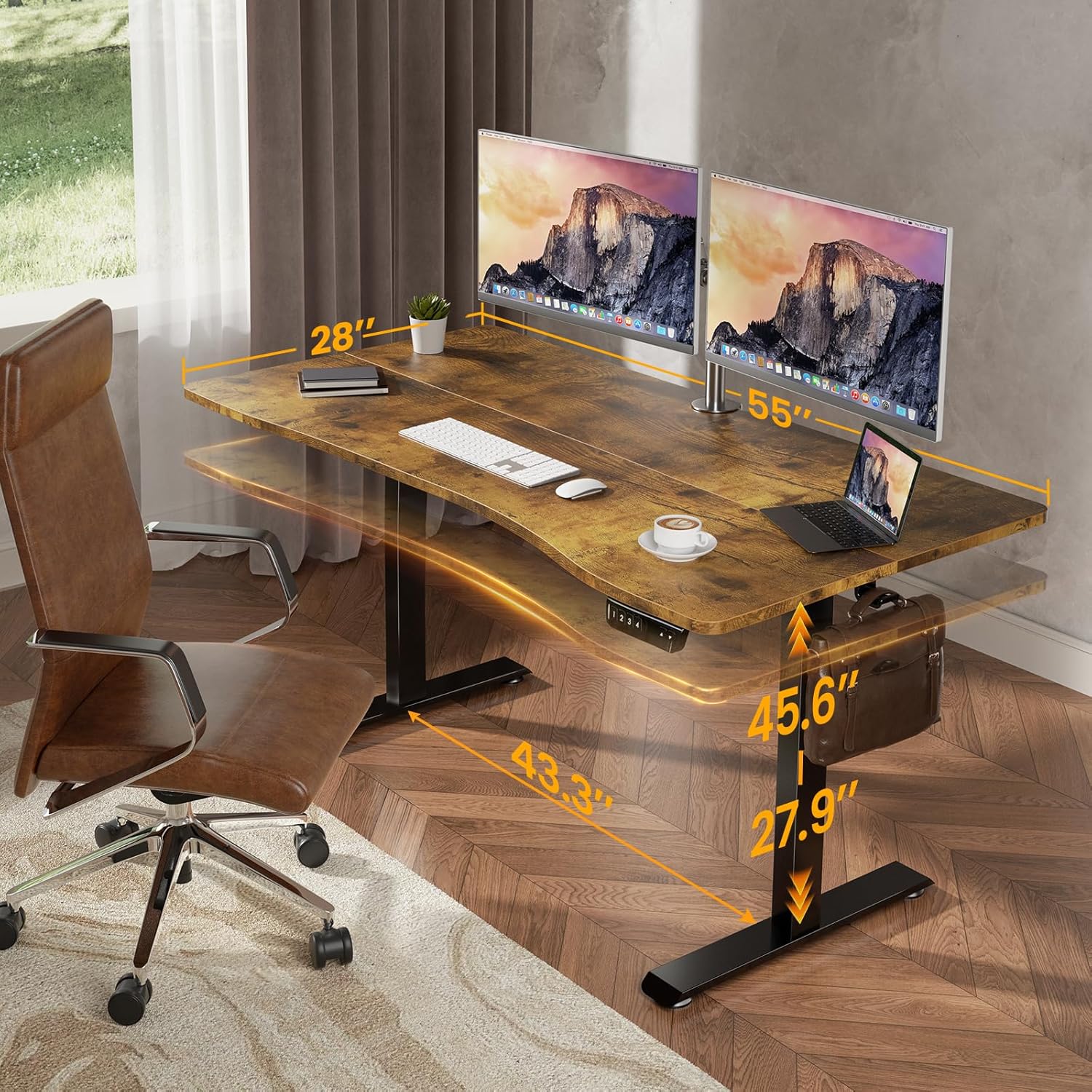
Figure 2: Desk Dimensions and Height Range
Ergonomic Design & Features
- Ergonomiškas išlenktas kraštas: The desktop features a smooth, human-centric curved edge to reduce arm strain and allow easy access to items, enhancing comfort and productivity.
- Spacious Worksurface: The 55" x 28" desktop accommodates multiple monitors and office supplies, providing ample space for an organized workflow.
- Ausinių kabliukas: A convenient hook is included for hanging headphones or bags, keeping your workspace tidy.

Figure 3: Ergonomic Desktop Design
Video 2: Veken - Choose Your Favorite Standing Desk. This video demonstrates the desk's versatility in various settings.
6. Priežiūra
To ensure the longevity and optimal performance of your Veken Electric Standing Desk, follow these maintenance guidelines:
- Valymas: Nuvalykite darbastalį ir rėmą minkšta, d šluosteamp šluoste. Venkite stiprių cheminių medžiagų ar abrazyvinių valiklių, kurie gali pažeisti apdailą.
- Kabelių valdymas: Periodically check and adjust cable clips to keep wires tidy and prevent them from getting caught during height adjustments.
- Tvirtinimo detalių patikrinimas: Occasionally inspect all screws and fasteners to ensure they are tight. Retighten if necessary, but avoid overtightening.
- Variklio priežiūra: The motor is designed for durability. If you notice any unusual sounds or resistance during adjustment, refer to the troubleshooting section.
7. Problemų sprendimas
If you encounter any issues with your Veken Electric Standing Desk, please refer to the following common problems and solutions:
- Desk Not Adjusting / Uneven Legs: If one leg is not moving synchronously with the other, or the desk is not adjusting, it may indicate an incorrect installation of the transmission rod. Ensure the transmission rod is fully inserted into the hexagonal nut on the left leg's hole position.
- Vibration During Adjustment: A slight vibration when lowering the desk might occur. This is often due to the legs catching slightly. Regular use typically smooths this out. If persistent, ensure all connections are secure.
- Stripped Screw Holes: The desktop is made of particle board. When assembling, avoid overtightening screws to prevent stripping the pre-drilled holes. If a hole is stripped, consider using wood glue and a larger screw, or a repair kit.
Troubleshooting Video Guide
Video 3: Incorrect Installation Direction of the Side Plate. This video provides guidance on correcting common assembly errors related to the side plates.
8. Specifikacijos
| Funkcija | Detalė |
|---|---|
| Prekės ženklas | Veken |
| Modelio numeris | ODHOME123 |
| Gaminio matmenys (D x P x A) | 28 "D x 55" P x 27.9" A |
| Minimalus Aukštis | 27.9 colių |
| Maksimalus aukštis | 45.6 colių |
| Prekės svoris | 39.9 svaro |
| Svorio talpa | 154 svarai (70 kg) |
| Darbalaukio medžiaga | Blockboard (Laminated) |
| Bazinė medžiaga | Šaltai valcuotas plienas |
| Ypatingos savybės | Adjustable Height, Electric, Ergonomic, Memory Preset |
| Reikalingas surinkimas | Taip (įrankiai pridedami) |

Figure 4: Desk Load-Bearing Capacity
9. Garantija ir palaikymas
Gamintojo garantija: This product comes with a limited manufacturer warranty. For specific details regarding the warranty period and coverage, please refer to the documentation included in your product packaging or contact Veken customer support.
Klientų aptarnavimas: If you have any questions, suggestions, or require assistance with your Veken Electric Standing Desk, please do not hesitate to contact Veken customer support. Contact information can typically be found on the product packaging or the official Veken websvetainę.


