
1. Produktas baigtasview
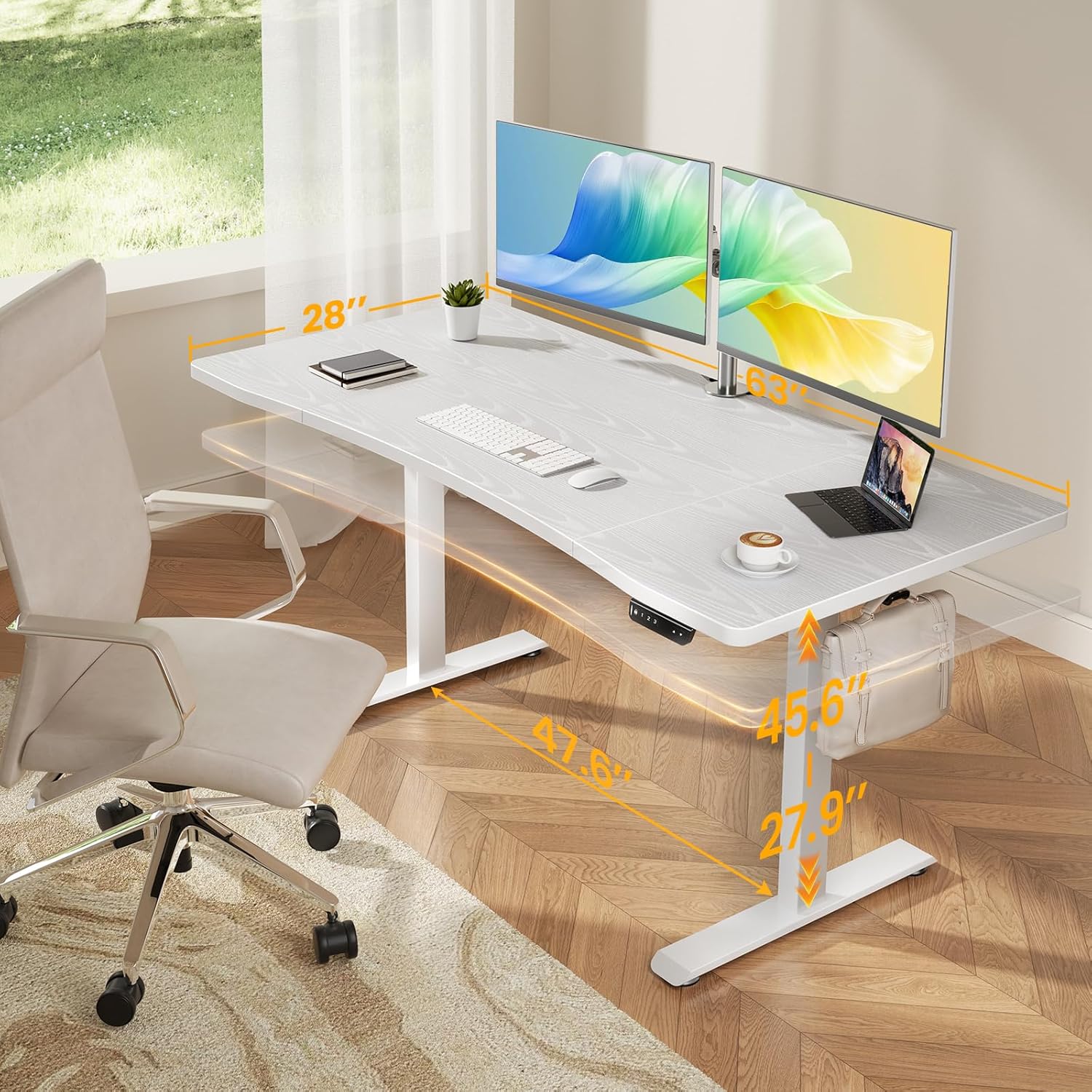
The Veken 63 x 28 Inch Electric Standing Desk (Model ODHOME123) is designed to provide a versatile and ergonomic workspace. It features a spacious desktop, smooth electric height adjustment, and a robust metal frame for stability. This desk is suitable for various uses including home office work, study, and gaming.
Pagrindinės funkcijos:
- Spacious Worksurface: An expansive 63" x 28" desktop accommodates multiple monitors and office supplies, promoting an organized and efficient workflow.
- Ergonomiškas išlenktas kraštas: A smooth, human-centric curved edge reduces arm strain and allows easy access to items, enhancing comfort during long work hours.
- Tvirtas stabilumas kaip uola: A reinforced structure ensures exceptional stability and shake-free operation, even at full height.
- Tvirtas metalinis rėmas: Constructed with premium cold-rolled steel, the desk legs offer robust load-bearing capacity and long-lasting durability.
- Sklandus aukščio reguliavimas: Easily switch between sitting and standing positions with an electric motor, offering a wide height range from 27.9" to 45.6".

2. Saugos informacija
Prieš surinkdami ir naudodami, perskaitykite ir supraskite visas saugos instrukcijas, kad išvengtumėte sužalojimų ar žalos.
- Ensure proper assembly and stability by following all user manual instructions carefully.
- Use the provided feet pads to prevent slipping and protect floor surfaces.
- Be mindful of the weight limits and avoid overloading the desk to maintain stability and prevent damage. The desk has an ultra-high load-bearing capacity of up to 176 lbs.
- Keep children and pets away from the desk during height adjustment to prevent accidents.
- Do not place liquids directly on the desk surface without protective coasters.

3. Pakuotės turinys
Prieš pradėdami surinkimą, patikrinkite, ar yra visi komponentai.
- Desk Components (Desktop sections, Legs, Frame)
- Valdymo skydelis
- Maitinimo adapteris ir laidas
- Kabelio spaustukas
- Feet Pads (4 units)
- Ausinių kabliukas
- Vartotojo vadovas (1 vnt.)
- Surinkimo detalės (varžtai, šešiabriauniai veržliarakčiai ir kt.)
4. Sąrankos ir surinkimo instrukcijos
Follow these steps carefully for correct assembly. All holes are pre-drilled, and accessories are pre-labeled for ease of installation.
- Išpakuokite komponentus: Atsargiai išimkite visas dalis iš pakuotės ir padėkite jas ant švaraus, minkšto paviršiaus, kad nesusibraižytumėte.
- Surinkite darbalaukį: Connect the desktop sections according to the included diagrams, ensuring the curved edge faces the user.
- Attach Legs and Frame: Secure the desk legs and crossbar frame to the desktop using the provided hardware. Ensure all connections are tight and stable.
- Įdiekite valdymo skydelį: Valdymo skydelį pritvirtinkite prie stalo apačios tam skirtoje vietoje.
- Prijunkite maitinimą: Prijunkite maitinimo adapterį prie valdymo dėžutės, o tada – prie sieninio lizdo.
- Kabelių valdymas: Use the included cable clips to organize power and data cables for a tidy workspace.

Surinkimo vaizdo įrašo vadovas:
5. Naudojimo instrukcijos
The Veken Electric Standing Desk features an intuitive control panel for easy height adjustment and memory presets.
Aukščio reguliavimas:
- Naudokite Aukštyn (▲) ir Žemyn (▼) Valdymo skydelio mygtukai, skirti stalo aukščiui rankiniu būdu reguliuoti.
- The desk can be adjusted smoothly within a range of 27.9 inches to 45.6 inches.
Išankstiniai atminties nustatymai:
The control panel allows you to save preferred sitting and standing heights for quick adjustments.
- Stalo aukštį reguliuokite pagal poreikį naudodami mygtukus aukštyn / žemyn.
- Paspauskite M. button (Memory) followed by a number button („1“, „2“, arba „3“), kad išsaugotumėte dabartinį aukštį tame iš anksto nustatytame parametre.
- Norėdami atkurti išsaugotą aukštį, tiesiog paspauskite atitinkamą skaičių mygtuką („1“, „2“, arba „3“). The desk will automatically move to the preset height.

6. Priežiūra
Regular maintenance ensures the longevity and optimal performance of your Veken Electric Standing Desk.
- Valymas: Nuvalykite stalo paviršių minkšta, damp audiniu. Venkite stiprių cheminių medžiagų ar abrazyvinių valiklių, kurie gali pažeisti laminuotą paviršių.
- Patikrinkite jungtis: Periodiškai patikrinkite visus varžtus ir veržles, kad jie būtų tvirtai priveržti. Jei reikia, priveržkite.
- Kabelių valdymas: Ensure cables are not pinched or tangled, especially during height adjustments.
- Svorio pasiskirstymas: Distribute weight evenly across the desktop to prevent strain on the motor and frame.
7. Problemų sprendimas
Jei kyla problemų dėl stalo, žr. toliau pateiktas dažniausiai pasitaikančias problemas ir sprendimus.
Dažnos problemos:
- Desk Not Adjusting: Check if the power cable is securely plugged into both the desk and the wall outlet. Ensure no obstructions are blocking the desk's movement.
- Netolygus aukščio reguliavimas: This can sometimes be caused by incorrect installation of internal components. Refer to the specific installation videos below.
- Klaidų kodai: If the control panel displays an error code, consult the full user manual for specific code meanings and troubleshooting steps.
Troubleshooting Video Guides:
8. Specifikacijos
| Prekės ženklas | Veken |
| Modelio numeris | ODHOME123 |
| Gaminio matmenys | 63 cm pločio x 28 cm gylio x 27.9 cm–45.6 cm aukščio |
| Minimalus Aukštis | 27.9 colių |
| Maksimalus aukštis | 45.6 colių |
| Prekės svoris | 43.4 svaro |
| Apkrova | 176 Lt |
| Spalva | Baltas |
| Aukščiausias medžiagos tipas | Blockboard (Laminated Finish) |
| Bazinė medžiaga | Šaltai valcuotas plienas |
| Ypatingos savybės | Adjustable Height, Electric, Ergonomic, Memory Preset |
| Reikalingas surinkimas | Taip |
9. Garantija ir palaikymas
For warranty information and customer support, please refer to the documentation included with your product or contact Veken customer service.
- Gamintojo garantija: Details regarding the manufacturer's warranty are typically provided within the product packaging.
- Klientų aptarnavimas: If you have any questions, require assistance with assembly, or need troubleshooting help, please reach out to Veken customer support through the contact information provided on the official Veken websvetainėje arba jūsų pirkimo platformoje.