Įvadas
The Lexon Flip Classic x Pantone is a digital alarm clock designed for ease of use and portability. Its unique ON/OFF function, vibrant Pantone colors, and clear LED display make it a functional and stylish accessory for any room or travel. This manual provides instructions for setting up, operating, maintaining, and troubleshooting your device.
Sąranka
1. Išpakavimas ir pirminė apžiūra
Carefully remove the alarm clock and all accessories from the packaging. Verify that all components are present and undamaged.
2. Įrenginio įkrovimas
The Lexon Flip Classic is equipped with an integrated rechargeable battery via USB-C. For optimal performance, fully charge the device before first use.
- Connect the provided USB-C cable to the charging port on the back of the clock.
- Kitą USB-C laido galą prijunkite prie suderinamo USB maitinimo šaltinio (pvz., kompiuterio USB prievado, USB sieninio adapterio).
- The charging indicator on the display will show the charging status. A full charge provides up to 6 months of battery life.

Image: The back of the Lexon Flip Classic alarm clock, highlighting the USB-C charging port and control buttons.
3. Pradinis įjungimas
Press and hold the power button (usually marked with a circle and a vertical line) located on the back of the device to turn it on.
Naudojimo instrukcijos
1. ON/OFF Alarm Function
The Lexon Flip Classic features an intuitive ON/OFF alarm function. Simply flip the clock to activate or deactivate the alarm.
- Į aktyvuoti the alarm: Place the clock with the side marked 'ON' facing upwards. The alarm icon will appear on the display.
- Į išjungti the alarm: Flip the clock so the side marked 'OFF' is facing upwards. The alarm icon will disappear from the display.
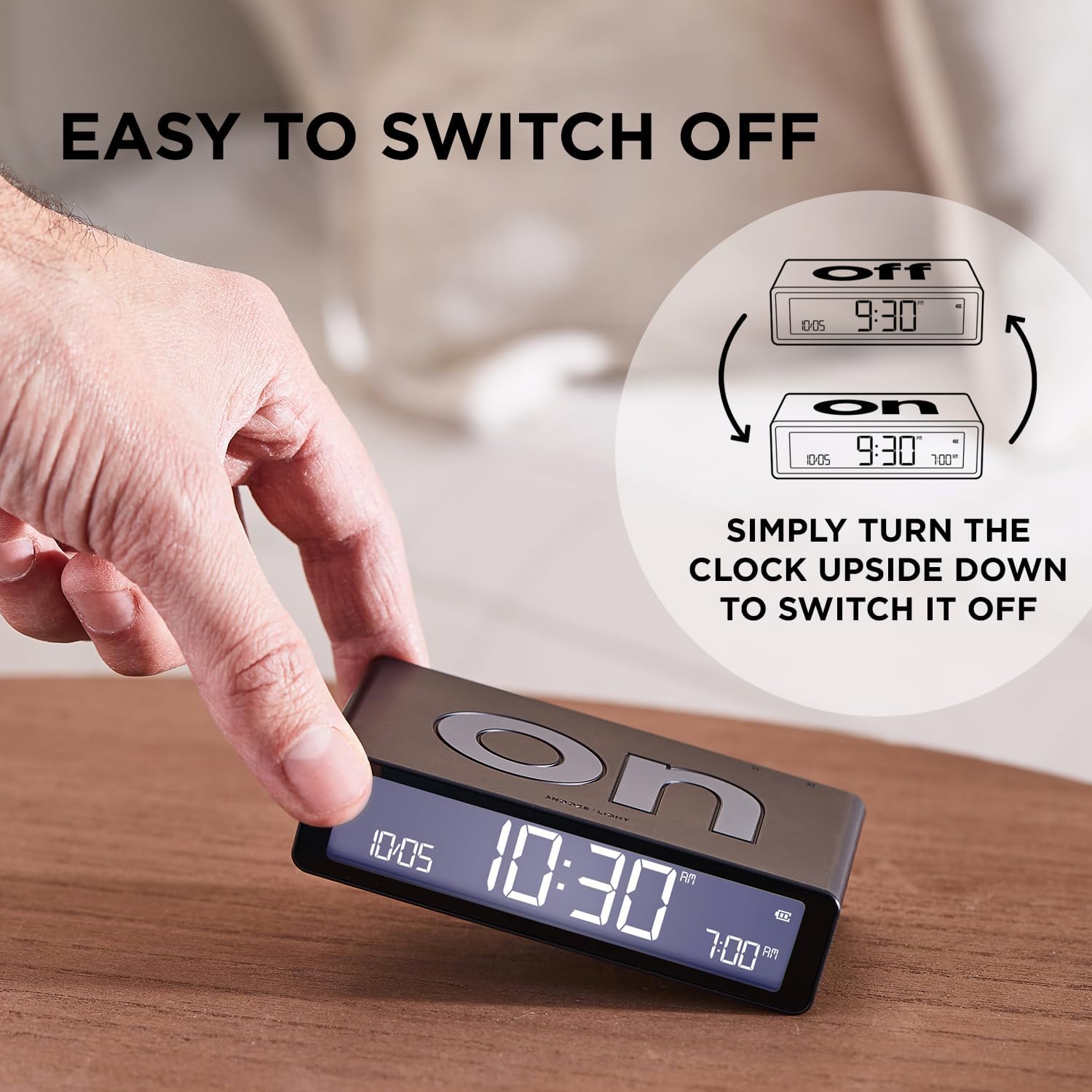
Image: The Lexon Flip Classic alarm clock demonstrating its 'ON' and 'OFF' sides for alarm activation and deactivation.
2. Laiko ir žadintuvo nustatymas
Use the control buttons located on the back of the clock to adjust time and alarm settings.
- Press the 'SET' button to enter time setting mode. The hour digits will flash. Use the up/down arrow buttons to adjust the hour.
- Press 'SET' again to move to minute adjustment, then use arrow buttons.
- Continue pressing 'SET' to cycle through setting the 12/24-hour format, date, and alarm time.
- Once the alarm time is flashing, use the up/down arrow buttons to set your desired alarm time.
- Press 'SET' one last time to exit the setting mode.

Image: The back panel of the Lexon Flip Classic, detailing the power button, USB-C port, 'SET' button, and up/down arrow buttons for configuration.
3. Snooze and Display Light
When the alarm sounds, gently tap the top surface of the clock to activate the snooze function. The alarm will pause and sound again after a short interval (typically 5 minutes).
To temporarily illuminate the display at night without activating the alarm, simply tap the top surface of the clock.

Image: The Lexon Flip Classic alarm clock with its display showing time and alarm, indicating the touch-sensitive area for snooze and backlight activation.
4. Adjustable Brightness
The LED display offers adjustable brightness levels to suit your preference and environment.
- While in normal time display mode, press the 'SET' button briefly to cycle through the available brightness levels (e.g., Low, Medium, High).
5. Travel Lock Mode
To prevent accidental alarm activation or battery drain during travel, engage the travel lock mode.
- To activate: Press and hold the power button for a few seconds until a lock icon appears on the display, or the display indicates 'LOCK'.
- To deactivate: Press and hold the power button again until the lock icon disappears.
Video: Official Lexon video demonstrating the features of the Flip Classic alarm clock, including ON/OFF function, interface, charging, brightness adjustment, and travel lock mode.
Priežiūra
1. Valymas
Norėdami išlaikyti žadintuvo išvaizdą ir funkcionalumą:
- Išorę nuvalykite minkštu, sausu, nepūkuotu skudurėliu.
- Venkite naudoti abrazyvinius valiklius, tirpiklius ar cheminius purškalus, nes jie gali pažeisti apdailą.
2. Akumuliatoriaus priežiūra
Norėdami pailginti vidinės įkraunamos baterijos veikimo laiką:
- Venkite prietaiso laikymo ekstremaliose temperatūrose (karštyje arba šaltyje).
- If storing the device for an extended period, ensure it has a partial charge (around 50%) rather than being fully charged or completely depleted.
Trikčių šalinimas
If you encounter issues with your Lexon Flip Classic, refer to the following common problems and solutions:
| Problema | Sprendimas |
|---|---|
| Signalizacija neskamba | Ensure the 'ON' side of the clock is facing upwards. Verify that the alarm time is correctly set. Check if the travel lock mode is active. |
| Ekranas nešviečia | Check the battery level and recharge if necessary. Tap the top surface of the clock to activate the backlight. If the issue persists, try resetting the device by holding the power button for 10 seconds. |
| Clock not charging | Ensure the USB-C cable is securely connected to both the clock and the power source. Try using a different USB-C cable or power adapter. |
| Neteisingas laikas / data | Enter time setting mode by pressing the 'SET' button and adjust the time and date as described in the 'Setting Time and Alarm' section. |
Specifikacijos
| Funkcija | Detalė |
|---|---|
| Prekės ženklas | Lexon |
| Modelis | LR157PT-R |
| Spalva | Raudona |
| Gaminio matmenys | 10.4 x 3.81 x 2.6 cm |
| Prekės svoris | 125 gramų |
| Ekrano tipas | Skaitmeninis LED |
| Maitinimo šaltinis | Battery powered (Rechargeable via USB-C) |
| Ypatingos savybės | Pantone Exclusive Colors, Compact & Rechargeable, Clear LED Display, Intuitive ON/OFF System |

Image: The Lexon Flip Classic alarm clock shown with its key dimensions (length, width, height) indicated.
Garantija ir palaikymas
For warranty information, technical support, or service inquiries, please refer to the official Lexon website or contact your authorized retailer. Please retain your proof of purchase for any warranty claims.


