1. Įvadas
This manual provides detailed instructions for the installation, configuration, and maintenance of your TP-Link SX3832 Omada 24-Port 10GBASE-T L2+ Managed Switch. This high-performance switch is designed for robust network environments, offering advanced Layer 2+ features, high-speed connectivity, and centralized cloud management capabilities.
2. Pakuotės turinys
Patikrinkite, ar jūsų pakuotėje yra šie elementai:
- 1 x SX3832 Managed Switch
- 1 x maitinimo laidas
- 1 x Console Cable
- 2 x tvirtinimo laikikliai
- 4 x guminės kojos
- 8 x Varžtai
3. Produktas baigtasview
3.1 Priekinis skydelis
The front panel of the SX3832 switch features 24 1/2.5/5/10 Gbps RJ45 ports and 8 1/10 Gbps SFP+ slots, along with LED indicators for power, system status, and port activity.
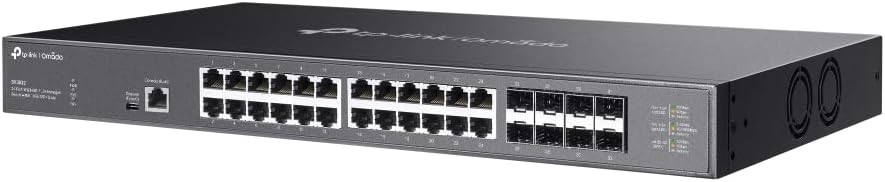
Vaizdas: Priekinis kampas view of the TP-Link SX3832 Omada switch, highlighting the 24 RJ45 ports and 8 SFP+ slots for high-speed network connections.

Vaizdas: Iš viršaus į apačią kampu view of the TP-Link SX3832 Omada switch, providing a clearer look at the port labels and LED indicators for status monitoring.
3.2 Galinis skydelis
The rear panel includes the power input, a grounding terminal for safety, and a physical security lock slot.

Vaizdas: Galinis view of the TP-Link SX3832 Omada switch, detailing the power input, grounding terminal, and physical security lock slot.
3.3 Apatinis skydelis
The bottom panel features mounting points for rack installation and locations for attaching rubber feet for desktop use.

Vaizdas: Apačia view of the TP-Link SX3832 Omada switch, illustrating the mounting points for various installation scenarios.
3.4 Pagrindinės savybės
- 24× 1/2.5/5/10 Gbps RJ45 ports for versatile high-speed connections.
- 8× 1/10 Gbps SFP+ slots for fiber optic uplinks.
- 640 Gbps switching capacity for high-bandwidth demands.
- Centralized cloud management via web or Omada app.
- Standalone management via web, CLI, SNMP, and RMON.
- Static Routing for efficient internal traffic management.
- VLAN, ACL, QoS, IGMP Snooping, OAM, and DDM support for advanced network control.
- ERPS for rapid protection and recovery in ring topologies.
- Patvarus metalinis casing and rack-mountable design.
4. Sąranka
4.1 Fizinis įrengimas
The SX3832 switch can be installed on a desktop or mounted in a standard 19-inch equipment rack. For desktop use, attach the provided rubber feet to the bottom of the switch. For rack mounting, secure the two mounting brackets to the sides of the switch using the included screws, then mount the switch into the rack.
4.2 Prisijungimas prie tinklo
- Maitinimo jungtis: Connect the provided power cord to the switch's power inlet and to an appropriate AC power source.
- Ethernet jungtys: Connect your network devices (servers, workstations, other switches) to the RJ45 ports using standard Ethernet cables. For fiber optic connections, insert compatible SFP+ modules into the SFP+ slots and connect fiber optic cables.
- Konsolės prijungimas (neprivaloma): For initial configuration or advanced troubleshooting via CLI, connect the console cable from your computer to the switch's console port.
5. Operacinis
5.1 Valdymo parinktys
The SX3832 switch offers flexible management options:
- „Omada“ debesijos valdymas: Integrate the switch into the TP-Link Omada Software Defined Networking (SDN) platform for centralized management via a web browser or the Omada app. This allows for remote control and monitoring of your entire Omada network.
- Web- pagrįsta GUI: Access the switch's graphical user interface via a web browser for intuitive configuration and monitoring.
- Komandinės eilutės sąsaja (CLI): Use the console port or Telnet/SSH for command-line based configuration, ideal for experienced network administrators.
- SNMP/RMON: Utilize Simple Network Management Protocol (SNMP) and Remote Monitoring (RMON) for network monitoring and management with compatible tools.
5.2 Pagrindinė konfigūracija
Upon initial power-up, the switch will obtain an IP address via DHCP by default. You can then access its web-based GUI or Omada controller for further configuration. Refer to the Omada SDN Controller User Guide for detailed instructions on cloud-based management.
6. Priežiūra
6.1 Firmware atnaujinimai
Reguliariai tikrinkite oficialią TP-Link svetainę. website for the latest firmware versions. Updating the firmware ensures optimal performance, security, and access to new features. Follow the instructions provided with the firmware download for the update process.
6.2 Gamyklinių parametrų atkūrimas
In case of configuration issues or if you need to restore the switch to its default settings, a factory reset can be performed. This typically involves pressing and holding a reset button on the device for a specified duration. Consult the full product manual for the exact procedure.
7. Problemų sprendimas
If you encounter issues with your SX3832 switch, consider the following basic troubleshooting steps:
- Nėra galios: Ensure the power cord is securely connected to both the switch and the power outlet. Verify the power source is active.
- Nėra ryšio / aktyvumo šviesos diodo: Check the Ethernet or fiber optic cable connections. Ensure connected devices are powered on and functioning correctly. Verify port settings (speed, duplex) if manually configured.
- Nepavyksta pasiekti valdymo sąsajos: Verify your computer's IP address is in the same subnet as the switch (if not using DHCP). Check network cable connections. Try accessing via console port if web prieiga nepavyksta.
- Našumo problemos: Check for network congestion, cable quality, and ensure devices are negotiating at expected speeds. Review QoS settings if configured.
For more advanced troubleshooting, refer to the comprehensive user guide available on the TP-Link support websvetainėje arba susisiekite su TP-Link technine pagalba.
8. Specifikacijos
| Atributas | Vertė |
|---|---|
| Prekės svoris | 9.6 svaro |
| Viršutinės temperatūros įvertinimas | 60 laipsniai Celsijaus |
| Sąsajos tipas | RJ45, SFP+ |
| Duomenų perdavimo sparta | 640 gigabitas per sekundę |
| Gamintojas | TP-Link |
| UPC | 810142821445 |
| Pakuotės matmenys | 26 x 17 x 9 colio |
| Prievadų skaičius | 24 |
| Spalva | Juoda |
| Suderinami įrenginiai | Stalinis kompiuteris, nešiojamas kompiuteris, spausdintuvas |
9. Oficialūs produktų vaizdo įrašai
9.1 Produktas baigtasview Vaizdo įrašas
Video: A concise product overview of the TP-Link Omada switch, highlighting its key features and design. This video is provided by the seller, Amazon Product Imaging.
9.2 10G-T SFP+ RJ45 Module Overview
Vaizdo įrašas: Viršijimasview of a 10G-T SFP+ RJ45 module, demonstrating its use and compatibility with SFP+ slots found on switches like the SX3832. This video is provided by the seller, 10Gtek.
10. Garantija ir palaikymas
The TP-Link SX3832 Omada 24-Port 10GBASE-T L2+ Managed Switch is backed by a 3-year warranty, ensuring reliability and peace of mind. For technical support, warranty claims, or additional resources, please visit the official TP-Link support websvetainėje arba susisiekite su jų klientų aptarnavimo tarnyba. Daugiau informacijos ir išteklių taip pat galite rasti TP-Link parduotuvė „Amazon“ platformoje.