1. Įvadas
This manual provides essential information for setting up, operating, maintaining, and troubleshooting your GMKtec G10 Mini PC. The GMKtec G10 is a compact and powerful mini-desktop computer designed for various tasks, from office work and multimedia consumption to light gaming. It features an AMD Ryzen 5 3500U processor, 16GB of DDR4 RAM, and a 1TB M.2 SSD, offering reliable performance and efficient operation.
2. Pakuotės turinys
Patikrinkite, ar jūsų siuntinyje yra visi toliau išvardyti daiktai:
- GMKtec G10 Mini PC
- Maitinimo šaltinis ir kabelis
- Vartotojo vadovas
- HDMI kabelis
- VESA laikiklis su varžtais
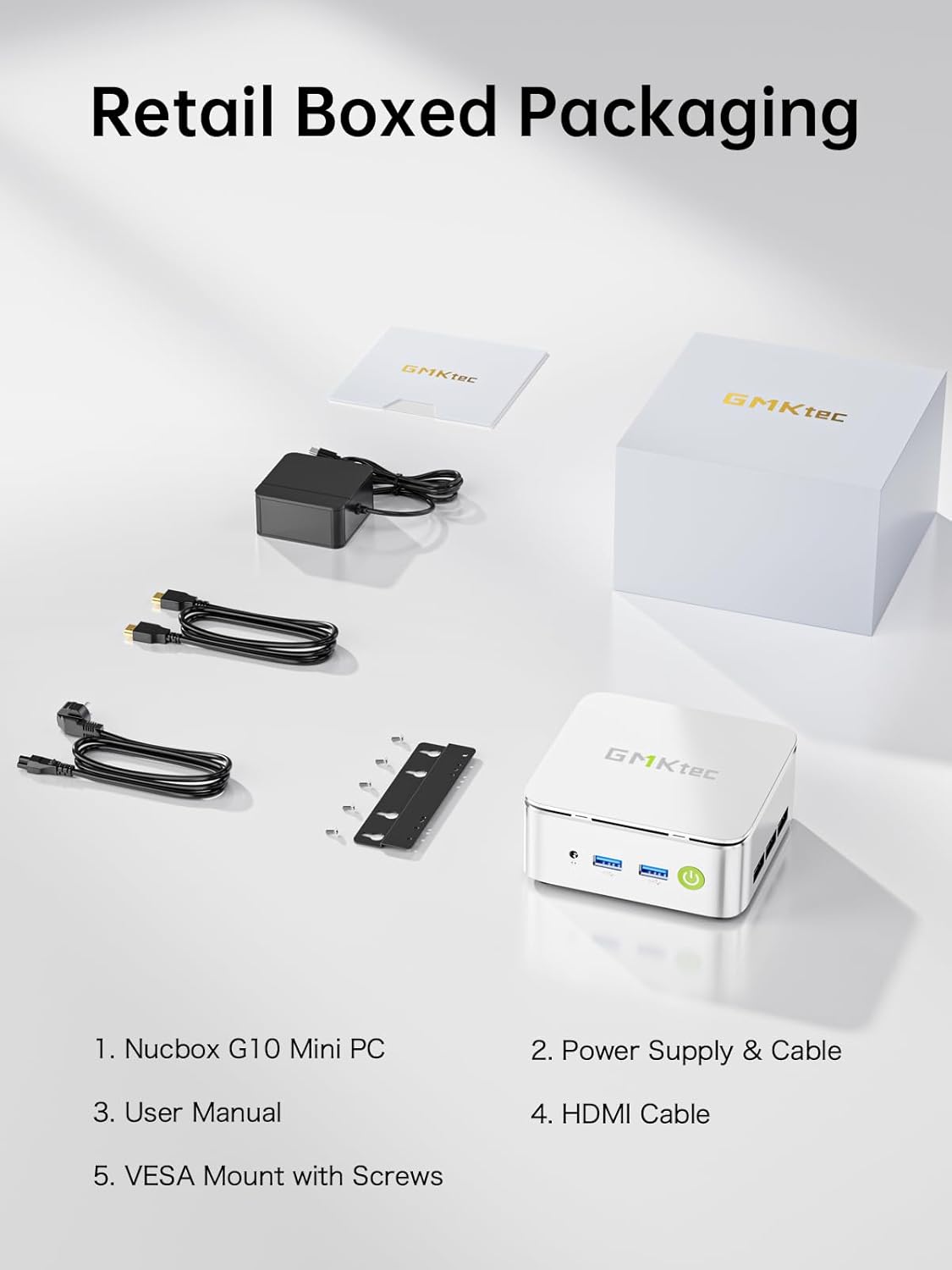
Vaizdas: Contents of the GMKtec G10 Mini PC retail box, including the mini PC unit, power adapter, user manual, HDMI cable, and VESA mount with screws.
3. Produktas baigtasview
3.1. External Components and Ports
Familiarize yourself with the various ports and components of your GMKtec G10 Mini PC for proper connectivity.
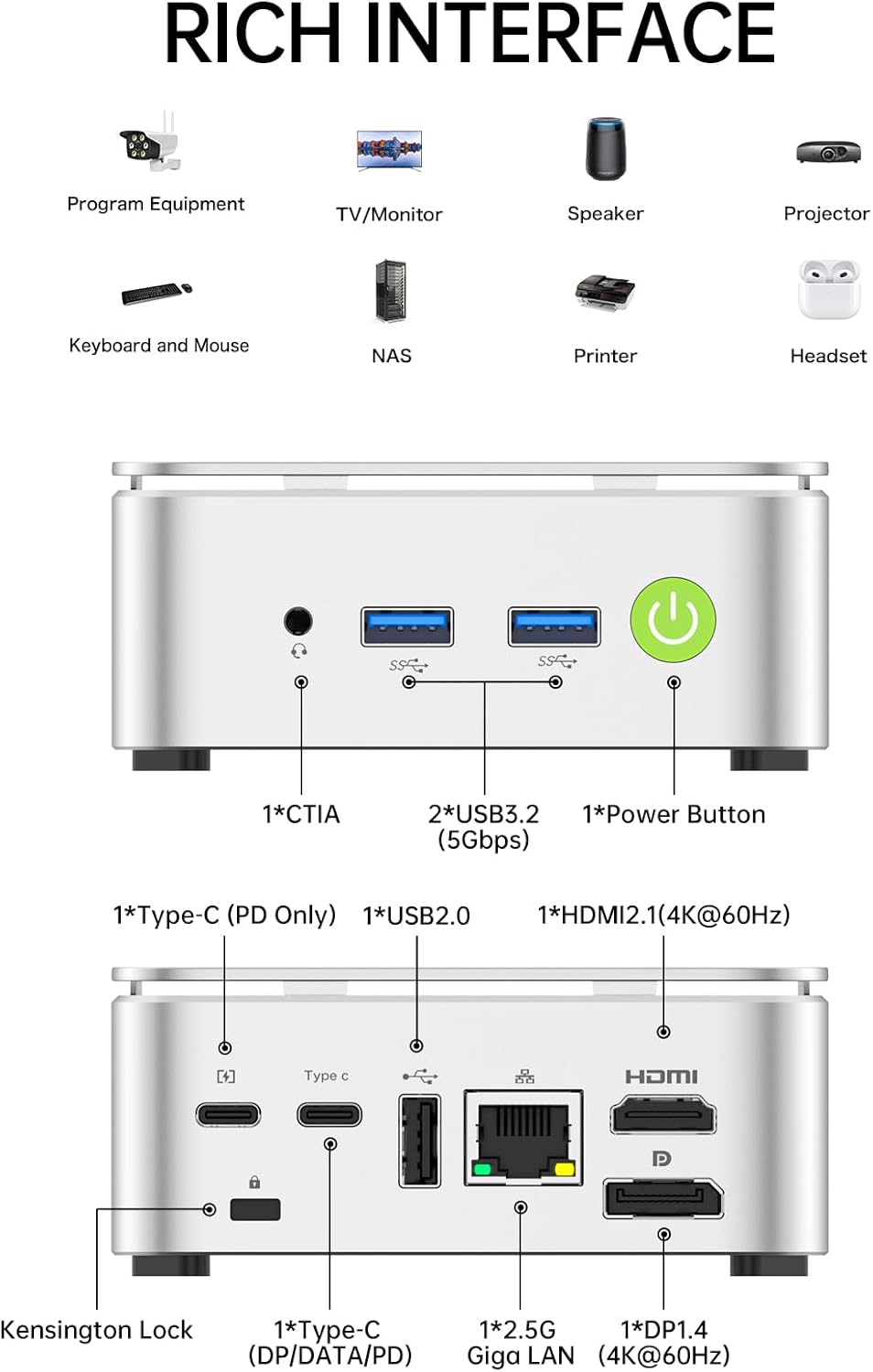
Vaizdas: A detailed diagram illustrating the front and rear ports of the GMKtec G10 Mini PC. The front panel includes an audio jack (CTIA), two USB 3.2 (5Gbps) ports, and the power button. The rear panel features a Kensington Lock slot, a full-function USB-C port (DP/Data/PD), a USB 2.0 port, a 2.5G Gigabit LAN port, a DisplayPort 1.4 (4K@60Hz), and an HDMI 2.1 (4K@60Hz) port.
Priekinis skydelis:
- 1x CTIA Audio Jack: Ausinėms arba laisvų rankų įrangai.
- 2x USB 3.2 (5Gbps) Ports: Skirta prijungti periferinius įrenginius, tokius kaip klaviatūros, pelės ar išorinės atminties įrenginiai.
- 1x Power Button: Norėdami įjungti/išjungti įrenginį.
Galinis skydas:
- 1x Kensington Lock Slot: Dėl fizinio saugumo.
- 1 USB 2.0 prievadas: For connecting low-bandwidth peripherals.
- 1x 2.5G Gigabit LAN Port: Didelės spartos laidinio tinklo ryšiui.
- 1x DisplayPort 1.4 (4K@60Hz): Skirta ekranui prijungti.
- 1x HDMI 2.1 (4K@60Hz): Skirta ekranui prijungti.
- 1x Full-function USB-C Port (DP/DATA/PD): Supports display output, data transfer, and power delivery.
3.2. Vidiniai komponentai
The GMKtec G10 Mini PC is equipped with the following core components:
- Procesorius: AMD Ryzen 5 3500U (4 Cores, 8 Threads, up to 3.70GHz Turbo Boost)
- Grafika: Integrated AMD Radeon Vega 8 Graphics (1200 MHz)
- RAM: 16GB DDR4 SO-DIMM (2x 8GB, Dual-Channel, expandable up to 64GB)
- Saugykla: 1TB M.2 2280 PCIe 3.0 SSD (expandable up to 16TB with dual M.2 slots)
- Tinklas: 2.5G Ethernet, Wi-Fi 5 (802.11ac), Bluetooth 5.0

Vaizdas: Vidinis view of the GMKtec G10 Mini PC, showing the two SO-DIMM DDR4 slots for RAM and two M.2 2280 SSD slots for storage, illustrating its dual-channel memory and high-capacity storage expansion capabilities.
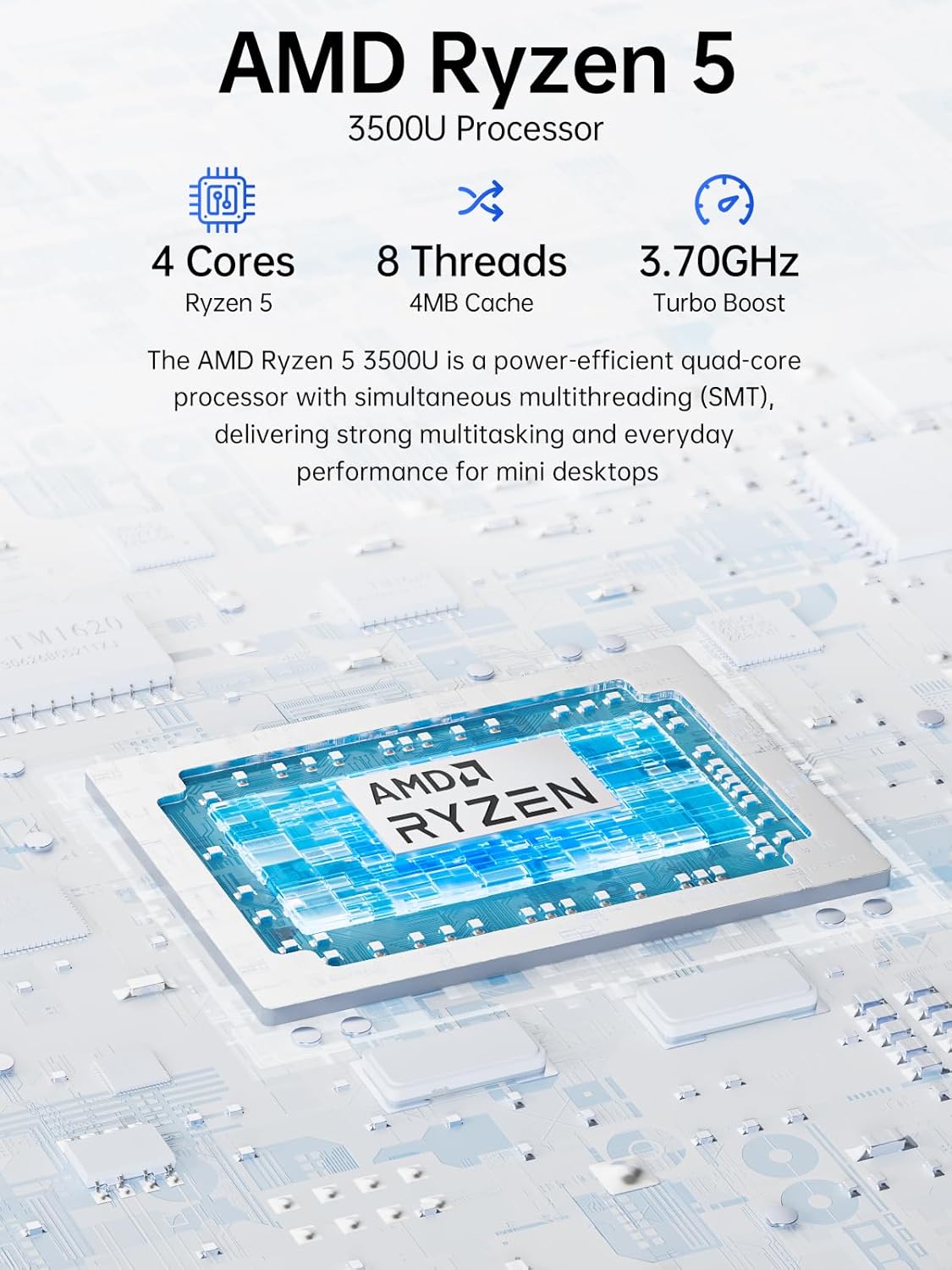
Vaizdas: A diagram highlighting the AMD Ryzen 5 3500U processor, detailing its 4 Cores, 8 Threads, 4MB Cache, and 3.70GHz Turbo Boost frequency. This processor provides strong multitasking and everyday performance for mini desktops.
4. Sąrankos instrukcijos
4.1. Pradinis prisijungimas
- Prijungti ekraną: Connect your monitor(s) to the Mini PC using the HDMI, DisplayPort, or USB-C ports. The G10 supports up to three 4K displays simultaneously.
- Prijunkite išorinius įrenginius: Prijunkite USB klaviatūrą ir pelę prie laisvų USB prievadų.
- Prijungti tinklą (neprivaloma): For a wired connection, connect an Ethernet cable from your router/modem to the 2.5G LAN port on the Mini PC. For wireless, Wi-Fi 5 is built-in.
- Prijunkite maitinimą: Connect the power adapter to the DC-in port on the Mini PC, then plug the power cable into an electrical outlet.
4.2. Pirmas įkrovimas
- Paspauskite maitinimo mygtuką priekiniame skydelyje.
- The Mini PC will boot into the pre-installed Windows 11 Pro operating system.
- Follow the on-screen instructions to complete the initial Windows setup, including language, region, network connection, and user account creation.
5. Naudojimo instrukcijos
5.1. Pagrindinis naudojimas
- Maitinimo įjungimas/išjungimas: Press the power button to turn on. To turn off, use the Windows Shut Down option or press and hold the power button for 5 seconds.
- Paleisti iš naujo: Use the Windows Restart option.
- Miegojimo rezimas: Use the Windows Sleep option or briefly press the power button.
5.2. Ekrano konfigūracija
The GMKtec G10 supports connecting up to three 4K displays simultaneously via its HDMI, DisplayPort, and USB-C outputs. You can configure display settings within Windows:
- Dešiniuoju pelės mygtuku spustelėkite darbalaukį ir pasirinkite „Ekrano nustatymai“.
- Here you can detect, arrange, and configure the resolution and orientation for each connected display.

Vaizdas: The GMKtec G10 Mini PC connected to two external monitors and a tablet via its triple display output capabilities, demonstrating its ability to support multiple 4K screens for enhanced productivity or entertainment.
5.3. Tinklas ir jungiamumas
- Laidinis tinklas: The 2.5G LAN port provides high-speed internet access. Ensure your router supports 2.5G for optimal performance.
- Wireless Network (Wi-Fi 5): To connect to Wi-Fi, click the network icon in the Windows taskbar, select your desired network, and enter the password.
- "Bluetooth 5.0": To pair Bluetooth devices, go to Windows Settings > Devices > Bluetooth & other devices, and follow the pairing instructions for your device.
5.4. Atminties ir saugyklos išplėtimas
The GMKtec G10 Mini PC supports memory expansion up to 64GB DDR4 RAM and storage expansion up to 16TB via its dual M.2 2280 PCIe 3.0 slots. Refer to the internal components image in Section 3.2 for slot locations. Consult a qualified technician for hardware upgrades.
6. Priežiūra
6.1. Valymas
- Ensure the Mini PC is powered off and unplugged before cleaning.
- Išorę valykite minkšta, sausa šluoste.
- For dust accumulation in vents, use compressed air. Do not insert objects into the vents.
6.2. Aušinimo sistema
The GMKtec G10 features an efficient cooling system designed for quiet operation. Ensure proper airflow around the device by keeping vents unobstructed.
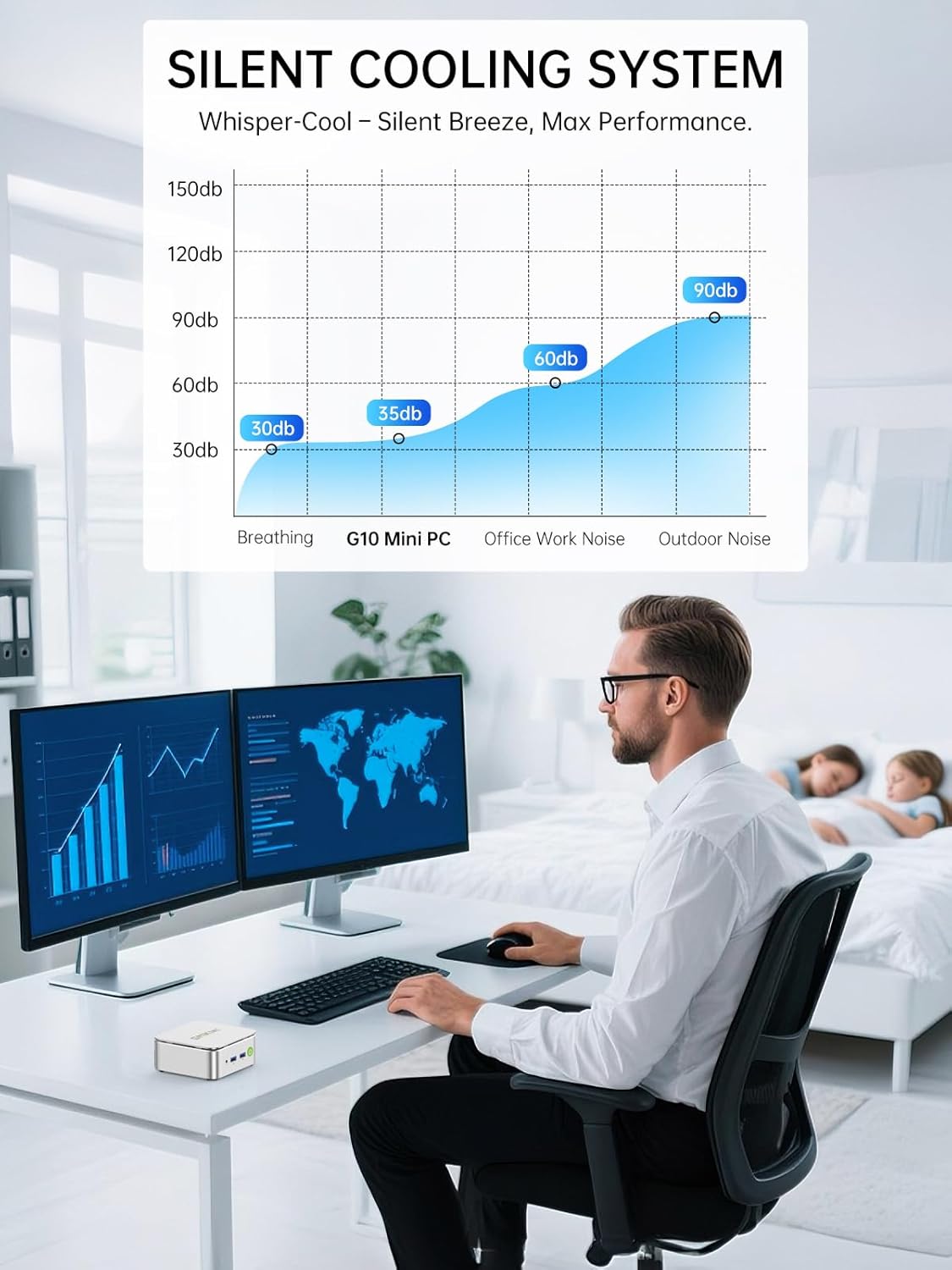
Vaizdas: A graph illustrating the noise levels of the GMKtec G10 Mini PC's silent cooling system, showing it operates at approximately 35dB, which is comparable to a quiet breathing sound and significantly lower than typical office work noise.
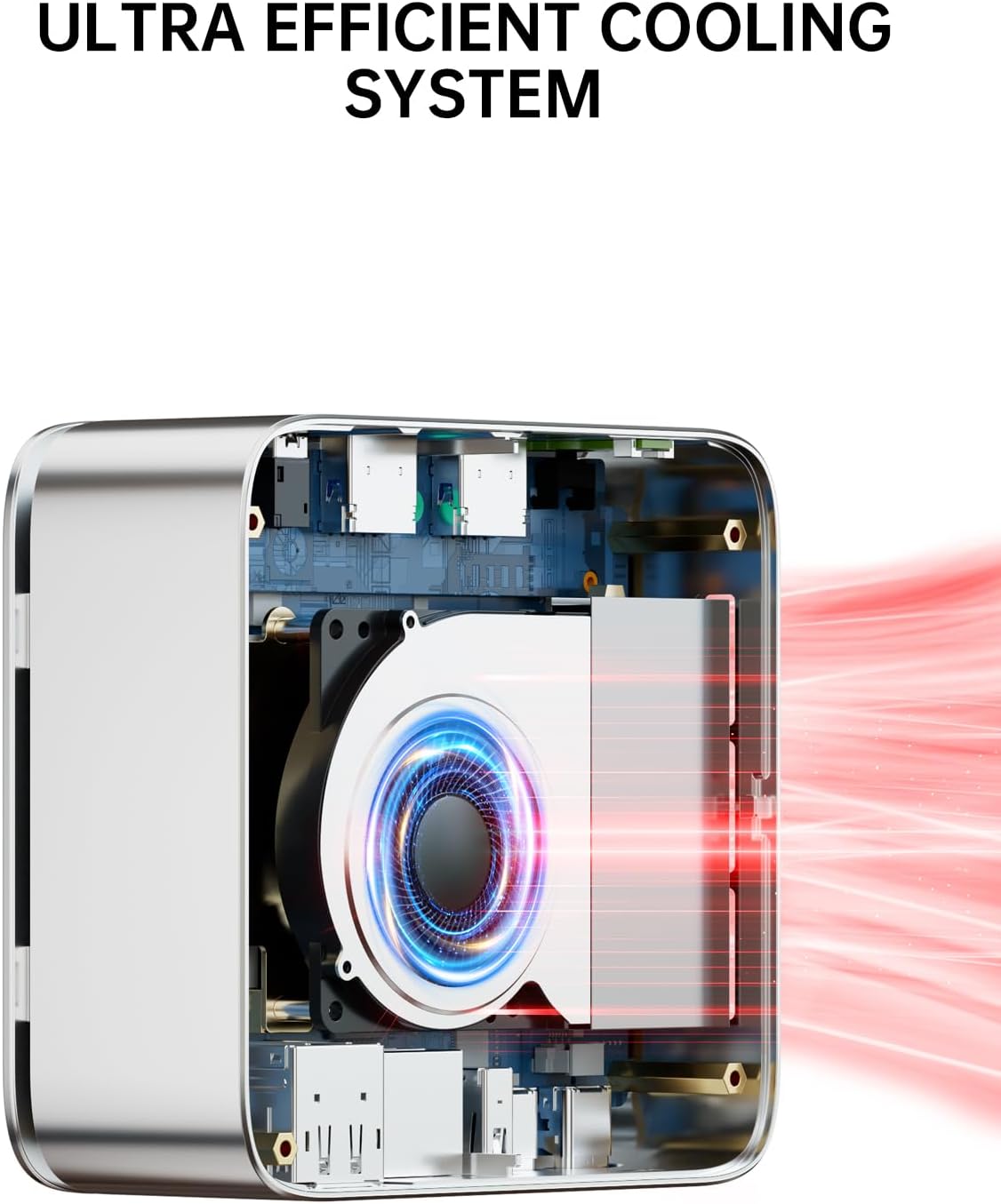
Vaizdas: An internal diagram of the GMKtec G10 Mini PC's ultra-efficient cooling system, showing the fan and heat sink design that ensures optimal thermal management and quiet performance.
6.3. Programinės įrangos atnaujinimai
Regularly update your Windows operating system and device drivers to ensure optimal performance, security, and compatibility. Windows Update can be accessed via Settings > Update & Security > Windows Update.
7. Problemų sprendimas
If you encounter issues with your GMKtec G10 Mini PC, refer to the following common solutions:
| Problema | Galimas sprendimas |
|---|---|
| Nėra maitinimo / kompiuteris neįsijungia | Ensure the power adapter is securely connected to both the Mini PC and a working electrical outlet. Test the outlet with another device. |
| Monitoriuje nėra vaizdo | Check all display cable connections (HDMI, DisplayPort, USB-C). Ensure the monitor is powered on and set to the correct input source. Try a different cable or monitor if possible. |
| Nėra interneto ryšio (laidinio) | Verify the Ethernet cable is properly connected. Check your router/modem status. Restart your router/modem and the Mini PC. |
| Nėra interneto ryšio (belaidžio) | Ensure Wi-Fi is enabled in Windows settings. Check if your Wi-Fi network is visible and you are entering the correct password. Restart your router/modem and the Mini PC. |
| Periferiniai įrenginiai (klaviatūra / pelė) neveikia | Try connecting the peripheral to a different USB port. Ensure drivers are installed (Windows usually handles this automatically). Test the peripheral on another computer. |
8. Specifikacijos
Detailed technical specifications for the GMKtec G10 Mini PC:
- Prekinis ženklas: GMKtec
- Modelis: G10
- Procesorius: AMD Ryzen 5 3500U (4 Cores, 8 Threads, 2.1 GHz base, up to 3.7 GHz boost)
- Procesoriaus lizdas: FP5
- Grafika: Integrated AMD Radeon Vega 8 Graphics (1200 MHz)
- RAM: 16 GB DDR4 SO-DIMM (Dual-Channel), Max 64 GB supported
- Saugykla: 1 TB M.2 SSD (PCIe 3.0), expandable up to 16 TB via dual M.2 2280 slots
- Operacinė sistema: Windows 11 Pro
- Laidinis tinklas: 2.5G Ethernet
- Belaidis ryšys: „Wi-Fi 5“ (802.11ac), „Bluetooth 5.0“
- Priekiniai prievadai: 1x CTIA Audio Jack, 2x USB 3.2 (5Gbps), 1x Power Button
- Galiniai prievadai: 1x Kensington Lock, 1x USB 2.0, 1x 2.5G LAN, 1x DisplayPort 1.4 (4K@60Hz), 1x HDMI 2.1 (4K@60Hz), 1x Full-function USB-C (DP/DATA/PD)
- Ekrano skiriamoji geba: Iki 3840x2160 (4K) raiškos
- Matmenys (paketas): 16.4 x 15.8 x 10.5 cm
- Svoris (pakuotės): 930 g
9. Garantija ir palaikymas
9.1. Informacija apie garantiją
GMKtec offers a limited warranty of 3 years for each Mini PC, starting from the purchase date. This warranty covers defects resulting from design and manufacturing processes. For specific terms and conditions, please refer to the warranty card included in your package or visit the official GMKtec websvetainę.
9.2. Pagalba klientams
Should you require technical assistance or have questions regarding your GMKtec G10 Mini PC, please contact GMKtec's professional after-sales support team. Contact information can typically be found on the official GMKtec websvetainėje arba dokumentuose, pateiktuose kartu su jūsų produktu.