1. Įvadas
The TABWEE 10.1 Inch WiFi Digital Calendar, Model P10, is an interactive touchscreen display designed to streamline family organization. It integrates calendars, task management, meal planning, and digital photo frame capabilities into a single device. This manual provides detailed instructions to help you set up and utilize all features of your new digital calendar.

1.1 vaizdas: The TABWEE Digital Calendar in use, showcasing its calendar interface and mobile app synchronization.
2. Saugos informacija
- Įsitikinkite, kad prietaisas pastatytas ant stabilaus, lygaus paviršiaus, kad išvengtumėte atsitiktinio kritimo.
- Naudokite tik pridėtą maitinimo adapterį. Naudojant nepatvirtintus adapterius, galite sugadinti įrenginį ir panaikinti garantiją.
- Saugokite įrenginį nuo vandens, drėgmės ir ekstremalių temperatūrų.
- Do not attempt to open or repair the device yourself. Refer to qualified service personnel for any maintenance or repair needs.
- Keep out of reach of small children to prevent accidental ingestion of small parts or damage to the device.
3. Pakuotės turinys
Patikrinkite, ar pakuotėje yra visi reikalingi daiktai:
- TABWEE 10.1 Inch WiFi Digital Calendar (Model P10)
- Maitinimo adapteris
- Vartotojo vadovas (šis dokumentas)
4. Produktas baigtasview
Familiarize yourself with the physical components of your TABWEE Digital Calendar.

4.1 vaizdas: Technical details and component layout of the TABWEE Digital Calendar.
- Įjungimo / išjungimo mygtukas: Located on the side for turning the device on or off.
- Garsumo didinimo / mažinimo mygtukai: Sureguliuokite įrenginio garso išvestį.
- Šviesos jutiklis: Automatiškai reguliuoja ekrano ryškumą pagal aplinkos apšvietimą.
- Atraminis stovas: Integrated stand for desk placement.
5. Sąranka
5.1 Pradinis įjungimas
- Connect the provided power adapter to the device's power port.
- Plug the adapter into a standard electrical outlet. The device will automatically power on.
- Vykdykite ekrane pateikiamus nurodymus, kad pasirinktumėte kalbą ir regioną.
5.2 Tinklo jungtis
- Pradiniame sąrankos ekrane iš sąrašo pasirinkite savo „Wi-Fi“ tinklą.
- Enter your Wi-Fi password and tap 'Connect'.
- Ensure the device is connected to a stable internet connection for full functionality.
5.3 Programėlės diegimas ir paskyros sukūrimas
To fully utilize the calendar's features, download and set up the companion 'eCalendar' app on your smartphone (iOS or Android).

5.1 vaizdas: Steps for downloading and creating an account on the eCalendar app.
- Scan the QR code displayed on the calendar screen or search for 'eCalendar' in your device's app store (Google Play Store for Android, Apple App Store for iOS).
- Atsisiųskite ir įdiekite programą.
- Open the eCalendar app and follow the prompts to create a new account or log in if you already have one.
- Sutikite su Vartotojo sutartimi ir Privatumo politika.
5.4 Device Linking
Link your TABWEE Digital Calendar to your eCalendar app account.

5.2 vaizdas: Linking the calendar device to the eCalendar app and setting up your unique calendar email.
- In the eCalendar app, select the option to 'Add Device' or 'Activate a new eCalendar Frame'.
- Follow the on-screen instructions to pair your device. This may involve scanning a QR code displayed on the calendar or entering a pairing code.
- Once linked, you can set up your unique calendar email address within the app.
6. Operacija
6.1 Pagrindinė navigacija
The TABWEE Digital Calendar features a responsive touchscreen. Navigate through menus and features by tapping, swiping, and pinching as you would on a tablet device.
6.2 Kalendoriaus valdymas
The core function of your device is calendar management, allowing for seamless synchronization and event organization.
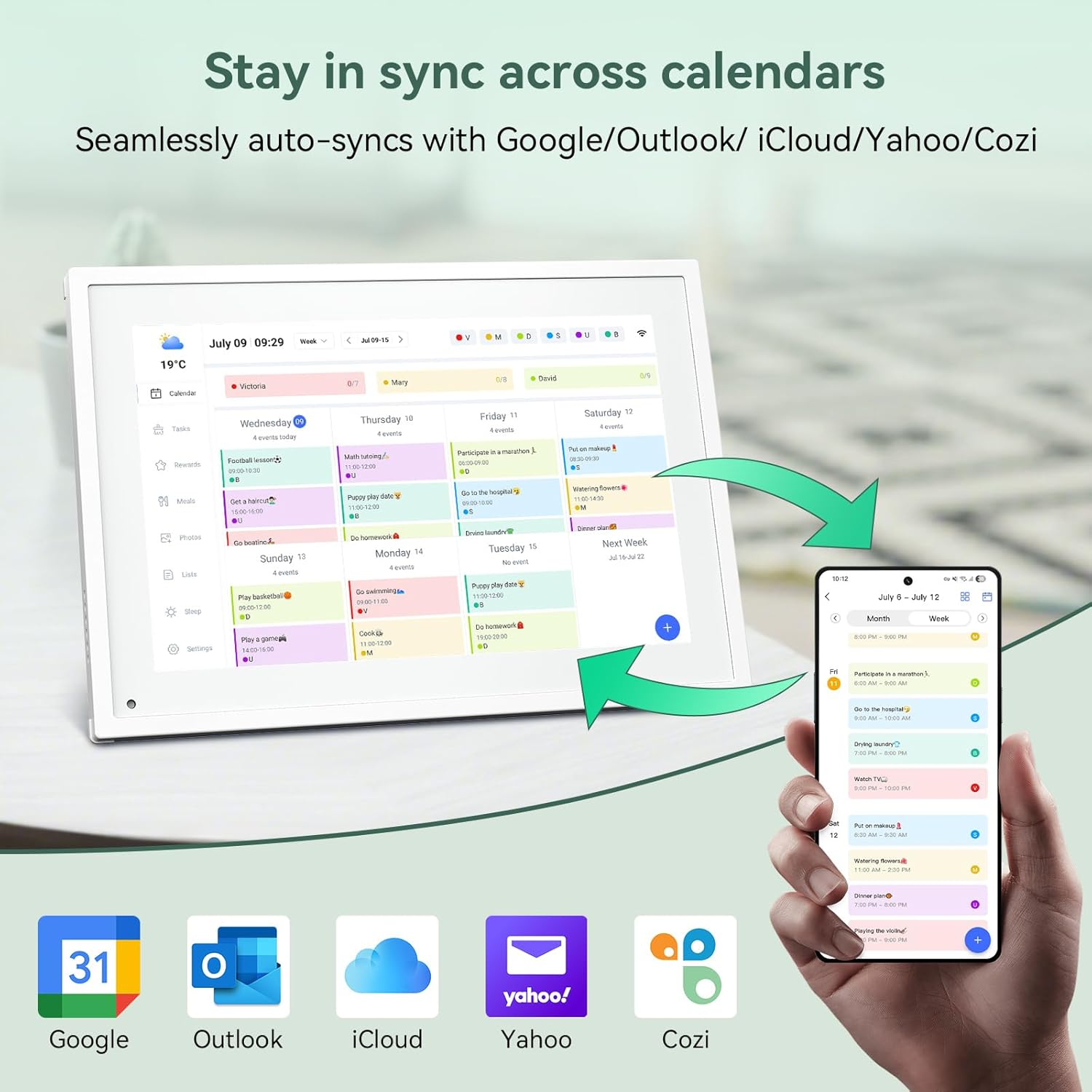
6.1 vaizdas: Seamless synchronization of the digital calendar with various external calendar services.
- Syncing External Calendars: Within the eCalendar app settings, you can link your Google, Apple, Outlook, Yahoo, or Cozi calendars. Events from these linked accounts will automatically appear on your TABWEE Digital Calendar.
- Adding/Editing Events: Tap on a date or time slot on the calendar display or use the eCalendar app to add new events. You can specify event details, set reminders, and assign participants.
- Pritaikyta Views: Switch between day, week, or month views directly on the device or through the app.
6.3 Task Management (Chore Chart)
Organize tasks and chores for family members with a built-in reward system.
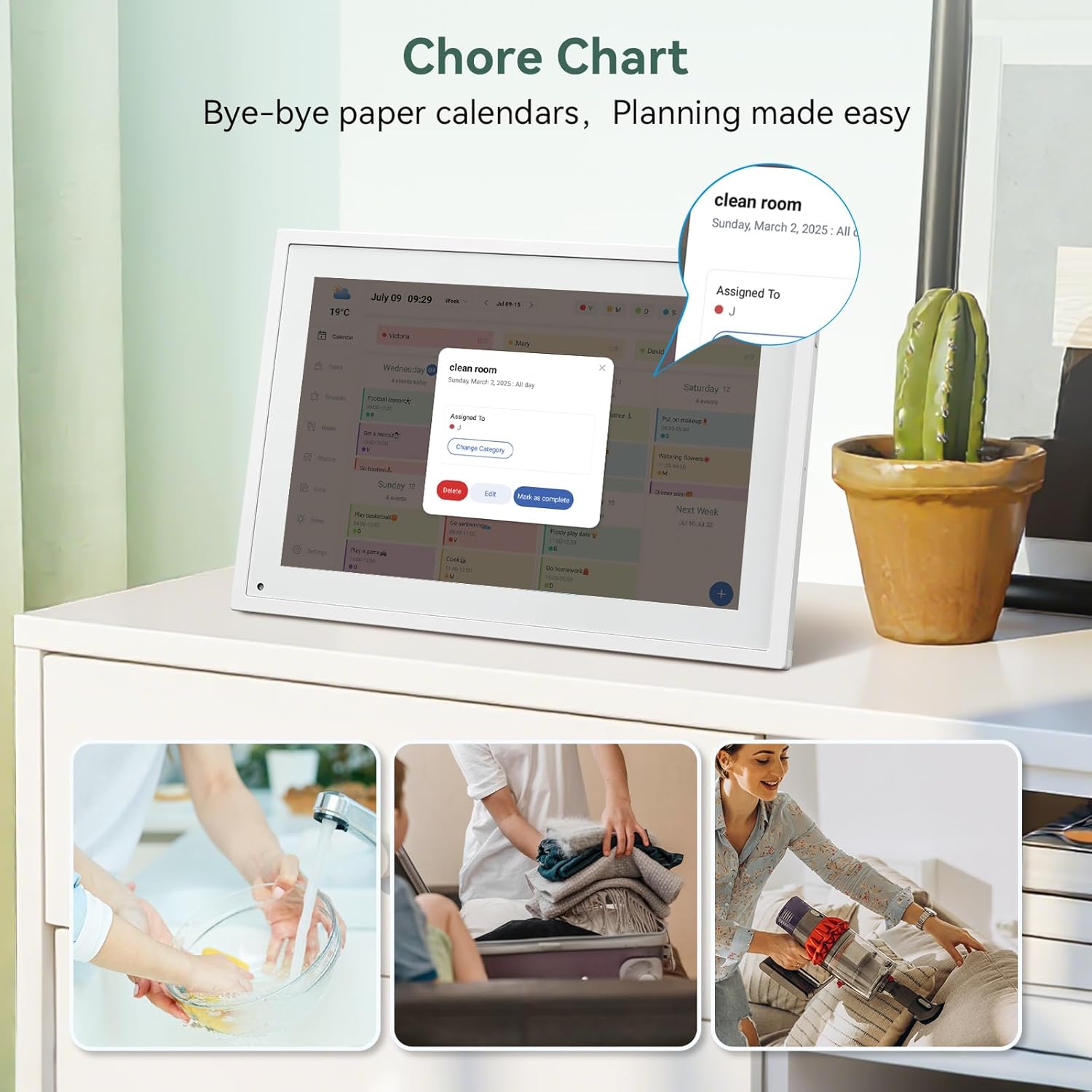
6.2 vaizdas: Managing tasks and chores on the digital calendar interface.
- Užduočių kūrimas: Use the 'Tasks' section on the device or app to create new tasks. Assign them to specific individuals, set due dates, and configure recurring tasks.
- Pažangos stebėjimas: Users can mark tasks as complete. The system tracks completion and can be configured to award points.
- Apdovanojimų sistema: Set up a star-point reward system within the app. Points earned from completed tasks can be redeemed for custom rewards, encouraging participation.

6.3 vaizdas: The task manager and rewards interface, designed for engaging users.
6.4 Maitinimo planavimas
Plan your meals directly on the device or through the app.

6.4 vaizdas: Visual meal planning interface on the digital calendar.
- Create Meal Plans: Access the 'Meals' section to plan breakfasts, lunches, dinners, and snacks for the week.
- Custom Recipes: Upload and store your favorite recipes.
- Grocery Lists: Generate grocery lists based on your meal plans.
6.5 Digital Photo Frame Functionality
The device can also function as a digital photo frame.

6.5 vaizdas: The digital calendar switching between calendar and photo frame modes, in both landscape and portrait orientations.
- Perjungimo režimai: Navigate to the 'Photos' section on the device or app to activate the digital photo frame mode.
- Nuotraukų įkėlimas: Upload your favorite memories directly from your smartphone via the eCalendar app.
- Orientacija: The device supports both landscape and portrait orientations, automatically adjusting the display.
6.6 Kitos funkcijos
The TABWEE Digital Calendar includes additional smart features to enhance usability.
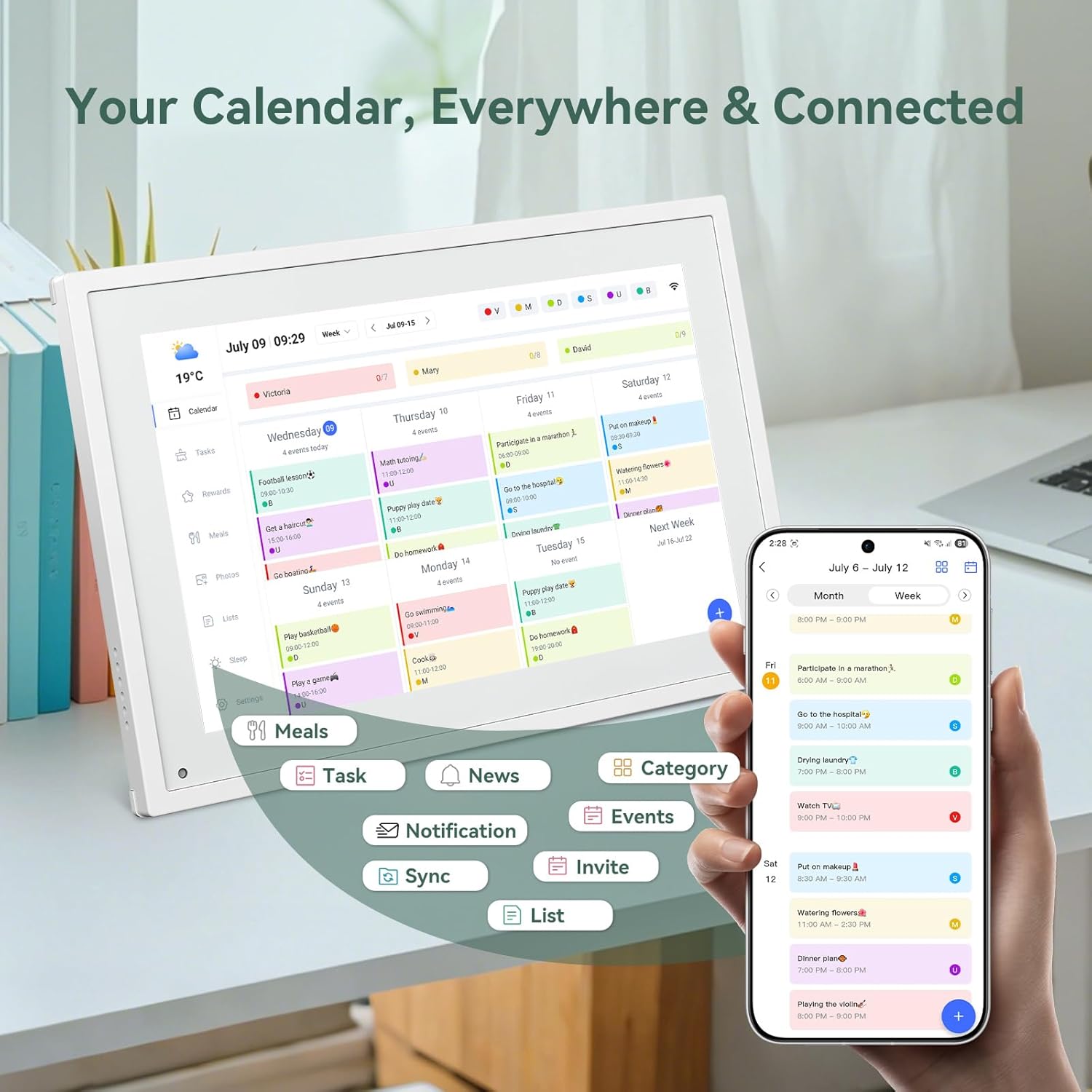
6.6 vaizdas: Baigėsiview of smart features and app connectivity.
- Live Weather Forecasts: Rodo dabartines oro sąlygas ir prognozes.
- Automatinis ryškumas: The built-in light sensor automatically adjusts screen brightness for optimal viewing.
- Miegojimo rezimas: Configure scheduled times for the device to enter a low-power sleep mode.
- Custom Lists: Create and manage various lists (e.g., shopping lists, packing lists).
- Spalvų kodavimas: Assign different colors to events or tasks for easy visual identification.
7. Priežiūra
7.1 Prietaiso valymas
- Švelniai nuvalykite ekraną minkštu, nepūkuotu skudurėliu. Jei dėmės sunkiai įveikiamos, šiek tiek nuvalykiteampnuvalykite šluostę vandeniu arba ekrano valymo tirpalu.
- Venkite naudoti stiprias chemines medžiagas, abrazyvines medžiagas ar aerozolinius purškalus tiesiai ant įrenginio.
- Prieš valydami įsitikinkite, kad prietaisas yra išjungtas ir atjungtas.
7.2 Programinės įrangos naujiniai
Įrenginys gali gauti periodinius programinės įrangos atnaujinimus, skirtus pagerinti našumą ir pridėti naujų funkcijų. Įsitikinkite, kad jūsų įrenginys prijungtas prie „Wi-Fi“, kad gautumėte šiuos atnaujinimus. Paprastai ekrane būsite informuoti, kai bus pasiekiamas atnaujinimas.
8. Problemų sprendimas
| Problema | Galima priežastis | Sprendimas |
|---|---|---|
| Įrenginys neįsijungia. | Maitinimo adapteris neprijungtas arba sugedęs. | Įsitikinkite, kad maitinimo adapteris yra tvirtai prijungtas prie įrenginio ir veikiančio maitinimo lizdo. |
| Nepavyksta prisijungti prie „Wi-Fi“. | Neteisingas slaptažodis, už diapazono ribų arba tinklo problema. | Verify Wi-Fi password. Move the device closer to the router. Restart your router. |
| Calendar events are not syncing. | App not linked, external calendar not connected, or internet issue. | Check app-device linking. Ensure external calendars are correctly linked in the eCalendar app. Verify internet connection. |
| Ekranas nereaguoja. | Laikinas programinės įrangos triktis. | Paleiskite įrenginį iš naujo laikydami nuspaustą maitinimo mygtuką, kol jis išsijungs, tada vėl jį įjunkite. |
9. Specifikacijos
| Funkcija | Detalė |
|---|---|
| Modelio numeris | 10 p |
| Ekrano dydis | 10.1 colių |
| Ekrano tipas | Jutiklinis ekranas |
| Ryšys | WiFi |
| Gaminio matmenys | 10.51 x 0.91 x 7.32 colio (26.7 x 2.3 x 18.6 cm) |
| Prekės svoris | 2.58 svaro (1.17 kg) |
| Montavimo tipas | Desk Mount (not wall-mountable) |
| Maitinimo šaltinis | Plug-in (no internal battery) |
| Spalva | Baltas |
10. Garantija ir palaikymas
The TABWEE Digital Calendar comes with a standard manufacturer's warranty. For specific warranty terms and conditions, please refer to the warranty card included in your product packaging or visit the official TABWEE websvetainę.
For technical support, troubleshooting assistance, or any inquiries regarding your product, please contact TABWEE customer service through their official websvetainėje arba kontaktinę informaciją, pateiktą jūsų produkto dokumentuose.


