Įvadas
Thank you for choosing the pTron Studio Evo Wireless Over-Ear Headphones. This manual provides essential information for setting up, operating, and maintaining your headphones to ensure optimal performance and longevity. Please read these instructions carefully before use.

Vaizdas: Viršview of pTron Studio Evo features including sound quality, battery life, driver size, controls, charging, and connectivity modes.
Sąranka
1. Išpakavimas ir komponentai
Atsargiai išimkite visus daiktus iš pakuotės. Dėžutėje turėtų būti:
- pTron Studio Evo Wireless Over-Ear Headphones
- C tipo USB įkrovimo laidas
- 3.5mm Audio Cable (Aux-in)
- Vartotojo vadovas (šis dokumentas)
2. Ausinių įkrovimas
Before first use, fully charge your headphones. Connect the provided USB Type-C cable to the charging port on the headphones and the other end to a compatible USB power source (e.g., wall adapter, computer USB port).
- Įkrovimo laikas: Apytiksliai 2 valandos pilnai įkrauti.
- Baterijos veikimo laikas: Up to 70 hours of playtime on a single full charge.

Image: pTron Studio Evo headphones highlighting 70 hours of playtime and Type-C fast charging.
3. Įjungimas/išjungimas
- Norėdami įjungti: Paspauskite ir palaikykite maitinimo mygtuką maždaug 3 sekundes, kol užsidegs LED indikatorius.
- Norėdami išjungti: Paspauskite ir palaikykite maitinimo mygtuką maždaug 3 sekundes, kol užges LED indikatorius.
4. „Bluetooth“ poravimas
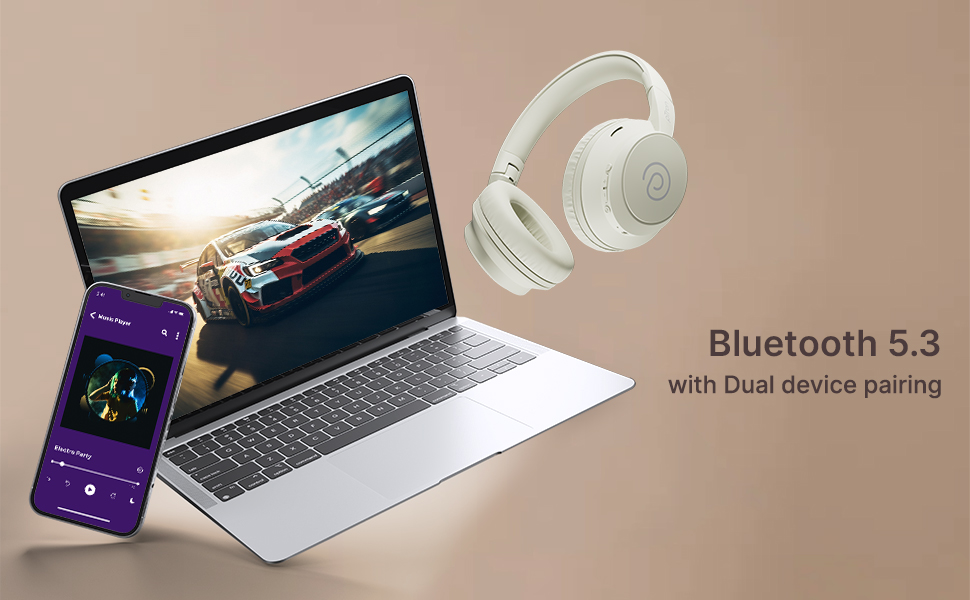
The pTron Studio Evo headphones utilize Bluetooth 5.3 for stable wireless connectivity.
- Įsitikinkite, kad ausinės yra išjungtos.
- Paspauskite ir palaikykite maitinimo mygtuką 5–7 sekundes, kol LED indikatorius pakaitomis mirksės raudonai ir mėlynai, rodydamas susiejimo režimą.
- Savo įrenginyje (išmaniajame telefone, nešiojamajame kompiuteryje ir kt.) įjunkite „Bluetooth“ ir ieškokite galimų įrenginių.
- Select "pTron Studio Evo" from the list of found devices.
- Prijungus, LED indikatorius ims šviesti mėlynai arba lėtai mirksėti mėlynai.
Dviejų įrenginių susiejimas: These headphones support connecting to two devices simultaneously. After pairing with the first device, disable Bluetooth on that device, then pair with the second device. Re-enable Bluetooth on the first device, and the headphones should connect to both. You can then switch audio playback between the two devices.

Image: Headphones connected to both a phone and a laptop, demonstrating Bluetooth 5.3 dual device pairing.
5. Wired Connection (Aux-in)
For a wired connection, use the provided 3.5mm audio cable. Plug one end into the headphone's 3.5mm jack and the other end into your audio source's auxiliary output. The headphones will automatically switch to wired mode when the cable is connected.
Naudojimo instrukcijos
1. Valdymasview
The headphones feature integrated buttons for easy control of music, calls, and modes.
Vaizdas: Išsamus view of the integrated control buttons on the pTron Studio Evo headphones.
- Maitinimo mygtukas: Paspauskite ir palaikykite, kad įjungtumėte / išjungtumėte. Trumpai paspauskite, kad paleistumėte / pristabdytumėte muziką arba atsilieptumėte / baigtumėte skambučius.
- Garsumo padidinimas (+): Trumpas paspaudimas, norint padidinti garsumą. Ilgas paspaudimas, norint pereiti į kitą takelį.
- Sumažinti garsumą (-): Trumpas paspaudimas, jei norite sumažinti garsumą. Ilgas paspaudimas, jei norite pereiti į ankstesnį takelį.
- EQ mygtukas: Short press to cycle through EQ modes (Bass, Movie, Pop, Vocal).
2. Ekvalaizerio režimai
The pTron Studio Evo headphones offer multiple low-latency EQ modes optimized for different audio experiences:
- Žaidimo režimas: Sumažina garso delsą, kad žaidimo patirtis būtų sinchronizuota.
- Filmo režimas: Enhances dialogue clarity and cinematic sound effects.
- Muzikos režimas: Užtikrina subalansuotą profesionalų garsąfile bendram muzikos klausymui.
- Boso režimas: Boosts low frequencies for a deeper bass response.
- Pop režimas: Optimized for pop music genres.
- Vokalinis režimas: Enhances vocal clarity, ideal for podcasts or audiobooks.
Norėdami perjungti šiuos režimus, paspauskite EQ mygtuką.
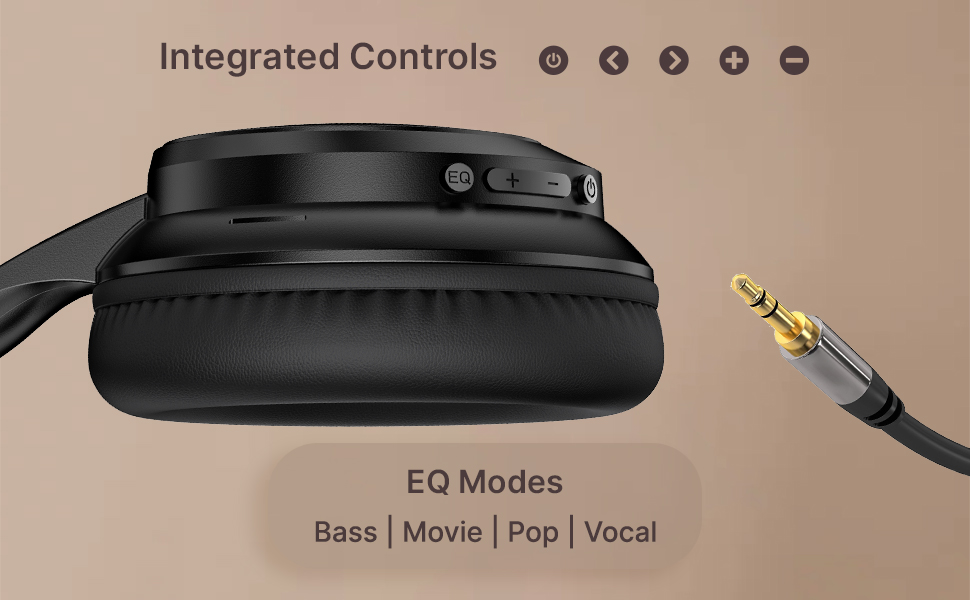
Image: User engaging in gaming with headphones, demonstrating low-latency sync for game mode.
3. Skambinimas ir skambučių priėmimas
The headphones include a built-in HD microphone for hands-free calls.
- Atsiliepti / Baigti skambutį: Trumpai paspauskite maitinimo mygtuką.
- Atmesti skambutį: Paspauskite ir 2 sekundes palaikykite maitinimo mygtuką.
4. Balso asistentas
Access your device's voice assistant (e.g., Siri, Google Assistant) by double-pressing the Power button.
5. Ausinių dėvėjimas
The pTron Studio Evo headphones feature an ergonomic design with soft earcups and an adjustable head beam for comfortable all-day listening. Adjust the head beam to position the earcups exactly over your ears for the best fit and sound isolation.
Priežiūra
1. Valymas
Regularly clean your headphones to maintain hygiene and performance.
- Ausų kaušelius ir galvos juostą nuvalykite minkštu, sausu skudurėliu.
- Nenaudokite abrazyvinių valiklių ar tirpiklių.
- Avoid getting moisture into the charging port or audio jack.
2. Atsparumas vandeniui
The headphones are IPX5 water-resistant, meaning they can withstand splashes and sweat. Do not submerge them in water or expose them to heavy rain.
3. Sandėliavimas
The foldable design allows for easy storage. Fold the headphones when not in use to protect them from damage and save space. Store them in a cool, dry place away from direct sunlight and extreme temperatures.
Trikčių šalinimas
- Nėra galios: Įsitikinkite, kad ausinės yra visiškai įkrautos. Prijunkite prie maitinimo šaltinio ir bandykite dar kartą.
- Nepavyksta sujungti: Make sure Bluetooth is enabled on your device and the headphones are in pairing mode (flashing red and blue LED). Try restarting both devices.
- Nėra garso: Check the volume levels on both the headphones and your connected device. Ensure the correct audio output is selected on your device. If using a wired connection, ensure the 3.5mm cable is fully inserted.
- Prasta garso kokybė: Ensure the headphones are within the Bluetooth range (up to 10 meters) of your device. Avoid obstacles that may interfere with the signal. Try switching EQ modes.
- Mikrofonas neveikia: Ensure the headphones are properly connected and selected as the input device on your call application.
Specifikacijos
| Funkcija | Specifikacija |
|---|---|
| Modelio pavadinimas | Studija |
| Ryšio technologija | Belaidis ryšys („Bluetooth“) |
| Belaidžio ryšio technologija | Bluetooth 5.3 |
| Bluetooth diapazonas | 10 metrų |
| Garso tvarkyklės dydis | 40 milimetrų |
| Baterijos veikimo laikas | 70 valandų |
| Įkrovimo laikas | 2 valandų |
| Ausinės Jack | 3.5 mm lizdas |
| Atsparumo vandeniui lygis | IPX5 Atsparus vandeniui |
| Kontrolės metodas | Mygtukas, balsas |
| Triukšmo valdymas | Garso izoliacija |
| Medžiaga | Akrilnitrilo butadieno stirenas (ABS) |
| Prekės svoris | 157 gramų |
| Gaminio matmenys | 19.2 x 15.8 x 7.9 cm |
Garantija ir palaikymas
1. Gamintojo garantija
The pTron Studio Evo headphones come with a 1 metų gamintojo garantija from the date of purchase. This warranty covers manufacturing defects only. Please retain your proof of purchase for warranty claims.
2. Pagalba klientams
Jei turite klausimų, techninės pagalbos ar pretenzijų dėl garantijos, susisiekite su „pTron“ klientų aptarnavimo tarnyba:
- El. paštas: support@ptron.in
- Telefonas: 040-67138888