1. Įvadas
This manual provides detailed instructions for the installation, operation, and maintenance of your EmpireTech IPC-T54PRO-ZE 4MP Turret IP Camera. Please read this manual thoroughly before using the product to ensure proper functionality and safety.
The EmpireTech IPC-T54PRO-ZE is a high-performance 4-megapixel IP camera featuring a 1/1.8" CMOS image sensor, motorized vari-focal lens (2.7mm-12mm), built-in IR and warm dual lights, two-way talk capability, and Intelligent Video System (IVS) functions. It is designed for both indoor and outdoor surveillance applications.
2. Pakuotės turinys
Verify that all items are present and in good condition. If any items are missing or damaged, contact your vendor immediately.
- EmpireTech IPC-T54PRO-ZE 4MP Turret IP Camera
- Tvirtinimo detalės (varžtai, sieniniai inkarai)
- Vandeniui atspari Ethernet kabelio jungtis
- Greitos pradžios vadovas
- Gręžimo šablonas
3. Produktas baigtasview
The following image illustrates the main components of the EmpireTech IPC-T54PRO-ZE camera.
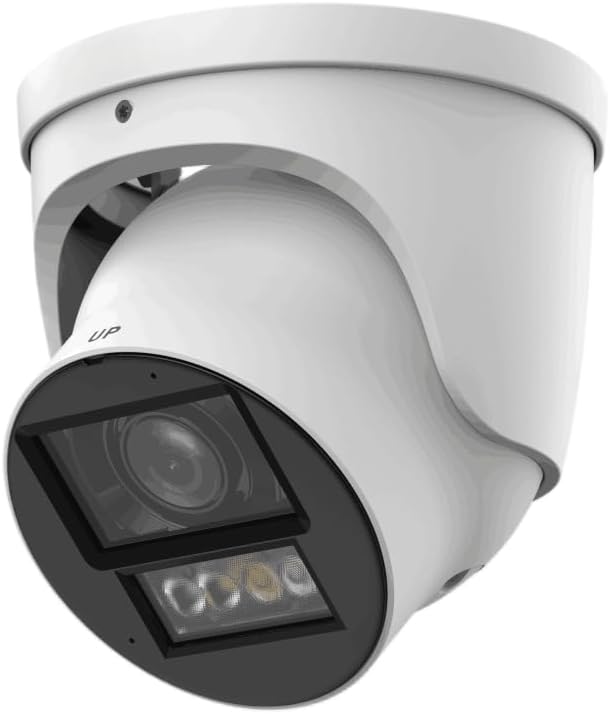
Figure 3.1: EmpireTech IPC-T54PRO-ZE Turret IP Camera. This image shows the front and side view of the white turret camera, highlighting the lens, IR/warm lights, and the adjustable mounting bracket.
- Kameros objektyvas: 2.7mm-12mm Motorized vari-focal lens.
- IR šviestuvai: Provides infrared light for night vision up to 60m.
- Šiltos lemputės: Provides visible light for color night vision up to 50m and active deterrence.
- Mikrofonas: Built-in dual microphone for audio input.
- Pranešėjas: Built-in speaker for two-way talk functionality.
- Ethernet prievadas (PoE): For network connection and Power over Ethernet.
- Maitinimo įvestis: 12 V nuolatinės srovės maitinimo įvestis.
- „Micro SD“ kortelės lizdas: Supports up to 1 TB Micro SD card for local storage.
- Aliarmo įvestis/išvestis: 1 input, 1 output.
- Garso įvestis/išvestis: 1 input, 1 output.
- RS-485 prievadas: For control and communication.
4. Sąranka ir diegimas
4.1 Saugos priemonės
- Prieš montuodami arba atlikdami techninę priežiūrą įsitikinkite, kad maitinimas yra atjungtas.
- Use only specified power adapters (12 VDC or PoE).
- Saugokite, kad fotoaparatas nepatektų į ekstremalią temperatūrą ar drėgmę.
- Nebandykite ardyti kameros. Dėl techninės priežiūros kreipkitės į kvalifikuotus specialistus.
4.2 Fotoaparato montavimas
- Pasirinkite vietą: Pasirinkite tinkamą vietą viduje arba lauke, kuri užtikrintų norimą viewing angle and is within range of your network and power source. The camera is IP67 and IK10 rated for outdoor use.
- Paruoškite paviršių: Use the provided drill template to mark the screw holes on the mounting surface.
- Gręžimo skylės: Drill pilot holes for the mounting screws and insert wall anchors if necessary.
- Apsaugokite fotoaparatą: Attach the camera base to the mounting surface using the provided screws.
- Sureguliuoti kampą: Loosen the adjustment screws to position the camera lens to the desired viewing angle, then tighten the screws to secure it.
4.3 Laidų jungtys
- Ethernet jungtis: Connect an Ethernet cable to the camera's RJ45 port. If using PoE, this will also provide power. Use the waterproof connector for outdoor installations.
- Maitinimo jungtis (neprivaloma): If not using PoE, connect a 12 VDC power adapter (not included) to the camera's power input port.
- Audio/Alarm/RS-485 (Optional): Connect external audio devices, alarm sensors, or RS-485 control devices as required.
- Micro SD kortelės montavimas: Locate the Micro SD card slot (usually under a cover) and insert a Micro SD card (up to 1 TB) for local storage. Ensure the camera is powered off before inserting/removing the card.
5. Naudojimo instrukcijos
5.1 Initial Setup and Network Configuration
- Maitinimas: Connect the camera to power (PoE or 12V DC adapter).
- Prieiga prie tinklo: The camera will obtain an IP address via DHCP by default. Use the manufacturer's IP Search Tool (available on the EmpireTech website) to find the camera's IP address on your network.
- Web Sąsajos prieiga: Atidarykite a web browser and enter the camera's IP address. Log in using the default username and password (refer to the Quick Start Guide or manufacturer's documentation for default credentials).
- Keisti slaptažodį: Dėl saugumo, pirmą kartą prisijungę, nedelsdami pakeiskite numatytąjį slaptažodį.
- Tinklo nustatymai: Configure network settings (e.g., static IP address) if required.
5.2 Video Surveillance and Recording
- Tiesiogiai View: Access the live video feed through the web interface or a compatible NVR/VMS software.
- Motorized Lens Control: Use the zoom and focus controls in the web interface to adjust the 2.7mm-12mm motorized vari-focal lens for optimal clarity.
- Įrašas: Configure recording schedules, motion detection recording, or continuous recording to the Micro SD card, NVR, or network storage.
- Smart H.264+/H.265+ Encoding: The camera supports advanced compression for efficient storage and bandwidth usage.
5.3 Dual Light Modes (IR and Warm Light)
- The camera features built-in IR illuminators for black and white night vision and warm lights for full-color night vision.
- Išmanioji dviguba šviesa: The camera can automatically switch between IR and warm light modes based on detected events or ambient light conditions. Configure these settings in the camera's web sąsaja.
5.4 Dvipusis pokalbis
- Utilize the built-in dual microphone and speaker for two-way audio communication through the camera's web interface or compatible mobile application.
5.5 Intelligent Video System (IVS)
- The camera supports IVS features such as tripwire and intrusion detection. Configure these functions in the camera's web interface to enhance surveillance capabilities and trigger alarms.
6. Priežiūra
- Reguliarus valymas: Periodically clean the camera lens and housing with a soft, dry cloth. For stubborn dirt, use a mild cleaning solution and a soft cloth. Do not use abrasive cleaners.
- Firmware atnaujinimai: Check the EmpireTech official website regularly for firmware updates. Updating firmware can improve performance, add new features, and enhance security. Follow the provided instructions carefully when updating.
- Slaptažodžio valdymas: Regularly change your camera's password to maintain security.
- Saugyklos valdymas: Jei naudojate „Micro SD“ kortelę, periodiškai ją peržiūrėkiteview ir tvarkyti įrašytą footage, kad būtų užtikrinta pakankamai vietos daiktams laikyti.
7. Problemų sprendimas
| Problema | Galima priežastis | Sprendimas |
|---|---|---|
| Nėra vaizdo kanalo | Nėra maitinimo; Tinklo ryšio problema; Neteisingas IP adresas. | Check power supply (PoE or 12V DC). Verify Ethernet cable connection. Use IP Search Tool to confirm IP address. |
| Prasta vaizdo kokybė | Dirty lens; Incorrect focus; Low light conditions. | Clean the lens. Adjust the motorized vari-focal lens focus via the web interface. Ensure IR/warm lights are enabled for low light. |
| Negaliu prieiti web sąsaja | Incorrect IP address; Network firewall; Browser issues. | Verify IP address. Check network firewall settings. Try a different web naršyklė. |
| Dvipusis pokalbis neveikia | Microphone/speaker settings; Network bandwidth. | Patikrinkite garso nustatymus, esančius web interface. Ensure sufficient network bandwidth. |
8. Specifikacijos
| Funkcija | Detalė |
|---|---|
| Modelio numeris | IPC-T54PRO-ZE |
| Vaizdo jutiklis | 4-MP 1/1.8" CMOS |
| Maks. Rezoliucija | 4 MP (2688 × 1520) @25/30 fps |
| Objektyvo tipas | 2.7mm-12mm Motorized Vari-focal |
| IR atstumas | Iki 60 196.85 m (XNUMX XNUMX pėdos) |
| Warm Light Distance | Iki 50 164.04 m (XNUMX XNUMX pėdos) |
| Vaizdo įrašų suspaudimas | ROI, SVC, SMART H.264+/H.265+, AI H.264/H.265 |
| Garsas | Built-in Dual Mic, 1-ch Speaker, Two-Way Talk |
| Sandėliavimas | Micro SD card (max. 1 TB) |
| Signalizacija I/O | 1 in, 1 out |
| Maitinimo šaltinis | 12 VDC/PoE (ePoE support) |
| Maitinimo išvestis | 12 VDC, max. 165mA |
| Apsauga | IP67, IK10 |
| Matmenys | 5.02 x 4.8 x 5.02 colio |
| Svoris | 2.03 svaro |
| Ryšio protokolas | Ethernet |
| Specifiniai naudojimo būdai | Stebėjimas (viduje, lauke) |
9. Informacija apie garantiją
EmpireTech products typically come with a limited manufacturer's warranty. For specific warranty terms and conditions, please refer to the warranty card included with your product or visit the official EmpireTech websvetainėje. Išsaugokite pirkimo įrodymą garantiniams reikalavimams.
10. Pagalba klientams
If you encounter any issues or have questions regarding your EmpireTech IPC-T54PRO-ZE camera, please contact EmpireTech customer support through their official websvetainėje arba kontaktinę informaciją, pateiktą jūsų produkto dokumentuose.
- Internetiniai ištekliai: Aplankykite EmpireTech Store on Amazon dėl produkto informacijos ir atnaujinimų.
- Techninė pagalba: Refer to the contact details provided in your product packaging or on the official EmpireTech webtechninės pagalbos svetainę.


