1. Įvadas
The Sony RX1R III is a full-frame premium compact camera designed for photographers seeking exceptional image quality in a portable form factor. It features a 61 MP CMOS sensor, a high-quality ZEISS Sonnar T* 35mm F2 lens, the advanced BIONZ XR™ processor, and AI-based subject recognition for precise autofocus and tracking. This manual provides essential information for setting up, operating, and maintaining your camera.
2. Sąranka
2.1. Išpakavimas ir pradinė apžiūra
Atsargiai išimkite visus komponentus iš pakuotės. Įsitikinkite, kad yra šie daiktai:
- Sony RX1R III Camera Body
- Rechargeable Battery Pack (NP-FW50)
- Kintamosios srovės adapteris
- C tipo USB kabelis
- Pečių dirželis
- Objektyvo dangtelis
- Batų dangtelis
- Okuliaro taurė
- Instrukcijų vadovas (šis dokumentas)
Apžiūrėkite, ar fotoaparatas ir priedai nėra pažeisti. Jei trūksta kokių nors daiktų arba jie pažeisti, kreipkitės į pardavėją.
2.2. Pečių dirželio pritvirtinimas
Attach the provided shoulder strap to the camera's strap lugs for secure handling.

Image: User attaching a wrist strap to the camera, demonstrating how to secure it for carrying.
2.3. Akumuliatoriaus įkrovimas
Insert the NP-FW50 rechargeable battery pack into the camera. Connect the camera to the AC adaptor using the USB Type-C cable, then plug the AC adaptor into a wall outlet. The charging indicator will light up during charging and turn off when complete. A full charge takes approximately 150 minutes.
Note: The camera is compatible with NP-FW50 rechargeable battery packs, offering up to 300 images on a single charge (CIPA standard, using LCD monitor). Fast charging via USB Power Delivery (PD) is supported with an 18 W (9 V/2 A) or higher output capacity USB Type-C cable.
2.4. Atminties kortelės įdėjimas
Open the memory card/battery cover. Insert a compatible SD card (sold separately) into the memory card slot with the label facing the front of the camera until it clicks into place. Close the cover securely.
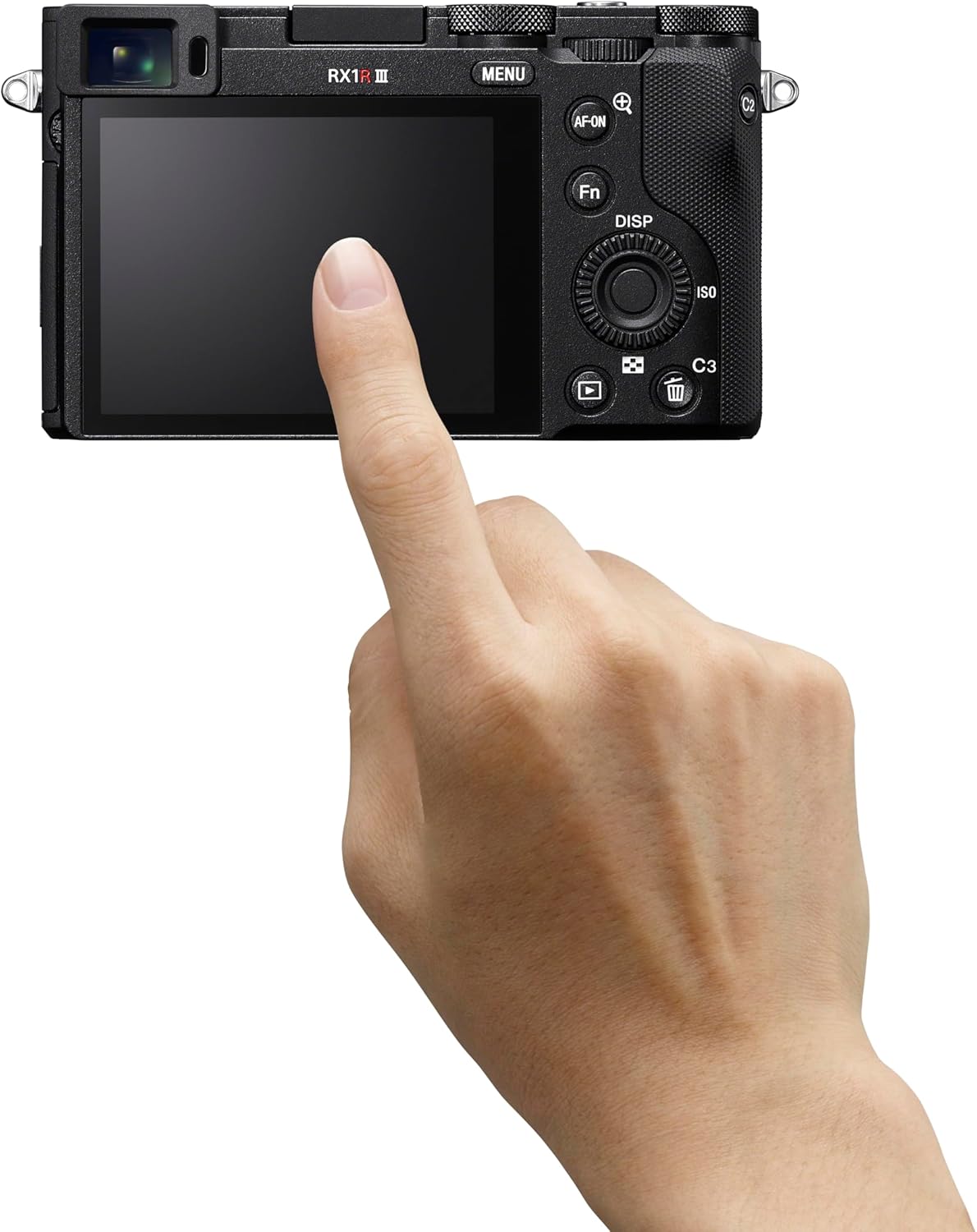
Vaizdas: Galinis view of the Sony RX1R III, showing the LCD screen and control buttons. The memory card slot is typically located near the battery compartment on the bottom or side.
2.5. Pradinis įjungimas ir nustatymai
Turn the camera on using the ON/OFF switch. Follow the on-screen prompts to set the language, date, time, and time zone. These settings are crucial for proper image metadata.
3. Fotoaparato valdymas
3.1. Pagrindiniai fotografavimo režimai
The RX1R III offers various shooting modes accessible via the mode dial on the top of the camera:
- Programuojama automatinė (P): The camera automatically sets aperture and shutter speed for optimal exposure.
- Diafragmos prioritetas (A): Jūs nustatote diafragmą, o fotoaparatas sureguliuoja užrakto greitį. Idealiai tinka lauko gyliui valdyti.
- Užrakto prioritetas (S): Jūs nustatote užrakto greitį, o fotoaparatas sureguliuoja diafragmą. Idealiai tinka judesio suliejimo kontrolei.
- Rankinis išlaikymas (M): Jūs kontroliuojate ir diafragmą, ir užrakto greitį.
- Auto (AUTO): Fully automatic mode for quick shooting.
- Scenos pasirinkimas: Iš anksto nustatyti režimai konkrečioms scenoms, tokioms kaip portretas, kraštovaizdis, sportas.
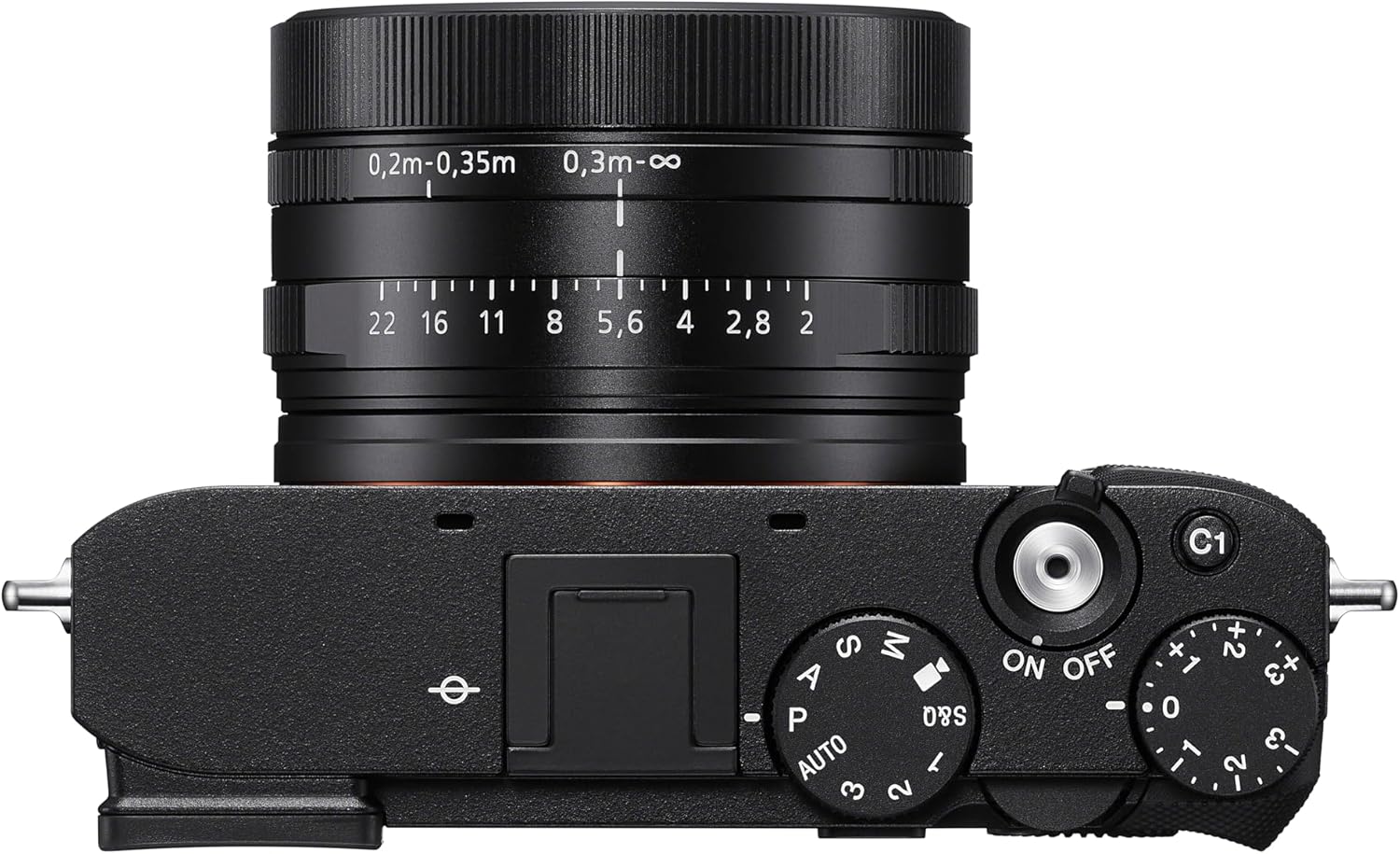
Vaizdas: Viršus view of the Sony RX1R III, highlighting the mode dial, shutter button, and exposure compensation dial.
3.2. Autofocus (AF) System
The camera features an advanced 693-point phase-detection AF system with AI-based subject recognition and real-time tracking. This allows for fast and precise focusing on a wide range of subjects, including humans, animals, and birds.
- Stebėjimas realiuoju laiku: The camera recognizes color, pattern, and spatial data to track subjects accurately.
- Subject Recognition: Automatically detects and focuses on human eyes/faces, animal eyes/bodies, and bird eyes/bodies.
- AF įjungimo mygtukas: Use the dedicated AF-ON button to activate autofocus independently from the shutter button.
Video: Official Sony RX1R III Product Feature Video. This video demonstrates the camera's key features, including its advanced autofocus system and image quality.
3.3. Step Crop Shooting
Leverage the camera's 61 MP sensor with Step Crop Shooting to achieve different focal lengths without changing lenses. This feature allows you to crop images to 50mm equivalent (29 MP) or 70mm equivalent (15 MP) from the native 35mm lens, providing flexibility in composition. This function is not available for movies.
3.4. Creative Look Modes
The RX1R III includes Creative Look modes for expanded in-camera expression. These modes allow you to apply various stylistic effects to your photos directly, such as Standard, Portrait, Neutral, Vivid, Film, Instant, Soft Highkey, Black & White, and Sepia.
3.5. Vaizdo įrašymas
The camera supports high-quality video recording:
- 4K vaizdo įrašas: Record stunning 4K video at 30 frames per second (4K/30p).
- Full HD vaizdo įrašas: Capture smooth Full HD video at up to 120 frames per second (1080p/120fps) for slow-motion effects.
- XAVC Format: Videos are recorded in the XAVC format for high quality.
3.6. Ryšys
The RX1R III offers versatile connectivity options:
- „Wi-Fi“ ir „Bluetooth“: Connect wirelessly to your smartphone for remote control, image transfer, and direct upload to Creators' App or Creators' Cloud Web.
- C tipo USB: For fast data transfer and charging.
- HDMI išvestis: Connect to an external display for video playback.
4. Priežiūra
4.1. Kameros valymas
- Kameros korpusas: Nuvalykite fotoaparato korpusą minkšta, sausa šluoste. Jei nešvarumai sunkiai įveikiami, naudokite lengvai sudrėkintą šluostę.ampnuplauti vandeniu arba švelniu valymo tirpalu.
- Objektyvas: Use a lens brush to remove dust, then gently wipe with a lens cleaning cloth and lens cleaning fluid. Avoid touching the lens surface with your fingers.
- Jutiklis: Cleaning the image sensor should only be performed by authorized service personnel to prevent damage.
4.2. Akumuliatoriaus priežiūra
Norėdami pailginti baterijos veikimo laiką, venkite jos veikti itin aukštoje temperatūroje. Nenaudojamą bateriją laikykite vėsioje, sausoje vietoje. Prieš ilgas fotografavimo sesijas visiškai įkraukite bateriją.
4.3. Sandėliavimas
When storing the camera for extended periods, remove the battery and memory card. Store the camera in a dry, well-ventilated area, preferably in a camera bag with desiccant to prevent mold and mildew.
5. Problemų sprendimas
If you encounter issues with your Sony RX1R III, refer to the following common troubleshooting tips:
- Kamera neįsijungia: Įsitikinkite, kad akumuliatorius yra visiškai įkrautas ir teisingai įdėtas.
- Vaizdai neryškūs: Check your focus mode and ensure the subject is within the camera's focusing range. Verify shutter speed is fast enough to prevent motion blur.
- Atminties kortelės klaida: Įsitikinkite, kad atminties kortelė įdėta teisingai, nėra pilna ar sugadinta. Pabandykite formatuoti kortelę (tai ištrins visus duomenis).
- Ryšio problemos: Check Wi-Fi/Bluetooth settings on both the camera and your smart device. Ensure the Creators' App is up to date.
For more detailed troubleshooting, please visit the official Sony support website or consult the comprehensive online manual.
6. Specifikacijos
| Funkcija | Detalė |
|---|---|
| Modelio pavadinimas | DSCRX1RM3B |
| Nuotraukų jutiklio skiriamoji geba | 61 MP (Effective Still Resolution: 60 MP) |
| Nuotraukų jutiklio dydis | Visas rėmas (35 mm) |
| Objektyvo tipas | ZEISS Sonnar T* 35mm F2 lens (Fixed Focal Length) |
| Didžiausia diafragma | F2 |
| Vaizdo stabilizavimas | Skaitmeninis |
| Procesorius | BIONZ XR™ |
| Automatinio fokusavimo taškai | 693 (fazės aptikimas) |
| Vaizdo raiška | 4K (30p), 1080p (120fps) |
| Ekrano dydis | 3 colių |
| Ryšys | Bluetooth, Wi-Fi, USB Type-C, HDMI |
| Baterija | NP-FW50 Rechargeable Battery Pack |
| Prekės svoris | 1 svaro |
7. Garantija ir palaikymas
7.1. Informacija apie garantiją
This Sony RX1R III camera comes with a 1 metų ribota garantija nuo įsigijimo datos. Ši garantija taikoma medžiagų ir gamybos defektams įprasto naudojimo sąlygomis. Išsaugokite pirkimo įrodymą, jei norėtumėte pateikti pretenzijas dėl garantijos.
7.2. Pagalba klientams
For further assistance, technical support, or service inquiries, please visit the official Sony Support websvetainė:
You can also find additional resources, FAQs, and software updates on the support page.