1. Įvadas
Ačiū, kad pirkoteasing the Moukey MAMP3 2.0 Channel Stereo Amplifier. This manual provides essential information for the safe and efficient operation of your device. Please read it thoroughly before use and retain it for future reference.
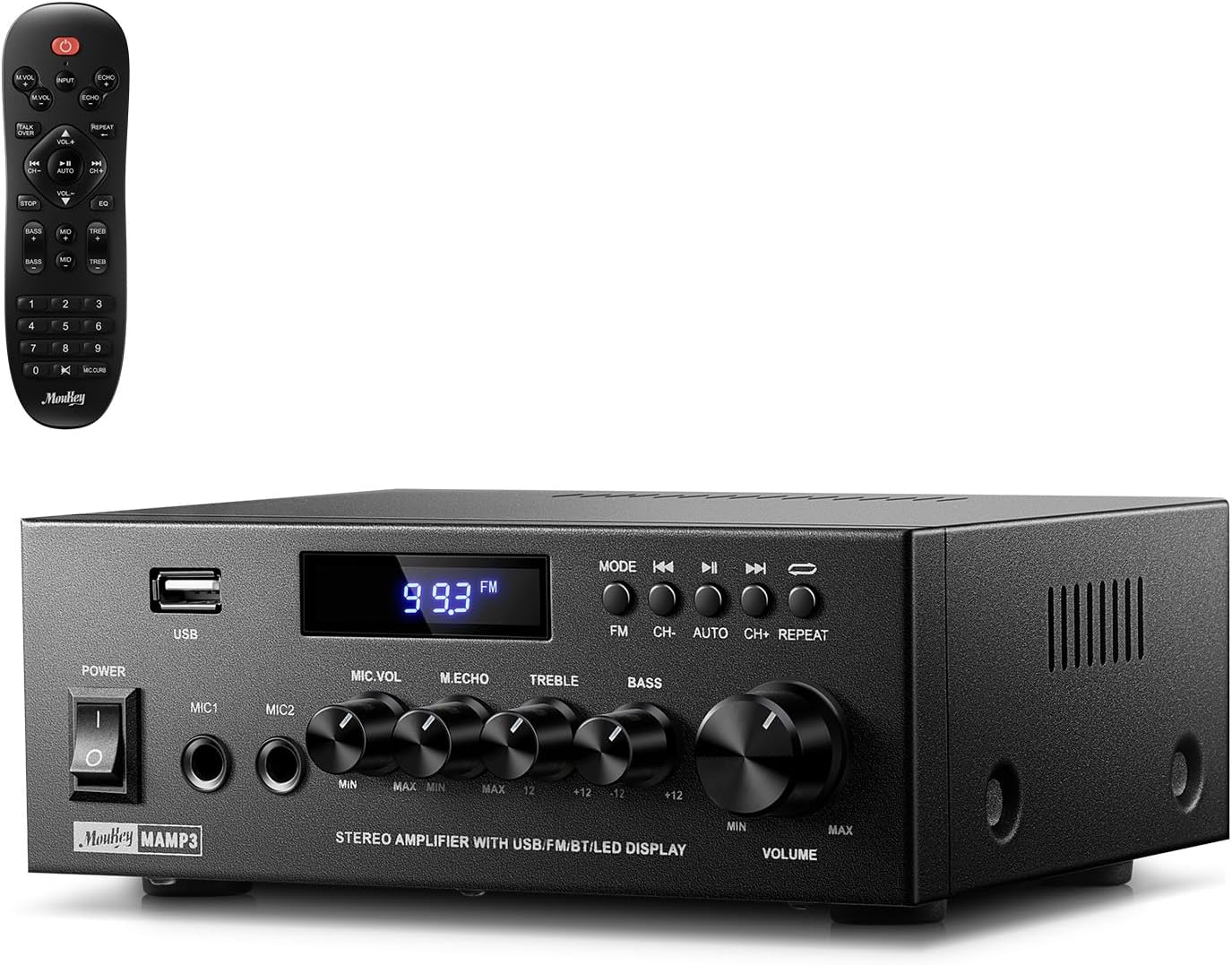
Image 1.1: The Moukey MAMP3 amplifier ir jo nuotolinio valdymo pultas.
2. Saugos instrukcijos
- Prieš naudodami perskaitykite visas instrukcijas ampgyvesnis.
- Laikykite amplifier away from water, moisture, and extreme temperatures.
- Do not block ventilation openings. Ensure proper airflow around the unit.
- Naudokite tik su įrenginiu pateiktą maitinimo adapterį.
- Nebandykite patys taisyti ar modifikuoti įrenginio. Visus techninės priežiūros darbus patikėkite kvalifikuotiems specialistams.
- Disconnect the power cord from the outlet if the unit will be unused for extended periods.
3. Produktas baigtasview
3.1 Pagrindinės savybės
- 2.0 Channel Stereo Audio Output
- „Bluetooth 5.3“ stabiliam belaidžiam ryšiui
- Multiple Audio Inputs: RCA, USB, FM Radio, 2 Microphone Inputs
- Full-function Remote Control with EQ adjustments
- Customizable Treble, Midrange, and Bass controls
- Memory function for mode, volume, and EQ settings
- 300 vatų maksimali išėjimo galia
3.2 Priekinio skydelio valdikliai ir indikatoriai

Image 3.1: Front Panel Layout
- Maitinimo jungiklis: Įjungia arba išjungia įrenginį.
- MIC1/2: 6.35 mm mikrofono įvesties lizdai.
- Mikrofono garsumo rankenėlė: Reguliuoja prijungtų mikrofonų garsumą.
- Echo rankenėlė: Reguliuoja mikrofonų aidėjimo efektą.
- Aukštoji rankenėlė: Reguliuoja aukšto dažnio garso išvestį.
- Boso rankenėlė: Reguliuoja žemo dažnio garso išvestį.
- Muzikos garsumo rankenėlė: Main volume control for all audio sources.
- USB lizdas: Skirta USB atminties įrenginiams prijungti garso atkūrimui.
- Skystųjų kristalų ekranas: Rodo dabartinį režimą, takelio informaciją arba FM dažnį.
- MODE mygtukas: Switches between input sources (BT, Aux, CD, USB, FM).
- Ankstesnis mygtukas: Skips to the previous track (USB/BT) or FM station.
- Atkūrimo / pristabdymo mygtukas: Plays or pauses audio (USB/BT).
- Kitas mygtukas: Skips to the next track (USB/BT) or FM station.
- Pakartojimo mygtukas: Repeats current track or all tracks (USB).
3.3 Galinio skydelio jungtys

Image 3.2: Rear Panel Connections
- FM antenos įvestis: Prijunkite pridedamą FM anteną radijo imtuvui.
- GARSO ĮVESTIS (RCA): Connect external audio sources like CD/DVD players using RCA cables.
- AUDIO OUTPUT (Speaker Terminals): Connect passive speakers. Ensure correct polarity (+ to + and - to -).
- POWER AC INPUT: Prijunkite maitinimo laidą prie kintamosios srovės lizdo.
4. Sąranka
4.1 Išpakavimas
Atsargiai nuimkite amplifier and all accessories from the packaging. Verify that all items listed in the 'What's in the Box' section are present.
4.2 Garsiakalbių prijungimas
MAMP3 amplifier supports two passive speakers. Connect your speakers to the GARSO IŠĖJIMAS terminals on the rear panel. Ensure that the positive (+) terminal on the amplifier connects to the positive (+) terminal on your speaker, and the negative (-) terminal on the amplifier connects to the negative (-) terminal on your speaker. Incorrect polarity can affect sound quality.

Image 4.1: Speaker Connection Diagram
4.3 Garso šaltinių prijungimas
The amp„lifier“ siūlo kelias įvesties parinktis:
- RCA įvestis: Use RCA cables to connect devices such as CD players, DVD players, or other audio equipment to the GARSO ĮVADAS lizdai galiniame skydelyje.
- USB įvestis: Įdėkite USB atmintinę į USB lizdas on the front panel for direct audio playback.
- Bluetooth: Belaidžiu būdu susiekite savo „Bluetooth“ įrenginį (išmanųjį telefoną, planšetinį kompiuterį, nešiojamąjį kompiuterį).
- FM radijas: Prijunkite pridedamą FM anteną prie FM antenos įvestis on the rear panel for radio reception. Extend the antenna for optimal signal.
- Mikrofono įėjimai: Prijunkite iki dviejų mikrofonų MIC1/2 jacks on the front panel for karaoke or public address.

Image 4.2: Available Signal Inputs
4.4 Maitinimo jungtis
Prijunkite maitinimo laidą prie POWER AC INPUT on the rear panel and then plug it into a standard AC power outlet.
5. Naudojimo instrukcijos
5.1 Maitinimo įjungimas/išjungimas
Paspauskite Maitinimo jungiklis priekiniame skydelyje, kad įjungtumėte amplifier on or off. The LED display will illuminate when the unit is powered on.
5.2 Įvesties pasirinkimas
Paspauskite REŽIMAS button on the front panel or the remote control to cycle through the available input sources: Bluetooth (BT), Auxiliary (Aux), CD, USB, and FM radio. The selected mode will be shown on the LED display.
5.3 Garsumo valdymas
Pasukite didelį Music Volume Knob on the front panel clockwise to increase volume and counter-clockwise to decrease it. Volume can also be adjusted using the remote control.
5.4 Equalizer (EQ) Adjustment
Adjust the sound characteristics using the Aukšta rankenėlė ir Boso rankenėlė on the front panel. The remote control also provides dedicated buttons for Treble, Midrange, and Bass adjustments. The amplifier will automatically save your preferred EQ settings.
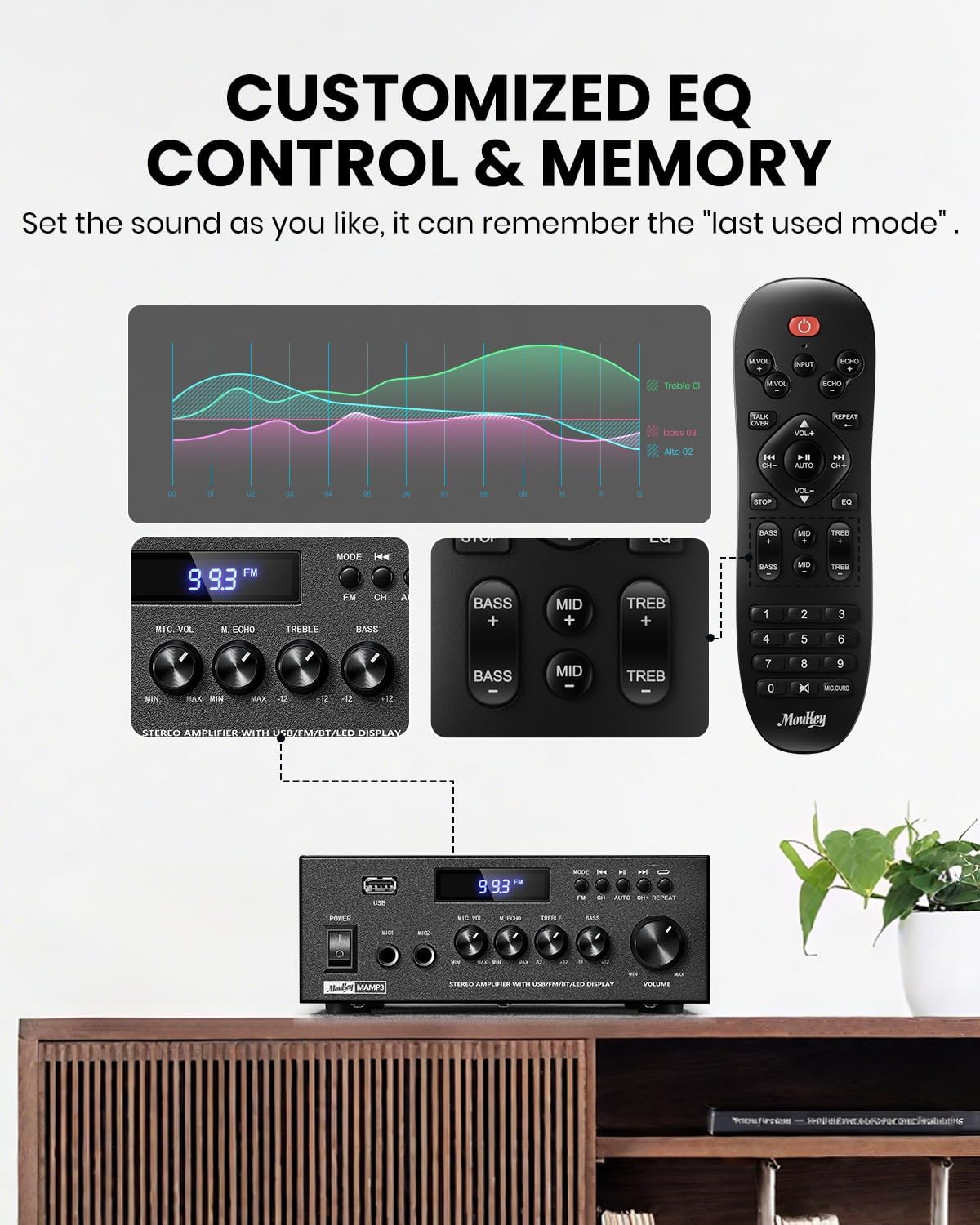
Image 5.1: Customizable EQ Control
5.5 Mikrofono valdikliai
If microphones are connected, use the Mikrofono garsumo rankenėlė to adjust their output level and the Echo rankenėlė to add an echo effect. The remote control also features a 'Talkover' function.
5.6 Bluetooth veikimas
- Paspauskite REŽIMAS button until "BT" appears on the LED display. The amplifier is now in Bluetooth pairing mode.
- On your mobile device, enable Bluetooth and search for "Moukey MAMP3".
- Select "Moukey MAMP3" to pair. Once connected, you will hear a confirmation tone.
- Dabar galite leisti garsą iš savo įrenginio per ampgyvesnis.

Image 5.2: Bluetooth Pairing
5.7 FM radijo veikimas
- Paspauskite REŽIMAS button until "FM" appears on the LED display.
- Automatinis nuskaitymas: Press the "AUTO" button on the remote to automatically scan and save available FM stations.
- Rankinis derinimas: Use the number pad on the remote control to directly enter the desired FM frequency (e.g., for 101.1 MHz, enter 1011).
- Naudokite Ankstesnis ir Kitas buttons to navigate between saved stations or fine-tune frequencies.
5.8 USB atkūrimas
Įdėkite USB atmintinę su MP3 arba WAV garso įrašu files į USB lizdas. The amp„Lifier“ automatiškai persijungs į USB režimą ir pradės atkūrimą. Naudokite Ankstesnis, Leisti / pristabdyti, ir Kitas mygtukai, skirti valdyti atkūrimą. Pakartokite mygtukas leidžia pakartoti dabartinį takelį arba visus takelius.
5.9 Nuotolinis valdymas
The included full-function remote control allows for convenient operation from a distance. It provides control over input selection, volume, EQ settings (treble, midrange, bass), microphone echo, and talkover functions across all input modes.

Image 5.3: Upgraded Remote Control Functionality
6. Priežiūra
- Valymas: Naudokite minkštą, sausą šluostę, kad nuvalytumėte prietaiso išorę ampNenaudokite skystų valiklių ar tirpiklių.
- Vėdinimas: Ensure that the ventilation openings are free from dust and debris to prevent overheating.
- Saugykla: Kai ilgesnį laiką nenaudojate, laikykite ampLaikyti vėsioje, sausoje vietoje, toliau nuo tiesioginių saulės spindulių ir ekstremalių temperatūrų.
7. Problemų sprendimas
| Problema | Galima priežastis | Sprendimas |
|---|---|---|
| Nėra galios | Neprijungtas maitinimo laidas; Sugedęs maitinimo lizdas; Išjungtas maitinimo jungiklis. | Ensure power cord is securely connected; Test outlet with another device; Turn power switch on. |
| Nėra garso išvesties | Volume too low; Incorrect input selected; Speaker wires loose/incorrectly connected; Audio source issue. | Increase volume; Select correct input mode; Check speaker wire connections and polarity; Verify audio source is playing. |
| Bluetooth neprisijungia | Amplifier not in BT mode; Device too far; Device already connected to another unit; Interference. | Perjungti amplifier to BT mode; Move device closer; Disconnect from other devices; Reduce interference. |
| Prastas FM priėmimas | Antenna not connected or poorly positioned; Weak signal. | Connect and adjust FM antenna position; Try auto-scan or manual tuning for stronger stations. |
| USB atkūrimo problemos | Nepalaikoma file formatavimas; USB diskas netinkamai suformatuotas; USB disko talpa per didelė. | Užtikrinti files are MP3/WAV; Format USB drive to FAT32; Use USB drives 32GB or less. |
8. Specifikacijos
| Funkcija | Specifikacija |
|---|---|
| Modelio numeris | MAMP3 |
| Išėjimo galia | 300 XNUMX vatų (didžiausia) |
| Kanalai | 2.0 Stereo |
| Ryšio technologija | Auxiliary, Bluetooth 5.3, FM, USB |
| Suderinami įrenginiai | Smartphone, Tablet, Laptop, Computer, Speakers, CD/DVD Player |
| Jungties tipas | RCA, USB, 2 Mic input |
| Garso išvesties režimas | Stereo |
| Gaminio matmenys | 6.1 colio gylis x 7.1 colio plotis x 2.8 colio aukštis (15.5 x 18.0 x 7.1 cm) |
| Prekės svoris | 2.14 svaro (0.97 kg) |
| Spalva | Juoda |
8.1 Kas yra dėžutėje
- Moukey MAMP3 Ampgyvybingesnis
- Nuotolinio valdymo pultelis
- FM antena
- Vartotojo vadovas
- Maitinimo adapteris
9. Garantija ir palaikymas
9.1 Informacija apie garantiją
Moukey products are designed and manufactured to the highest quality standards. This product is covered by a limited warranty against defects in materials and workmanship. Please refer to the warranty card included with your purchase for specific terms and conditions, or visit the official Moukey websvetainėje rasite išsamią informaciją apie garantiją.
9.2 Pagalba klientams
If you encounter any issues or have questions regarding your Moukey MAMP3 amplifier, please contact our customer support team. You can find contact information on the official Moukey websvetainėje arba per savo pirkimo platformą.
Websvetainė: www.moukey.com (Pvzample link, please refer to actual product documentation)
El. paštas: support@moukey.com (Pvzampel. paštu, žr. faktinę produkto dokumentaciją)


