Įvadas
This manual provides detailed instructions for the setup, operation, maintenance, and troubleshooting of your Soundcore Liberty Buds by Anker. Please read this manual thoroughly before using your earbuds to ensure optimal performance and longevity.
Kas yra dėžutėje
Patikrinkite, ar pakuotėje yra visi reikalingi daiktai:
- Soundcore Liberty Buds
- Įkrovimo dėklas
- Ear Fins (Sizes 0, 1, 2, 3)
- USB-C kabelis

Image: Contents of the Soundcore Liberty Buds package.
Sąranka
1. Wearing the Earbuds and Choosing Ear Fins
For optimal sound quality and comfort, it is crucial to select the correct ear fin size and ensure a secure fit. The Liberty Buds come with four sizes of ear fins (0, 1, 2, 3) to accommodate various ear shapes.
- Open the package and take out the accessories from the box.
- Choose the ear fin size that fits you best and remove the ear fin as per the instructions in the Quick Start Guide (QSG).
- Hold the ear fin and pull outward, then install the right-sized ear fin onto the earbud.
- Adjust the earbud so it fits snugly in your ear canal.
- If you prefer the size 0 ear fin, remove the pre-installed size 2 ear fin and store it back in the appropriate slot.
Video: Instructions on how to correctly wear Soundcore Liberty Buds and select the appropriate ear fin size.

Image: Diagram illustrating the process of selecting and installing ear fins for a secure fit.
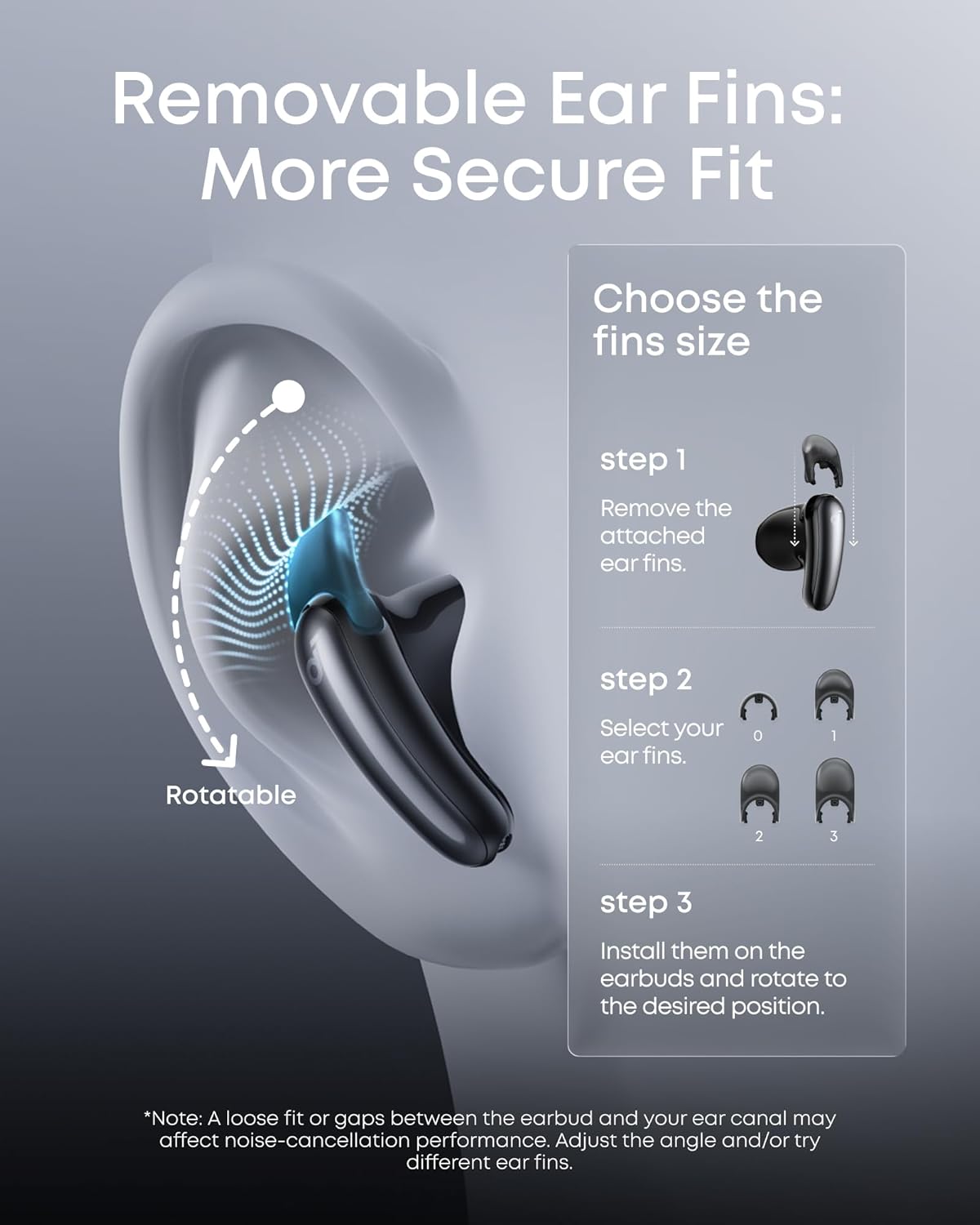
Image: Visual guide to checking the fit of the earbuds, demonstrating how a proper fit enhances noise cancellation.
2. Pradinis „Bluetooth“ susiejimas
- Ensure the earbuds are in the charging case with the lid open.
- Savo įrenginyje (išmaniajame telefone, planšetiniame kompiuteryje ir kt.) eikite į „Bluetooth“ nustatymus.
- Select "Soundcore Liberty Buds" from the list of available devices to pair.
- Prisijungus, išgirsite garso pranešimą, patvirtinantį sėkmingą susiejimą.
Naudojimo instrukcijos
Adaptyvus triukšmo slopinimas (ANC)
The Liberty Buds feature Adaptive ANC, which monitors your surroundings in real time. It detects environmental sounds such as traffic, voices, and wind noise, then automatically adjusts the level of noise cancellation for optimal performance. This ensures a quieter listening experience tailored to your environment.

Image: Demonstrating the Real-Time Adaptive ANC feature in an outdoor setting.
Erdvinis garsas
Experience an immersive audio profile with Spatial Audio, providing a well-balanced sound across all frequencies. This feature enhances every layer and detail of your music, whether you are listening to pop, classical, or electronic genres.

Image: A user enjoying Immersive Spatial Sound with Soundcore Liberty Buds.
Dirbtinio intelekto vertimas
Break down language barriers with the real-time face-to-face translation feature, supporting over 100 languages. The earbuds accurately recognize complex sentences and diverse accents, with an accuracy rate exceeding 97%.
4 mikrofonų dirbtinio intelekto aiškūs skambučiai
The smart noise reduction algorithm, combined with a 4-microphone array, precisely identifies and separates your voice from background noise. This ensures your calls are consistently clear and smooth, similar to a face-to-face conversation.
Baterijos veikimo laikas ir įkrovimas
The Soundcore Liberty Buds offer extended battery life:
- Standartinis režimas: Up to 7 hours of playback on a single charge, and a total of 30 hours with the charging case.
- ANC įjungta: Up to 6 hours of listening on a single charge, and up to 26 hours with the charging case.
The earbuds also support fast charging, providing 4 hours of playtime from just a 10-minute charge.

Vaizdas: Viršview of battery life and fast charging features.
Dviejų įrenginių jungtis
The Liberty Buds can connect to two devices simultaneously, allowing for seamless audio switching between them. This feature is particularly useful for users who frequently switch between a phone and a tablet or computer.
- After connecting your earbuds to your primary device (e.g., phone), open the Soundcore app.
- Eikite į More Settings > Dual Connections > Connect New Device. The earbuds will enter pairing mode, allowing them to connect to a new device.
- On your second device (e.g., tablet), open Bluetooth settings and pair with "Liberty Buds".
Audio playback on the earbuds will seamlessly switch between the two devices based on which device is actively playing audio.
Video: Guide on how to connect Soundcore Liberty Buds to two devices simultaneously.
Palieskite valdiklius
The Liberty Buds feature touch controls for managing playback, calls, and noise cancellation modes. Specific touch gestures can be customized via the Soundcore app.
- Vienas palietimas: Leisti / pristabdyti, atsiliepti / baigti skambutį
- Dukart paspausti: Kitas takelis, Atmesti skambutį
- Paspauskite ir palaikykite: Switch ANC modes (Noise Cancellation, Normal, Transparency), Activate Voice Assistant
Refer to the Soundcore app for detailed customization options for touch controls.
Priežiūra
Ausinių valymas
Regular cleaning helps maintain sound quality and hygiene. You will need alcohol wipes and a small cleaning brush.
- Prepare a cleaning brush and alcohol wipes.
- Gently brush the sound nozzle mesh/rear vent hole, mic hole, and pogo pin contacts for about 15 seconds to remove any debris.
- Wipe clean using the alcohol wipes.
- After cleaning, let the earbuds dry for about 5 minutes before reconnecting them to your phone for use.
Video: Detailed instructions on how to deep clean Soundcore Liberty Buds.
Atsparumas vandeniui
The Soundcore Liberty Buds are water resistant, providing protection against splashes and sweat. However, they are not designed for submersion in water. Ensure the earbuds are dry before placing them back in the charging case to prevent damage.
Trikčių šalinimas
Ausinių nustatymas iš naujo
Some product issues, such as being unable to pair, no sound coming from one earbud, or touch controls not working, can be resolved by resetting the earbuds.
- With the case's lid open, press the button on the charging case for 10 seconds to reset the earbuds.
- The LED indicator will flash white quickly 3 times, indicating that the earbuds have been reset.
Video: Instructions on how to reset Soundcore Liberty Buds.
Bendros problemos ir sprendimai
- Poor Fit / Earbuds Falling Out: Ensure you have selected the correct ear fin size. Experiment with different sizes (0, 1, 2, 3) and adjust the earbud's position in your ear for a snug fit. A loose fit can negatively impact sound quality and noise cancellation.
- ANC neveikia: The effectiveness of Adaptive ANC is highly dependent on a proper earbud fit. Re-adjust the earbuds and try different ear fin sizes to achieve a better seal.
- Sound Quality Issues (Anemic/Weak Sound): If the sound appears weak after turning on or after a period of inactivity, try toggling the ANC mode on and off, or playing loud/bassy audio to re-engage the full sound profile. Ensure the earbuds are clean and free of debris.
- Ryšio problemos: If earbuds fail to connect or maintain connection, try resetting them as described above. Ensure your device's Bluetooth is enabled and the earbuds are within range.
Specifikacijos
| Funkcija | Detalė |
|---|---|
| Modelio pavadinimas | Liberty Buds |
| Modelio numeris | D1200 |
| Prekės ženklas | Soundcore |
| Triukšmo valdymas | Adaptyvusis triukšmo slopinimas |
| Ryšio technologija | Belaidis ryšys („Bluetooth“) |
| Bluetooth versija | 6.1 |
| Garso tvarkyklės tipas | Dinaminis vairuotojas |
| Garso tvarkyklės dydis | 11 milimetrų |
| Dažnio atsakas | 40 KHz |
| Jautrumas | 122 dB |
| Varža | 14 omai |
| Baterijos veikimo laikas (standartiniu režimu) | Iki 7 valandų (ausinės), 30 valandų (su įkrovimo dėklu) |
| Baterijos veikimo laikas (įjungus ANC) | Iki 6 valandų (ausinės), 26 valandų (su įkrovimo dėklu) |
| Valdymo tipas | Palieskite valdymą |
| Atsparumo vandeniui lygis | Atsparus vandeniui (IP55) |
| Prekės svoris | 54.12 gramai (iš viso) |
| Gaminio matmenys | 2.22 x 2.13 x 1.05 colio |
| Ypatingos savybės | AI Translation, Adaptive ANC, Semi-In-Ear Design |
| Įtraukti komponentai | Charging Case, Ear Fins (Sizes 0, 1, 2, 3), USB-C Cable, Soundcore Liberty Buds |
Garantija ir palaikymas
„Soundcore“ gaminiams taikoma ribota garantija. Išsamios informacijos apie garantiją, gaminio registraciją ir techninę pagalbą rasite oficialioje „Soundcore“ svetainėje. websvetainėje arba susisiekite su klientų aptarnavimo tarnyba. Išsaugokite pirkimo kvitą garantiniams reikalavimams.
Palaikymas internetu: „Soundcore“ palaikymo puslapis


