1. Įvadas
Thank you for choosing the MONODEAL CD401 Portable HiFi Stereo CD Player. This versatile device combines classic CD playback with modern connectivity options, including Bluetooth, FM radio, USB, and AUX input. Enjoy high-fidelity audio with built-in speakers, dynamic RGB lighting, and convenient remote control. This manual provides essential information for setup, operation, and maintenance to ensure optimal performance.
2. Kas yra dėžutėje
- 1x MONODEAL CD401 CD Player
- 1x vartotojo vadovas
- 1x nuotolinio valdymo pultas
- 1x 3.5 mm garso kabelis
- 1x Charging Cable and Plug
3. Produktas baigtasview
The MONODEAL CD401 is designed for both portability and desktop use, offering a blend of classic and contemporary audio features. Its compact design includes integrated speakers and a clear display for easy navigation.
1 pav.: priekis view of the MONODEAL CD401 Portable CD Player, showcasing its compact design and central display.
Pagrindinės funkcijos:
- Daugiaspalvis RGB apšvietimas: Dynamic lighting effects that change color to the beat of the music, enhancing visual and auditory experience.
- "Bluetooth 5.3": Functions as both a Bluetooth transmitter (to headphones/speakers) and receiver (from phones/tablets).
- Integrated 4*HIFI Speakers: Provides surround sound for an immersive listening experience.
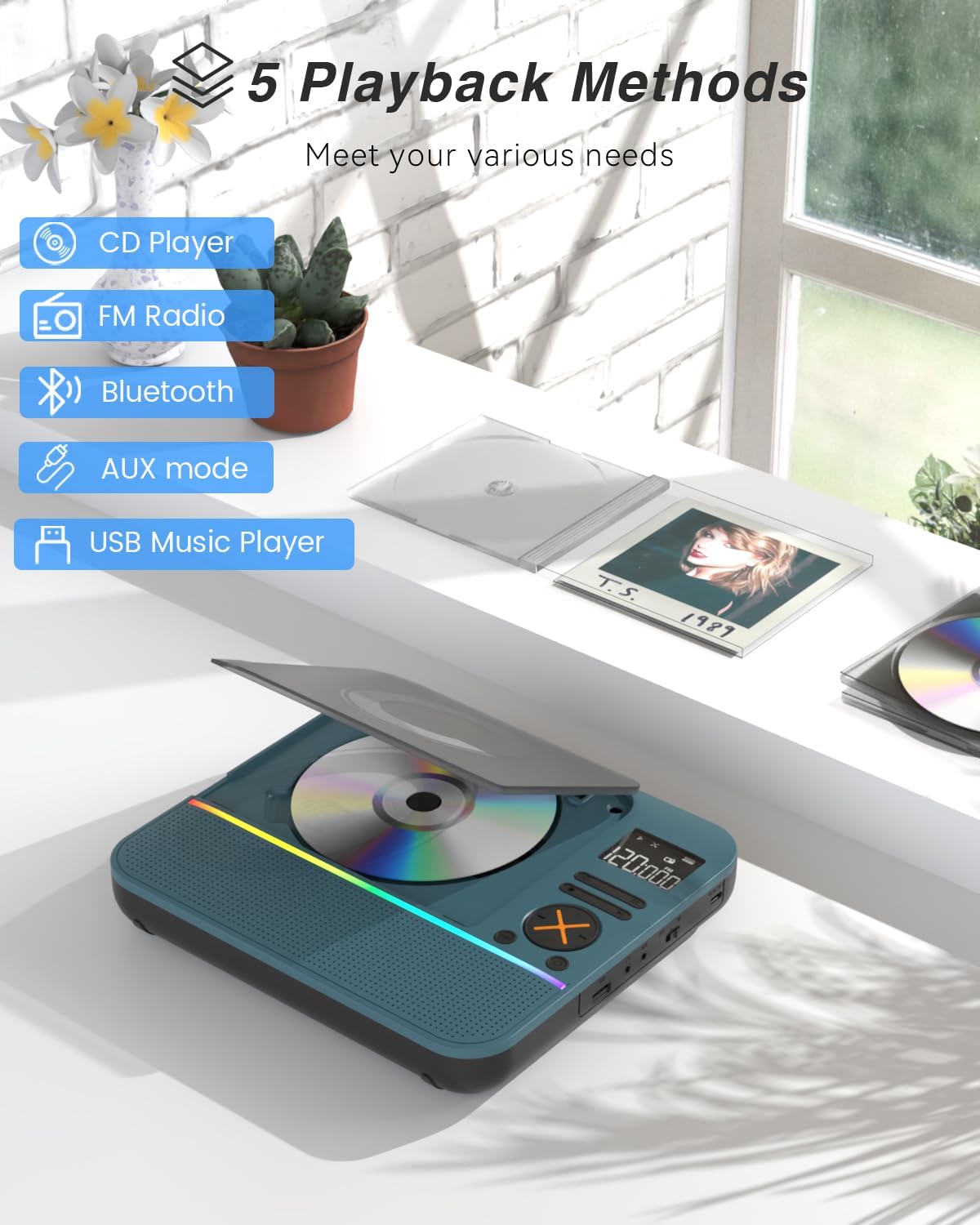
- Keli atkūrimo režimai: Easily switch between CD, Bluetooth, FM Radio, AUX, and USB modes via a large LCD screen.
- Wide CD Compatibility: Supports CD, CD-R, CD-RW, MP3, and WMA formats.
- Garso efektai: Choose from five equalizer presets: Flat, Rock, Pop, Jazz, and Classic.
- FM radijas: Access FM frequencies from 76MHz to 108MHz.
- USB & AUX Connectivity: Play music from a USB flash drive or connect external devices via the 3.5mm AUX cable.
- Įkraunama baterija: Built-in 3000mAh battery offers up to 8 hours of continuous playback.
- Miego laikmatis: Customizable sleep timer from 10 to 90 minutes.

Figure 2: The MONODEAL CD401 displaying its multi-color RGB lighting effects, which synchronize with the music.
Valdikliai ir prievadai:
The device features intuitive controls on its top panel and essential ports on the side for easy access.

Figure 3: Top panel of the CD player showing playback controls, mode selection, and display.

Figure 4: The side panel of the CD player, illustrating the AUX input, USB port, and charging port.
Oficialus produkto vaizdo įrašas:
Video 1: Official product video from MonoDeals showcasing the Desktop CD Player with Bluetooth and RGB Light features.
Video 2: Official product video from MonoDeals demonstrating the Desktop Player's Bluetooth functionality and colorful lighting effects.
4. Sąranka
4.1 Įrenginio įkrovimas
- Connect the provided USB charging cable to the charging port on the side of the CD player.
- Plug the other end of the USB cable into a compatible USB power adapter (included) or a computer's USB port.
- The battery indicator on the LCD screen will show charging status. A full charge provides up to 8 hours of playback.
4.2 Kompaktinio disko įdėjimas
- Gently open the CD compartment cover.
- Place the CD with the label side facing up onto the spindle. Ensure it clicks into place.
- Close the CD compartment cover firmly until it latches.
4.3 Įjungimas / išjungimas
- To power on, slide the ON/OFF switch to the 'ON' position. The LCD screen will light up.
- Norėdami išjungti, įjungimo/išjungimo jungiklį perjunkite į padėtį „IŠJUNGTA“.
5. Naudojimo instrukcijos
5.1 Režimo pasirinkimas
Paspauskite REŽIMAS button on the device or remote control to cycle through the available modes: CD, Bluetooth, FM, AUX, and USB.

Figure 5: The CD player's display indicating the five available playback methods: CD, FM Radio, Bluetooth, AUX mode, and USB Music Player.
5.2 CD atkūrimas
- Insert a compatible CD (CD, CD-R, CD-RW, MP3, WMA).
- Select 'CD' mode. The player will automatically start reading the disc.
- Naudokite Leisti / pristabdyti, Kitas takelis, ir Ankstesnis takelis mygtukai, skirti valdyti atkūrimą.
- Paspauskite KARTOT button to cycle through repeat options (e.g., repeat one, repeat all).
- Paspauskite EQ button to select desired sound effects (Flat, Rock, Pop, Jazz, Classic).
5.3 „Bluetooth“ režimas
The CD401 supports both Bluetooth transmission (BT TX) and reception (BT RX).
- Bluetooth Receiver (BT RX): Select 'Bluetooth' mode. The device will enter pairing mode. On your phone/tablet, search for 'CD401' and connect. Audio from your device will play through the CD player's speakers.
- Bluetooth Transmitter (BT TX): Select 'Bluetooth' mode. Press and hold the BT TX button. The CD player will search for nearby Bluetooth headphones or speakers. Once connected, CD audio will transmit to the external Bluetooth device.

Figure 6: Illustration of the CD player's dual Bluetooth functionality, allowing it to receive audio from a phone (RX) or transmit to headphones (TX).
5.4 FM radijas
- Select 'FM' mode.
- Naudokite Kitas takelis ir Ankstesnis takelis mygtukai radijo stotims ieškoti.
- The FM frequency range is 76MHz to 108MHz.
5.5 AUX įvestis
- Select 'AUX' mode.
- Connect an external audio device (e.g., smartphone, computer) to the AUX IN port using the provided 3.5mm audio cable.
- The CD player will now act as a wired speaker for the connected device.
- Note: Bluetooth connectivity is not supported in cars; use the 3.5mm AUX cable for car audio.
5.6 USB atkūrimas
- Select 'USB' mode.
- Įdėkite USB atmintinę su MP3 arba WMA garso įrašu files į USB prievadą.
- The player will automatically detect and begin playing the audio files.
5.7 Garsumo valdymas
Adjust the volume using the dedicated volume buttons on the device or the remote control.
5.8 Miego laikmatis
- Paspauskite MIEGAS nuotolinio valdymo pulto mygtuką.
- Cycle through the available sleep timer durations (10, 20, 30, 40, 50, 60, 70, 80, 90 minutes).
- The device will automatically power off after the selected time.

Figure 7: The CD player featuring its sleep timer function, allowing users to set automatic shutdown after a specified duration.
6. Priežiūra
6.1 Valymas
- Nuvalykite įrenginį minkštu, sausu skudurėliu. Nenaudokite skystų valiklių ar abrazyvinių medžiagų.
- CD skyrių laikykite švarų ir be dulkių.
6.2 Saugykla
- Store the CD player in a cool, dry place away from direct sunlight and extreme temperatures.
- Remove any CDs or USB drives before storing for extended periods.
7. Problemų sprendimas
| Problema | Galima priežastis | Sprendimas |
|---|---|---|
| Įrenginys neįsijungia | Išsikrovusi baterija arba išjungtas maitinimo jungiklis. | Charge the device fully. Ensure the ON/OFF switch is in the 'ON' position. |
| Iš garsiakalbių nėra garso | Garsumas per mažas arba pasirinktas neteisingas režimas. | Increase volume. Verify correct playback mode (CD, Bluetooth, FM, AUX, USB). |
| CD negroja | Kompaktinis diskas yra nešvarus, subraižytas arba neteisingai įdėtas. | Clean the CD. Check for scratches. Reinsert the CD correctly with the label side up. |
| „Bluetooth“ susiejimas nepavyko | Device is not in pairing mode or too far from the source. | Ensure the CD player is in Bluetooth pairing mode. Move devices closer. Disconnect from other Bluetooth devices. |
8. Specifikacijos
| Funkcija | Detalė |
|---|---|
| Modelio numeris | CD401 |
| Prekės ženklas | MONODEAL |
| Ryšio technologija | Bluetooth 5.3 |
| Garsiakalbio tipas | 4*HIFI Stereo |
| Baterijos talpa | 3000 mAh (įmontuota) |
| Atkūrimo laikas | Iki 8 valandų (su pilnu įkrovimu) |
| Palaikomi disko formatai | CD, CD-R, CD-RW |
| Palaikomi garso formatai | MP3, WMA |
| FM dažnių diapazonas | 76MHz iki 108MHz |
| Pakuotės matmenys | 10.83 x 9.13 x 1.93 colio |
| Prekės svoris | 2.48 svaro |
9. Garantija ir palaikymas
For warranty information, technical support, or customer service inquiries, please refer to the contact details provided in your product packaging or visit the official MONODEAL websvetainę. Išsaugokite pirkimo čekį garantiniams reikalavimams.


