Įvadas
Thank you for choosing the Geevon Mini Digital Refrigerator Thermometer. This device is designed to provide accurate temperature readings for your refrigerator or freezer, ensuring safe storage of perishable goods. Its IP65 waterproof rating and user-friendly design make it suitable for various environments, from home kitchens to commercial settings.
Prieš naudodami gaminį, atidžiai perskaitykite šį vadovą, kad užtikrintumėte tinkamą veikimą ir pailgintumėte jo tarnavimo laiką.
Saugos informacija
- Do not expose the device to extreme temperatures outside its operating range (-30°C to 50°C / -22°F to 122°F).
- Keep the device away from strong magnetic fields, which may affect its accuracy.
- Nebandykite ardyti ar modifikuoti įrenginio. Tai panaikins garantiją ir gali sukelti gedimų.
- Baterijas išmeskite pagal vietinius reikalavimus. Nedeginkite baterijų.
- Laikyti vaikams nepasiekiamoje vietoje, kad būtų išvengta atsitiktinio smulkių dalių ar baterijų prarijimo.
Produktas baigtasview
The Geevon Mini Digital Refrigerator Thermometer features a clear LCD display, simple controls, and versatile mounting options. It is designed for reliable temperature monitoring in various cold storage environments.
Pagrindinės funkcijos:
- Tikslus temperatūros matavimas: Provides precise readings within -30°C to 50°C (-22°F to 122°F) with an accuracy of ±1°C (±2°F).
- Didelis LCD ekranas: Easy-to-read screen shows current, maximum, and minimum temperatures.
- IP65 vandeniui atsparus dizainas: Ensures reliable performance in humid or wet conditions.
- Max/Min Temperature Record: Tracks the highest and lowest temperatures recorded since the last reset.
- Perjungiami įrenginiai: Lengvai perjunkite tarp Celsijaus (°C) ir Farenheito (°F).
- Universalus montavimas: Features a magnetic back, a stable kickstand, and a hanging hook for flexible placement.
- Paprasta operacija: Three-button interface for power, unit change, and Max/Min reset.
Komponentai:
- Skaitmeninis termometras
- CR2032 Button Cell Battery (pre-installed or included)
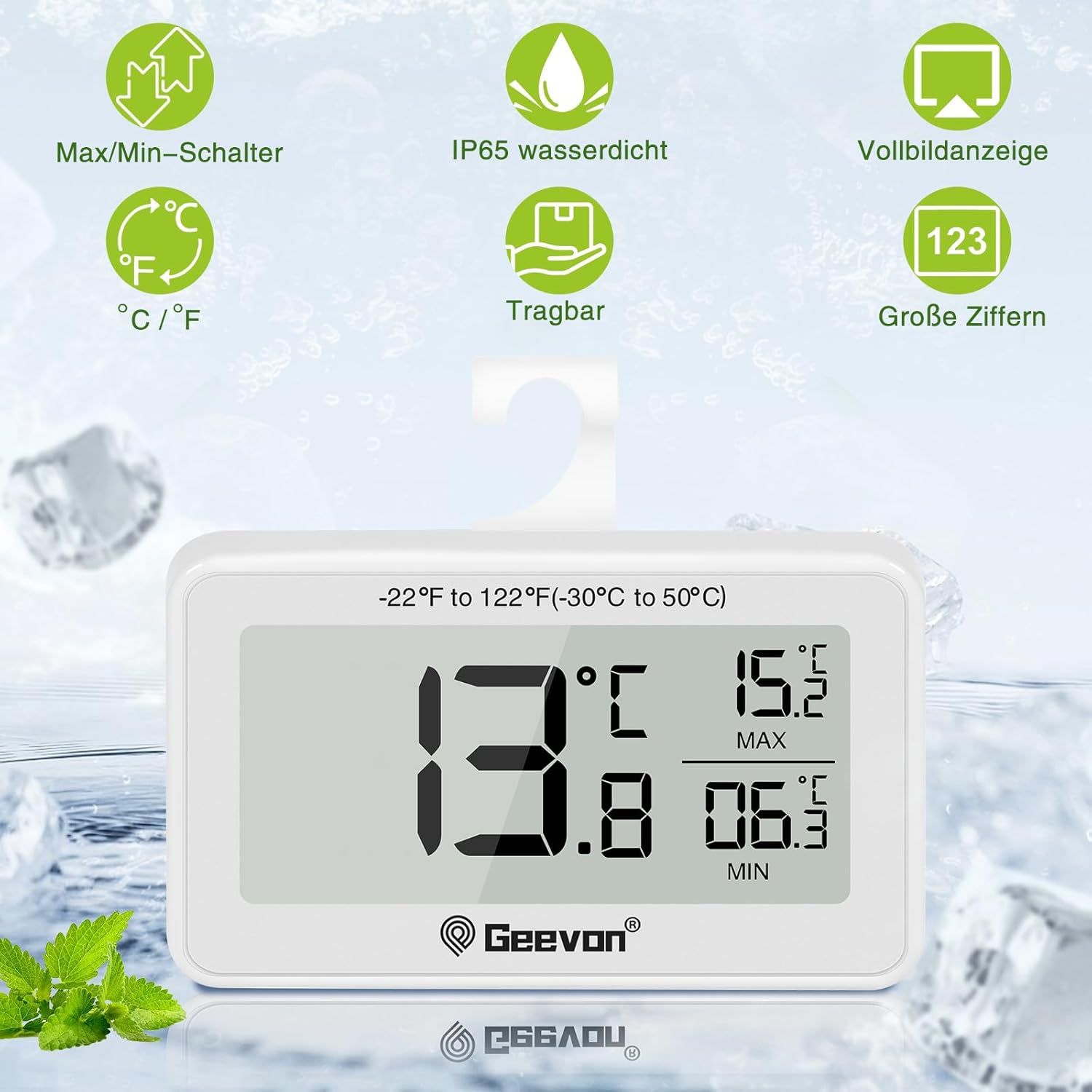
1 pav.: priekis view of the thermometer displaying current, maximum, and minimum temperatures. The display shows 13.8°C as current, 15.2°C as MAX, and 06.3°C as MIN. Icons for Max/Min switch, IP65 waterproof, full screen display, °C/°F switch, portable, and large digits are visible above the device.
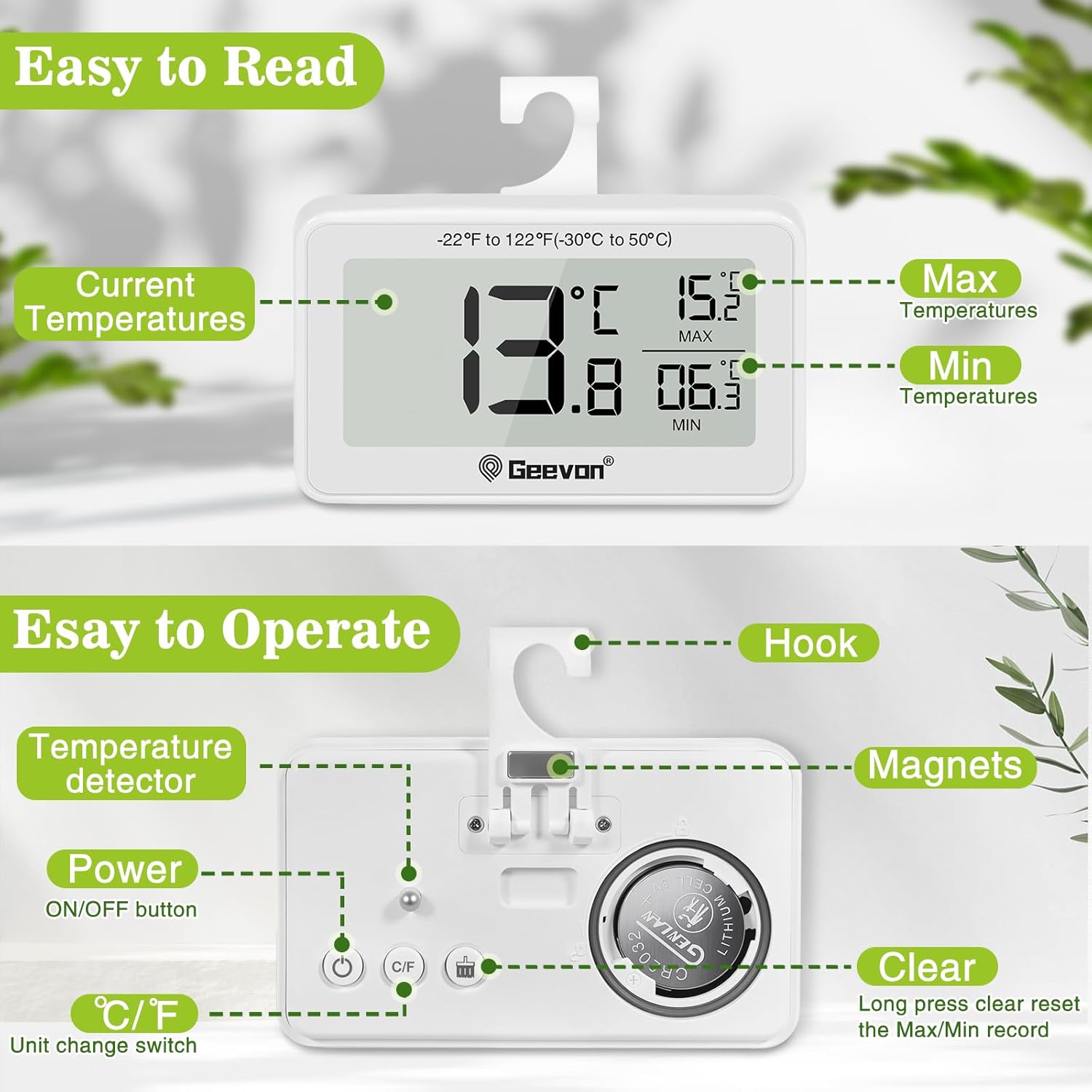
2 pav.: Nugara view of the thermometer highlighting the hook, magnets, temperature detector, ON/OFF button, °C/°F unit change switch, and the clear (Max/Min reset) button. The battery compartment for the CR2032 battery is also visible.
Sąranka
1. Battery Installation/Activation:
The thermometer typically comes with a CR2032 button cell battery pre-installed. If the display is not active, you may need to remove a plastic insulation tab from the battery compartment or install a new battery.
- Suraskite akumuliatoriaus skyrių įrenginio gale.
- Use a coin or a small screwdriver to twist the battery cover counter-clockwise to open.
- Remove any plastic insulation tab if present.
- Įdėkite naują CR2032 bateriją teigiama (+) puse į viršų.
- Replace the battery cover and twist clockwise to secure.

Figure 3: Battery replacement guide. The image illustrates how to open and close the battery compartment by twisting the cover. It also notes that unscrewing is not required.
2. Initial Placement:
Once the battery is installed, the thermometer will power on automatically and display the current temperature. Place the thermometer in your desired location within the refrigerator or freezer.
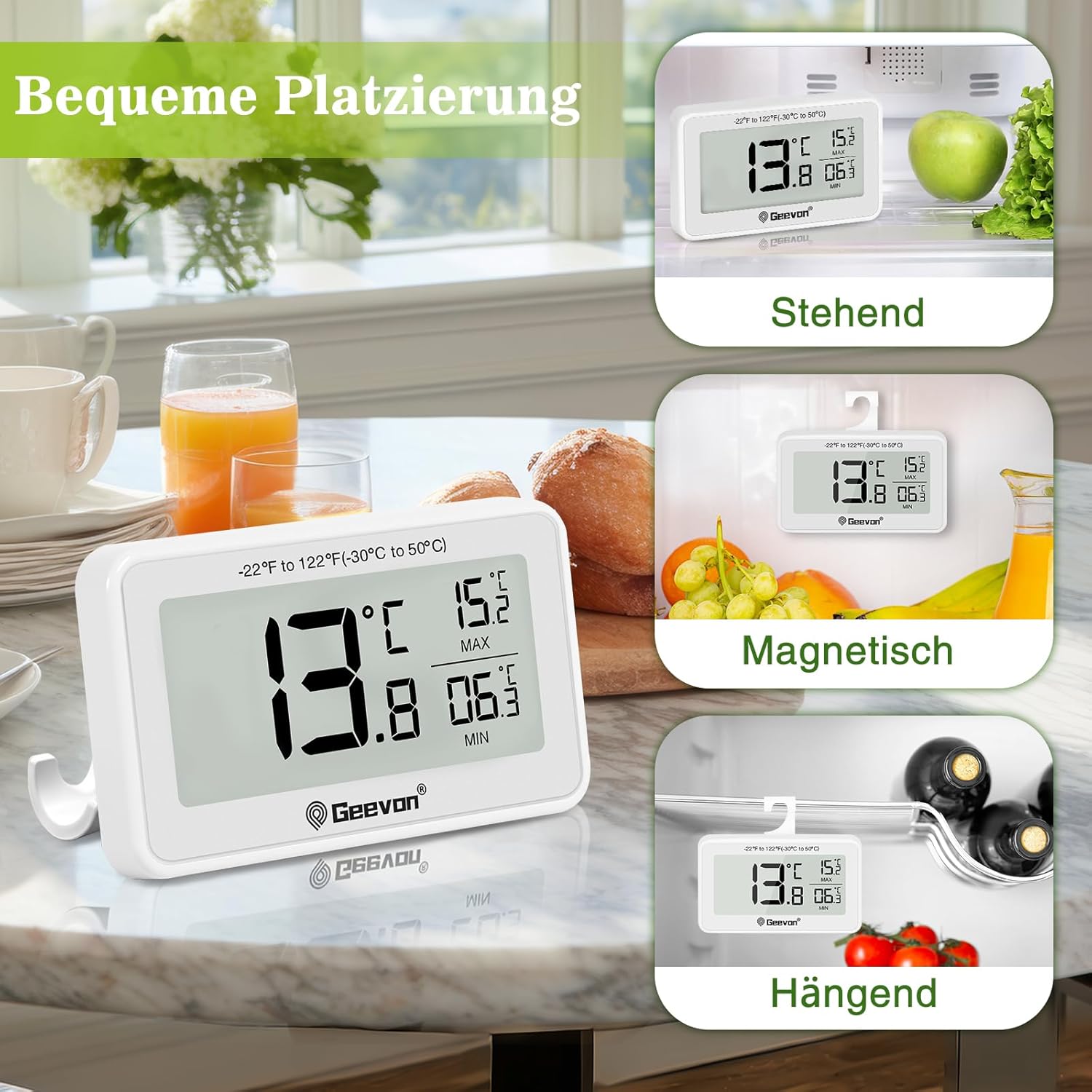
Figure 4: Versatile placement options for the thermometer, including standing on its kickstand, magnetic attachment to a metal surface, and hanging from a shelf or rack using its integrated hook.
Naudojimo instrukcijos
Maitinimo įjungimas/išjungimas:
- Paspauskite ĮJUNGTA/IŠJUNGTA button (power symbol) on the back to turn the device on or off.
Temperatūros vienetų perjungimas (°C/°F):
- Paspauskite ° C / ° F button on the back to toggle between Celsius and Fahrenheit display.
Viewing and Resetting Max/Min Temperatures:
The thermometer automatically records the maximum (MAX) and minimum (MIN) temperatures reached since the last reset. These values are displayed on the right side of the screen.
- Norėdami iš naujo nustatyti MAX/MIN įrašus, paspauskite ir palaikykite IŠVALYTI button (labeled "Clear" or with a reset icon) on the back for approximately 3 seconds. The MAX/MIN values will reset to the current temperature.
Priežiūra
Valymas:
- Nuvalykite termometrą minkšta, damp audinys. Nenaudokite abrazyvinių valiklių ar tirpiklių.
- The device is IP65 waterproof, meaning it is protected against low-pressure water jets from any direction. However, avoid submerging it completely in water for extended periods.

Figure 5: The thermometer demonstrating its IP65 waterproof capability, shown partially in water.
Baterijos keitimas:
When the display becomes dim or the device stops functioning, it's time to replace the battery. Refer to the "Battery Installation/Activation" section under Setup for detailed instructions.
Trikčių šalinimas
| Problema | Galima priežastis | Sprendimas |
|---|---|---|
| Nėra ekrano arba ekranas yra pritemdytas | Baterija išsikrovusi arba netinkamai įdėta. | Replace the CR2032 battery or ensure it is correctly inserted with the positive (+) side up. Remove any plastic insulation tab. |
| Neteisingas temperatūros rodmuo | Device placed too close to a heat source or air vent; battery low. | Relocate the thermometer to a central area of the refrigerator/freezer. Replace battery if low. Allow time for the temperature to stabilize. |
| Mygtukai nereaguoja | Battery low; temporary software glitch. | Replace the battery. Try turning the device off and on again. |
| MAX/MIN vertės neatkuriamos iš naujo | CLEAR button not held long enough. | Press and hold the CLEAR button for approximately 3 seconds until the values reset. |
Specifikacijos
| Funkcija | Detalė |
|---|---|
| Modelio numeris | 8707B-WH-4 |
| Temperatūros diapazonas | -30°C iki 50°C (nuo -22°F iki 122°F) |
| Temperatūros tikslumas | ±1 °C (±2 °F) |
| Ekrano raiška | ±0.1°C/°F |
| Atsparumo vandeniui įvertinimas | IP65 |
| Maitinimo šaltinis | 1 x CR2032 Button Cell Battery (included) |
| Gaminio matmenys (I x P x A) | 6.2 x 2.2 x 8.4 cm (2.44 x 0.87 x 3.31 colio) |
| Produkto svoris | 100 gramų (3.53 uncijos) |
| Ekrano tipas | Skaitmeninis LCD |
| Medžiaga | Akrilnitrilo butadieno stirenas (ABS) |
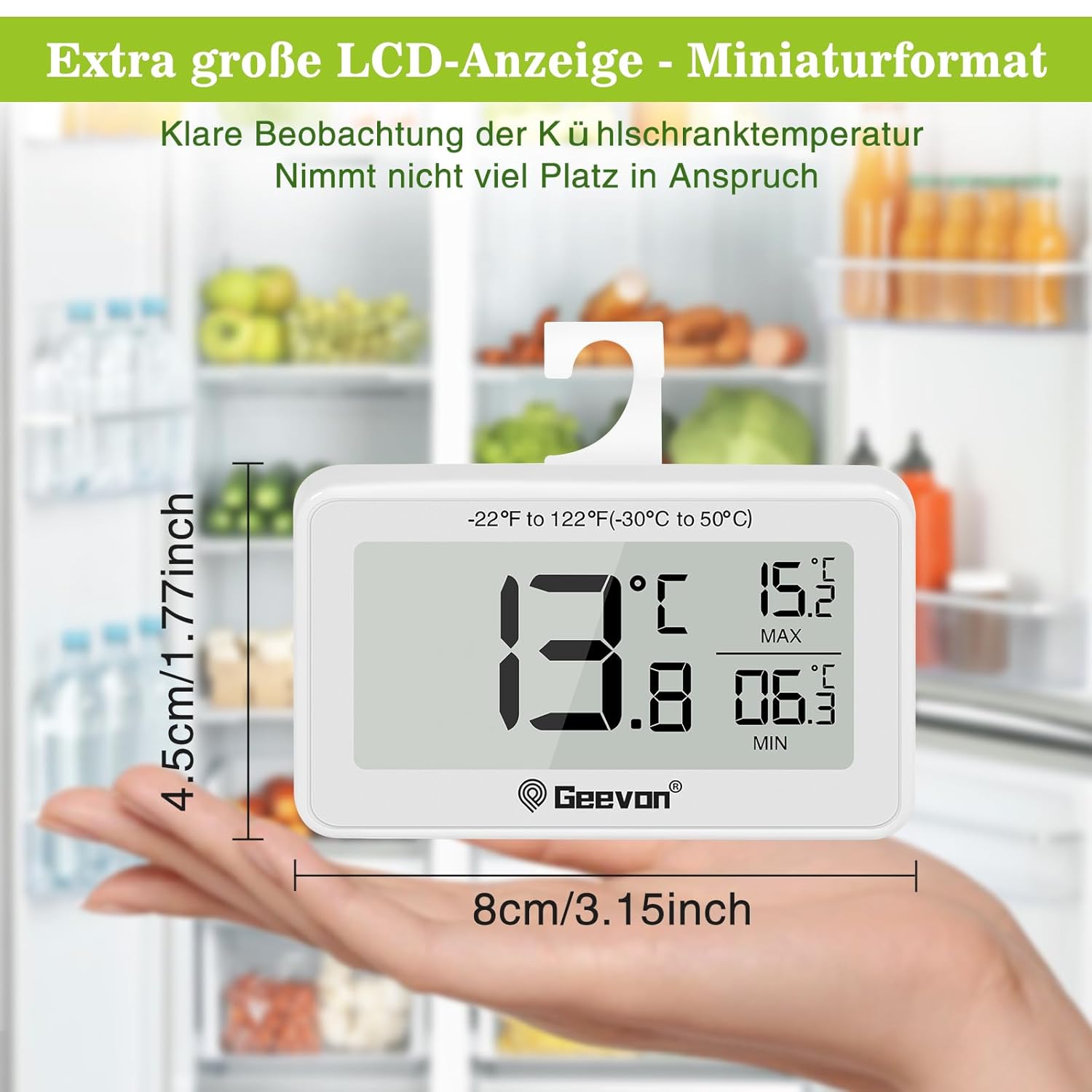
Figure 6: Dimensions of the thermometer, illustrating its compact size in hand.

Figure 7: The thermometer in a refrigerator setting, emphasizing its measurement accuracy of ±1°C (±2°F), resolution of ±0.2°F, and temperature range of -30°C to 50°C (-22°F to 122°F).
Garantija ir palaikymas
Geevon is committed to providing high-quality products and customer satisfaction. While specific warranty details are not provided in this manual, Geevon offers a lifetime consulting service for its products.
If you encounter any questions or issues with your Geevon Mini Digital Refrigerator Thermometer, please contact Geevon customer support for assistance. Your feedback and experience are important to us.
For support, please refer to the contact information provided with your purchase or visit the official Geevon websvetainę.


