Įvadas
Welcome to the bmani Wireless Earbuds user manual. These Bluetooth headphones are designed for comfort and performance, featuring a secure over-ear fit, long battery life, and intuitive controls. This manual will guide you through setting up, operating, and maintaining your new earbuds.
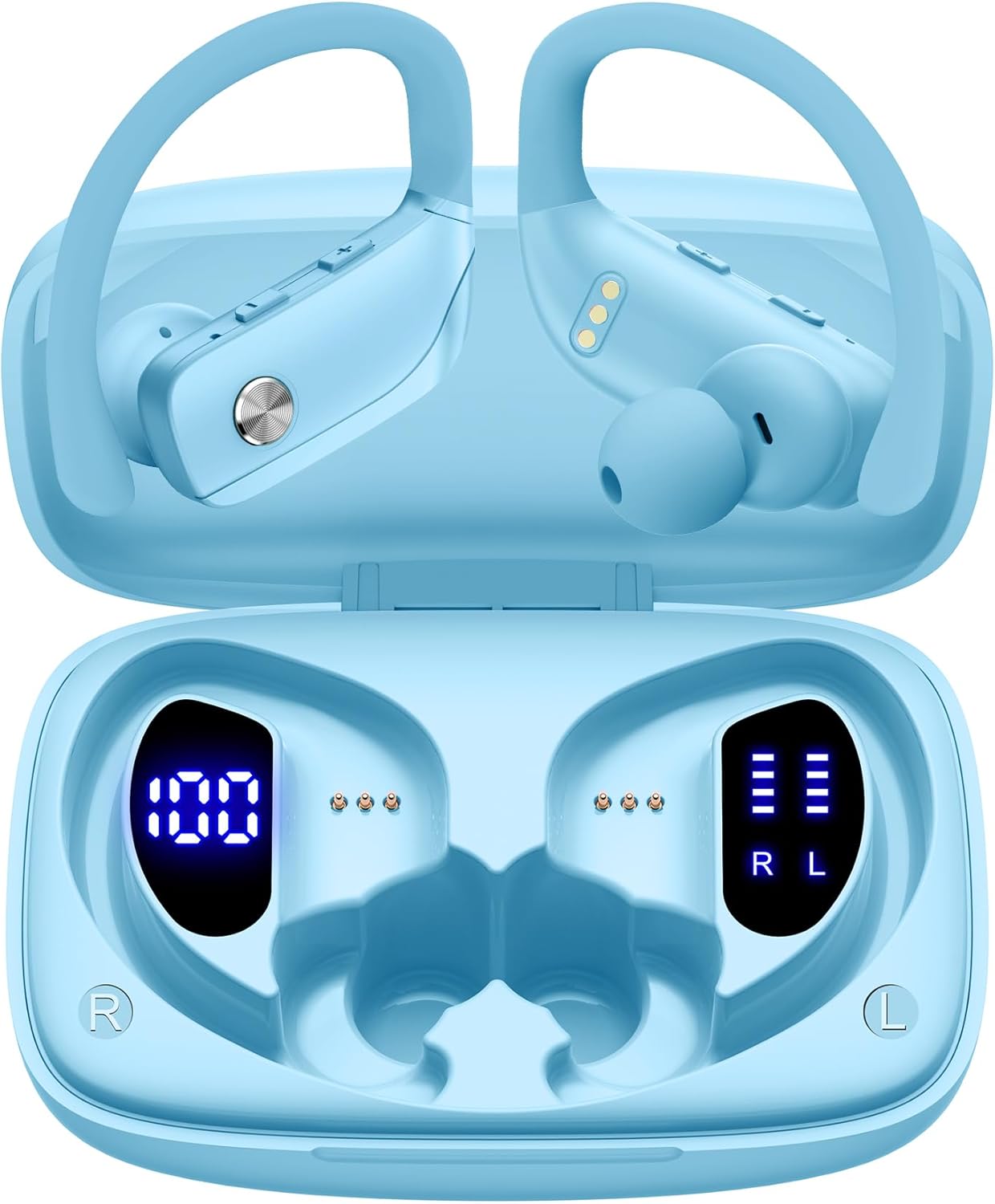
Image: The bmani Wireless Earbuds in their open sky blue charging case, showcasing the earbuds and the case's interior.
Kas yra dėžutėje
- Belaidės ausinės
- Įkrovimo dėklas
- Eartips (three size options: L, M, S)
- C tipo kabelis
- Vartotojo vadovas (šis dokumentas)

Image: This image displays all the items included in your bmani Wireless Earbuds package: the two wireless earbuds, their charging case, a set of three different sized eartips (L, M, S), a Type-C charging cable, and the user manual.
Produktas baigtasview & Funkcijos
The bmani Wireless Earbuds are engineered for an exceptional audio experience with user-friendly features.
Dual LED Displays Charging Case
The charging case features dual LED displays. The left display shows the remaining battery power of the case in percentage. The right side indicates the charging process of each earbud with four grids, each representing 25% of the bud's power. The LED indicator light will flash during charging.

Image: This image highlights the dual LED digital display on the charging case. The left screen shows the charging case's battery capacity as a percentage, while the right screen displays the power status of the left (L) and right (R) earbuds using four bars each.
Ilgas baterijos veikimo laikas
Enjoy extended listening sessions with up to 8 hours of music time per earbud and an additional 40 hours provided by the 600mAh charging case, totaling 48 hours of playback.

Image: This diagram illustrates the impressive battery life: 8 hours of music time per earbud (50mAh each) and an additional 40 hours of listening time provided by the 600mAh charging case, totaling 48 hours of playback.
Bluetooth 5.0 and Hi-Fi Stereo Sound Quality
Equipped with advanced Bluetooth 5.0 technology, these earbuds provide a clear and smooth connection with extended range and fewer dropouts, ensuring crystal-clear calls and uninterrupted music listening. The 10mm speakers deliver Hi-Fi stereo sound.

Image: This image visually represents the 10mm speakers within the earbuds, emphasizing their capability to deliver Hi-Fi stereo sound.

Image: This image emphasizes the Bluetooth 5.0 technology, offering extended range and fewer dropouts, and the integration with voice assistants like Siri.
Designed for Sports (IPX5 Water Resistant)
These sport headphones are designed to stay securely in place during long hours of training, preventing shifting or falling out. They come with flexible earhooks and three pairs of ear caps (S, M, L) to ensure a comfortable and suitable fit, even during intense activities like camping, running, or working out. They are also IPX5 water-resistant, protecting them from splashes and sweat.

Image: This image shows a woman wearing the earbuds during exercise, highlighting their secure fit. An inset graphic demonstrates the flexible earhooks and the three included eartip sizes (L, M, S) for personalized comfort.

Image: This infographic summarizes key features: Dual LED Battery Display, 600mAh Charging Case, Anti-skid Earhooks, IPX5 Waterproof rating, Hi-Fi Stereo sound, and Voice Assistant compatibility.
Sąranka
Ausinių ir dėklo įkrovimas
Prieš pirmą kartą naudodami, visiškai įkraukite ir ausines, ir įkrovimo dėklą.
- Connect the provided Type-C cable to the charging port on the back of the case.
- Kitą galą prijunkite prie USB maitinimo šaltinio.
- The LED display on the case will show the charging progress.
- Once fully charged, the display will show 100% for the case and full bars for both earbuds.
Pairing with Your Device (One-step Pairing)
The bmani earbuds feature automatic pairing for convenience.
- Open the charging case and take out both earbuds. They will automatically power on and attempt to pair with each other.
- Savo įrenginyje (išmaniajame telefone, planšetiniame kompiuteryje, nešiojamajame kompiuteryje ir kt.) įjunkite „Bluetooth“.
- Ieškokite „T16“ galimų „Bluetooth“ įrenginių sąraše ir pasirinkite jį, kad prisijungtumėte.
- Prijungus, išgirsite garso pranešimą ir ausinės bus paruoštos naudoti.
- Ausinės automatiškai prisijungs prie paskutinio suporuoto įrenginio, kai bus išimtos iš dėklo.

Image: This image demonstrates the one-step pairing process, showing the earbuds connected to a smartphone. It also highlights their wide compatibility with various Bluetooth-enabled devices, including notebooks, TVs, desktops, smartwatches, and tablets.
Naudojimo instrukcijos
Nešioti ausines
For optimal sound and comfort, ensure the earbuds are worn correctly.
- Uždėkite ausies kabliuką ant ausies galo.
- Įkiškite ausies dangtelį į ausies kanalą.
- Adjust by twisting the earbud for a comfortable and secure fit.

Image: This visual guide provides three simple steps for wearing your earbuds: 1. Place the ear hook over your ear. 2. Insert the ear cap into your ear. 3. Adjust the earbud by twisting it for a secure and comfortable fit.
Valdikliai
The bmani earbuds feature intuitive button controls.
| Veiksmas | Funkcija |
|---|---|
| Spustelėkite Vieną kartą | Groti / pristabdyti muziką, atsiliepti / baigti skambutį |
| Quick Double-click (R) | Kitas takelis |
| Quick Double-click (L) | Ankstesnis takelis |
| Press "+" Button | Padidinti garsumą |
| Press "-" Button | Sumažinti garsumą |
| Quick Triple-click | Suaktyvinkite balso padėjėją |
| Laikykis | Maitinimo įjungimas/išjungimas |

Image: This image illustrates the dual audio controls on the earbuds. It shows the physical volume buttons (+/-) and a diagram explaining single click for play/pause, double click for track navigation, and holding the button for power on/off.

Image: This infographic details the various controls: single click for call answer/end and play/pause, double click for next/previous track, pressing +/- for volume, and triple click for voice assistant.
Priežiūra
To ensure the longevity and optimal performance of your bmani Wireless Earbuds, follow these maintenance guidelines:
- ValymasAusines ir įkrovimo dėklą reguliariai valykite minkštu, sausu, nepūkuotu skudurėliu. Nenaudokite stiprių cheminių medžiagų ar abrazyvinių medžiagų.
- Eartipsas: Remove and clean the eartips periodically. You can gently wash them with mild soap and water, then ensure they are completely dry before reattaching.
- Atsparumas vandeniui: The earbuds are IPX5 water-resistant, meaning they can withstand splashes and sweat. Do not submerge them in water or expose them to heavy rain. Ensure they are dry before placing them back in the charging case.
- Sandėliavimas: When not in use, store the earbuds in their charging case to protect them from dust and damage.
- Įkrovimas: Use only the provided Type-C cable for charging. Avoid extreme temperatures during charging and storage.
Trikčių šalinimas
If you encounter any issues with your bmani Wireless Earbuds, please refer to the following common solutions:
Ausinės nesusijungia tarpusavyje arba su įrenginiu:
- Įsitikinkite, kad abi ausinės yra visiškai įkrautos.
- Place both earbuds back into the charging case, close the lid, wait a few seconds, then open the lid and take them out again. This often resets the pairing.
- On your device, forget or delete "T16" from your Bluetooth device list. Then, try the pairing process again from step 1.
- Įsitikinkite, kad jokie kiti „Bluetooth“ įrenginiai netrukdo ryšiui.
Nėra garso arba garsas per mažas:
- Patikrinkite garsumo lygį abiejose ausinėse ir prijungtame įrenginyje.
- Įsitikinkite, kad ausinės tinkamai įstatytos į ausis.
- Clean any debris from the eartips or earbud speakers.
- Iš naujo prijunkite ausines prie įrenginio.
Įkrovimo dėklas neįkraunamas:
- Įsitikinkite, kad C tipo laidas yra tvirtai prijungtas prie korpuso ir maitinimo šaltinio.
- Išbandykite kitą USB maitinimo adapterį arba prievadą.
- Patikrinkite, ar nepažeistas įkrovimo laidas.
Iškritusios ausinės:
- Try different sizes of eartips provided in the box to find the best fit for your ears.
- Įsitikinkite, kad ausų kabliukai yra tinkamai uždėti ant ausų.
Specifikacijos
| Funkcija | Detalė |
|---|---|
| Modelio pavadinimas | T16 |
| Ryšio technologija | Belaidis ryšys („Bluetooth 5.0“) |
| Baterijos veikimo laikas | Iki 8 valandų (ausinės), 40 valandų (su įkrovimo dėklu) |
| Įkrovimo dėklo talpa | 600 mAh |
| Ausinės akumuliatoriaus talpa | 50 mAh (kiekvienas) |
| Atsparumas vandeniui | IPX5 |
| Valdymo tipas | Mygtukų valdymas |
| Medžiaga | Plastikiniai |
| Prekės svoris | 2 uncijos |
| Gaminio matmenys | 3.54 x 2.36 x 0.79 colio |
| Įtraukti komponentai | Charging Case, Eartip, Type-C Cable, User Manual, Wireless Earbuds |
| Suderinami įrenginiai | All Bluetooth-enabled mobile phones, tablets, laptops, computers, audiobooks, TV, and all devices with Bluetooth 5.0 |
Garantija ir palaikymas
bmani products are designed with quality and reliability in mind. For specific warranty information or technical support, please refer to the contact details provided on the product packaging or visit the official bmani websvetainę. Išsaugokite pirkimo čekį garantiniams reikalavimams.


