1. Produktas baigtasview
The bmani T16 Wireless Earbuds are designed for active lifestyles, offering an ultra-long 80-hour playtime with their dual LED display charging case. They feature immersive stereo sound with 10mm dynamic drivers, clear calls with dual microphones, and seamless Bluetooth connectivity. The adjustable over-ear hooks ensure a secure and comfortable fit for various activities. Easy button controls provide intuitive management of music and calls.
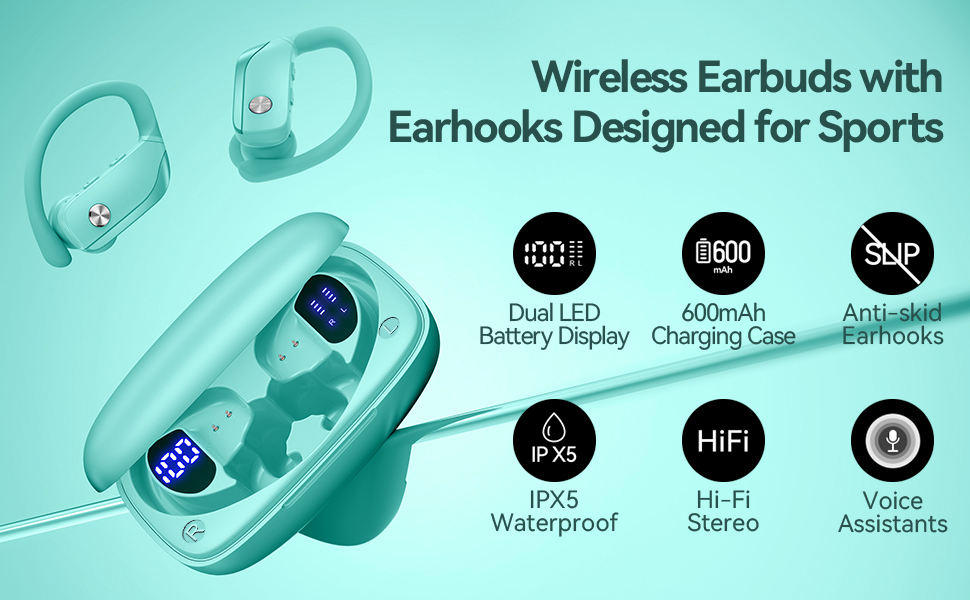
Image: bmani T16 Wireless Earbuds in their charging case, highlighting 80 hours of total playtime and the dual LED battery display.
2. Kas yra dėžutėje
- bmani T16 Wireless Earbuds (Left and Right)
- Įkrovimo dėklas su LED ekranu
- Ausų antgaliai (maži, vidutiniai, dideli dydžiai)
- C tipo įkrovimo laidas
- Vartotojo vadovas (šis dokumentas)

Image: The bmani T16 Wireless Earbuds, charging case, and various eartip sizes.
3. Sąranka ir susiejimas
The bmani T16 earbuds feature one-step pairing for quick and easy connection to your devices.
- Pradinis poravimas: Atidarykite įkrovimo dėklą. Ausinės automatiškai įsijungs ir pradės veikti susiejimo režimu.
- Išmaniajame telefone, planšetiniame kompiuteryje ar kitame įrenginyje su „Bluetooth“ ryšiu eikite į „Bluetooth“ nustatymus.
- Ieškokite available devices and select "T16" from the list.
- Prisijungę išgirsite balso raginimą, patvirtinantį sėkmingą susiejimą.
- Automatinis pakartotinis prisijungimas: After the initial pairing, the earbuds will automatically reconnect to the last paired device when removed from the charging case.

Image: Illustration of the one-step pairing process for the bmani T16 earbuds with a smartphone and other compatible devices.
Video: An official seller video demonstrating the features and pairing process of the bmani T16 Wireless Earbuds.
4. Dėvėjimo instrukcijos
For optimal sound quality and a secure fit, follow these steps to wear your bmani T16 earbuds:
- Choose the correct eartip size (S, M, L) that best fits your ear canal.
- Place the flexible ear hook over the back of your ear.
- Švelniai įkiškite ausinę į ausies kanalą.
- Adjust the earbud and hook by twisting until you achieve a comfortable and secure fit. The ear hooks are designed to adapt to different ear shapes, minimizing slippage during movement.

Image: Visual guide demonstrating how to correctly position the bmani T16 earbuds with their flexible ear hooks for a secure fit.
5. Veikimo valdikliai
The bmani T16 earbuds feature intuitive physical buttons for easy control of your audio and calls.
- Leisti / pristabdyti: Spustelėkite vieną kartą ant bet kurios ausinės.
- Kitas takelis: Quick double-click on the Right (R) earbud.
- Ankstesnis takelis: Quick double-click on the Left (L) earbud.
- Pagarsink: Paspauskite ausinės mygtuką „+“.
- Patildyti: Paspauskite ausinės mygtuką „-“.
- Atsiliepti / Baigti skambutį: Spustelėkite vieną kartą ant bet kurios ausinės.
- Atmesti skambutį: Hold either earbud button.
- Įjunkite balso asistentą („Siri“ / „Google“ asistentas): Quick triple-click on either earbud.
- Maitinimo įjungimas/išjungimas: Hold the button on either earbud.
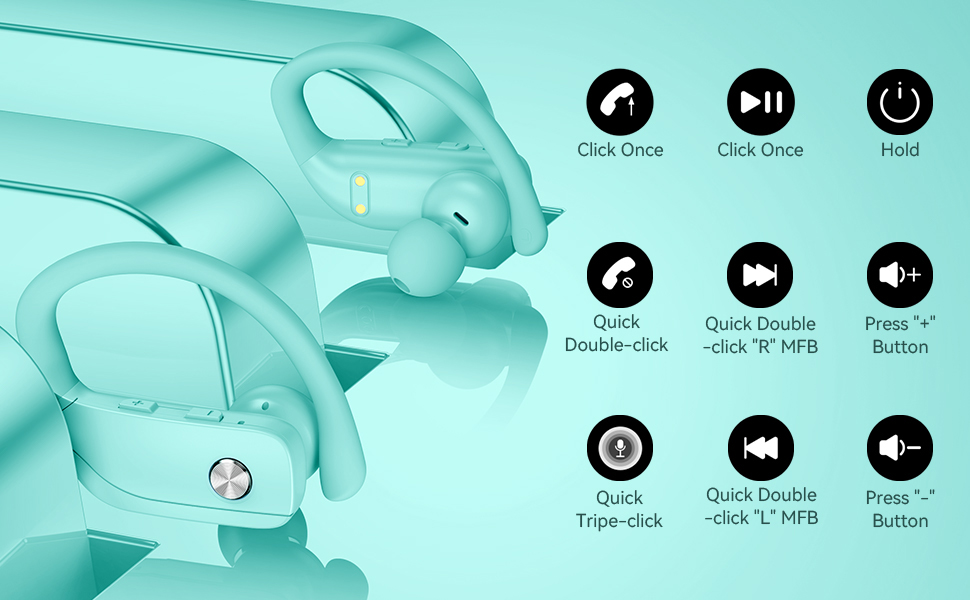
Image: Detailed diagram showing the various button controls on the bmani T16 earbuds for managing audio playback, calls, and voice assistant.
6. Įkrovimas
The bmani T16 earbuds and charging case provide an impressive 80 hours of total playtime.
- Ausinių įkrovimas: Place the earbuds back into the charging case. The LED indicators on the case will show the charging status of each earbud. Each earbud offers up to 8 hours of playtime per charge.
- Bylos įkrovimas: Connect the provided Type-C charging cable to the charging port on the case and to a USB power source. The digital display on the left side of the case will show the remaining power percentagįkrovimo dėklo e.
- The charging case can recharge the earbuds multiple times, extending total usage to 80 hours.
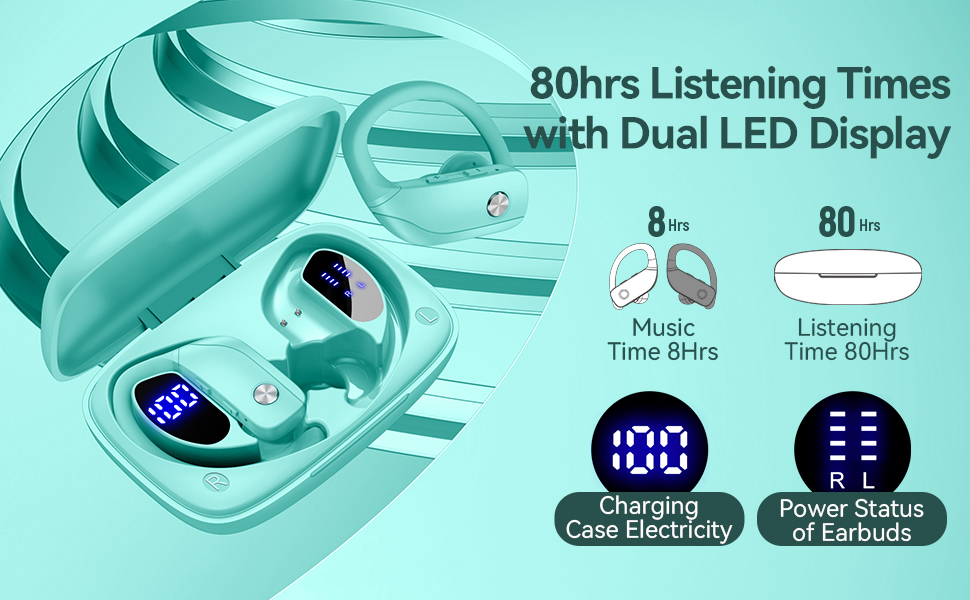
Image: The bmani T16 charging case with its dual LED digital display, indicating the battery percentagDėklo e ir kiekvienos ausinės įkrovimo būsena.
Video: An official seller video showcasing the 48-hour playback (note: product features state 80H) and LED display of the bmani T16 Sport Earphones.
7. Priežiūra
- Reguliariai valykite ausines ir įkrovimo kontaktus minkštu, sausu skudurėliu, kad nesikauptų dulkės ir nešvarumai.
- Venkite ausinių ilgalaikio laikymo itin aukštoje temperatūroje arba tiesioginiuose saulės spinduliuose.
- Kai nenaudojate, laikykite ausines įkrovimo dėkle, kad jos būtų apsaugotos ir liktų įkrautos.
- The earbuds are sweat-resistant and dust-resistant, but avoid submerging them in water.
8. Problemų sprendimas
- Ausinės nesusijungia: Ensure both earbuds are removed from the case and are powered on. Turn off Bluetooth on your device and turn it back on. If issues persist, try resetting the earbuds (refer to the full user manual for specific reset instructions).
- Nėra garso: Check the volume level on both your device and the earbuds. Ensure the earbuds are properly connected to your device via Bluetooth.
- Įkrovimo problemos: Įsitikinkite, kad įkrovimo laidas yra tvirtai prijungtas prie dėklo ir maitinimo šaltinio. Įsitikinkite, kad ausinių ir dėklo įkrovimo kontaktai yra švarūs ir be šiukšlių.
- Nestabilus ryšys: Ensure your device is within the Bluetooth range (approximately 33 feet/10 meters) and there are no significant obstacles between the earbuds and your device.
9. Specifikacijos
| Modelio pavadinimas | T16 |
| Ryšio technologija | Belaidis ryšys („Bluetooth 5.0“) |
| Žaidimo laikas (ausinės) | Iki 8 valandų vienu įkrovimu |
| Bendras grojimo laikas (su dėklu) | Iki 80 valandų |
| Garso tvarkyklės tipas | 10 mm dinaminė tvarkyklė |
| Triukšmo kontrolės funkcijos | Noise Cancellation (Dual Mics) |
| Atsparumo vandeniui lygis | Sweat-resistant and Dust-resistant |
| Kontrolės metodas | Mygtukų valdikliai |
| Ausų išdėstymas | Virš ausies |
| Prekės svoris | 2 uncijos |
10. Garantija ir palaikymas
bmani offers a lifetime warranty for permanent replacement of damaged, defective, upgraded, or lost products. Please refer to the warranty card included in your package for activation details and terms. For further assistance, please contact bmani customer support.


